TODO Expiry
TODO comments that turn 🟢 green → 🟡 yellow → 🔴 red as their due date approaches.
Zero config. Works in every language. No ESLint needed.




The Problem
Every codebase has TODO comments that were written once and never touched again:
// TODO: fix this later          ← when is "later"?
// TODO: remove before release   ← which release?
// TODO: optimize this           ← still here 2 years later
There is no urgency, no deadline, no reminder. They just rot.
The Solution
Add a date to your TODO. TODO Expiry does the rest — instantly, in every language, with zero setup.
// TODO[2026-08-01]: Refactor payment service     ← 🟢 Green — plenty of time
// TODO[2026-07-05]: Write unit tests             ← 🟡 Yellow — due soon!
// TODO[2025-01-01]: Remove deprecated endpoint  ← 🔴 Red — overdue!
Screenshots
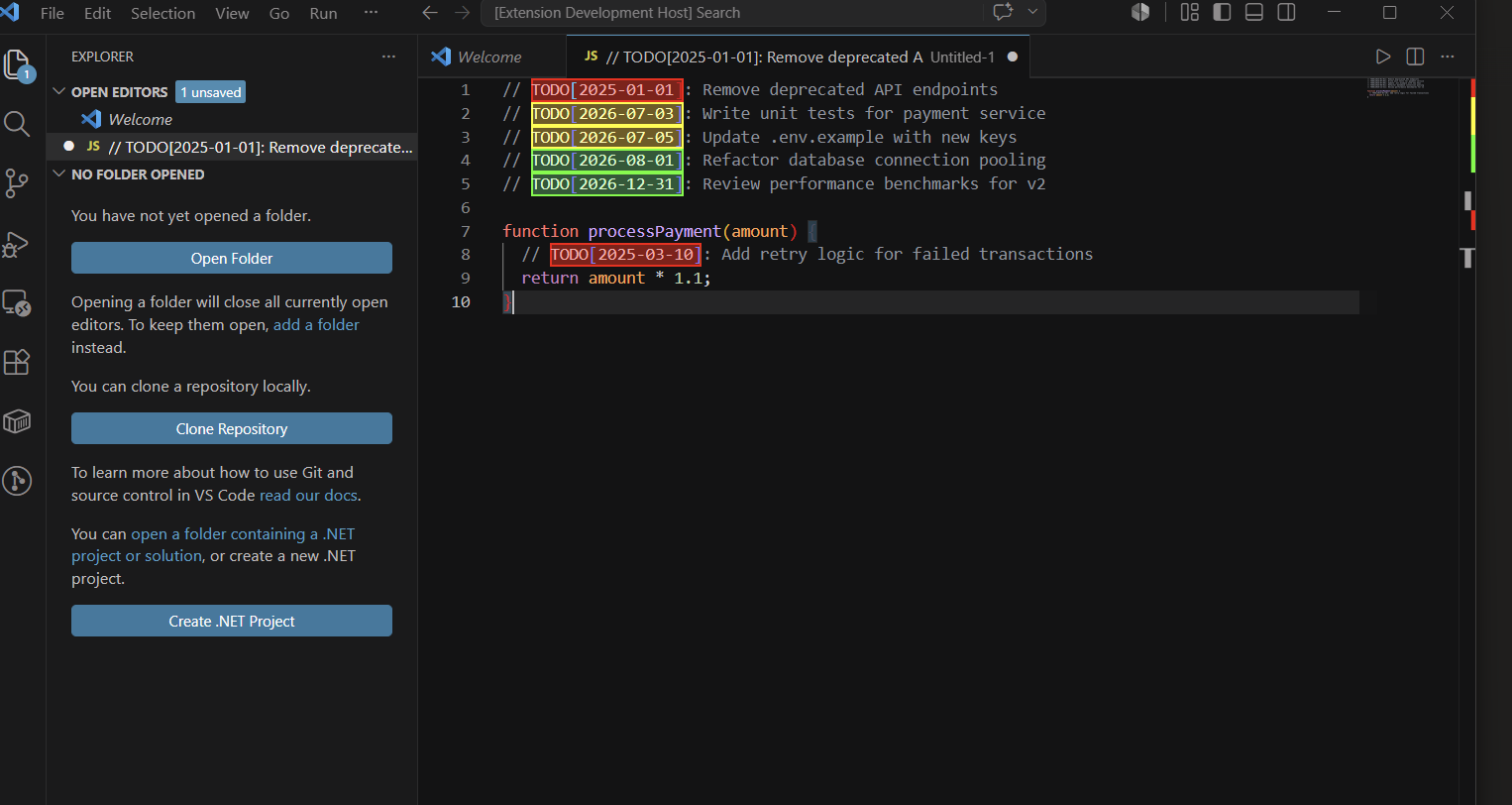
Color highlighting — green, yellow and red directly in your code
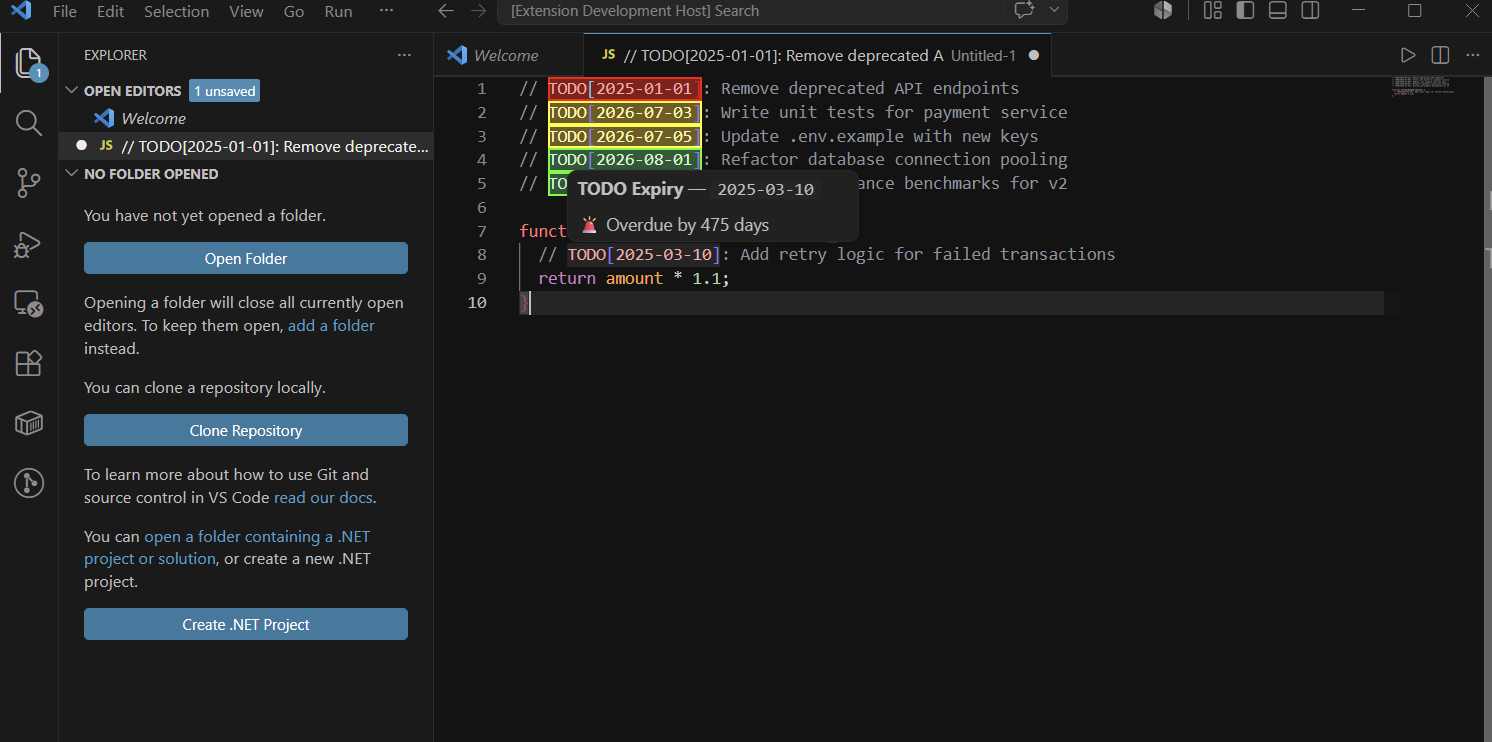
Hover tooltip — see exactly how many days remain or how overdue it is
Features
- 🟢 Green — more than 7 days remaining
- 🟡 Yellow — within 7 days of the due date
- 🔴 Red — past the due date (overdue)
- 💬 Hover tooltip — shows exact days remaining or days overdue
- 📊 Status bar — live count of overdue / due soon / on track TODOs at a glance
- 🌍 Every language — JS, TS, Python, C#, Go, Java, Rust, PHP, Ruby and more
- ⚡ Zero config — just write the comment and it works instantly
- 🔒 Non-invasive — just add a date, nothing else changes in your code
Usage
Write any comment with a date in TODO[YYYY-MM-DD] format:
// TODO[2026-09-01]: Migrate to new API
# TODO[2026-07-10]: Add input validation
// TODO[2026-08-15]: Refactor auth middleware
// TODO[2026-07-03]: Optimise database query
// TODO[2026-10-01]: Handle error edge cases
Works in any file type. No ESLint, no build tools, no CI pipeline needed.
How the colours work
| Colour |
Condition |
Meaning |
| 🟢 Green |
More than 7 days away |
You have time |
| 🟡 Yellow |
Within 7 days |
Act soon |
| 🔴 Red |
Past the due date |
Overdue! |
The threshold of 7 days is fully configurable.
Why Not Just Use ESLint?
|
TODO Expiry |
ESLint plugins |
| Works in every language |
✅ |
❌ JS/TS only |
| Visual green/yellow/red colour |
✅ |
❌ Just a lint error underline |
| Zero config |
✅ |
❌ Requires ESLint setup in every project |
| Hover tooltip with days count |
✅ |
❌ |
| Status bar summary |
✅ |
❌ |
| Works in CI |
➖ |
✅ |
Settings
| Setting |
Default |
Description |
todoExpiry.warningDays |
7 |
Days before due date when a TODO turns yellow |
Example — turn yellow 14 days before due date:
{
  "todoExpiry.warningDays": 14
}
Tips
- Put TODO Expiry dates on technical debt you actually want to fix
- Use it in code reviews — leave a dated TODO instead of a comment
- Great for marking things to clean up before a release date
- Works alongside your existing TODO comments — only TODOs with
[YYYY-MM-DD] are highlighted
License
MIT © Sonu

