Memory Lint for Claude Code — VS Code extension
Sidebar companion for claude-memory-lint:
integrity checks for Claude Code's file-based memory, right in the editor.
Published on the
VS Code Marketplace
(publisher smyshnikof, since 2026-09-08). Updates: bump version,
npx @vscode/vsce package, then upload the .vsix on the
manage page or vsce publish with a PAT.
Claude Code keeps long-term memory as a folder of markdown notes linked with
[[wikilinks]]. Nothing validates that folder — links rot silently and the
assistant simply stops recalling a fact. The CLI linter finds that rot; this
extension puts its findings one click away.
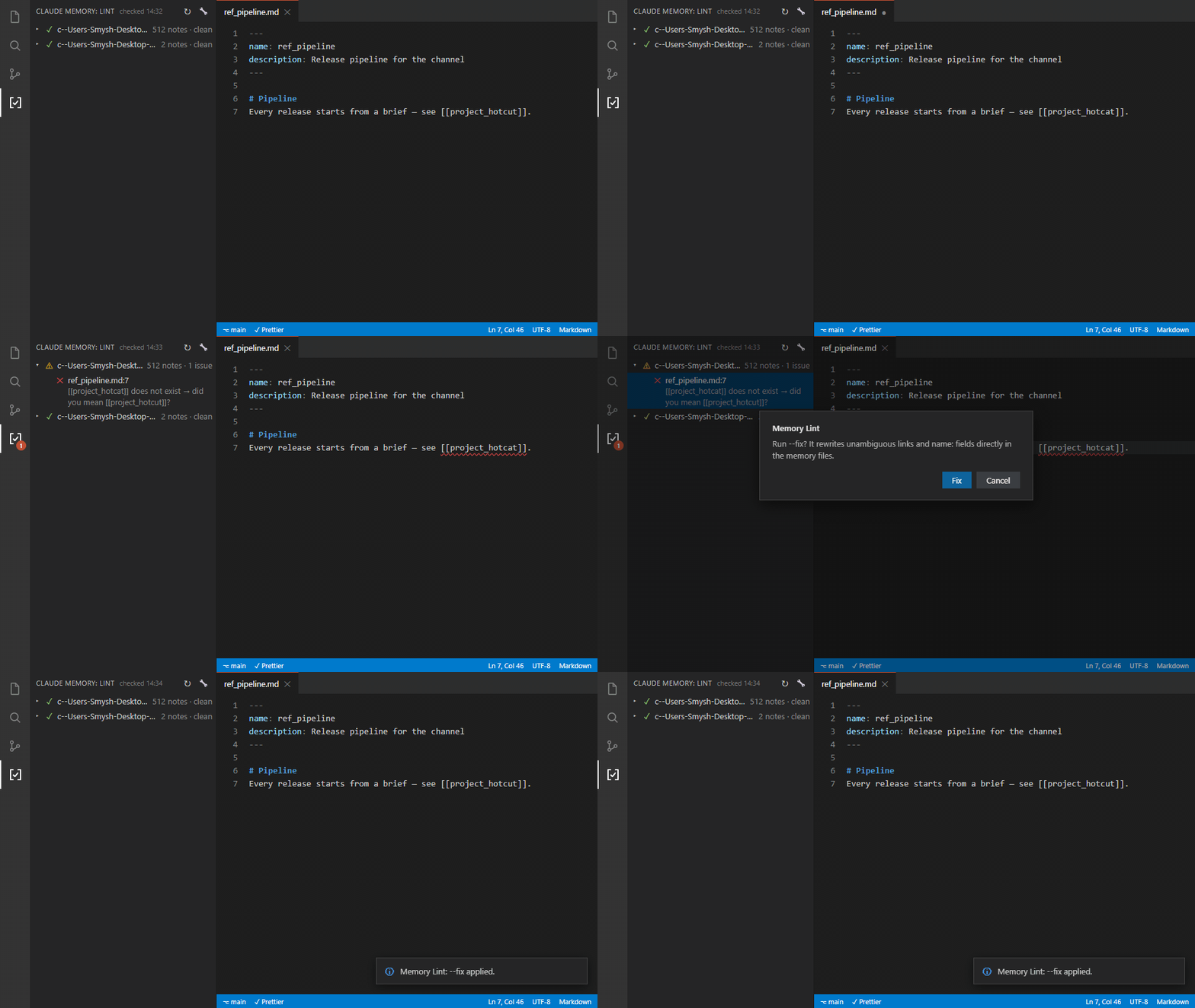
Privacy
The extension reads only ~/.claude/projects/*/memory/*.md — Claude
Code's memory folders — regardless of the open workspace (that's why the note
count covers every project on the machine). No network, no telemetry: nothing
leaves your machine. Files are written only by the explicit --fix command,
behind a modal confirmation. The startup check can be disabled with
memoryLint.runOnStartup.
Features
[✓] icon in the Activity Bar → "Claude Memory" panel. ↻ checks every
memory folder (--all), 🔧 runs --fix after confirmation.- Badge on the icon — the number of issues (like the git counter).
- Findings grouped by project — one row per memory folder with note/issue
counts; click a project to open its
MEMORY.md. Red — broken
[[links]]/paths/duplicates, yellow — orphans and frontmatter. Click a
finding to open the note at the offending line. The panel header shows when
the last check ran.
- Editor squiggles + the Problems panel — the same findings.
- Ctrl+click on a
[[wikilink]] in a memory note opens its target.
- Auto-check: on VS Code startup and whenever a memory note is saved.
Requirements
Python 3.8+ on PATH (or set memoryLint.pythonPath). The linter itself
(check.py) is bundled with the extension — no other setup.
Settings
memoryLint.runOnStartup — check automatically on startup (default: on).memoryLint.pythonPath — interpreter for check.py (default: python).memoryLint.scriptPath — custom check.py instead of the bundled copy.
Building
npx @vscode/vsce package                 # produces claude-memory-lint-vscode-<v>.vsix
code --install-extension .\claude-memory-lint-vscode-<v>.vsix
For development, open this folder in VS Code and press F5 (the dev host
launches with --disable-extensions; the extension is plain JS with zero
dependencies).
UI strings ship in English with a Russian locale (package.nls.ru.json).
Note on the bundled check.py (this repo)
The canonical linter lives in the public repo; ../memory-lint/check.py is
the vendored copy for CLI use. After updating it, copy the file here and
rebuild the .vsix. In dev mode (F5) the extension prefers the sibling
vendored copy, so the bundle only matters for the installed build.
Mirror (08.09.2026): the extension source is also published in the public
repo at claude-memory-lint/vscode-extension/ — the Marketplace listing links
there. Same rule as the linter: change here → sync the mirror (or vice versa),
don't let them drift.

