Better Codebase Memory MCP










VS Code panel for operating the codebase-memory-mcp engine: install the CLI, register it as an MCP server, watch what it has indexed, and keep it current - without leaving the editor or memorising a command.
This extension is the operator's side of the engine. It resolves which binary is in use, verifies and installs releases, registers the MCP server, and reports index state per repository. It is intended for people who run DeusData/codebase-memory-mcp as day-to-day tooling and want its upkeep - installation, updates, reindexing, logs - visible and reversible rather than implicit.
If this project saves you time or helps your setup, you can support ongoing maintenance via Coindrop, Ko-fi, or Buy Me a Coffee.
Table of Contents
Background
codebase-memory-mcp is a CLI that indexes repositories into a code knowledge graph and serves it to agents over MCP. Running it well means keeping a binary current, keeping its MCP registration valid on every machine, and knowing which repositories are indexed and how stale they are. That work is normally done by hand in a terminal.
This extension moves that operational surface into VS Code. It is an independent, clean-room TypeScript implementation. It is not affiliated with, but inspired by the tunakite03.codebase-memory-mcp extension, and it is not a fork of the upstream CLI.
Screenshots
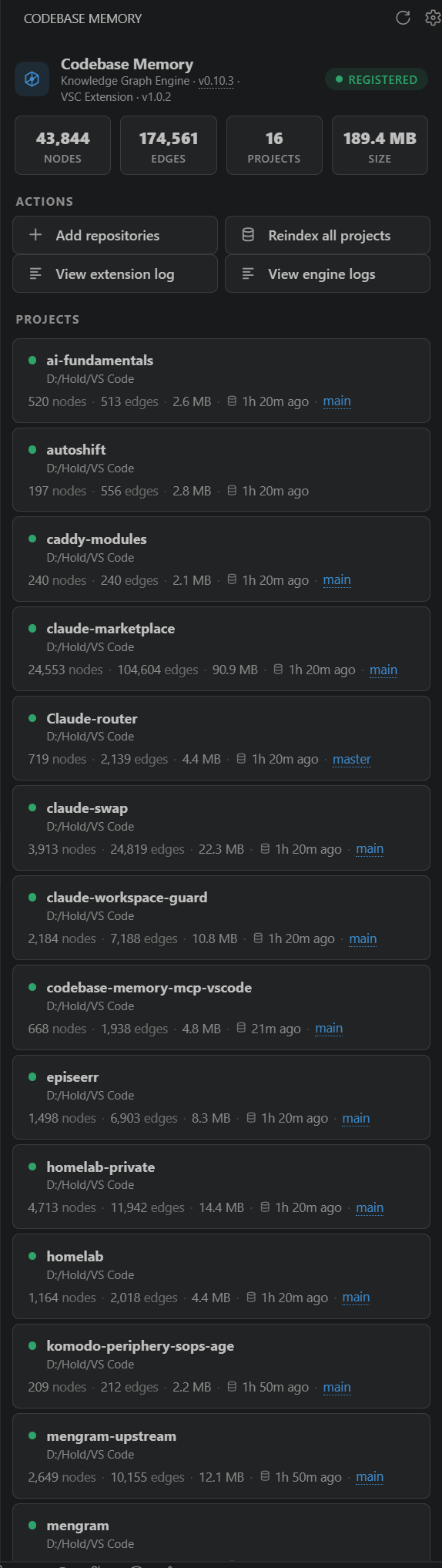
| Panel |
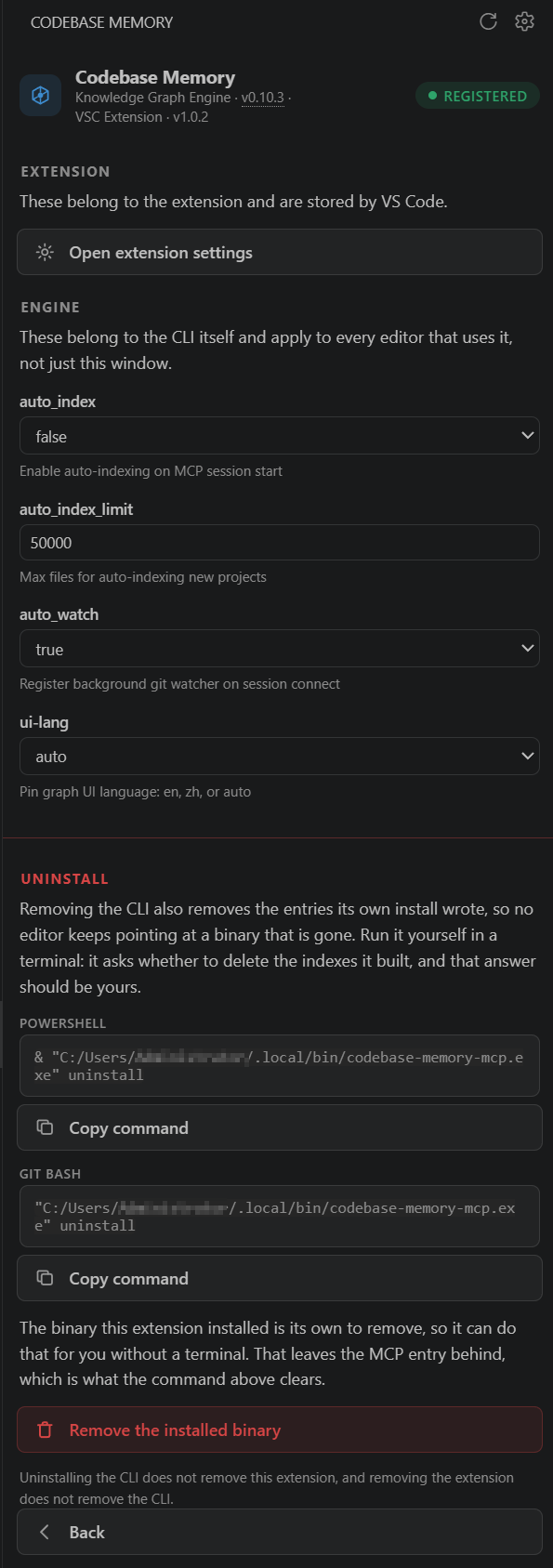
Engine settings |
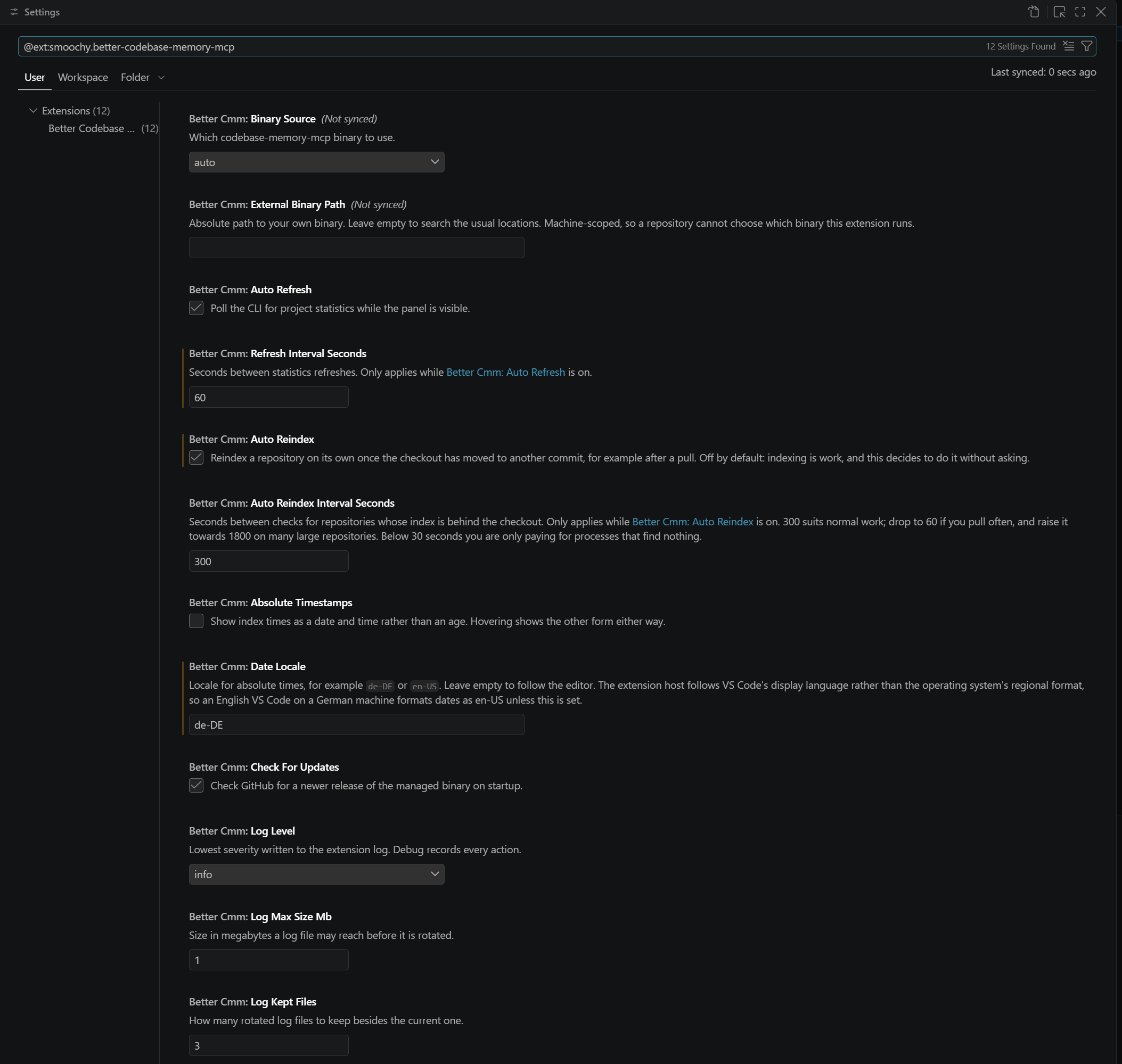
Extension settings |
 |
 |
 |
| Graph totals and a card per repository, with branch, index age and counts. |
The CLI's own settings, read from config list and written back through the panel. |
The extension's settings, in VS Code's own settings UI. |
Install
Install from the Visual Studio Marketplace or from Open VSX, or from a terminal:
code --install-extension smoochy.better-codebase-memory-mcp
Requires VS Code 1.101 or newer, the release that finalised the MCP server definition provider API this extension registers through. There is no other runtime dependency: the extension ships zero npm dependencies and no bundled binary.
Usage
Open the Codebase Memory view in the activity bar and run Setup. It finds an existing CLI or downloads the release for your platform, then registers it as an MCP server for this window.
What it does
- Setup in one action. Finds an existing CLI or downloads the release for your platform, then registers it as an MCP server. The Setup button fills as its own progress bar while the download runs, so the wait is visible without leaving the panel.
- Verified updates. A newer release is announced on the activity bar and in the panel. Taking it downloads the asset, checks it against the release's published SHA-256 checksums, and reports progress on the button that started it.
- Project overview. Nodes, edges, project count and total index size, plus a card per repository with its branch, index time and counts.
- Reindexing, manual or on commit. Reindex one project or all of them. Optional auto reindex watches the checked-out commit rather than the file system, so it acts on a pull instead of on every keystroke.
- Settings in one place. The extension's own settings live in VS Code; the CLI's settings are read from
config list at runtime and edited in the panel, which VS Code's static settings UI cannot do.
- A log worth reading. Every user action, every install, every reindex, with a size-capped rotating file and a level you control.
Projects
Adding a repository indexes it with the CLI; it does not add the folder to your VS Code workspace. Removing a project un-indexes it and leaves your workspace folders untouched. The workspace folder is never auto-added as a project.
Binary management
The CLI is downloaded at runtime from the upstream project's GitHub releases, verified against the release's SHA-256 checksums, and installed to ~/.local/bin. That location is not a preference: the provided server names an absolute path there, so the location is what makes the server startable.
VS Code is served by the extension itself. The active binary is offered through an MCP server definition provider, in memory, for as long as the window is open. Nothing is written to mcp.json for it. That file is carried between machines by Settings Sync and holds one absolute command path, so an entry written on one machine names a binary the other does not have; a provided server has no path to sync, and each machine offers its own.
Setup still runs the CLI's own install, which wires up the other agents it supports. That command detects VS Code as one of them and writes an entry of its own, so the extension removes that one key again straight afterwards - in every profile of the installation, and again on startup - and leaves the rest of each file alone. This is a stopgap, and it goes as soon as the CLI can be told to skip an agent.
If you already manage your own installation, the extension prefers it and never overwrites it. Because both end up in the same directory, ownership is decided by a record written at install time rather than by the path: a binary the extension did not install is never updated, overwritten, or offered for removal. For such an installation a new release is reported and linked, but no update button appears - that upgrade is yours to run.
Uninstalling
Removing the extension does not remove the CLI. Use Copy Uninstall Command, or the CLI's own uninstall flow, to remove the binary as well. Removing the CLI likewise leaves the extension in place.
Settings
| Setting |
Type |
Default |
Description |
betterCmm.binarySource |
auto | managed | external |
auto |
Which binary to use. auto prefers an existing installation, otherwise the managed one. external is never modified by the extension. |
betterCmm.externalBinaryPath |
string |
"" |
Absolute path to your own binary. Empty searches the usual locations. Machine-scoped, so a repository cannot choose which binary runs. |
betterCmm.autoRefresh |
boolean |
true |
Poll the CLI for statistics while the panel is visible. |
betterCmm.refreshIntervalSeconds |
number |
30 |
Seconds between refreshes (minimum 5). |
betterCmm.autoReindex |
boolean |
false |
Reindex a repository once its checkout moves to another commit. |
betterCmm.autoReindexIntervalSeconds |
number |
300 |
Seconds between those checks (30-3600). |
betterCmm.absoluteTimestamps |
boolean |
false |
Show index times as a date rather than an age. |
betterCmm.dateLocale |
string |
"" |
Locale for absolute times, e.g. de-DE. Empty follows the editor. |
betterCmm.checkForUpdates |
boolean |
true |
Check GitHub for a newer CLI release. |
betterCmm.logLevel |
debug | info | warn | error |
info |
Lowest severity written to the log. |
betterCmm.logMaxSizeMb |
number |
1 |
Size a log file may reach before rotation (1-100). |
betterCmm.logKeptFiles |
number |
3 |
Rotated log files kept besides the current one (1-20). |
Commands
All commands are available from the command palette under Codebase Memory.
| Command |
Purpose |
| Run Setup |
Resolve or install the CLI and register the MCP server. |
| Update Binary |
Download and verify a newer managed CLI release. |
| Add Repositories |
Index one or more repositories. |
| Reindex Project, Remove Project |
Per-project maintenance. |
| Reindex All Projects |
Reindex everything the CLI knows about. |
| Refresh |
Re-read statistics from the CLI now. |
| Settings, Open Settings |
The CLI settings screen, or VS Code's extension settings. |
| View Extension Log, View Engine Logs, Clear Extension Log |
Log inspection and cleanup. |
| Copy Uninstall Command (PowerShell or Git Bash) |
Put the CLI's uninstall command on the clipboard. |
| Copy Daemon Stop Command (PowerShell or Git Bash) |
Put daemon stop on the clipboard, bound to the binary. |
| Copy Binary Folder |
Copy the resolved binary directory. |
| Remove Managed Binary |
Delete a binary this extension installed. |
Development
npm install
npm run build          # esbuild bundle into dist/
npm run lint           # tsc --noEmit
npm run test:unit      # unit suite
npm run test:package   # asserts what the .vsix ships
npm run test           # unit + integration, in a real extension host
npm run package        # vsce package --no-dependencies
The marketplace listing icon is committed as media/icon.png rather than built, since it is a published asset. Regenerate it after editing its source, media/icon-marketplace.svg:
uv run --with resvg-py python -c "import resvg_py; open('media/icon.png','wb').write(bytes(resvg_py.svg_to_bytes(svg_path='media/icon-marketplace.svg', width=256, height=256)))"
docs/MANUAL-TESTING.md holds the manual checklist for the paths a headless suite cannot reach. CHANGELOG.md records every released version.
Transparency
The code, documentation, and related project materials in this repository were created and refined with AI assistance, using Claude Code. All generated output was reviewed and adapted before publication. Beyond the automated suites named above, every release that changes behaviour is additionally exercised by hand against a real editor, following the checklist in docs/MANUAL-TESTING.md - it covers the install, update, reindex and uninstall paths a headless suite cannot reach. That document records which build each sign-off was run against, including the releases it deliberately does not cover.
Maintainers
@smoochy
Contributing
Issues and pull requests are welcome. See CONTRIBUTING.md and CODE_OF_CONDUCT.md; report a vulnerability through SECURITY.md.
License
MIT - see LICENSE. An independent MIT-licensed work; the upstream CLI is MIT licensed and separately maintained.

