
Audio inspection for speech, ML, and signal engineering workflows inside VS Code.
Waveform ·
Spectrogram ·
Multi-channel tracks ·
Selection analysis ·
Raw PCM ·
Kaldi WAV Ark ·
Remote SSH










English | 简体中文 | 日本語
AudioLens turns VS Code into a practical audio viewer for audio engineers, speech engineers, and ML practitioners. Open common audio files, raw PCM dumps, or Kaldi WAV Ark entries directly beside manifests, transcripts, logs, scripts, and model outputs.
It focuses on the daily workflow that generic audio players miss: inspect waveforms and spectrograms, review multi-channel files, open audio paths from text, decode raw PCM with explicit parameters, inspect headers, and analyze selected regions without leaving the workspace.
Install from VS Code Marketplace
·
Install from Open VSX
·
Download VSIX
Other platforms:  AudioLens for PyCharm · maintained by @CinderellaQAQ
Preview
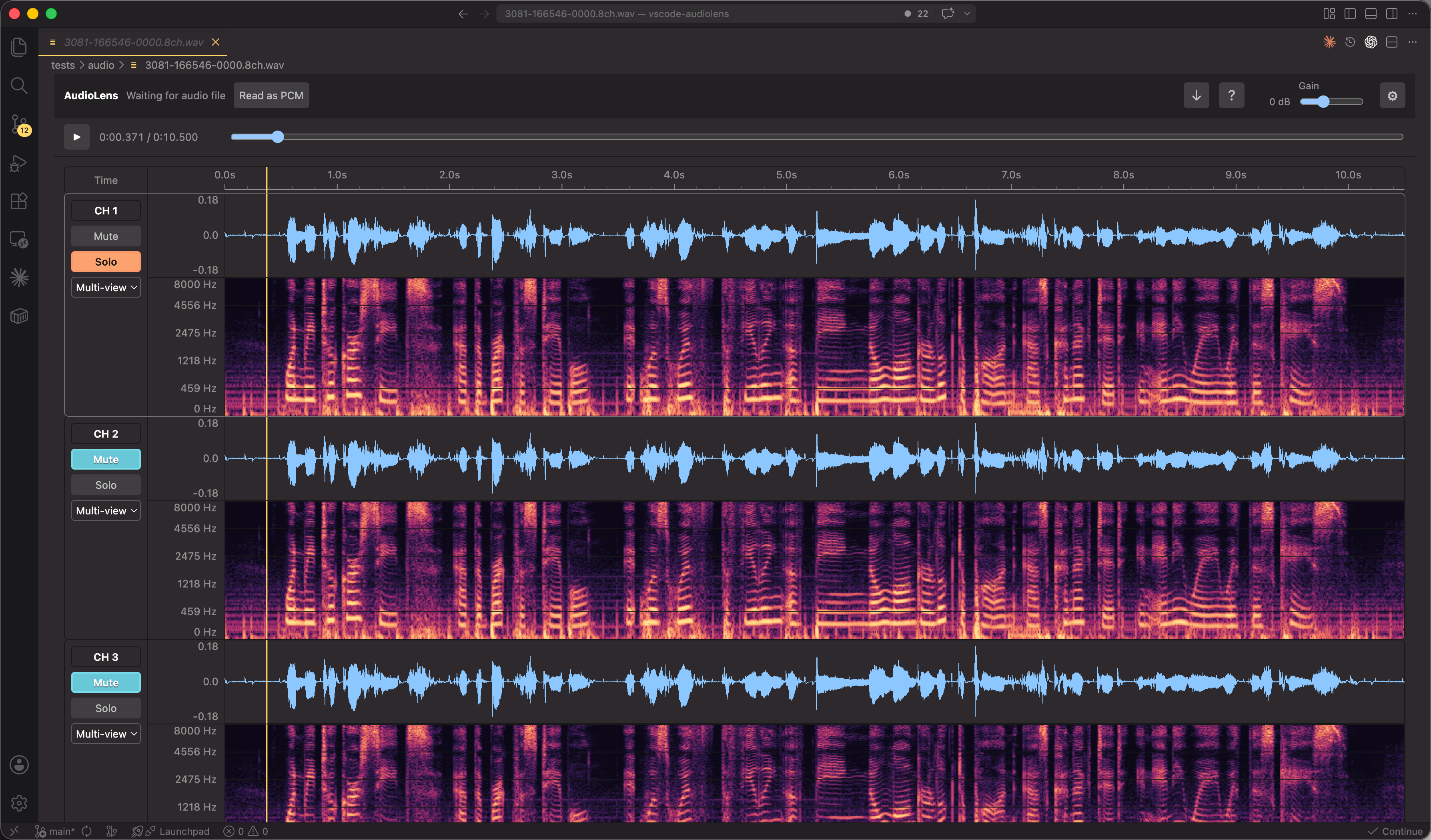
Why AudioLens
| Workflow |
What AudioLens gives you |
| Speech and ML datasets |
Inspect audio next to manifests, transcripts, logs, training scripts, and model outputs. |
| Multi-channel audio |
Audacity-style channel tracks, per-channel waveform/spectrogram views, mute, solo, and per-channel gain/pan playback. Stereo audio starts with channel 1 fully left and channel 2 fully right; mono and audio with three or more channels keep the centered downmix. Per-channel frequency scale/range and amplitude, with axis ticks that adapt to track height. |
| Audio analysis |
Drag a region, play only that selection, and read RMS, peak, clipping, dominant frequency, spectral centroid, ZCR, and frequency-band metrics. |
| Raw data debugging |
Open .pcm / .raw with explicit sample rate, channel count, encoding, byte order, and byte offset. Reopen WAV payloads as PCM for damaged or non-standard files. |
| Kaldi workflows |
Open wav.ark:offset entries or manually enter an Ark offset without loading the full archive. |
| Remote development |
Runs as a workspace extension, so Remote SSH workspaces can preview and analyze remote audio without copying the dataset first. |
Core Features
| Area |
Features |
| Playback |
Keyboard-ready Space play/pause, seek, selection playback, playback gain, per-channel mute and solo. |
| Visualization |
Waveform, spectrogram, combined view, shared timeline, draggable per-track height and waveform/spectrogram split, zoom, pan, and reset. |
| Spectrogram analysis |
Frequency-domain STFT analysis; FFT sizes up to 32768; multiple window functions, frequency scales, palettes, fixed brightness, and optional auto brightness. |
| File inspection |
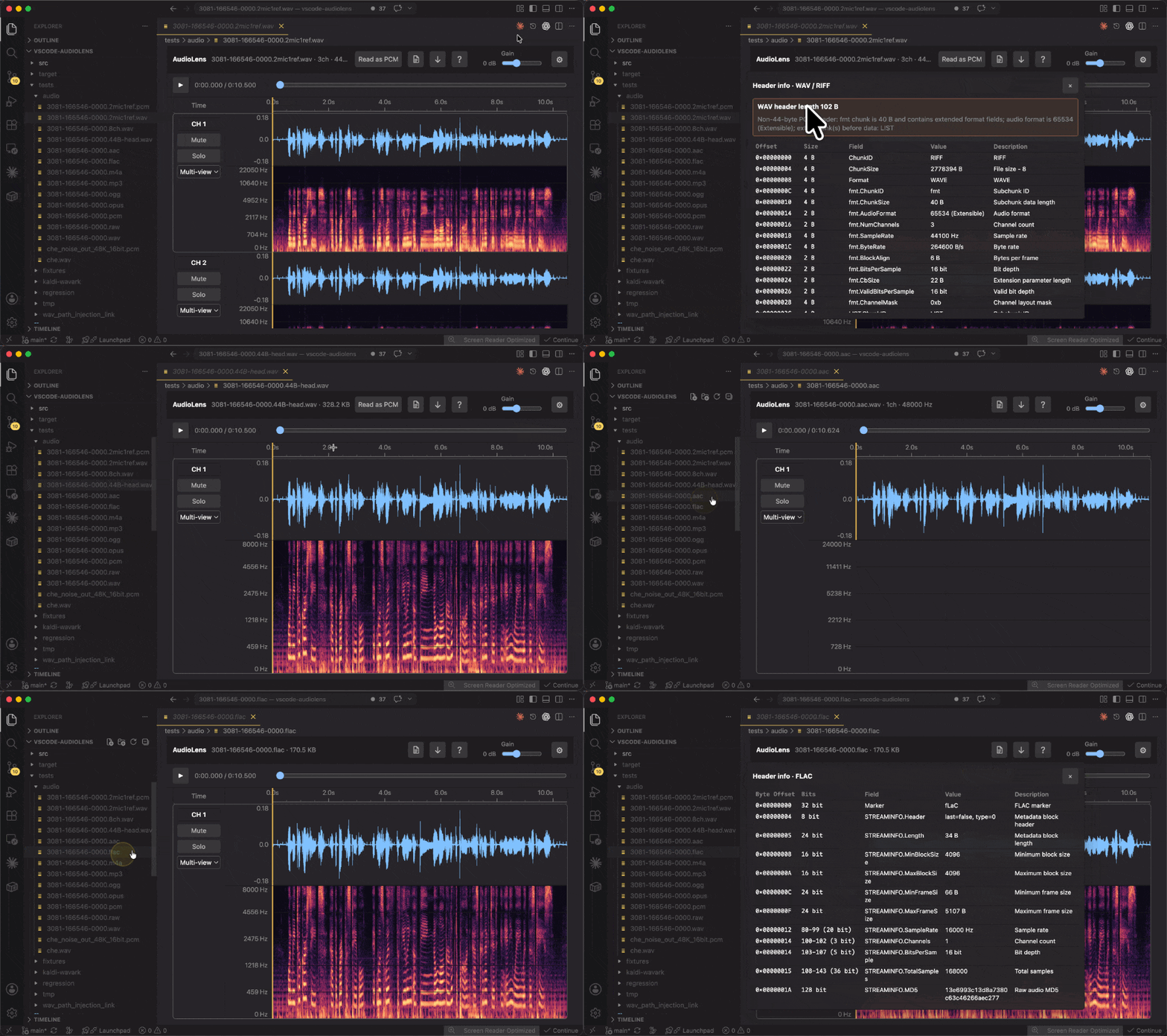
Structured header inspector for WAV/RIFF, FLAC, Ogg, MP4/M4A, AAC/ADTS, and MP3/MPEG frames. |
| Dataset navigation |
Hover/status-bar/command entry points for audio paths in ordinary text files without generating thousands of inline links. |
| Persistence |
Saves default track view, spectrogram settings, PCM defaults, and language preference. |
Install
Recommended: install from the Visual Studio Marketplace
https://marketplace.visualstudio.com/items?itemName=simzhou.audiolens
Alternative: install from Open VSX
https://open-vsx.org/extension/simzhou/audiolens
Command line
code --install-extension simzhou.audiolens
Offline VSIX
# Download audiolens-<version>.vsix from https://github.com/SimZhou/vscode-audiolens/releases
code --install-extension audiolens-<version>.vsix
Feature Demos
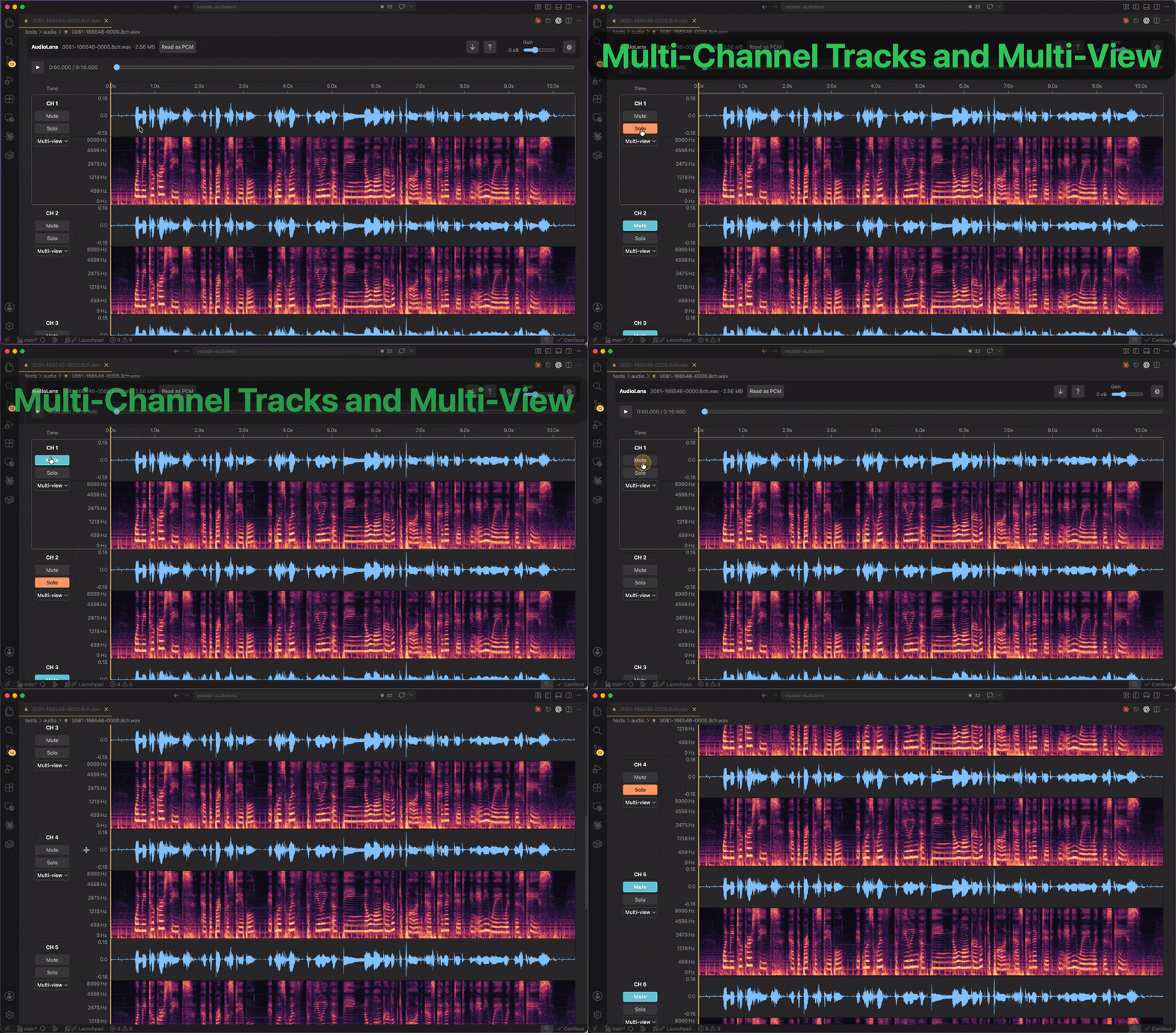
1. Multi-Channel Tracks and Multi-View
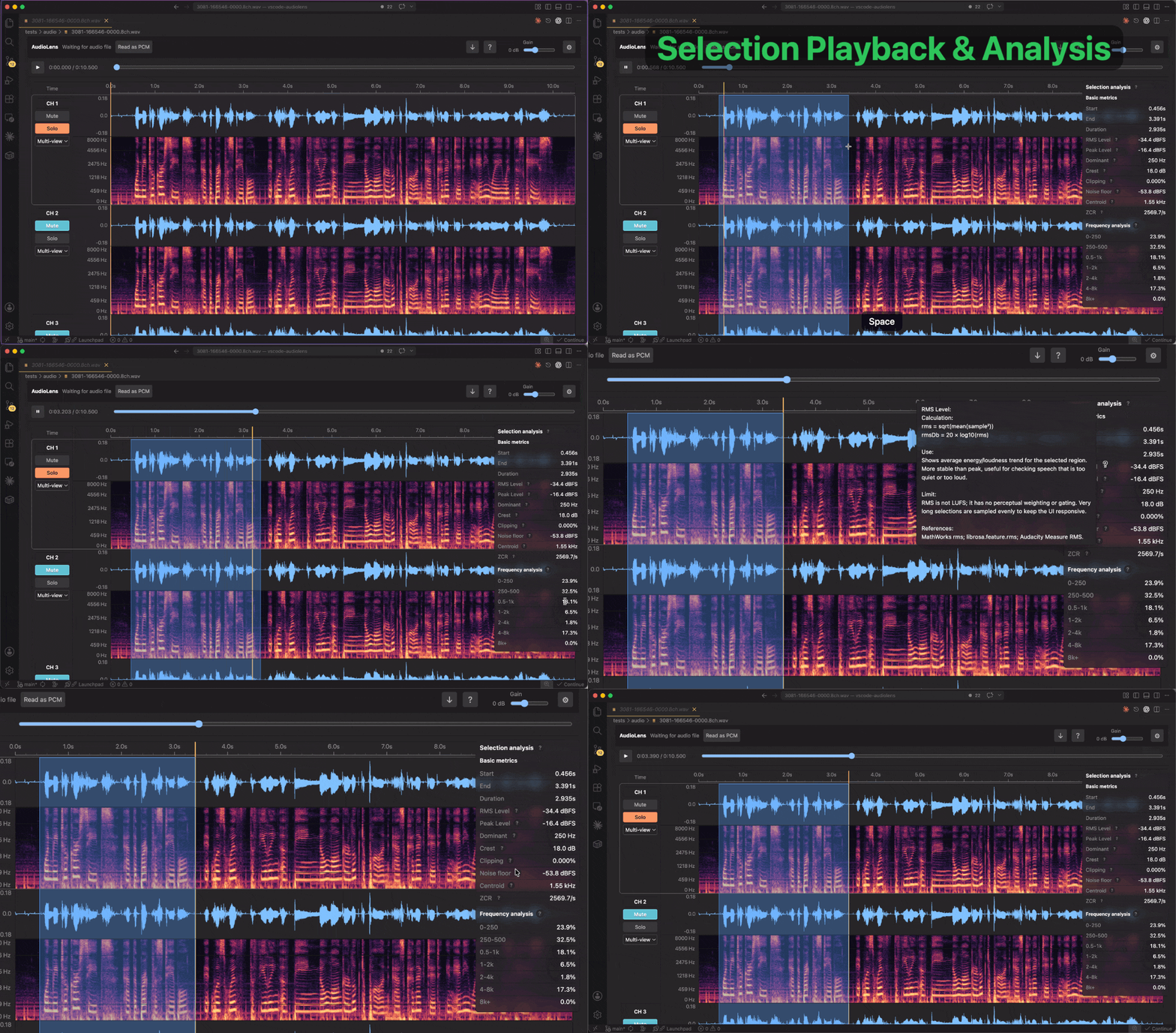
2. Selection Playback and Analysis
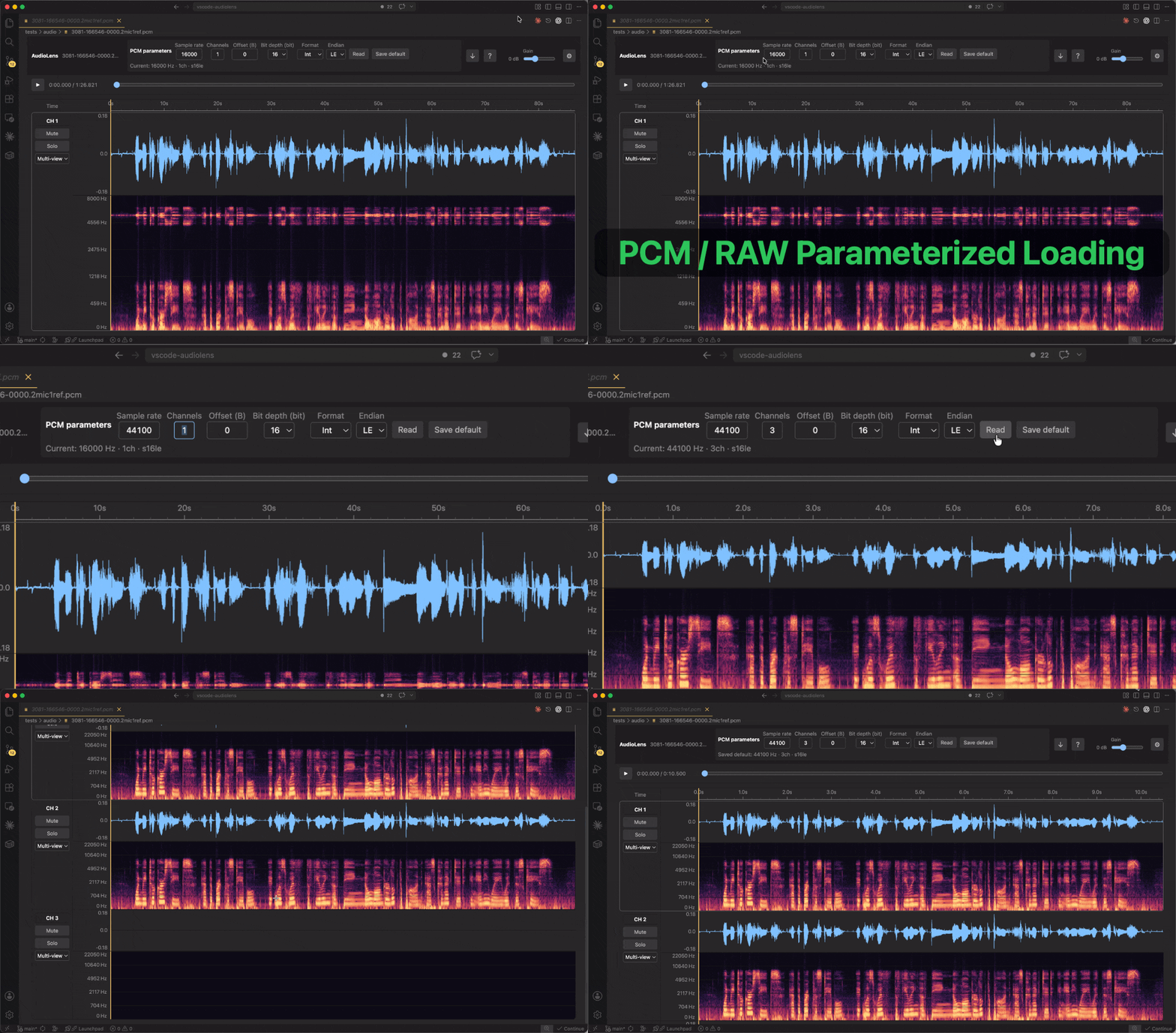
3. Open PCM / RAW Files
5. Open Audio Paths From Any File
6. Open Kaldi WAV Ark Directly
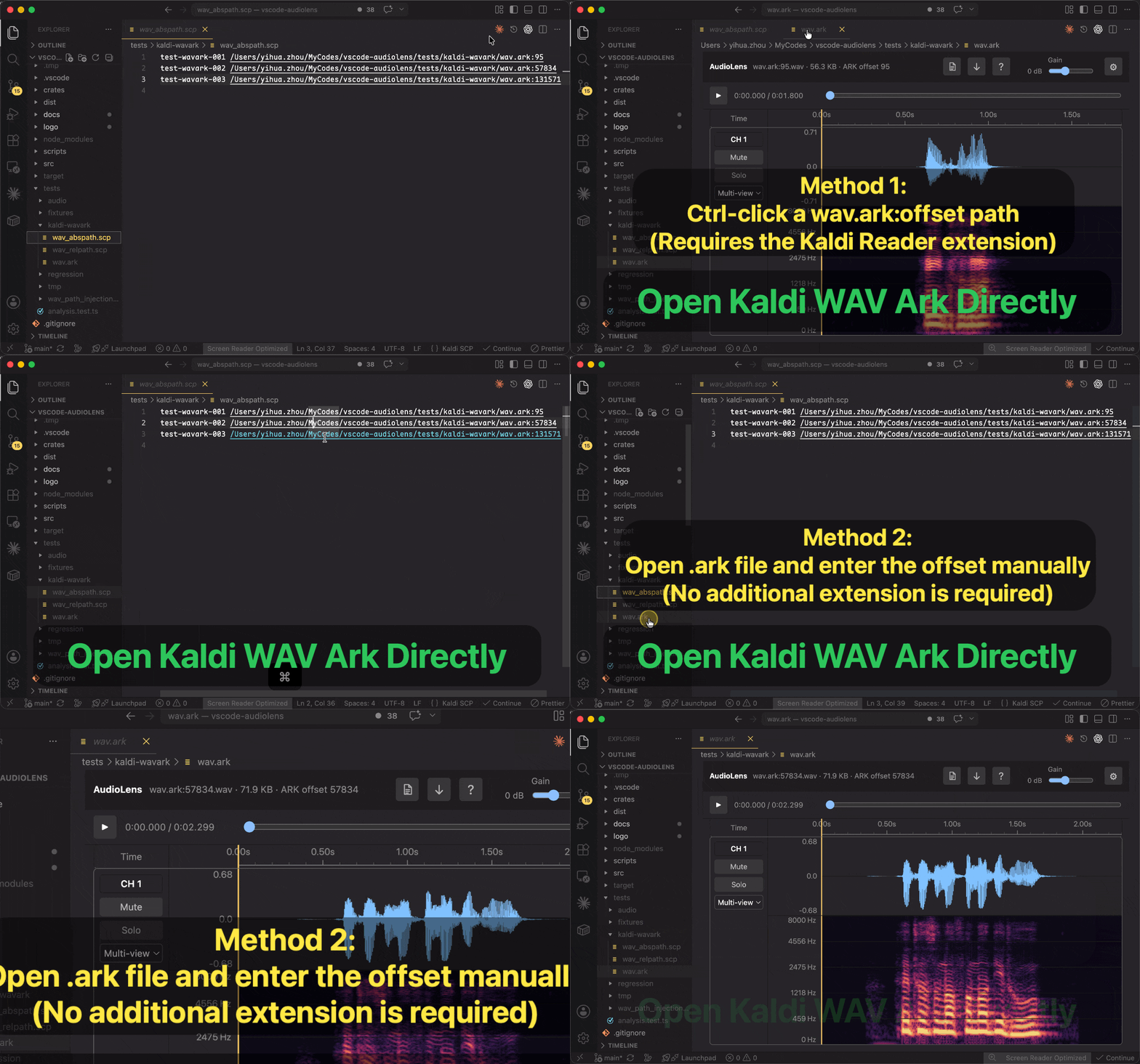
- Method 1: Ctrl-click a
wav.ark:offset path. Requires Kaldi Reader: GitHub, VS Code Marketplace, or Open VSX.
- Method 2: Open an
.ark file and enter the offset manually. No additional extension is required.
Supported Files
AudioLens uses the browser audio stack for common encoded formats and the extension host to read files from the VS Code workspace.
| Type |
Extensions |
Notes |
| WAV |
.wav |
Supports multi-channel WAV files, PCM WAV below 3000 Hz with native-rate analysis, ordered RIFF chunk inspection, standard 44-byte PCM header checks, and optional one-time PCM reread. |
| Kaldi wav ark |
.ark entries such as wav.ark:23252 |
Use AudioLens: Open Kaldi WAV Ark Entry or open an .ark file and enter an offset. AudioLens validates RIFF/WAVE at the offset and reads only that WAV entry. |
| Encoded audio |
.mp3, .flac, .ogg, .opus, .m4a, .aac |
Long MP4/M4A/AAC audio uses an extension-host FFmpeg disk cache with peak pyramids, bounded PCM playback chunks, and on-demand analysis windows, avoiding whole-file decoded PCM transfers and Electron AAC demuxer limitations. Other formats use the Webview decoder first and fall back to the same cache. |
| Raw PCM |
.pcm, .raw |
Requires explicit PCM parameters before reading. |
View Multi-Channel Audio
Multi-channel files are shown as separate channel tracks. Each track has a compact left control strip and a full-width analysis area.
Mute disables playback for that channel.Solo plays that channel and silences the other channels.- The track view selector switches a channel between waveform, spectrogram, and combined view.
- Drag the bottom edge of a track to change its height. In combined view, drag the boundary between waveform and spectrogram to change their ratio.
- Double-click either draggable boundary to restore the saved default layout. The latest layout is reused when opening other audio files.
- Selecting a track makes it the active channel for selection analysis.
The waveform color is consistent across channels so the selected channel does not visually distort track comparison. Adjacent tracks are drawn as a compact stack with shared borders, while the selected track keeps a rounded focus outline for quick orientation.
Open PCM Files
For .pcm and .raw files, AudioLens asks for PCM parameters before decoding:
- sample rate
- channel count
- encoding, such as Signed 16-bit PCM, Unsigned 8-bit PCM, 32-bit float, or 64-bit float
- byte order, with 8-bit encodings automatically using no endian setting
- start offset in bytes
The current PCM parameters can be saved as defaults for later PCM files. AudioLens does not guess PCM parameters from the file name, because raw PCM does not contain reliable metadata.
After a successful read or saved default update, the PCM file parameter panel collapses to a compact summary with an Edit parameters action, keeping more vertical space for the waveform and spectrogram.
WAV files can also be reopened as PCM from the top bar. This is a one-time operation for the current file and is useful when inspecting raw audio data, non-standard headers, or offset-sensitive test files.
Open Kaldi WAV Ark Files
Run AudioLens: Open Kaldi WAV Ark Entry from the Command Palette and enter a wav.ark:offset location. If you open an .ark file directly, AudioLens asks for the offset before reading.
AudioLens only supports ark entries whose audio payload starts with a WAV RIFF/WAVE header. It uses the WAV header size to read the selected entry and does not scan or load the whole ark file.
Open Audio Paths From Any File
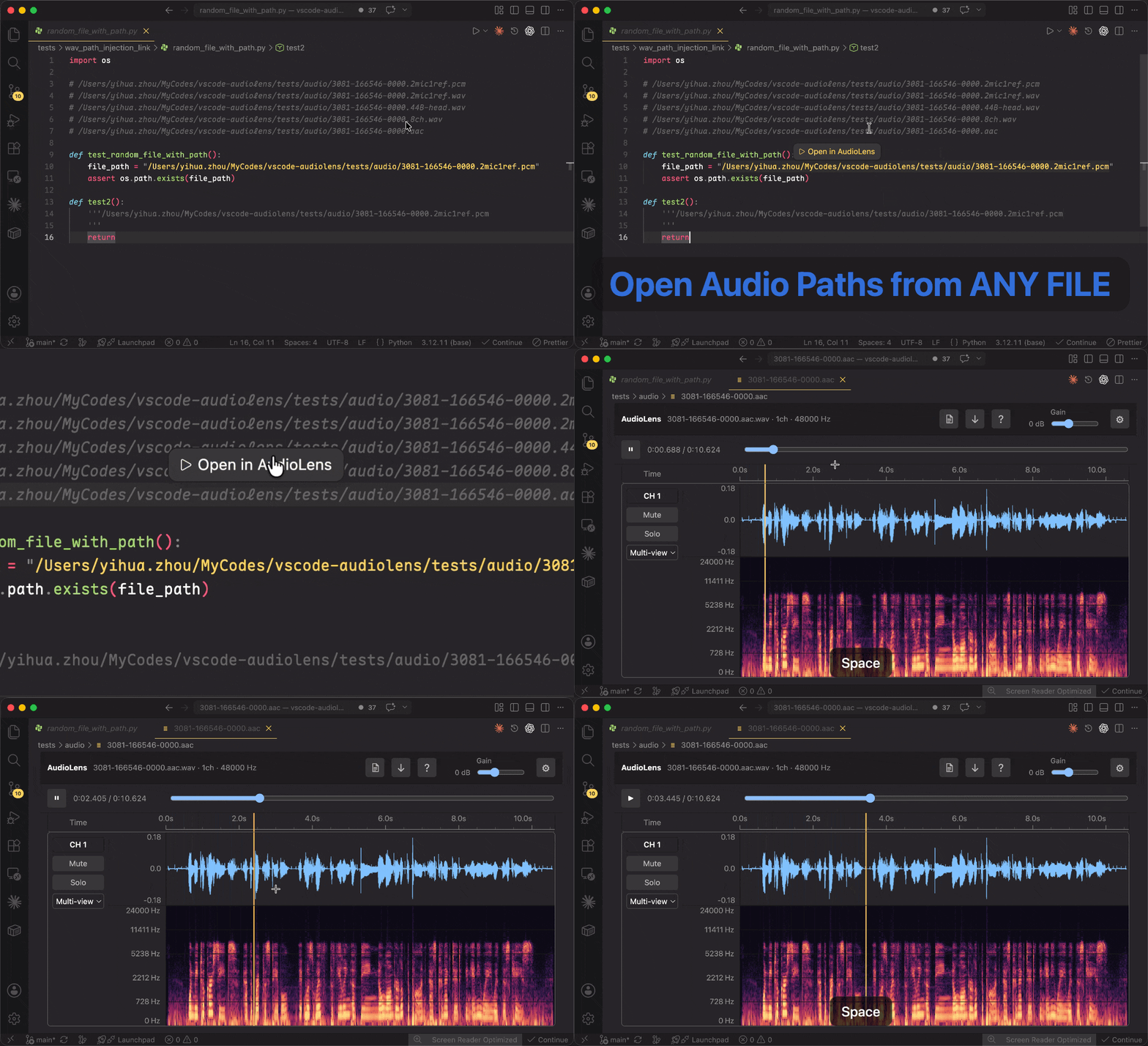
AudioLens can detect audio paths in ordinary text files and open them directly with the AudioLens editor. Hover an audio path and click Open in AudioLens, or place the cursor on a path and use the status-bar action or AudioLens: Open Audio Path at Cursor. It supports absolute paths and relative paths resolved from the current text file, workspace folders, and optional configured base directories.
Run AudioLens: Toggle "Open in AudioLens" from the Command Palette to turn this feature on or off. It is enabled by default and avoids generating inline links for the whole document, so large JSON, log, and dataset files stay responsive.
Kaldi *.ark:offset links are intentionally left to Kaldi Reader.
Use the document icon in the top bar to inspect structured header fields without leaving VS Code. AudioLens lists fields in file order and uses byte offsets for chunk-based formats, or bit ranges for packed headers such as ADTS AAC and MPEG audio frames.
For WAV files, the inspector highlights whether the file uses the standard 44-byte PCM header or contains extended chunks such as fmt extensions and LIST metadata. Audio payload rows identify the data region without dumping raw sample bytes.
Analyze Selected Audio
Drag across any waveform or spectrogram to create a time selection. AudioLens can play the selected range and calculate metrics for the active channel.
The yellow timeline label shows the playback position to three decimal places. Drag it to seek; an existing selection is preserved and limits the drag range. During playback, dragging pauses the audio and releasing resumes from the new position unless it is at the end of the range.
Current analysis includes:
- start time, end time, and duration
- RMS level and peak level
- dominant frequency
- crest factor
- clipping ratio
- noise floor estimate
- spectral centroid
- zero-crossing rate
- frequency-band distribution
Tooltips next to the metrics describe how each value is calculated and when it is useful.
Adjust Spectrograms
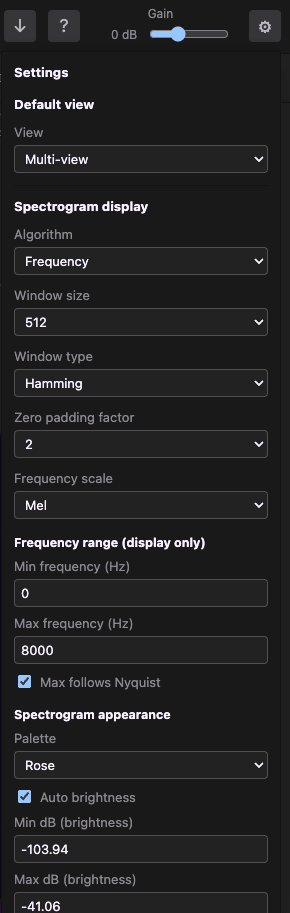
AudioLens includes practical spectrogram controls for speech and signal inspection:
- algorithm: Frequency-domain STFT
- FFT sizes from
8 to 32768
- window functions: Rectangular, Bartlett, Hamming, Hann, Blackman, Blackman-Harris, Welch, and Gaussian variants
- zero padding factors from
1 to 128 (the padded FFT is capped at 131072 to bound memory use)
- frequency scales: Linear, Log, Mel, Bark, ERB
- configurable display-only frequency range, with an optional Nyquist-following maximum
- palettes: Rose, Classic, Grayscale, Inverse Grayscale
- Audacity-style fixed brightness defaults: gain
20 dB, range 80 dB (−100 to −20 dB), high boost 0, preserving level differences between files. Auto brightness is off by default and remembered when enabled. Adjust these controls or use Restore default brightness.
The settings menu in the top-right corner keeps these controls close to the spectrogram view, including display-only frequency range limits and Nyquist-following maximum frequency.
Spectrogram analysis runs in a worker with a magnitude cache, so zoom and pan stay real time — horizontal pan reuses computed FFT columns, and frequency-axis, palette, and dB changes re-rasterize instantly without recomputing the FFT.
Time zoom supports a 1 ms visible range for both long and short recordings (or one sample at low sample rates). Spectrogram detail still depends on the FFT window: zooming further does not create additional frequency resolution.
Controls
After opening audio, the active spectrogram or waveform is keyboard-ready, so Space can play or pause immediately.
| Action |
Shortcut |
| Play or pause |
Space |
| Clear selection or playback cursor |
Esc |
| Reset time zoom |
Ctrl / Command + F |
| Time zoom on macOS |
Command + mouse wheel |
| Time zoom on Windows/Linux |
Ctrl + mouse wheel |
| Pan visible time range |
Shift + mouse wheel |
| Zoom waveform amplitude on macOS |
Option + mouse wheel |
| Zoom waveform amplitude on Windows/Linux |
Alt + mouse wheel |
| Reset playback gain |
Double-click the gain slider |
Interface Language
AudioLens follows the VS Code display language by default. You can override the Webview language with the audiolens.language setting or by running AudioLens: Switch Language from the Command Palette.
Supported languages:
Simplified Chinese, Traditional Chinese, English, Japanese, Korean, French, German, Russian, Spanish, Italian, Portuguese, Indonesian, Norwegian, Dutch, Polish, Turkish, and Vietnamese.
New interface strings fall back to English until a locale has a complete translation.
Use With Remote SSH
AudioLens is declared as a workspace extension. In a Remote SSH window, the extension host runs in the remote workspace, reads audio files from the remote file system, and streams the data to the local Webview for playback and visualization.
Use the top-bar download button when you want to save the current remote audio file. The save dialog defaults to the audio file's own folder, so you no longer land on the remote root; switch to a local location in the dialog when saving to your machine.
Privacy
AudioLens does not upload audio files to any third-party service. Audio content is read by the VS Code extension host and analyzed inside the VS Code Webview and worker runtime.
Development
npm install
npm run build
npm run typecheck
npm run rust:test
npm run package
Press F5 in VS Code and choose the AudioLens extension launch configuration. Then open a supported audio file in the Extension Development Host.
Author
SimZhou: https://simzhou.com/en/about/
Support AudioLens
If AudioLens helps with your speech, audio, or signal engineering workflow, you are welcome to support its ongoing development.
Ko-fi
Support AudioLens on Ko-fi: https://ko-fi.com/simzhou
WeChat

Copyright
Copyright (c) 2026 SimZhou. All rights reserved.

