Zuma MCP - Copilot Chat Log & Context Optimizer
Stop Copilot and other AI coding agents from reading thousands of raw build, test, and document lines. Zuma returns the first useful failures, exact sections, and a bounded handoff instead of filling the chat with whole logs.
Start in VS Code
- Install Zuma MCP from the VS Code Marketplace.
- Trust the workspace, start the MCP server, and approve its tools.
- Ask Copilot Chat:
Use Zuma MCP to run my tests and show only the new failures.
No manual mcp.json entry is required. The extension installs the platform binary, MCP provider, and PowerShell worker.
Measured examples
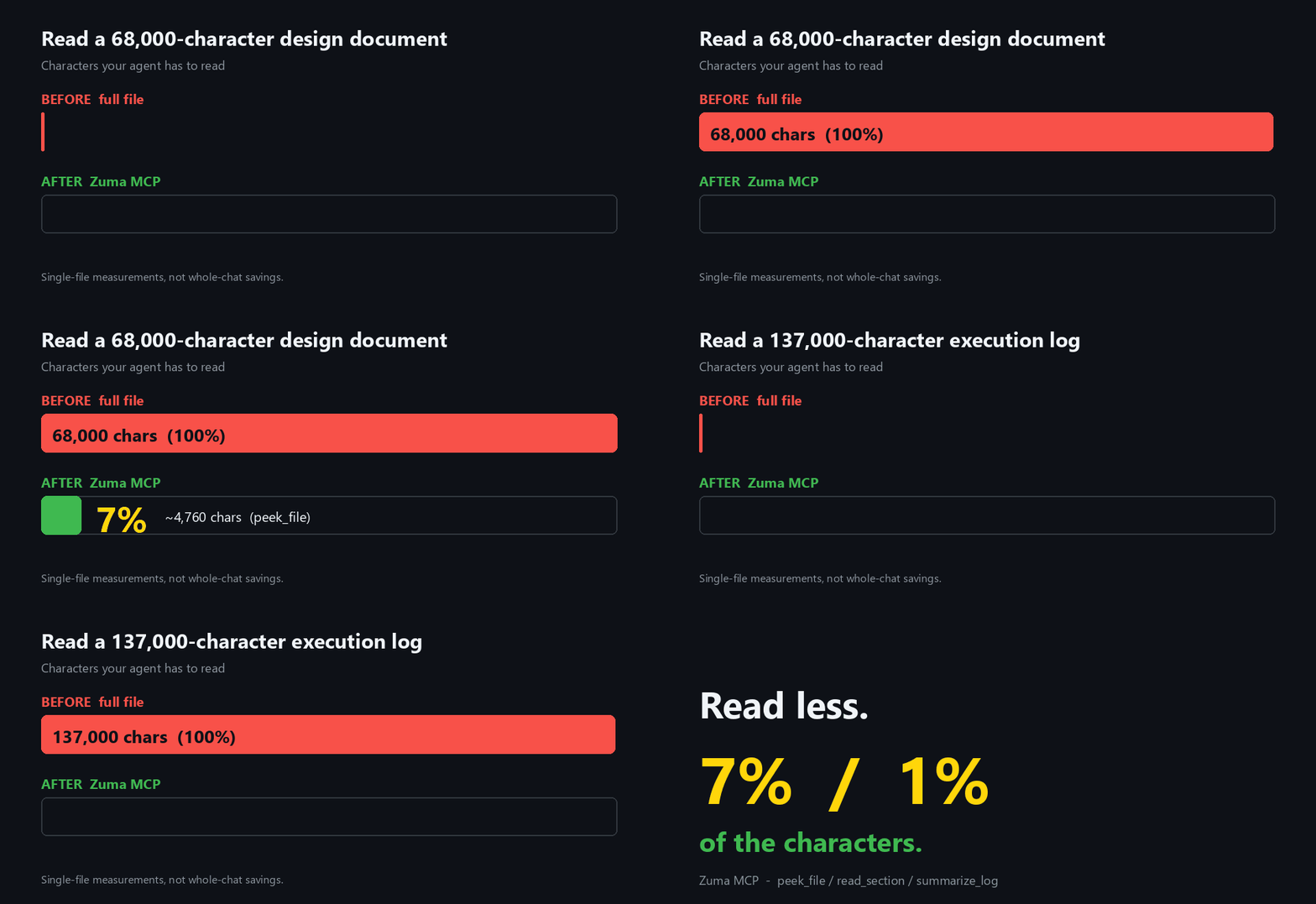
Your coding agent reads 7% of a design document and 1% of a build log—not 100%.
| Input |
Full read |
With Zuma MCP |
Characters returned |
| 68,000-character Markdown design document |
68,000 |
peek_file |
7% (about 4,760) |
| same document |
68,000 |
peek_file + one read_section |
20% (about 13,600) |
| 137,000-character execution log |
137,000 |
summarize_log |
1% (about 1,370) |
These are single-file measurements. Savings across complete chats have not been measured.
Zuma MCP (formerly InazumaPwsh) gives your VS Code coding agent a native Rust file/search engine, structured build and test diagnostics, persistent local PowerShell 7 sessions, and a compact chat handoff. Instead of loading entire files and terminal dumps into chat, inspect an outline, read an exact symbol or section, summarize a log, run only affected tests, or hand the next chat only the goal, changed files, latest verification, and next action.
Why Developers Use Zuma MCP
- Cut context bloat: Inspect file outlines, read exact symbols or sections, summarize logs, and keep large evidence in local capsules before loading raw text into chat.
- Never replay the same read: Exact repeated file, symbol, section, and log reads return a compact duplicate marker while the file is unchanged.
- Start on native Rust: Every packaged platform starts a lightweight Rust MCP front end for UTF-8 file outlines, Git-aware search, and log summaries.
- Find only new regressions: Run tests affected by Git changes, filter compiler and lint diagnostics to new findings, and keep only newly failing test transitions.
- Stop repeated failures: Trip a circuit breaker when the same command, Git diff, and failure recur, and block unscoped full suites during incremental work.
- Keep shell state alive: Reuse variables, modules, import state, and the current directory across PowerShell calls in a dedicated chat session.
- Non-blocking long work: Task-aware MCP clients can poll and cancel PowerShell, build, test, lint, and type-check operations while existing clients keep synchronous calls.
- Automatic VS Code integration: The extension registers its MCP server and bundles the Rust front end, C# compatibility core, and PowerShell worker. No manual
mcp.json setup is required.
Measured context reduction
On a 137,000-character log, Zuma returned a store_capsule response of 0.318% of the source size and a Delta Context response of 0.125% after the log grew by one line. The 1.0 Context API exposes seven purpose-based routers and preserves direct compatibility calls for existing clients. The packaged smoke test checks capsule budgets, context storage, compilation, parallel execution, cancellation, build, handoff, and parent lifetime.
These figures measure serialized MCP response characters against source characters. They are reproducible response-budget checks, not whole-chat token or billing measurements. The packaged real-smoke test, which CI runs on Windows, Linux, and macOS, fails if the initial response reaches 5% of the source or the delta response reaches 1%.
| Router |
Operations |
zuma_task |
set, get, clear |
zuma_shell |
execute, reset_session, list_sessions |
zuma_execute |
verify_all, build, test, lint, type-check, and affected-test runners |
zuma_read |
File outlines, sections, symbols, log summaries, file search, and trace inspection |
zuma_context |
Capsules, semantic Git diff, context memory, compilation, and read planning |
zuma_gate |
get, set, reset execution-loop protection and set_budget, clear_budget output budgets |
zuma_handoff |
prepare a bounded chat handoff |
The existing direct tool names remain callable for compatibility. New clients should use the routers and pass the operation that selects the implementation.
Task anchor
| Tool |
Purpose |
set_task_anchor |
Register the current goal, target, acceptance criteria, out-of-scope items, and absolute allowed paths. Zuma appends the anchor to later tool responses. |
get_task_anchor |
Return the active task anchor. |
clear_task_anchor |
Clear the active task anchor after the task is complete or when a new unrelated task starts. |
Set an anchor once at the start of a substantial task and update it when the goal or scope changes. Path-bearing tool calls outside allowedPaths return a scopeWarnings entry; this is a reminder, not a filesystem sandbox. Anchor state stays in the Zuma server process and is not persisted with the chat or included in handoff logs.
Execution Gate
| Tool |
Purpose |
get_execution_gate |
Return the current manual, incremental, or milestone mode, repeat threshold, and tripped circuits. |
set_execution_gate |
Change the mode and gate thresholds for the current server process. |
reset_execution_gate |
Clear repeat-failure history and tripped circuit state. |
The circuit breaker is shared by typed diagnostic tools and test commands run through execute_powershell. It compares the command, structured failure signature, and Git diff. The default threshold is three identical failures. In incremental mode, an unscoped full test run is blocked and the agent is directed to run_affected_tests or a specific test target. milestone permits full suites.
Persistent PowerShell 7 Sessions
| Tool |
Purpose |
execute_powershell |
Run a script in a persistent session and return structured data, output, errors, exit code, and fullLogPath when truncated. |
list_powershell_sessions |
List active sessions with location, creation time, last-used time, and busy state. |
reset_powershell_session |
Recreate one worker and its session state. Files and OS environment settings are not reverted. |
Structured diagnostics
| Tool |
Purpose |
|
|
|
|
|
|
run_dotnet_build |
Run a build and return the exit code and SARIF compiler diagnostics. Warnings are omitted by default. |
|
|
|
|
|
|
run_dotnet_test |
Run dotnet test and return test counts and failures with file, line, message, and stack from its TRX reports. |
|
|
|
|
|
|
run_affected_tests |
Select tests from Git changes, untracked files, naming conventions, and relative imports, then run each detected runner once. |
|
verify_all |
Build an ordered verification plan from Git changes, stop at the first failed step, and run affected tests last. |
|
run_playwright |
Run locally installed Playwright and return test counts, failures, and attachment paths from its JSON report. |
inspect_playwright_trace |
Inspect a trace ZIP for failed actions, HTTP and console errors, and a DOM excerpt. |
|
|
|
|
|
|
run_bun_test |
Run bun test and return test counts and failures with file, line, message, and stack from its JUnit XML report. |
|
|
|
|
|
|
run_pytest |
Run pytest and return test counts and failures with file, line, and message from its JUnit XML report. |
|
|
|
|
|
|
run_vitest |
Run locally installed Vitest once (vitest run) and return test counts, failures, and file-level errors from its JSON report. |
|
|
|
|
|
|
run_tsc |
Run the locally installed TypeScript compiler (tsc --noEmit) and return diagnostics with file, line, column, code, and message. |
|
|
|
|
|
|
run_eslint |
Run the locally installed ESLint and return counts, per-rule counts, and problems with file, line, column, rule, and message. |
|
|
|
|
|
|
run_cargo_check |
Run cargo check and return Rust compiler errors and warnings with file, line, column, code, and message. |
|
|
|
|
|
|
File and log reading
| Tool |
Purpose |
peek_file |
Return a text file's type, encoding, line count, outline with line ranges, and a FULL or PARTIAL reading recommendation. |
read_section |
Return one outline entry by title search, or a line range, with line numbers and a nextLine for continuation. |
read_symbol |
Return one exact named declaration from a code file, including decorators and the complete symbol range. Overloads can be selected with occurrence. |
summarize_log |
Group matching log lines with counts and context, and return the last lines of the log. |
search_files |
Search text files under a directory with a regex and return per-file match counts and the first matching lines. |
Exact repeated peek_file, read_section, read_symbol, and summarize_log calls for the same file version return status: "duplicate" and omit the prior response body for five minutes. A changed file size or timestamp automatically invalidates the marker.
Evidence capsules
| Tool |
Purpose |
store_capsule |
Save a local file or supplied text as content-addressed evidence and return a compact capsule ID, source hash, counts, and query hint. |
query_capsule |
Return selected lines, regular-expression matches, or the appended delta from baseCapsuleId, omitting lines already returned in the same server process. |
Prefer sourcePath over content so large evidence does not enter the chat request. Capsules are local temporary plaintext, deduplicated by content hash, and limited to 20 MB each, 100 capsules, 200 MB total, and three days. Potential credentials or sensitive URLs block content from query_capsule; the local capsule remains available to the operating-system user. ZUMA_CAPSULE_DIRECTORY can override the default %TEMP%/inazuma-pwsh-capsules location.
Context engine
| Tool |
Purpose |
semantic_git_diff |
Compare a worktree with a Git revision and return declaration-level additions, removals, and modifications instead of a raw text diff. |
remember_context |
Persist a fact, decision, unknown, next action, or invalidation marker under a stable key. |
query_context |
Search active structured records for one workspace without replaying prior source text. |
compile_context |
Compile the current Goal, Facts, Decisions, Unknowns, NextAction, Invalidated records, and evidence references under a character budget. |
plan_context_read |
Rank changed files, symbols, sections, and relative dependencies to propose the smallest next read for a question. |
Context records are local plaintext JSONL files separated by workspace hash under %TEMP%/inazuma-pwsh-context. Reusing a kind and key deactivates the older value; an invalidated record removes an old key from active queries. Secret-like values are redacted before storage. ZUMA_CONTEXT_DIRECTORY overrides the directory. No cloud service or model is called.
Chat handoff
| Tool |
Purpose |
prepare_handoff |
Replays an explicitly selected VS Code chat session and returns a bounded local summary with Git state, the latest Zuma verification, and the next action. |
Handoff access is disabled by default. Enable inazumaPwsh.handoff.enabled in a trusted workspace, then call prepare_handoff without a session to list candidates. Select one sessionId or sessionPath for a second call and pass nextActionHint. Zuma does not read an unsent editor draft as the next action, never silently chooses the newest chat, and never saves the handoff unless a client explicitly keeps the returned text.
Native Rust + C# Architecture
Every packaged platform starts the Rust MCP front end for UTF-8 Markdown and code outlines, explicit line ranges, Git-aware search, and log summaries. It forwards PowerShell sessions, AST parsing, symbol reads, non-UTF-8 fallback, and build/test diagnostics to the self-contained C# compatibility core when required.
Clients using MCP protocol revision 2026-07-28 and the io.modelcontextprotocol/tasks extension can request PowerShell, build, test, lint, and type-check tools as MCP Tasks. Clients without Tasks opt-in retain synchronous responses. File-reading, log, and trace tools remain synchronous.
Try it in a chat
After installing the extension and approving its MCP tools, ask your agent to use Zuma MCP. For example:
- "Use a dedicated Zuma MCP session for this chat. Set a task anchor for the target, acceptance criteria, and allowed paths. Load my module, then reuse it for the next commands."
- "Build this .NET project with Zuma MCP. Keep the task anchor focused on this build, then show the compiler errors first and consult the full log if compilation is outside the report."
- "Run this project's Playwright tests and summarize the failures and available trace paths."
- "Inspect this Playwright trace for failed actions, HTTP errors, and console errors."
- "Run the pytest suite with Zuma MCP and fix the first failure."
- "Run
bun test with Zuma MCP and show me the failing files and lines."
- "Run Vitest with Zuma MCP for
src/utils only and explain why the import failed."
- "Peek at this design document with Zuma MCP, then read only the section about approvals."
- "Read the
RunAsync symbol in this C# file, then fix the cancellation path."
- "Summarize the errors in this build log with Zuma MCP before opening it."
- "List safe chat-handoff candidates, let me choose one, then prepare the next chat context."
The agent must choose and reuse a unique sessionId to keep chat state separate. Trace inspection complements browser-based visual checks; it does not verify how a page looks.
What's new in 1.0.0
- Purpose-based routers. The public MCP surface has seven routers instead of 33 flat tools.
- Stable direct compatibility. Existing direct tool names remain accepted by the implementation.
- Status-bar coverage. Savings and execution-gate status bars continue to report measured reads and calls.
What's new in 0.14.0
- Context Compiler.
remember_context, query_context, and compile_context keep facts, decisions, unknowns, next actions, evidence references, and invalidations as bounded local state.
- Query-first Planner.
plan_context_read ranks changed files, outline symbols, source terms, and relative dependencies, then recommends the smallest read_symbol or read_section call.
- Semantic Git Diff.
semantic_git_diff compares tracked and untracked worktree content at declaration level and returns additions, removals, and modifications without replaying a raw diff.
- 33-tool contract. C# and Rust expose the same context tools, with packaged smoke coverage and workspace-scoped local JSONL storage.
What's new in 0.13.0
- Evidence Capsule + Delta Context. Save large files and logs locally, then return a compact ID, targeted lines, regular-expression matches, or appended-only content.
- Redundant Read Guard. Repeated file outlines, section reads, symbol reads, and log summaries return a compact duplicate marker while the source is unchanged.
- Response budgets in CI. Packaged checks enforce a 5% initial capsule response and a 1% delta response against a 137,000-character source.
What's new in 0.12.1
- Marketplace clarity. The listing now leads with log compression, focused file reads, task anchors, and handoff rather than implementation details.
- Shorter onboarding. The README starts with installation, measured examples, and the tools needed for the primary workflow.
Release notes for all versions are in CHANGELOG.md.
Requirements and installation
- VS Code 1.101 or later. Windows x64 is the verified platform; Linux (x64, arm64) and macOS (x64, arm64) are supported but experimental (see "Notes").
- External PowerShell 7 (
pwsh.exe on Windows, pwsh on Linux/macOS) installed on the system (only PowerShell 7.7.0 has been verified in practice). The server searches PATH first, then the standard install locations (Windows: %ProgramFiles%\PowerShell\7, %LOCALAPPDATA%\Microsoft\WindowsApps, %USERPROFILE%\.dotnet\tools; Linux/macOS: /opt/homebrew/bin, /usr/local/bin, /usr/bin, /snap/bin, ~/.dotnet/tools), or you can specify an explicit executable path via the inazumaPwsh.pwshPath setting or INAZUMA_PWSH_PATH environment variable. An invalid explicit path fails immediately without fallback.
- The extension bundles a Rust MCP server, a self-contained C# compatibility core, and the worker script (
powershell-worker.ps1) for every platform. The worker script runs under the external PowerShell 7 process to manage session runspaces.
- A trusted workspace. The extension runs in the local extension host, including when a remote workspace is open; it does not switch to the remote shell or filesystem.
- Install the VSIX for your platform (win32-x64, linux-x64, linux-arm64, darwin-x64 or darwin-arm64) using Extensions: Install from VSIX or from the Visual Studio Code Marketplace. The extension registers its MCP server automatically; no
mcp.json entry is required. Follow VS Code's prompts to trust the workspace, start the server, and approve tool calls.
- Build diagnostics require the .NET SDK; Playwright diagnostics require Node.js and a locally installed Playwright package.
run_bun_test requires Bun on PATH, run_pytest requires a Python interpreter with pytest installed, and run_vitest requires Node.js and a locally installed Vitest package.
| When you need... |
Extension |
Role |
| Long-term recall across chats |
Kioku |
Saves and searches lessons from earlier tasks. |
| Overnight continuation with a credit limit |
Eien |
Resumes stalled work and stops at the configured budget. |
| A fresh chat before context gets overloaded |
Tsugi |
Creates a reviewed handoff prompt for the next chat. |
| A reusable workflow from a completed task |
Waza |
Compiles a selected workflow into an Agent Skill. |
The Zuma MCP project code is licensed under the MIT License, copyright 2026 Shunsuke F. Bundled third-party components retain their own licenses; see LICENSE and THIRD-PARTY-NOTICES.txt for details. Repository: https://github.com/furukawa658/inazuma-pwsh
Notes
- Zuma MCP was formerly InazumaPwsh; the extension ID (
ShunsukeF.inazuma-pwsh), setting keys (inazumaPwsh.*), environment variables, executable names, and the log folder keep their inazuma names for compatibility.
- Linux and macOS are experimental. On Linux/macOS there is no Job Object, so workers may be orphaned if the server process crashes.
- Details on sessions, output limits, cancellation, execution gates, and building from source are in docs/reference.md.
Sessions and output
- Choose a unique
sessionId for each chat and reuse it within that chat. If omitted, calls share the default session. Calls with the same ID run sequentially; different IDs can run concurrently.
- Variables, modules, and the current location are retained per session until
reset_powershell_session or an unexpected worker process termination. This separation is not a security boundary.
- There are at most six sessions, including
default. Idle sessions expire after 10 minutes.
maxOutputChars limits output to 1,000 through 50,000 characters, with a default of 6,000. When output is truncated, the full log is saved locally.
Timeouts, compactResponse, Python standard input, MCP Tasks, execution gates, and the limits of each diagnostic tool are described in docs/reference.md.
Safety and logs
Scripts run with the current user's permissions. Zuma MCP is not a security sandbox, and syntax checks do not restrict unauthorized system operations. Connect only trusted local clients, and do not put credentials in scripts. Avoid interactive commands, GUI prompts, authentication prompts, and elevation requests.
Full logs are saved as UTF-8 under %TEMP%/inazuma-pwsh-logs/. fullLogPath identifies an execution log; fullReportPath, when present, identifies detailed structured diagnostics. Logs older than 3 days, or beyond 200 MB in total, are deleted at server startup, and they may contain sensitive output. Review and remove them when no longer needed.
Cancellation and timeout behavior is described in docs/reference.md.
Build and verification
Build commands, reproducibility notes, and the limits of the test suite are in docs/reference.md.
| |

