
Tsugi: keep the task, lose the bloated chat
The Tsugi sidebar turns chat handoff into a repeatable workflow:
- Set the suggested AI-credit budget for the next chat.
- Choose summary-only, summary plus decisions, or full handoff context.
- Open the new chat automatically, or copy the handoff to the clipboard.
- Switch the sidebar instantly between English and Japanese.
The sidebar opens from the Tsugi activity-bar icon. The credit value is written into the handoff prompt as a next-chat target. VS Code does not expose a billing API that Tsugi can use to enforce a hard limit, so this setting is a control and review aid, not a billing circuit breaker.
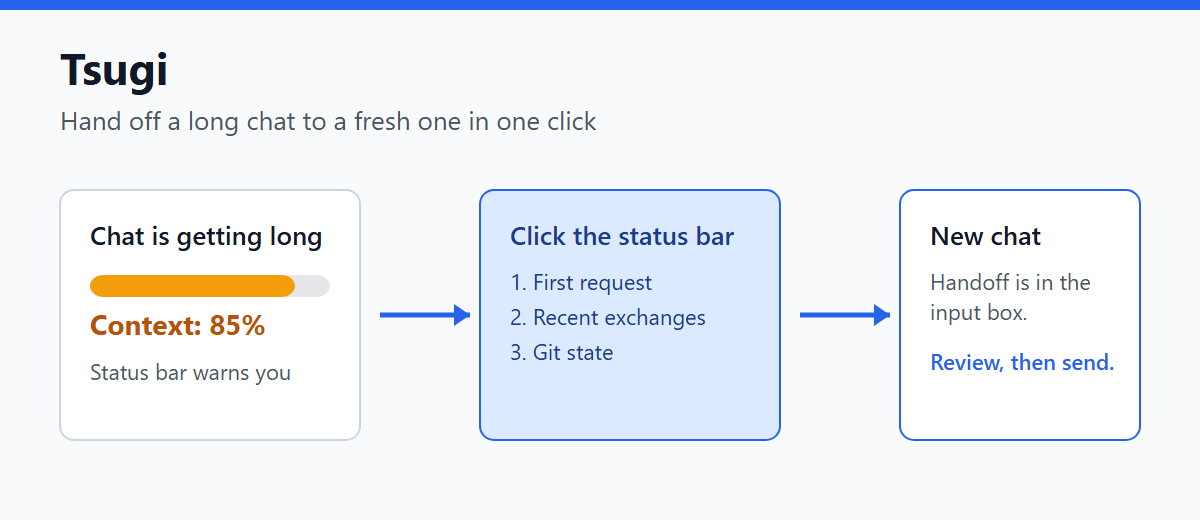
A long Copilot conversation starts missing instructions and taking longer to answer. Tsugi shows the moment that context is filling up, then opens a fresh chat with the goal, recent decisions, Git state, and relevant task context already in the input. No model call is used for a handoff, so changing chats does not spend extra tokens.
Use it when you would rather continue working than rewrite the story from memory.
Japanese README
Watch the demo
Does this sound familiar?
- Halfway through a long conversation, you repeat the same correction again and again.
- You want a new chat, but rewriting the background is a chore.
- You cannot tell how much context is used, so you miss the right moment to switch.
Features
| Feature |
Details |
| Next-chat sidebar |
Configure the credit target, handoff detail, automatic opening, and English or Japanese display in one panel. |
| Fast live usage in the status bar |
A resident Zig scanner reads the latest indexed token patches whenever the session file changes, without reconstructing the full chat object for every refresh. |
| No Zig setup required |
Small native scanners ship for Windows, Linux, and macOS. If a scanner cannot read a session, Tsugi falls back to the JavaScript replay implementation. |
| One-click handoff |
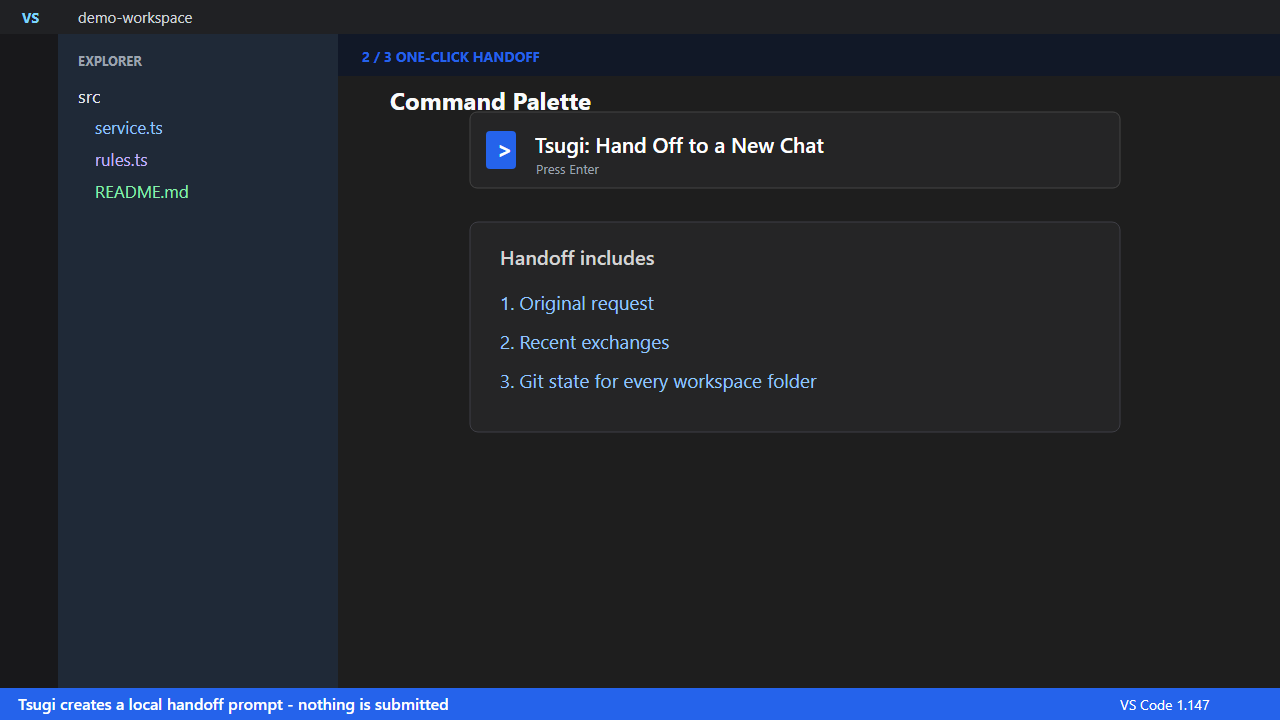
Click the status bar to put a handoff prompt into a new chat input. The saved model and mode are inherited when available. |
| One chat to many task chats |
Run Tsugi: Split into Separate Task Chats, review the proposed independent tasks, and choose one or more tasks to place in separate chat sessions. |
| Task-filtered split context |
Each split prompt contains that task's goal, relevant files, decisions, acceptance checks, matching exchanges, and Git changes limited to those files. |
| What the handoff contains |
The first request, recent exchanges, and the Git state of every workspace folder. |
| Nothing is sent for you |
The text only lands in the input box. You review and edit it before sending. |
| Optional file copy |
The handoff can also be saved to the extension storage (tsugi.saveHandoff). |
How to use
- Install the extension. The usage appears in the status bar.
- When it turns to the warning color, click it.
- Review the handoff prompt in the new chat and send it.
You can also run Tsugi: Hand Off to a New Chat or Tsugi: Split into Separate Task Chats from the Command Palette. Split asks for confirmation before sending the recent transcript to the selected language model. It validates the proposed task structure, lets you choose which tasks to create, and leaves every prompt unsent in a separate chat session for review.
Privacy
- Handoff itself is not sent anywhere automatically.
- Split sends the recent transcript to the selected VS Code language model only after the confirmation prompt.
- Files are only read. The only write is the optional handoff copy.
Good to know
- It reads the chat save format (
chatSessions/*.jsonl), which Copilot Chat does not publish. If the Zig scanner cannot read a session, Tsugi uses the JavaScript implementation and warns only when neither path can read it.
- Model metadata and context size are parsed once in JavaScript. Later updates use the resident Zig process, so a large session object is not reconstructed for each status-bar refresh.
- If token fields are unavailable, run
Developer: Set Log Level..., choose GitHub Copilot Chat, and select Debug or Trace.
- The usage shown is for the most recently updated chat in the workspace. It can differ from the chat on screen.
- The base overhead correction defaults to 0 because current prompt totals already include system instructions and tool definitions in the verified format.
- Verified on VS Code 1.147 and Copilot Chat 0.75.
Settings
| Setting |
Default |
Description |
tsugi.language |
en |
Sidebar language: en or ja |
tsugi.nextChatCredits |
20 |
Suggested next-chat AI-credit budget added to the handoff prompt; it is not a hard billing limit |
tsugi.handoffMode |
summary-decisions |
Context detail: summary-only, summary-decisions, or full |
tsugi.autoOpenNewChat |
true |
Open a fresh chat automatically instead of copying the handoff to the clipboard |
tsugi.warnPercent |
80 |
Usage (%) at which the status bar turns to the warning color |
tsugi.saveHandoff |
true |
Also save the handoff text to a file |
tsugi.baseOverheadTokens |
0 |
Additional system and MCP overhead when the saved prompt total undercounts it |
- Eien: resume chats that stall overnight
- Ne: turn repeated corrections into rules
- Install the complete Copilot Chat workflow (Context + Rules + Credit Guard): Copilot Chat Power Pack
Bugs and requests: GitHub Issues. License: MIT.
| |

