✨ Features
Browse all 25 Maestro commands organized into four categories — Analysis, Fix & Improve, Enhancement, and Utility. Click any command to instantly inject it into your AI chat panel.
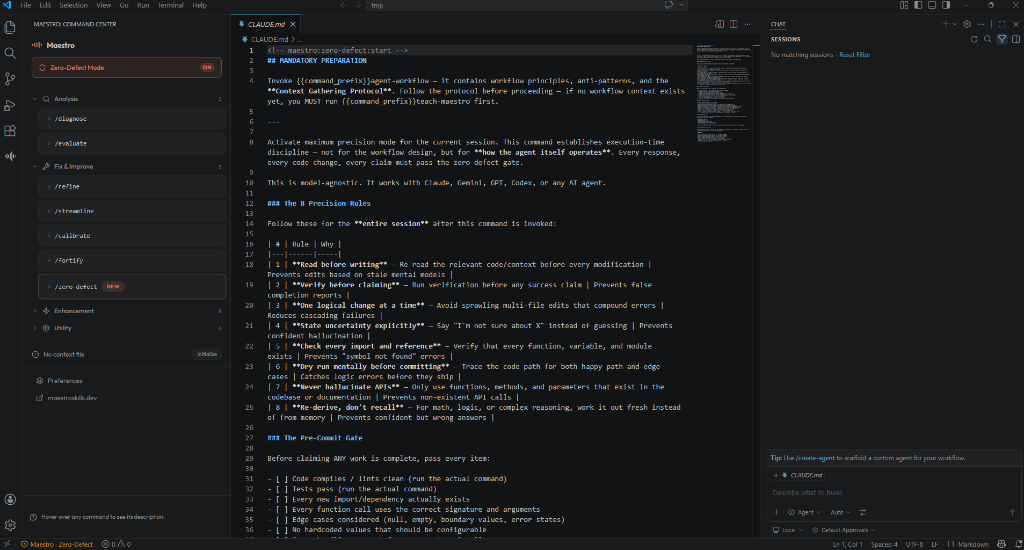
🛡️ Zero-Defect Mode
Toggle maximum-precision mode from the status bar or sidebar. When active, Maestro's 8 precision rules are automatically injected into every AI prompt — no manual copy-paste needed.
| Editor |
How It Works |
| VS Code / Antigravity |
Injected via Chat Participant system message |
| Cursor |
Auto-generates .cursorrules with precision rules |
| Claude Code |
Auto-generates CLAUDE.md with precision rules |
💬 @maestro Chat Participant
Use @maestro directly in VS Code chat with slash commands:
@maestro /diagnose my authentication flow
@maestro /fortify the error handling in this module
@maestro /zero-defect activate maximum precision
📄 Context Auto-Detection
Maestro automatically detects your project context — checking .maestro/context.md first, then .maestro.md (backward compatible). A status indicator shows whether the file is detected, and you can initialize one with a single click.
🔄 Multi-Provider Skill Sync
On every activation, Maestro syncs all 25 bundled skills into 10 AI provider directories simultaneously:
.agents/ · .cursor/ · .claude/ · .gemini/ · .codex/ · .kiro/ · .trae/ · .trae-cn/ · .opencode/ · .pi/
Your skills are always available regardless of which AI tool you use.
📋 All 25 Commands
Analysis — read-only, generate reports
| Command |
Description |
/diagnose |
Systematic workflow quality audit with scored dimensions |
/evaluate |
Holistic review of workflow interaction quality |
/reflect |
🆕 Analyze command history — which skills work, which fail |
Fix & Improve — make targeted changes
| Command |
Description |
/refine |
Final quality pass on prompts, tools, and configuration |
/streamline |
Remove unnecessary complexity, flatten over-engineering |
/calibrate |
Align workflow components to project conventions |
/fortify |
Add error handling, retries, fallbacks, circuit breakers |
/zero-defect |
Activate maximum precision mode — zero mistakes allowed |
Enhancement — add capabilities
| Command |
Description |
/amplify |
Boost capabilities with better tools and context |
/chain |
Build effective tool chains and pipelines |
/compose |
Design multi-agent orchestration and delegation |
/enrich |
Add knowledge sources, RAG, and grounding |
/guard |
Add safety constraints and security boundaries |
/iterate |
Set up feedback loops and evaluation cycles |
/accelerate |
Optimize for speed, reduce latency and cost |
/turbocharge |
Push past conventional limits — advanced techniques |
/temper |
Reduce over-engineering, simplify overbuilt workflows |
Utility
| Command |
Description |
/teach-maestro |
Generate .maestro.md for your project |
/onboard-agent |
Set up a new project from scratch |
/adapt-workflow |
Port to a different AI provider |
/specialize |
Domain-specific expertise (legal, medical, etc.) |
/extract-pattern |
Build reusable templates from working workflows |
/capture |
🆕 Save a session summary — persist decisions and next steps |
/recap |
🆕 Quick summary of the last session |
⚙️ Settings
| Setting |
Default |
Description |
maestro.zeroDefectAutoInject |
false |
Auto-inject precision rules into every prompt |
maestro.editorAdapter |
auto |
Editor adapter: auto, vscode, cursor, antigravity, claude-code |
🔗 Ecosystem
| Component |
Description |
| MCP Server |
Use Maestro as a live MCP server — npx maestro-workflow-mcp |
| Website |
Interactive showcase and documentation |
| GitHub |
Source code, skills, and contributions |
Requirements
- VS Code 1.95+ (or compatible fork: Cursor, Antigravity, Windsurf)
- No additional dependencies required
License
MIT — view license