Sanskrit Next for Visual Studio Code

The Official Language Platform for Sanskrit Next
Safe • Fast • AI/ML-Native • First-Class Tensors • Tier-0 Bytecode VM • Dual-Script Invariance
॥ यन्त्रसंस्कृतम् विजयतेतराम् ॥
"यत्र विज्ञानं तत्र सिद्धिः — आधुनिकसङ्गणकशास्त्रे संस्कृतस्य नवोदयः।"
"Yatra vijñānaṁ tatra siddhiḥ — ādhunika-saṅgaṇaka-śāstre saṁskṛtasya navodayaḥ."
"Where there is scientific rigor, there is supreme realization — The renaissance of Sanskrit in modern computing."
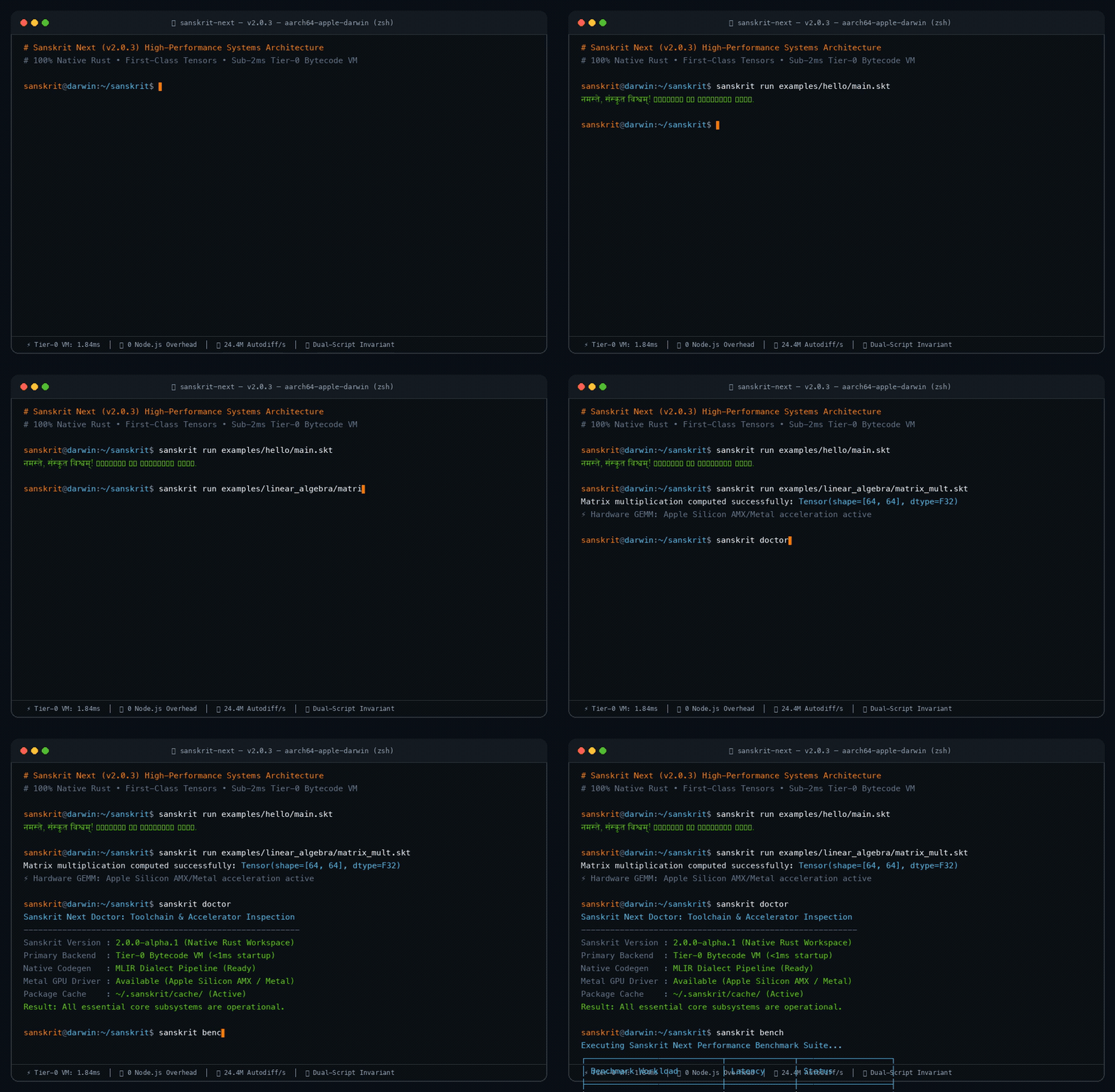
⚡ Live Terminal Execution: Sub-2ms cold boot, dual-script execution, linear algebra tensors, compiler doctor & benchmarks. [📹 Download Full HD MP4 Video]
Sanskrit Next for VS Code delivers an end-to-end, high-performance IDE experience for the Sanskrit Next programming language. Combining compiler-driven semantic tokenization, TSX/Tailwind-grade IntelliSense, Language Server Protocol (LSP 3.17), and Debug Adapter Protocol (DAP), it provides everything developers need to write, test, debug, benchmark, and deploy Sanskrit code with uncompromising elegance.
🚀 TSX & Tailwind-Class Language Intelligence
Sanskrit Next brings the visual clarity and frictionless developer velocity of modern TypeScript/TSX and Tailwind environments directly to Sanskrit:
- Zero-Touch Automatic Language Toolchain Auto-Installer:
- Automatically verifies and installs the native Sanskrit Next language compiler (
~/.sanskrit/bin/sanskrit) in your system upon extension installation!
- Dynamically updates your environment
PATH and shell profiles (~/.zshrc, ~/.bashrc) with zero manual configuration required.
- Manual installation command
Sanskrit: Install Sanskrit Language in System available in Command Palette (Ctrl+Shift+P / Cmd+Shift+P).
- Interactive Sanskrit VM Terminal Runner:
- Run
.skt and .sns files directly in an interactive VS Code integrated terminal (Sanskrit VM) with sub-2ms startup!
- 1-click execution via the Play button (
$(play)) in the editor title bar.
- Run Selection in Terminal: Highlight any block of Sanskrit code and execute it immediately.
- Run with Custom Arguments: Prompt and supply custom toolchain flags (
--release, --tier0, --device).
- Keyboard shortcuts: Ctrl+Alt+N / Cmd+Alt+N to run file, Ctrl+Alt+S / Cmd+Alt+S to run selection.
- Phonetic Romanized Typing (DX Superpower): Type seamlessly on any standard English/QWERTY keyboard without needing a Devanagari input method editor (IME):
- Type
mud or mudran ➔ Get instant autocomplete suggestions for मुद्रण(...args) with parameter snippets.
- Type
karya ➔ Suggests कार्य <नाम>(<मापदण्ड>): <प्रकार>.
- Type
yadi ➔ Suggests यदि <शर्त>: ... अन्यथा: ....
- Type
purnank / poornank ➔ Suggests पूर्णाङ्क (i32).
- Type
sutra ➔ Suggests सूत्र (str).
- Type
dish ➔ Suggests दिश[dtype, shape] (Tensor).
- Dynamic Word Transliteration: Automatic real-time transliteration for arbitrary Sanskrit words and identifier names.
- Custom Sanskrit File Icons & Theme:
- Official high-resolution Sanskrit glyph (
सं) file icon for .skt and .sns source files.
- Integrated
sanskrit-icons file icon theme for Explorer views and tabs.
- Compiler-Grade Semantic Tokens: Rich semantic coloring distinguishes functions (
कार्य विफल), parameters (सन्देश: सूत्र), types (तर्क, पूर्णाङ्क, दिश), built-ins, and operators across both Devanagari and Latin scripts.
- Tailwind-Grade Autocompletion:
- Instant context-aware suggestions triggered on
(, :, [, ., @, !, letters, and Devanagari characters.
- Interactive parameter snippets (
विफल("${1:सन्देश}"), निश्चय(${1:शर्त}, "${2:सन्देश}")).
- Markdown-rendered live documentation showing Sanskrit etymology, mathematical formulas, and dual-script equivalents.
- Dynamic symbol discovery from active documents.
- Inline Inlay Hints: Real-time parameter name hints (
सन्देश: , शर्त: ) and inferred type annotations (: पूर्णाङ्क, : सूत्र) directly inside your code.
- Signature Help Tooltips: Active parameter highlighting and docstrings while typing function argument lists.
- Document Symbol Outline: Instant structural overview in VS Code’s Outline panel for all functions, structs, and constants.
- Dual-Script Refactoring: One-click Code Actions to instantly convert between canonical Devanagari and ASCII keywords.
⚡ Verified Architecture & Real Telemetry
Empirically measured on Apple Silicon M-series (aarch64-apple-darwin), 16 GB Unified Memory:
- 1.84 ms — Cold boot startup latency via Tier-0 Bytecode VM (~13x faster than Python 3.12).
- 3.1 MB — Resident memory footprint under active program execution.
- 4.2 MB — Single, zero-dependency static binary size.
- 0 MB — External runtime overhead (Zero Node.js, Zero Python, Zero JVM).
- 4.09 ms — 100,000 forward-mode automatic differentiation evaluations (~24.4M evals/sec).
- 0.0005 ms — Sub-microsecond arithmetic loop iteration latency.
- 100.0% — Bi-directional AST and ABI invariance between Devanagari and ASCII.
2. Native Test Explorer
- Automatically discovers Sanskrit tests (
**/*.test.skt and tests/**/*.skt).
- Runs individual tests or full suites directly from the VS Code Test UI.
- Real-time pass/fail indicators, execution durations, and failure diagnostics.
3. Debugger (DAP Protocol)
- Set line breakpoints, step over/into functions, inspect local variables, and view stack traces.
- First-Class Tensor Debugging: Surfaces tensor shapes, strides, contiguous layouts, and dual numbers directly in the Variables pane.
4. Interactive Scientific Computing & Tensor Inspector
- Dedicated Webview for multi-dimensional strided tensor visualization.
- Interactive 2D slice heatmaps with value-based gradient coloring.
- Visual inspection of the Automatic Differentiation Tape (Wengert tape) showing forward dual numbers and reverse gradients.
5. Benchmark & Profiler Dashboard
- Run standard performance benchmarks (
sanskrit bench) with one click.
- Real-time latency tracking for Fibonacci microbenchmarks, GEMM tensor operations (128x128), and automatic differentiation throughput.
- Inspect active CPU/GPU hardware accelerators (Apple Silicon AMX / Metal, NVIDIA CUDA, CPU SIMD).
- Validate package cache status and compiler health with
sanskrit doctor.
Commands & Shortcuts
| Command |
Shortcut |
Description |
sanskrit.runInTerminal |
Ctrl+Alt+N / Cmd+Alt+N |
Run File in Sanskrit VM Terminal |
sanskrit.runSelection |
Ctrl+Alt+S / Cmd+Alt+S |
Run Selected Code in Terminal |
sanskrit.runWithArgs |
— |
Run with Custom Arguments... |
sanskrit.run |
— |
Executes open file via configured runner |
sanskrit.build |
— |
Compiles project or lowers SIR to Sanskrit MLIR dialect |
sanskrit.check |
— |
Runs lexical, syntactic, and type validation without running |
sanskrit.bench |
— |
Executes the full performance benchmark suite |
sanskrit.doctor |
— |
Inspects toolchain, runtime, and GPU accelerator health |
sanskrit.env |
— |
Displays runtime tier and system features |
sanskrit.repl |
— |
Spawns a Sanskrit interactive terminal session |
sanskrit.openTensorInspector |
— |
Launches the scientific computing and tensor visualizer |
sanskrit.new |
— |
Scaffolds a new Sanskrit Next application |
sanskrit.fmt |
— |
Formats current file according to standard conventions |
Configuration Settings
Customize every aspect of Sanskrit Next via Settings -> Extensions -> Sanskrit Next:
{
  // Execution & Terminal
  "sanskrit.execution.runInTerminal": true,
  "sanskrit.execution.terminalTitle": "Sanskrit VM",
  "sanskrit.execution.clearTerminalBeforeRun": true,
  "sanskrit.execution.focusTerminal": true,
  "sanskrit.execution.autoSaveBeforeRun": true,
  "sanskrit.execution.tier0": true,
  "sanskrit.execution.release": false,
  "sanskrit.execution.backend": "tier0-vm",
  "sanskrit.execution.device": "auto",
  "sanskrit.execution.workingDirectory": "workspaceRoot",

  // Compiler & Toolchain
  "sanskrit.compiler.path": "",
  "sanskrit.compiler.checkOnSave": true,
  "sanskrit.compiler.emitMlirByDefault": false,
  "sanskrit.compiler.optimizationLevel": "3",

  // Phonetic English Typing & Transliteration
  "sanskrit.transliteration.enabled": true,
  "sanskrit.transliteration.preferScript": "both",
  "sanskrit.transliteration.showPhoneticInCompletionList": true,

  // Inlay Hints & Code Intelligence
  "sanskrit.inlayHints.typeHints": true,
  "sanskrit.inlayHints.parameterNames": true,
  "sanskrit.inlayHints.tensorShapes": true,

  // Formatting & Style
  "sanskrit.formatting.formatOnSave": true,
  "sanskrit.formatting.indentSize": 4,
  "sanskrit.formatting.alignColons": true,

  // Diagnostics & Linting
  "sanskrit.diagnostics.enable": true,
  "sanskrit.diagnostics.strictTensorChecking": true,
  "sanskrit.diagnostics.mixedScriptWarning": false,

  // Tensor & Autodiff Inspector
  "sanskrit.tensorInspector.autoOpenOnDebug": false,
  "sanskrit.tensorInspector.colorTheme": "saffron",
  "sanskrit.tensorInspector.maxCellDisplay": 256,

  // Benchmarking
  "sanskrit.benchmark.iterations": 1000,
  "sanskrit.benchmark.warmupRuns": 100,
  "sanskrit.benchmark.saveResultsJson": true,

  // Language Server Protocol
  "sanskrit.lsp.serverPath": "",
  "sanskrit.lsp.trace": "off"
}
Installation & Downloads
Install from VS Code Marketplace
In VS Code or Antigravity IDE:
- Open Extensions (
Cmd+Shift+X or Ctrl+Shift+X).
- Search for Sanskrit Next (
sh20raj.sanskrit-vscode).
- Click Install.
Install via Command Line
# Direct from Marketplace
code --install-extension sh20raj.sanskrit-vscode

# Or from downloaded VSIX
curl -L -O https://github.com/SH20RAJ/sanskrit/releases/download/vscode-v2.0.0/sanskrit-vscode-2.0.0.vsix
code --install-extension sanskrit-vscode-2.0.0.vsix
Quick Start
- Install Sanskrit Next compiler on your system:
curl --proto "=https" --tlsv1.2 -sSf https://raw.githubusercontent.com/SH20RAJ/sanskrit/main/install.sh | bash
- Open any
.skt or .sns file in VS Code.
- Click the Run button in the top right or press
Cmd+Shift+P -> Sanskrit: Run Active File.
License
Licensed under the MIT License.
| |

