manan-kanchu — AI Code Detector
Detect AI-generated code, scan for vulnerabilities, audit security policies and protect your codebase — all inside VS Code.





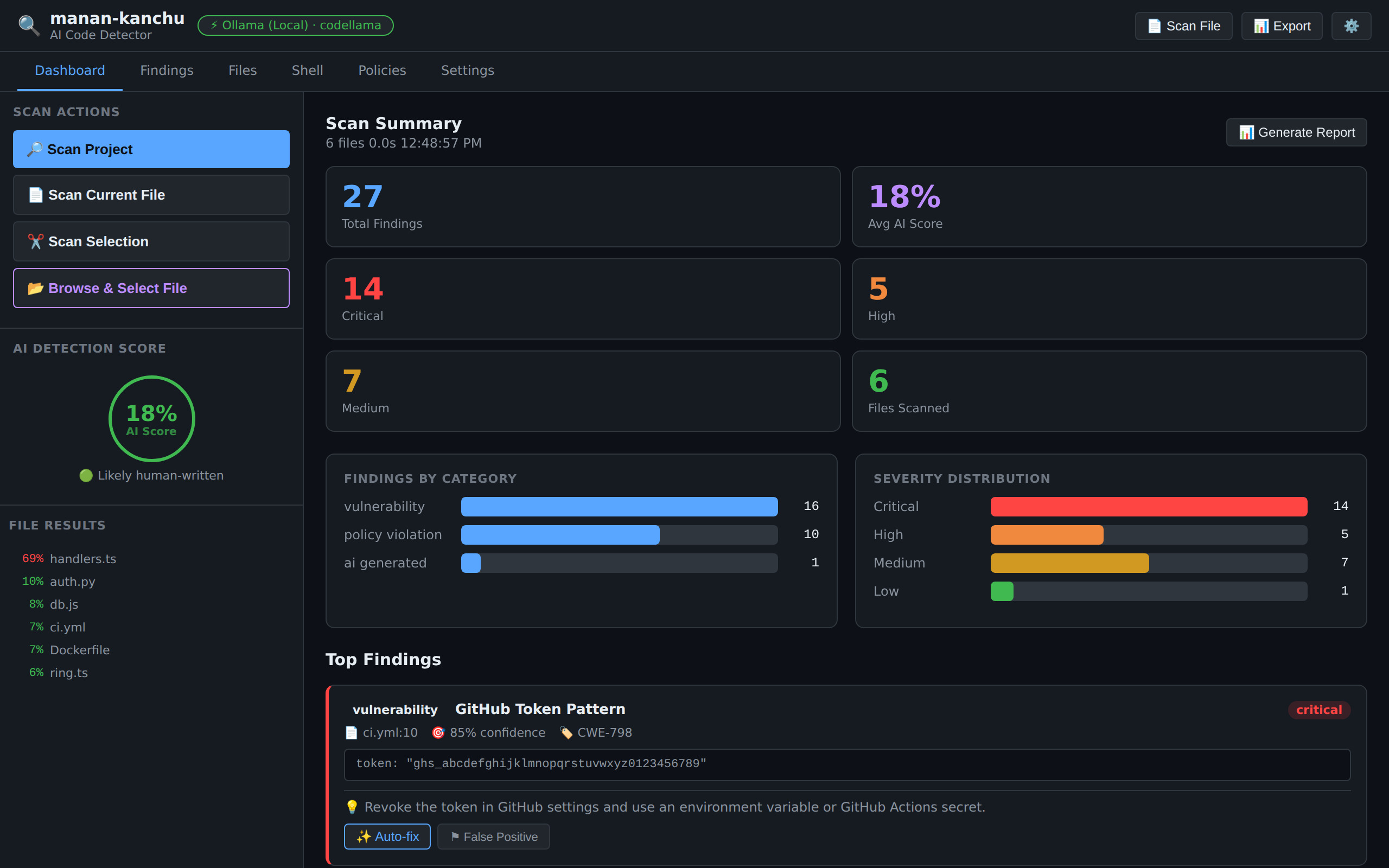
Screenshots show the real dashboard rendered with sample data from a demo project.
Prefer motion? See the animated demos: dashboard · project scan.
Table of contents
What is manan-kanchu?
manan-kanchu (mah-nan-KAHN-chu) is a Quechua expression meaning "there isn't" — the extension looks for what shouldn't be there: AI-generated code passed off as human work, insecure patterns, and malicious payloads.
It combines heuristic analysis with optional multi-provider AI analysis in a security and code-quality dashboard that lives inside VS Code.
|
|
| 🔍 Detect |
Hybrid AI-authorship scoring per file, with the evidence behind every score |
| 🛡️ Scan |
91 vulnerability patterns (with CWE codes) and 7 categories of malicious code |
| 📋 Audit |
14 built-in policy rules plus your own custom rules |
| 🔒 Private |
Open source (MIT). Code goes only to your chosen provider — there are no manan-kanchu servers |
How it works
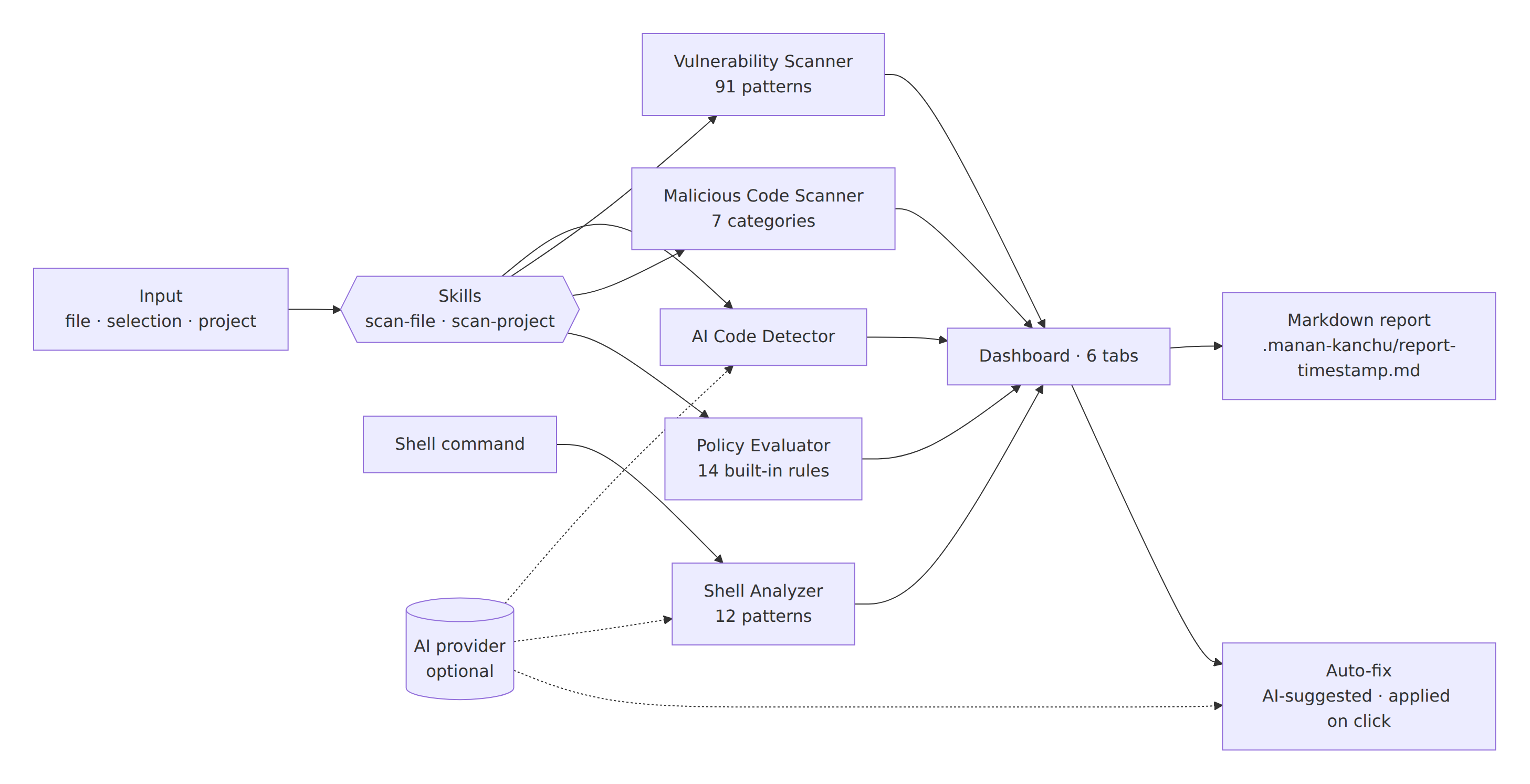
Every scan runs your code through independent engines and consolidates the results in one dashboard, which can be exported as a Markdown report.
Features
1. AI Code Detection
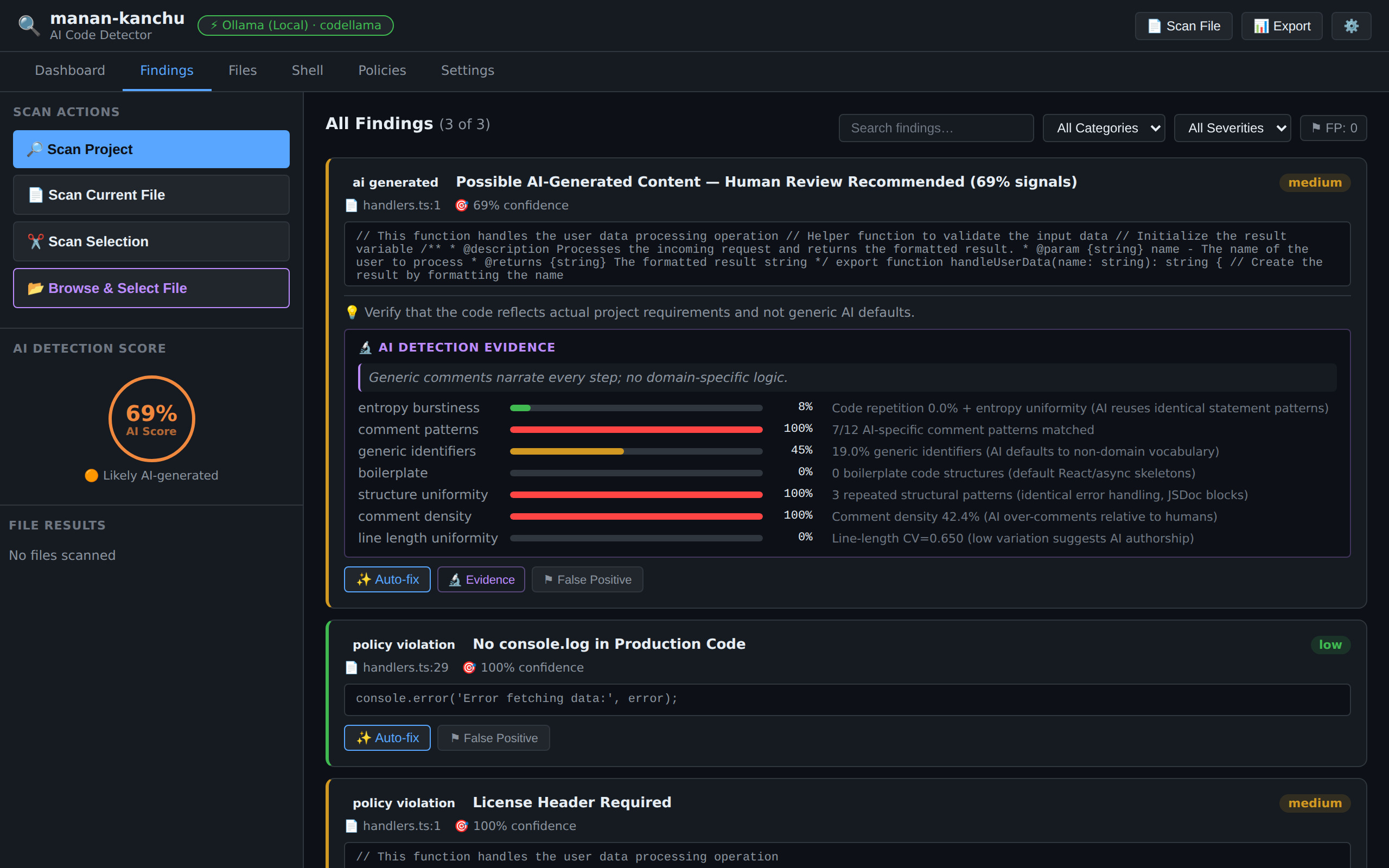
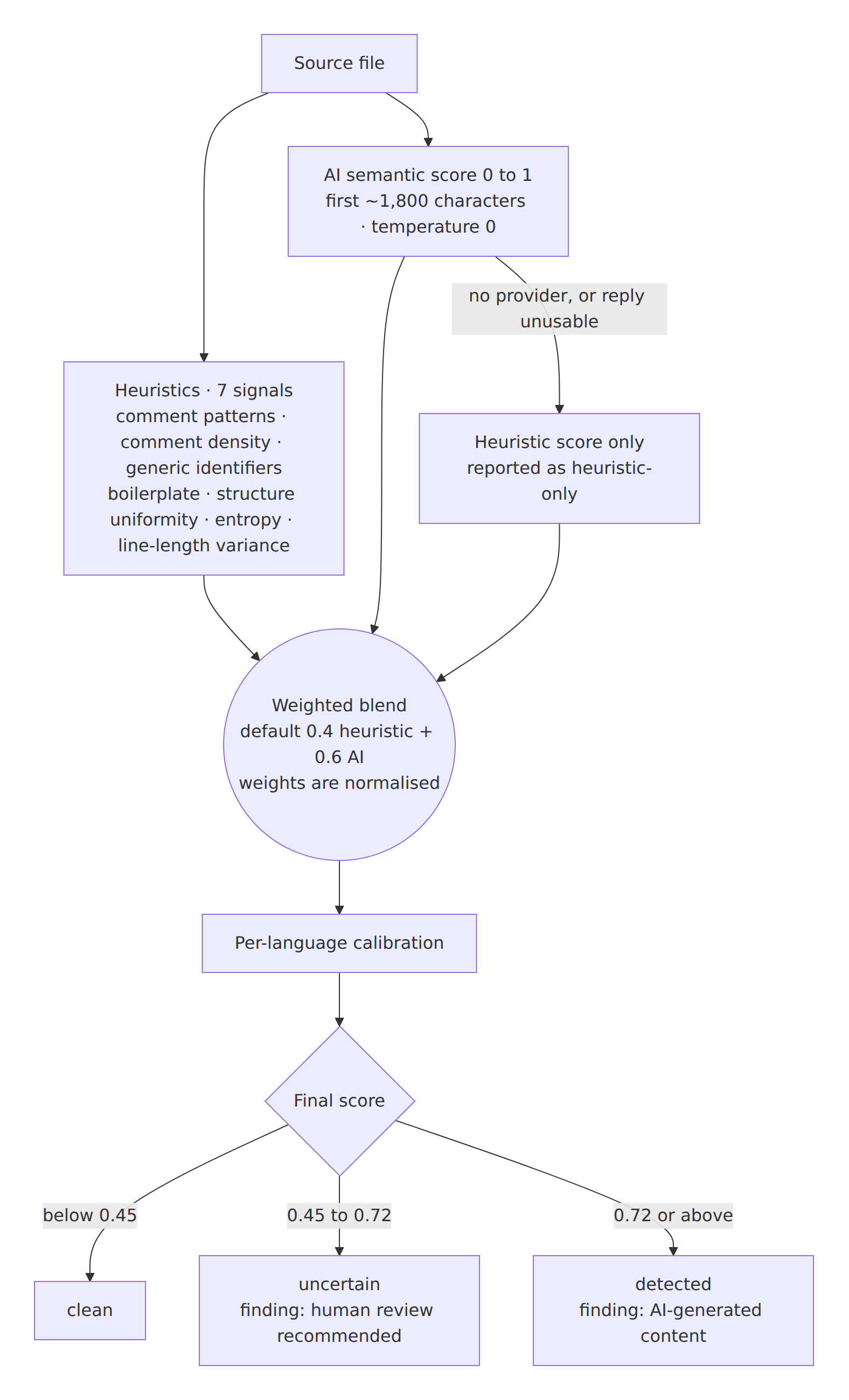
Seven heuristic signals (comment patterns and density, generic identifiers, boilerplate, structural uniformity, entropy, line-length variance) are blended with an AI semantic score. Default weights are 40% heuristic / 60% AI; they are normalised, so custom values never have to sum to 1.
| Final score |
Tier |
What you get |
| below 0.45 |
clean |
no finding |
| 0.45 – 0.72 |
uncertain |
finding: human review recommended |
| 0.72 and above |
detected |
finding: AI-generated content |
Without an AI provider the score is computed from the heuristics alone and reported as heuristic-only.
2. Vulnerability Scanner
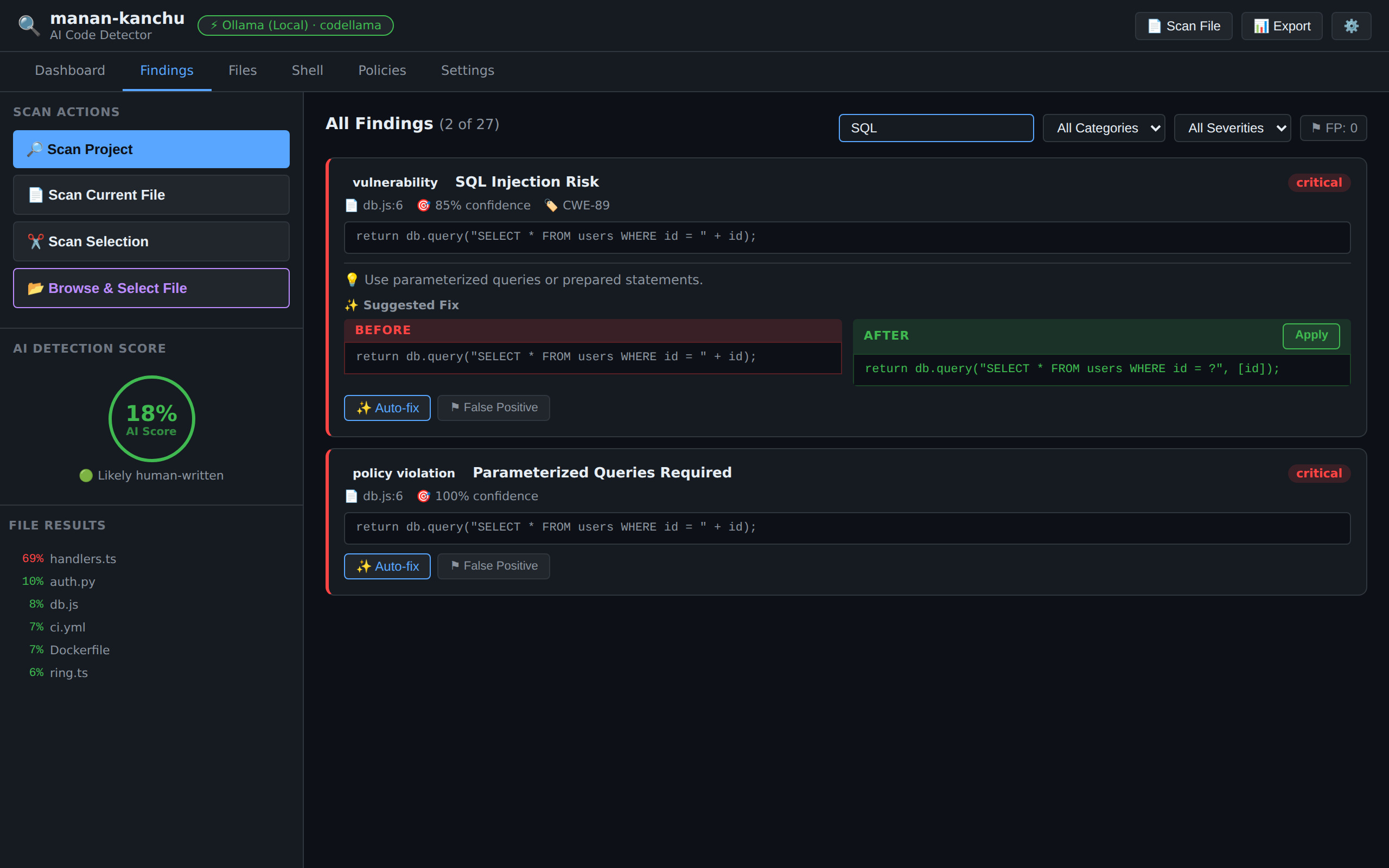
91 patterns, reported with CWE codes, across application code, infrastructure and pipelines:
| Area |
Examples |
| Injection |
SQL, command and code injection (eval, exec, Function), unsafe deserialization (pickle, Marshal, ObjectInputStream) |
| Web |
innerHTML, dangerouslySetInnerHTML, document.write, open redirects, prototype pollution |
| Secrets |
Hardcoded passwords and API keys; AWS, Google, GitHub, Slack and Azure keys; private-key blocks |
| Crypto |
MD5/SHA-1, insecure random for tokens, disabled TLS verification |
| Memory safety |
gets, strcpy, sprintf, scanf %s, unsafe blocks |
| Infrastructure |
Terraform, Dockerfile, Kubernetes manifests |
| CI/CD |
Hardcoded pipeline secrets, curl \| bash, risky pull_request_target |
Languages: JavaScript/TypeScript, Python, Java, C#, C/C++, PHP, Go, Ruby, Rust, Kotlin, Swift, Scala, Dart and shell.
3. Malicious Code Scanner
Seven categories, useful when auditing third-party code and supply-chain risk:
- Keyloggers — key listeners combined with network calls
- Data exfiltration — credential,
localStorage and cookie theft, hidden iframes
- Form hijacking — submit interception and input harvesting (web skimmers)
- Crypto miners — CoinHive-style libraries, WebAssembly loaded from outside
- Clipboard hijacking — silent replacement of copied content
- Obfuscation —
eval(atob(...)), long hex-encoded payloads
- Tracking — fingerprinting data sent to a server
4. Policy Evaluator
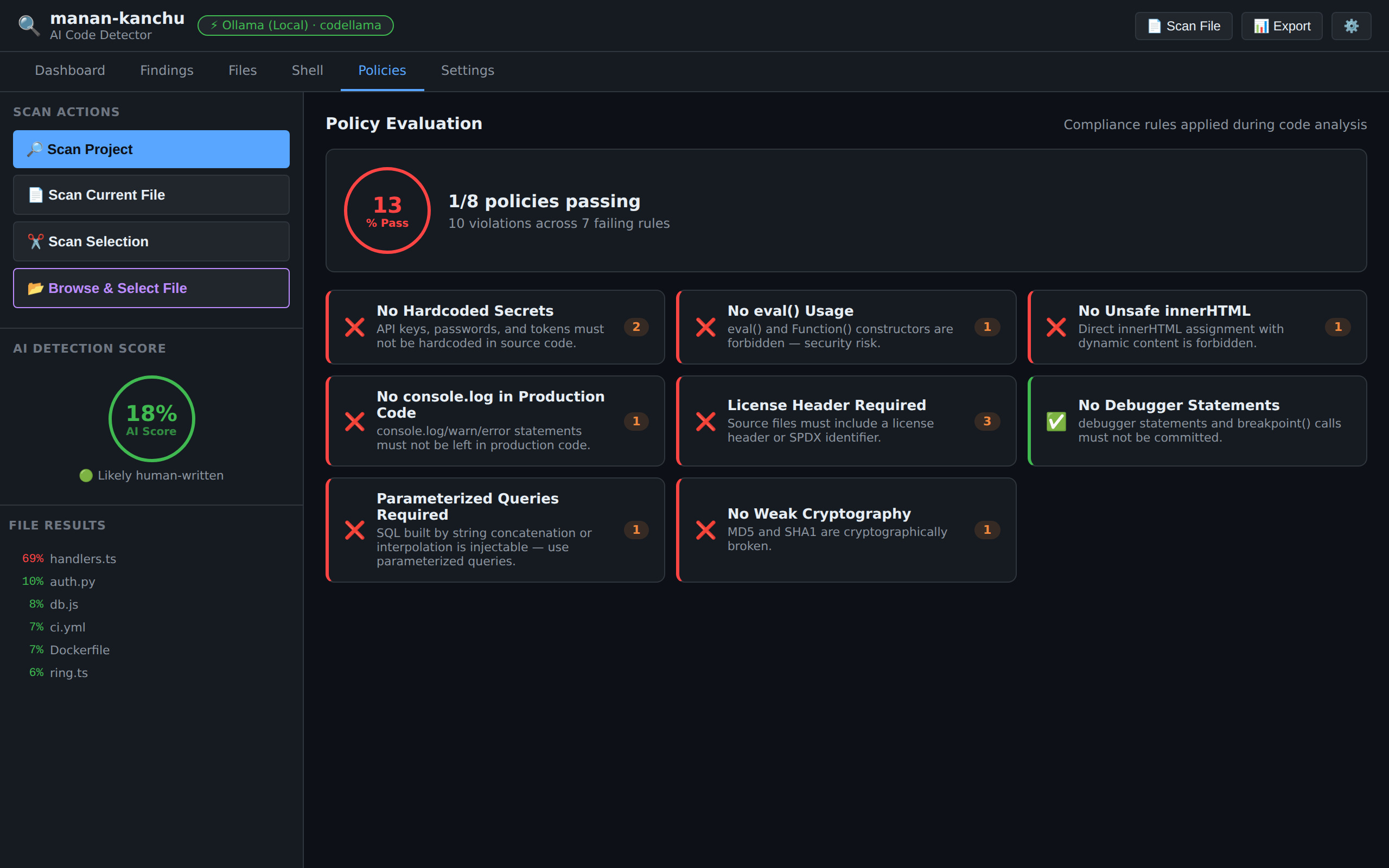
14 built-in rules. Four are active by default (✅); enable the rest with the manan-kanchu.policies setting, or add your own rules.
| Rule ID |
Description |
Default |
no-hardcoded-secrets |
No API keys or passwords in source files |
✅ |
no-eval |
eval() / new Function() forbidden |
✅ |
no-innerHTML |
No direct innerHTML assignment |
✅ |
license-compliance |
License header or SPDX identifier in source files |
✅ |
no-sql-injection |
SQL built by concatenation/interpolation is flagged |
|
no-weak-crypto |
MD5 and SHA-1 forbidden |
|
gdpr-personal-data-logging |
No PII in log statements |
|
no-console-log |
No console.* left in production code |
|
no-debugger |
No debugger, breakpoint() or pdb.set_trace() |
|
no-todo-comments |
No unresolved TODO / FIXME comments |
|
no-http-external |
External URLs must use HTTPS |
|
no-any-typescript |
No TypeScript any |
|
no-async-without-await |
async functions must use await |
|
no-synchronous-fs |
No fs.*Sync calls |
|
5. Shell Command Analyzer
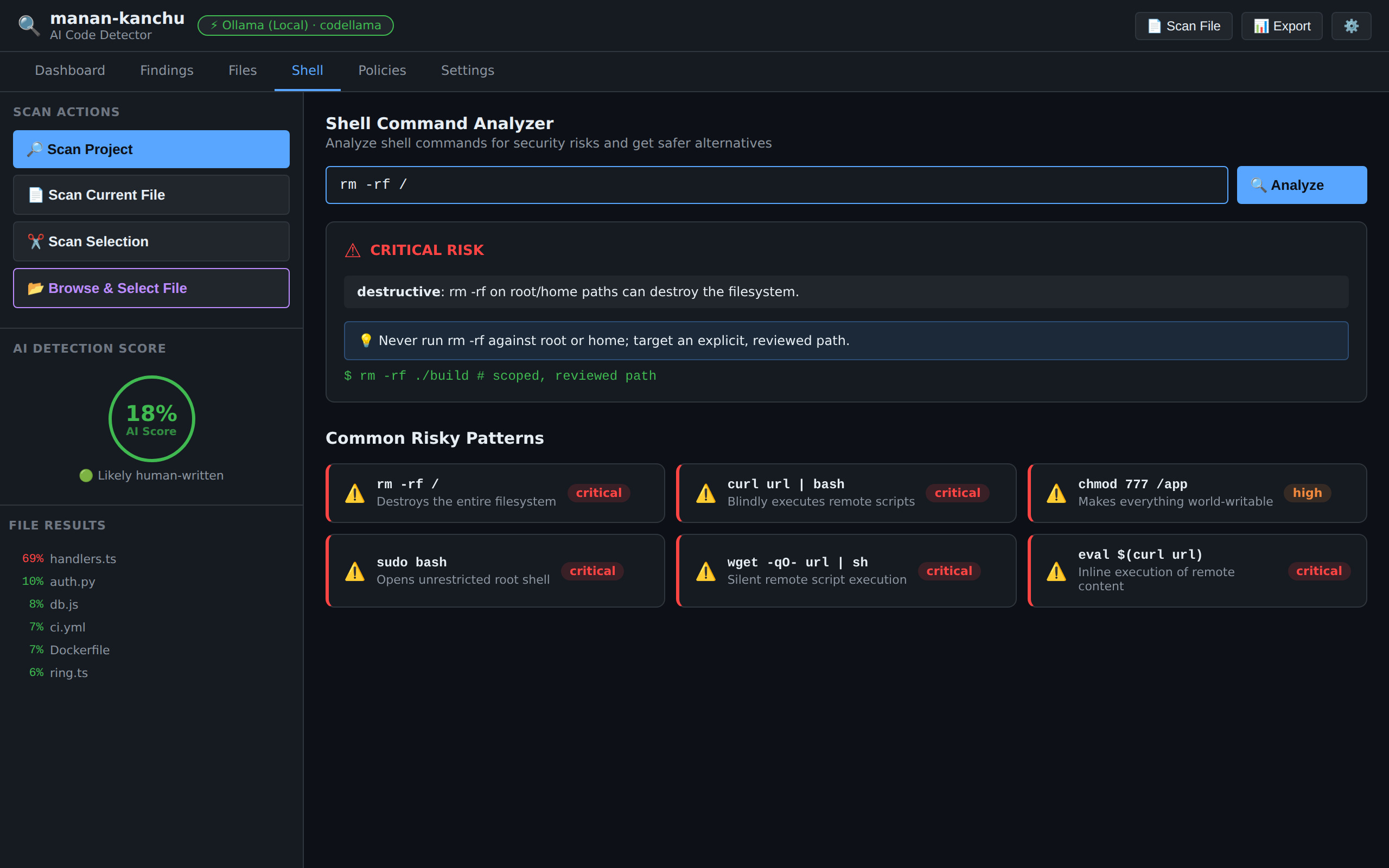
Paste a command and get an instant risk assessment from 12 patterns:
- Destructive —
rm -rf on root/home paths (also rm -r -f, --force), dd from /dev/zero or /dev/urandom, writes to raw disks, truncate
- Remote execution —
curl | bash, wget | sh
- Privilege escalation —
sudo bash, world-writable chmod (777, 666, a+w), crontab edits
- Exfiltration — sensitive files sent over the network, reverse SSH tunnels
With an AI provider configured you also get a tailored tip and a safer version of the command.
6. Audit Dashboard
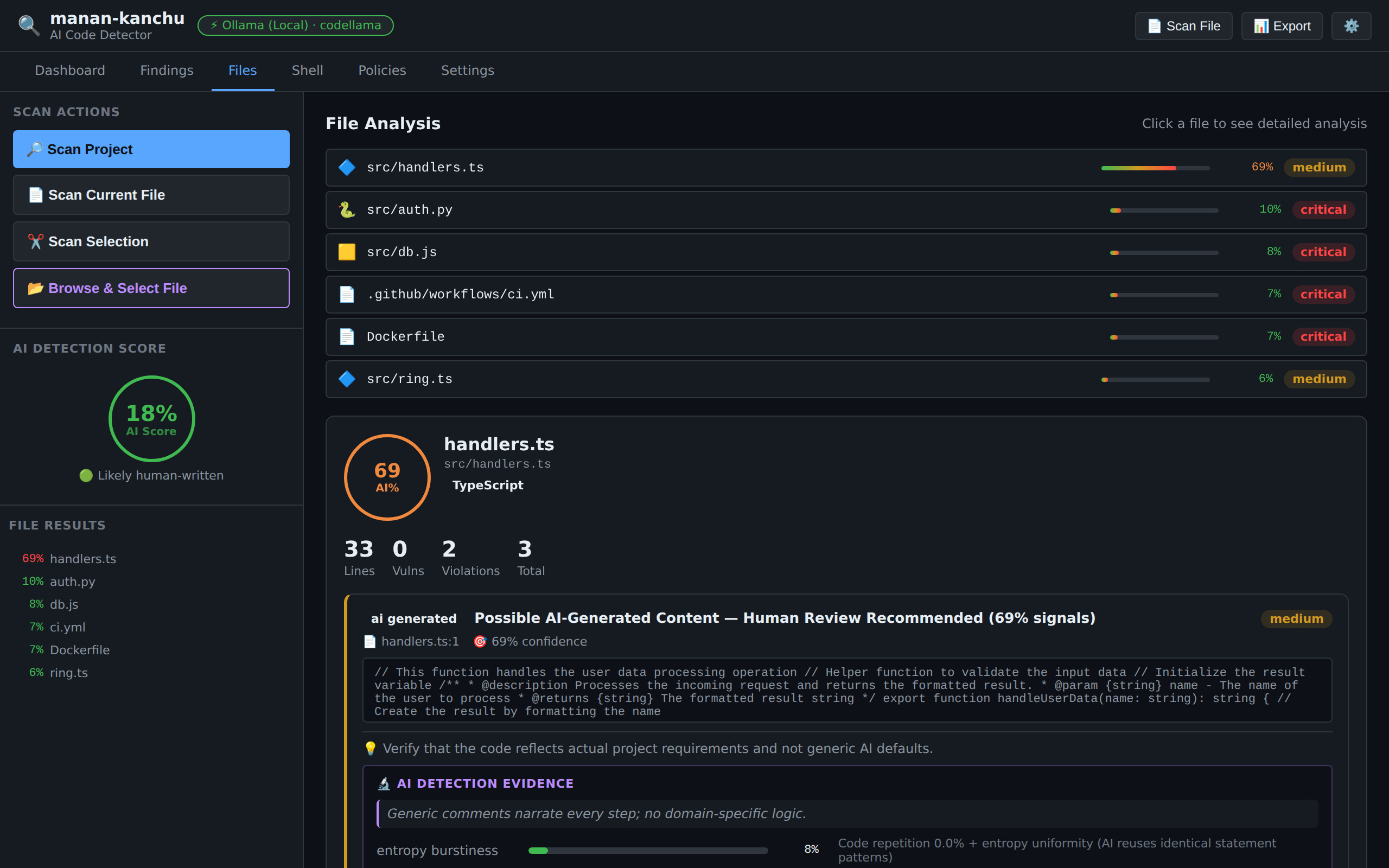
A dark-theme WebviewPanel with 6 tabs:
| Tab |
Content |
| Dashboard |
Scan summary, severity charts, top findings |
| Findings |
Every finding, filterable by category and severity, with Auto-fix and False positive actions |
| Files |
Per-file AI score, vulnerabilities and policy violations, with drill-down |
| Shell |
Shell command analyzer |
| Policies |
Pass/fail grid and compliance percentage |
| Settings |
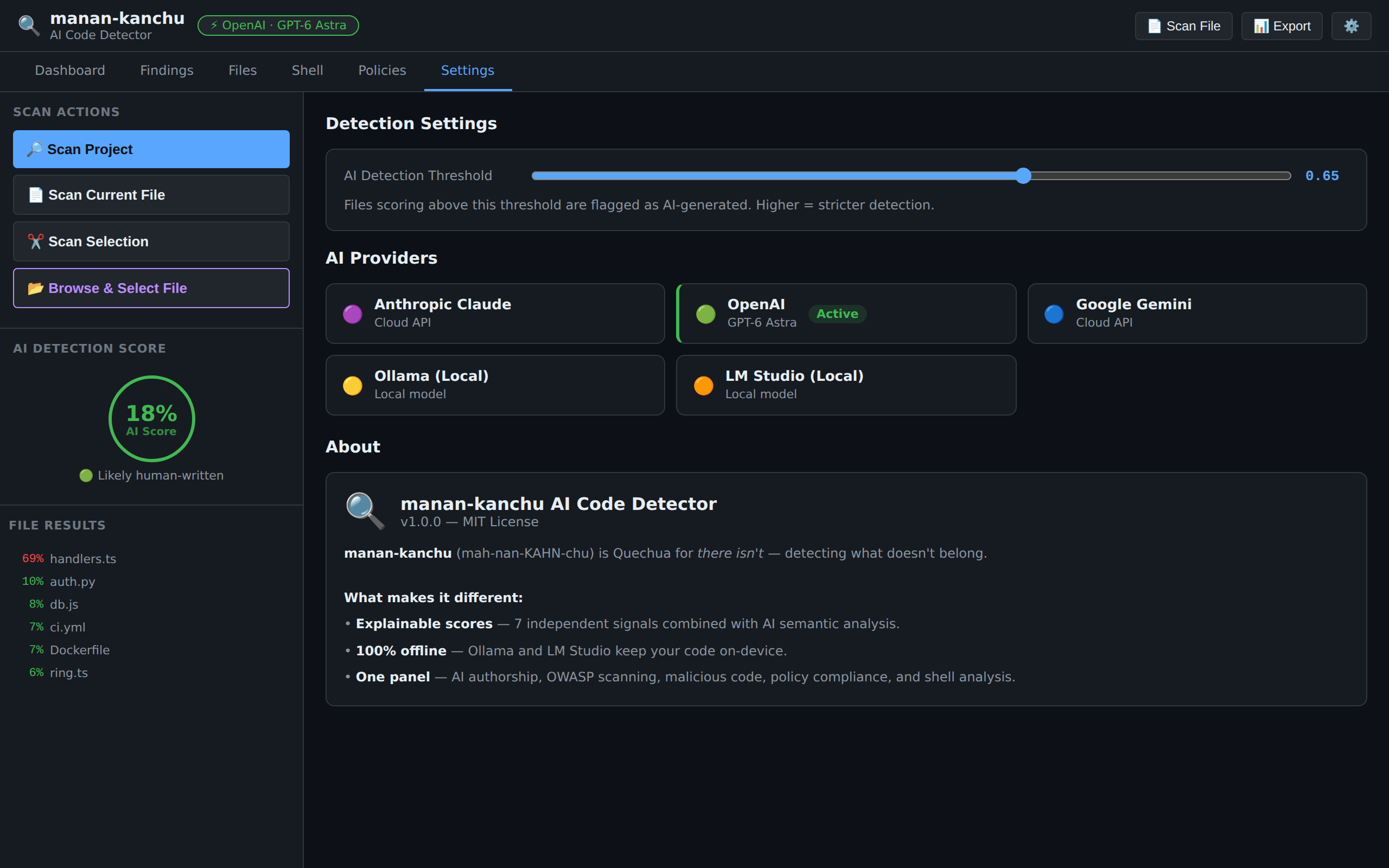
Detection threshold and AI provider configuration |
Export the full audit as Markdown to .manan-kanchu/report-<timestamp>.md. Add .manan-kanchu/ to your .gitignore so reports are not committed by accident.
Quick start
1. Install
Search "manan-kanchu" in the Extensions panel (Ctrl+Shift+X), or run:
code --install-extension sergioide007.manan-kanchu-code-ai
The scanners work without one. To enable AI detection scoring, shell tips and auto-fix, press Ctrl+Shift+M → Configure AI Provider.
Local (free, fully private):
# Ollama — auto-detected at http://localhost:11434
ollama pull codellama

# LM Studio — auto-detected at http://localhost:1234
# Load any model and start the local server
Cloud: pick Anthropic, Google Gemini or OpenAI and paste your API key. Keys live in the OS keychain through VS Code SecretStorage — never in settings.json. To remove a stored key, run Configure AI Provider, pick the provider and submit an empty key.
3. Open the dashboard and scan
Shortcut (Cmd instead of Ctrl on macOS) |
Action |
Ctrl+Alt+M |
Open the dashboard |
Ctrl+Alt+S |
Scan the current file |
Ctrl+Shift+M |
Quick command menu |
You can also click Scan Project in the dashboard, right-click a file → Scan Current File, or select code → right-click → Scan Selected Code.
Commands & shortcuts
| Command |
Shortcut |
Description |
manan-kanchu: Open Dashboard |
Ctrl+Alt+M |
Open the main analysis panel |
manan-kanchu: Show Commands |
Ctrl+Shift+M |
Quick menu with the main commands |
manan-kanchu: Scan Current File |
Ctrl+Alt+S |
Analyze the active editor file |
manan-kanchu: Scan Entire Project |
— |
Scan every source file in the workspace |
manan-kanchu: Scan Selected Code |
— |
Analyze the highlighted selection |
manan-kanchu: Generate Audit Report |
— |
Export a Markdown report to the workspace |
manan-kanchu: Configure AI Provider |
— |
Pick a provider and store or remove its API key |
manan-kanchu: Sanitize Detected Issues |
— |
Points you to the dashboard, where Auto-fix on any finding proposes and applies a fix |
AI providers
| Provider |
Type |
Where your code goes |
Cost |
| Ollama |
Local |
Stays on your machine |
Free |
| LM Studio |
Local |
Stays on your machine |
Free |
| Anthropic Claude |
Cloud |
Direct API call with your key |
API pricing |
| Google Gemini |
Cloud |
Direct API call with your key |
API pricing |
| OpenAI GPT |
Cloud |
Direct API call with your key |
API pricing |
Auto mode (default)
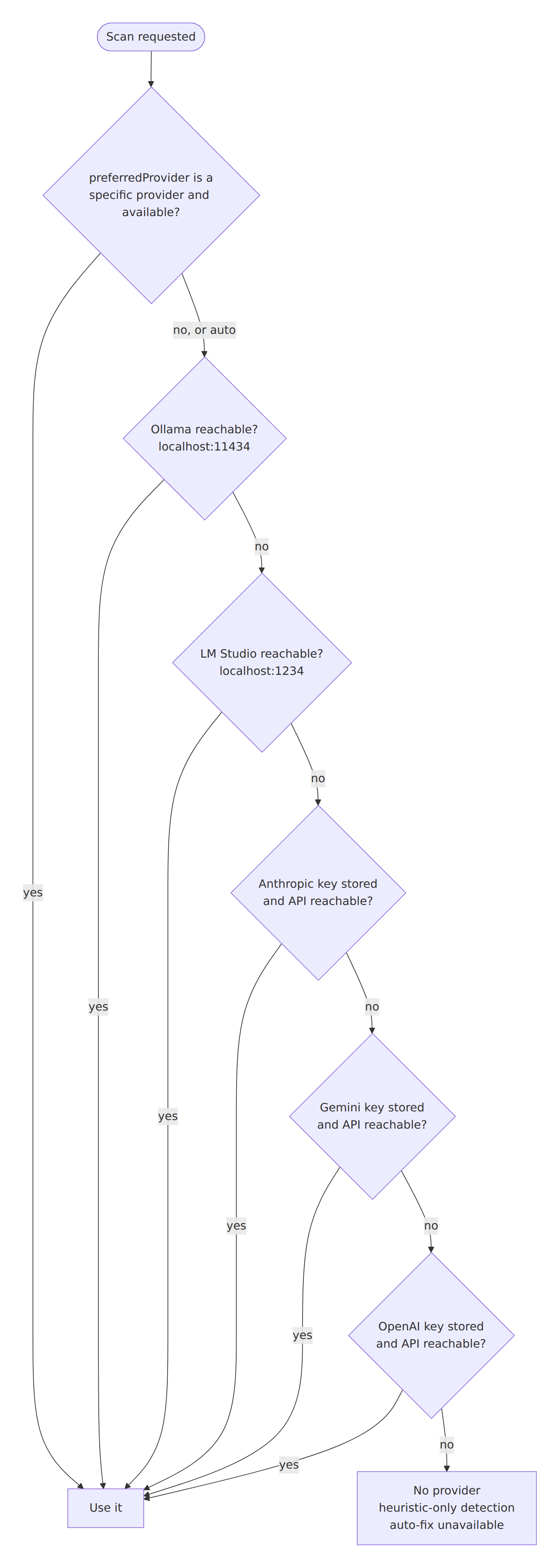
With manan-kanchu.preferredProvider: auto, the first provider that is reachable wins, and local providers always come first. If you pick a specific provider that is not available, selection falls back to auto.
Default models
| Provider |
Setting value |
Shown in the dashboard as |
| Anthropic |
claude-sonnet-4-6 |
Claude Sonnet 4.6 |
| OpenAI |
gpt-6-astra |
GPT-6 Astra |
| Gemini |
gemini-3.1-flash-lite |
Gemini 3.1 Flash-Lite |
| Ollama |
codellama |
codellama |
The dashboard shows the active provider with a readable model name (for example OpenAI · GPT-6 Astra); unknown model IDs are shown as typed.
OpenAI reasoning models (GPT-5 and later, such as gpt-6-astra) are handled automatically: the request uses max_completion_tokens with extra headroom for hidden reasoning tokens, a low reasoning effort, and no custom temperature. If a compatible server rejects a parameter, the extension retries without it. GPT-6 Astra is a flagship model — for high-volume project scans, pick a smaller model in manan-kanchu.openai.model or use a local provider.
Model names change quickly — set the one you prefer in the settings below.
Settings reference
Show all settings
| Setting |
Default |
Description |
manan-kanchu.preferredProvider |
auto |
auto, anthropic, openai, gemini, ollama or lmstudio |
manan-kanchu.anthropic.model / .baseUrl |
claude-sonnet-4-6 / https://api.anthropic.com/v1 |
Anthropic model and API base URL |
manan-kanchu.openai.model / .baseUrl |
gpt-6-astra / https://api.openai.com/v1 |
OpenAI model and API base URL. Any OpenAI-compatible server works through baseUrl |
manan-kanchu.gemini.model / .baseUrl |
gemini-3.1-flash-lite / https://generativelanguage.googleapis.com/v1beta |
Gemini model and API base URL |
manan-kanchu.ollama.endpoint / .model |
http://localhost:11434 / codellama |
Ollama server and model |
manan-kanchu.lmstudio.endpoint |
http://localhost:1234 |
LM Studio server |
manan-kanchu.detection.threshold |
0.65 |
Files at or above this score count as AI-generated in project summaries and reports. Per-file tiers use the fixed 0.45 / 0.72 cut-offs described above |
manan-kanchu.detection.heuristicWeight |
0.4 |
Weight of the heuristic score (normalised against aiWeight) |
manan-kanchu.detection.aiWeight |
0.6 |
Weight of the AI semantic score |
manan-kanchu.scan.excludePatterns |
node_modules, dist, out, .git, *.min.js, *.min.css |
Names/globs skipped in project scans. node_modules, .git, coverage, build, dist, out and .next are always skipped |
manan-kanchu.scan.maxFileSizeKB |
512 |
Larger files are skipped |
manan-kanchu.policies |
no-hardcoded-secrets, no-eval, no-innerHTML, license-compliance |
Active policy rule IDs |
manan-kanchu.requestTimeout |
120000 |
AI request timeout in ms |
manan-kanchu.maxTokens |
4096 |
Ceiling on tokens per AI request. Each feature asks for what it needs (score: 80, shell tip: 200, auto-fix: 1,024) and is capped at this value |
manan-kanchu.temperature |
0.1 |
Sampling temperature for every AI request, 0–1. Lower is more consistent; 0–0.2 is recommended for analysis. Models that don't accept a custom temperature (such as GPT-6 Astra) ignore it |
manan-kanchu.privacy.telemetry |
false |
Reserved. The extension sends no telemetry |
{
  "manan-kanchu.preferredProvider": "ollama",
  "manan-kanchu.policies": ["no-hardcoded-secrets", "no-eval", "no-sql-injection", "no-debugger"],
  "manan-kanchu.scan.excludePatterns": ["node_modules", "dist", "out", "coverage"]
}
Architecture
The extension is layered: entry point → panel → skills → analyzers → providers. Analyzers are pure functions of the code you give them, so they are easy to test. Every read and write of a project file inside the workspace (scans, reports, file previews, Apply fix) goes through the Filesystem MCP server, which refuses any path that escapes the workspace.
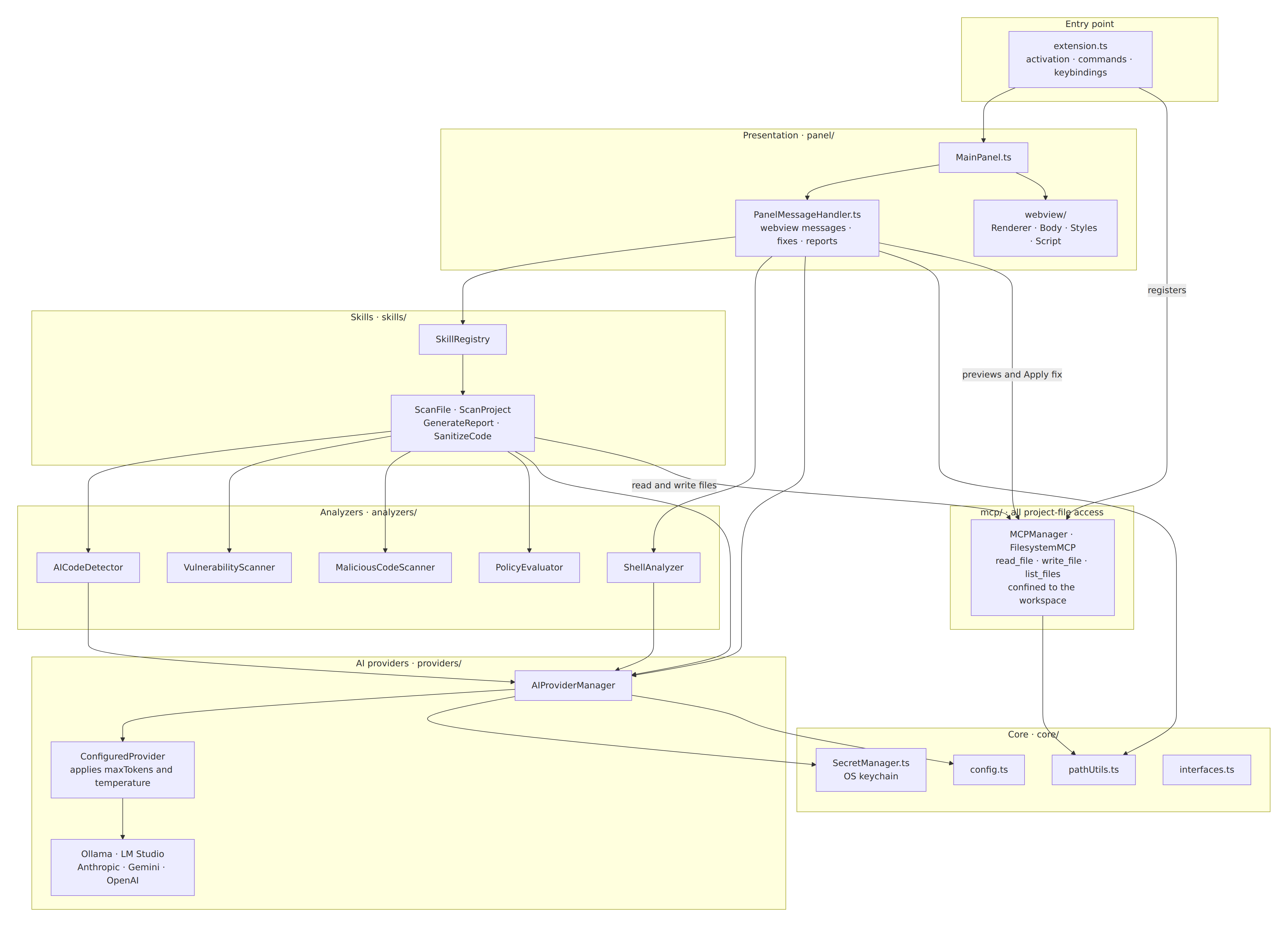
Scan lifecycle
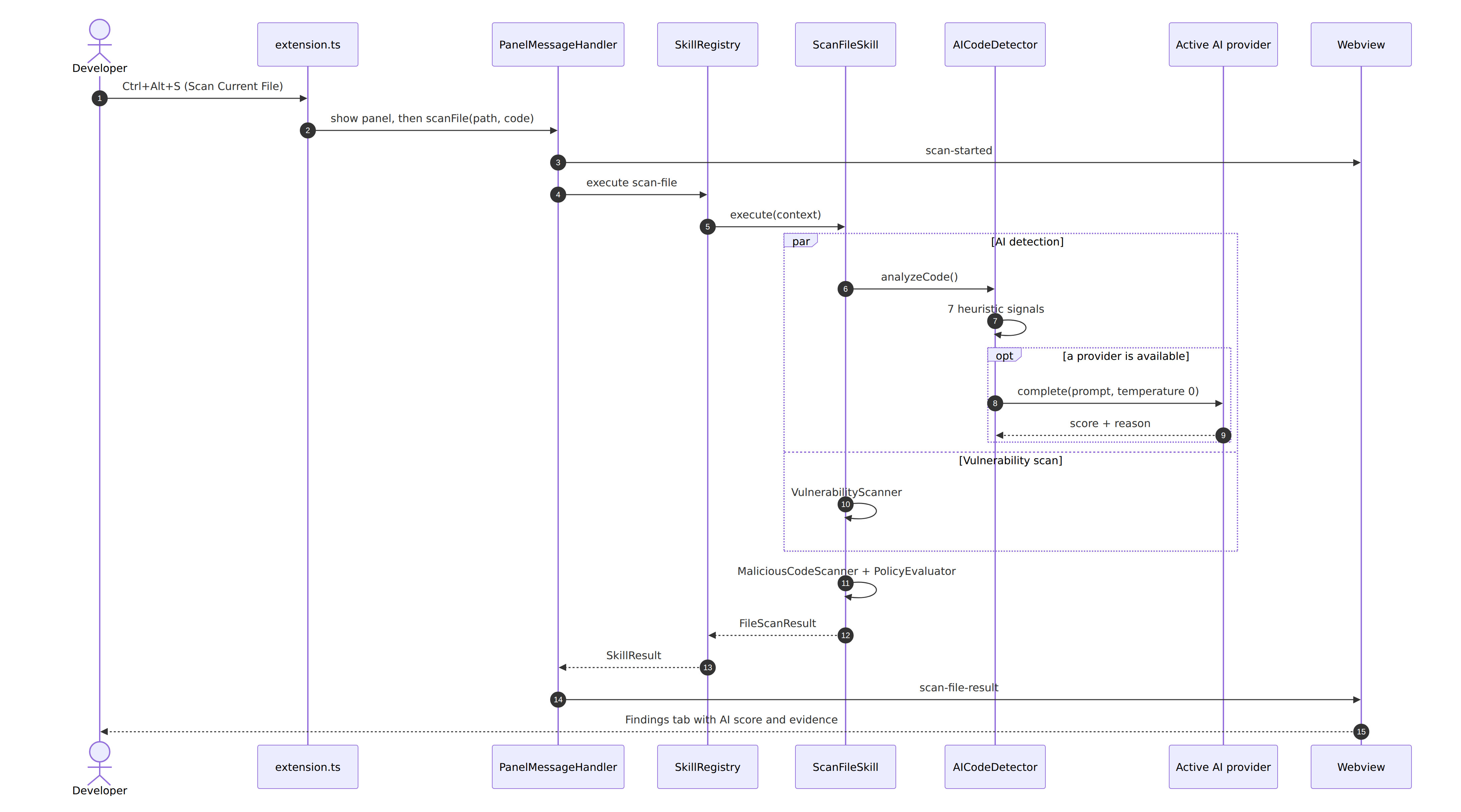
What happens when you scan the current file:
Project structure
src/
├── extension.ts                 ← Activation, commands, keybindings
├── core/
│   ├── interfaces.ts            ← Shared TypeScript types
│   ├── config.ts                ← Settings manager
│   ├── SecretManager.ts         ← API keys in the OS keychain
│   ├── pathUtils.ts             ← Workspace-safe path resolution
│   └── modelNames.ts            ← Friendly model labels
├── providers/
│   ├── AIProviderManager.ts     ← Selection order, key removal
│   ├── ConfiguredProvider.ts    ← Applies the maxTokens / temperature settings
│   └── Anthropic · OpenAI · Gemini · Ollama · LMStudio providers
├── analyzers/
│   ├── AICodeDetector.ts        ← Heuristics + AI blend
│   ├── VulnerabilityScanner.ts  ← 91 patterns
│   ├── MaliciousCodeScanner.ts  ← 7 categories
│   ├── PolicyEvaluator.ts       ← 14 built-in rules
│   ├── ShellAnalyzer.ts         ← 12 patterns
│   └── utils.ts
├── panel/
│   ├── MainPanel.ts             ← WebviewPanel host
│   ├── PanelMessageHandler.ts   ← Webview ↔ extension messages
│   └── webview/                 ← Renderer, Body, Styles, Script
├── skills/                      ← SkillRegistry, ScanFile, ScanProject, GenerateReport, SanitizeCode
└── mcp/                         ← MCPManager, FilesystemMCP, workspaceFiles (workspace-confined file access)
Diagram sources live in docs/diagrams as Mermaid files.
Privacy & data flow
- No telemetry and no manan-kanchu servers.
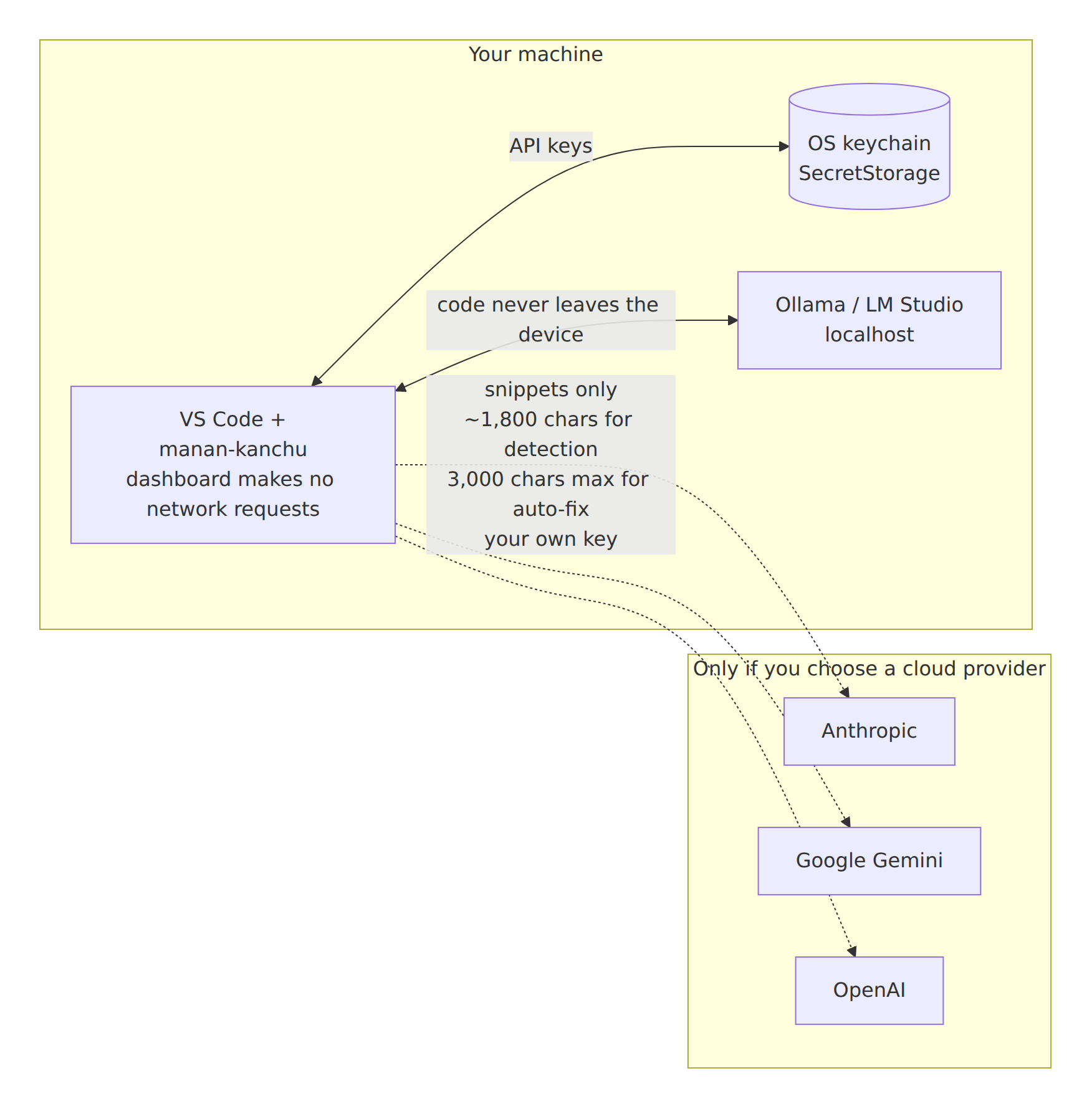
- The dashboard makes no network requests: no web fonts, no CDNs, and a strict content-security policy.
- API keys are stored in the OS keychain and can be removed from the extension.
- Only snippets reach a provider, and only the one you chose: about the first 1,800 characters of a file for AI detection, at most 3,000 characters of surrounding code plus the flagged line for an auto-fix, and the command text for shell tips.
- Local providers (Ollama, LM Studio) keep everything on your machine.
See PRIVACY.md for the full policy.
Limitations & responsible use
- AI-authorship detection is probabilistic. A score is an indicator, not proof of who wrote the code. False positives and negatives happen, especially with short files, boilerplate-heavy code, and code shaped by strict style guides or formatters.
- Never use the score as the sole basis for academic, disciplinary, employment or contractual decisions.
- Scanners are pattern-based. They are not a substitute for a security review, a SAST/DAST pipeline or a dependency audit. To reduce noise, matches that sit inside a string literal on the same line are ignored (secret detectors are exempt).
- Project scans skip hidden folders (except
.github, .circleci and .gitlab-ci.yml), files over the size limit and unsupported extensions.
- Cloud providers receive the code snippets they analyze. Use a local provider for sensitive or proprietary code.
- Review AI-suggested fixes before applying them — Apply rewrites the file on disk (only inside the workspace).
Contributing
Contributions are welcome — see CONTRIBUTING.md.
git clone https://github.com/sergioide007/manan-kanchu-code-ai
cd manan-kanchu-code-ai
npm ci
npm run compile
npm test        # 154 tests
npm run lint
Press F5 in VS Code to launch the Extension Development Host. Recording screenshots? See docs/CONTRIBUTING-MEDIA.md.
License
MIT — see LICENSE.

