Skip to content
| Marketplace
Sign in
Visual Studio Code>Themes>Title Bar PaletteNew to Visual Studio Code? Get it now.
Title Bar Palette

Title Bar Palette

Serbyte Development

| (0) | Free
Automatically give each VS Code or Cursor workspace a distinct title-bar accent color.
Installation
Launch VS Code Quick Open (Ctrl+P), paste the following command, and press enter.
Copied to clipboard
More Info

Title Bar Palette

CI Visual Studio Marketplace Version Open VSX Version License: MIT

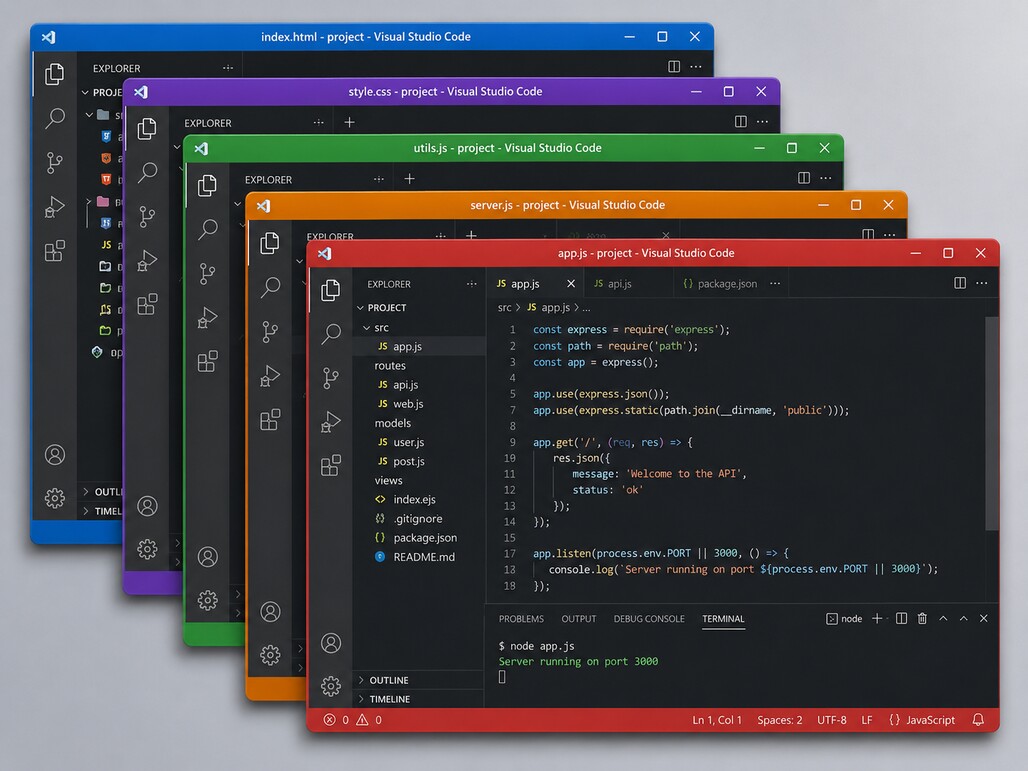
Automatically give each VS Code or Cursor workspace a distinct title-bar accent so open windows are easier to identify at a glance.

VS Code workspaces with distinct Title Bar Palette accents

Features

  • Automatic workspace colors. New workspaces rotate through 12 curated presets.
  • Strong title-bar colors. The title bar and Command Center carry the workspace color in both VS Code and Cursor.
  • Theme-aware shell tint. Current VS Code gets a muted modernUI shell tint derived from the workspace color, with separate dark and light variants.
  • Theme-aware presets. Built-in colors switch automatically when the editor theme changes.
  • Persistent sequence. The next automatic color is remembered across editor restarts.
  • Workspace-safe behavior. Complete custom workspace accents and unrelated workbench.colorCustomizations values are preserved.
  • Manual selection. Run Title Bar Palette: Select Color to choose any preset for the current workspace.

Install

Install from the Visual Studio Marketplace or Open VSX.

Title Bar Palette requires VS Code ^1.85.0. Open a folder or workspace after installation and the extension assigns the next palette color automatically.

Using Title Bar Palette

Automatic assignment needs no configuration. Each fresh workspace receives the next preset in the sequence.

To choose a color yourself, open the Command Palette and run Title Bar Palette: Select Color. Manual selection moves the automatic sequence to the following preset.

Empty untitled windows are left unchanged because the extension writes only to workspace settings.

Palette

Color Dark theme Light theme
Blue #2563EB #93C5FD
Violet #7C3AED #C4B5FD
Emerald #047857 #6EE7B7
Amber #A16207 #FCD34D
Rose #BE123C #FDA4AF
Teal #0F766E #5EEAD4
Cyan #0E7490 #67E8F9
Indigo #4338CA #A5B4FC
Fuchsia #A21CAF #F0ABFC
Orange #C2410C #FDBA74
Lime #4D7C0F #BEF264
Pink #BE185D #F9A8D4

Dark variants use white Command Center text. Light variants use #111827. Every preset is validated for at least 4.5:1 Command Center text contrast.

How it works

Title Bar Palette writes workspace-scoped workbench.colorCustomizations values for:

  • Command Center background, foreground, active, inactive, and border colors
  • Title-bar active/inactive backgrounds and foregrounds
  • modernUI.shellBackground and modernUI.inactiveShellBackground
  • window.activeBorder and window.inactiveBorder
  • titleBar.border

The title bar uses the full preset color. On current VS Code, the explicit modernUI values prevent that strong title-bar color from bleeding across the entire shell; the shell gets a darker or lighter muted tint instead. Cursor versions without those modernUI theme keys simply use the title-bar colors and ignore the extra shell values.

The extension inspects the workspace-scoped value directly, so User-level color customizations do not suppress automatic assignment. Complete custom workspace accents and complete custom title-bar colors are preserved. Recognized built-in presets re-anchor the sequence so the next automatic workspace receives the following color.

Recognized 0.1 title-bar presets and earlier 0.2 compact presets migrate in place to the current title-bar plus shell format. Other workspace color customizations stay in place.

Compatibility

Title Bar Palette uses standard VS Code workspace configuration APIs, has no native dependencies, and is designed for desktop VS Code and Cursor. The extension metadata supports untrusted and virtual workspaces.

Window border visibility depends on editor chrome support. The title bar and Command Center remain the primary workspace identifiers.

Development

npm install
npm test
npm run package

Support

Report bugs, compatibility issues, and focused feature requests through GitHub Issues or see SUPPORT.md.

Developed and maintained by Serbyte Development.

  • Contact us
  • Jobs
  • Privacy
  • Manage cookies
  • Terms of use
  • Trademarks
  • Your Privacy Choices
  • Consumer Health Privacy
© 2026 Microsoft