Why SecretGuard?
Every day, developers accidentally push API keys, database credentials, and tokens to public repositories. Once a secret is in git history — it's permanent. Deleting the file doesn't help; anyone with git log can recover it.
SecretGuard stops secrets at three layers — before they ever leave your machine:
| Layer |
When |
How |
| 🔴 While you type |
Real-time |
Red squiggly underlines in the editor |
| 🔴 Before you commit |
At git commit |
Pre-commit hook blocks the commit |
| 🔴 Across your workspace |
On startup |
Full scan of every file |
Features
- Real-time detection — scans as you type with an 800ms debounce; no manual action needed
- Inline diagnostics — red squiggly underlines using the VS Code Diagnostics API, exactly like ESLint
- Sidebar findings panel — lists every detected secret grouped by file; click any finding to jump to that exact line
- Commit blocker — git pre-commit hook prevents
git commit if secrets are staged, with redacted output and a rotation link
- Shannon entropy analysis — distinguishes real secrets from placeholders like
YOUR_API_KEY_HERE
- Git history audit — scans the last 500 commits for previously leaked secrets
- Export reports — one-click HTML or JSON scan report
- Auto-gitignore — automatically adds flagged sensitive files to
.gitignore
- Status bar indicator — shield icon confirms SecretGuard is actively running
What It Detects
30+ Secret Patterns
| Secret Type |
Pattern |
Severity |
| AWS Access Key ID |
AKIA[0-9A-Z]{16} |
🔴 Error |
| AWS Secret Access Key |
40-char base64 near aws |
🔴 Error |
| GitHub PAT |
ghp_[A-Za-z0-9]{36} |
🔴 Error |
| GitHub OAuth Token |
gho_[A-Za-z0-9]{36} |
🔴 Error |
| Stripe Live Secret Key |
sk_live_[A-Za-z0-9]{24} |
🔴 Error |
| Stripe Test Key |
sk_test_[A-Za-z0-9]{24} |
🟡 Warning |
| Google API Key |
AIza[0-9A-Za-z_-]{35} |
🔴 Error |
| OpenAI API Key |
sk-proj-[A-Za-z0-9]{48} |
🔴 Error |
| Anthropic API Key |
sk-ant-[A-Za-z0-9]{40} |
🔴 Error |
| Slack Webhook |
hooks.slack.com/services/... |
🔴 Error |
| Discord Webhook |
discord.com/api/webhooks/... |
🔴 Error |
| Slack Bot Token |
xoxb-[0-9]{11}-... |
🔴 Error |
| Twilio Account SID |
AC[a-z0-9]{32} |
🔴 Error |
| SendGrid API Key |
SG.[A-Za-z0-9]{22}.[A-Za-z0-9]{43} |
🔴 Error |
| JWT Token |
eyJ... |
🟡 Warning |
| PEM Private Key |
-----BEGIN.*PRIVATE KEY----- |
🔴 Error |
| SSH Private Key |
-----BEGIN OPENSSH PRIVATE KEY----- |
🔴 Error |
| Database URL |
postgres://, mysql://, mongodb:// with credentials |
🔴 Error |
| Generic secret assignment |
password = "...", secret = "..." |
🟡 Warning |
| High-entropy string |
Any 20+ char string with entropy ≥ 3.5 bits/char |
🟡 Warning |
25+ Sensitive Filenames
.env  .env.local  .env.production     → Always flagged
id_rsa  id_ed25519                    → SSH private keys
*.pem  *.p12  *.pfx                   → Certificate files
credentials.json  *service-account*   → GCP / AWS credential files
.vault-token  .netrc  .npmrc          → Auth token files
How It Works
1. Real-time squiggly lines
const stripe_key = "sk_live_aBcDeFgHiJkLmNoPqRsTuV";
//                  ^^^^^^^^^^^^^^^^^^^^^^^^^^^^^^^^^^^
// ⚠ SecretGuard: Stripe Live Secret Key detected
//   Rotate at: https://dashboard.stripe.com/apikeys
SECRETGUARD — FINDINGS
└── 📄 config.js
    ├── 🔴 Stripe Live Secret Key        Line 3
    ├── 🔴 AWS Access Key ID             Line 7
    └── 🟡 Generic Secret Assignment     Line 12
└── 📄 .env
    ├── 🔴 Database URL                  Line 1
    └── 🔴 GitHub PAT                    Line 4
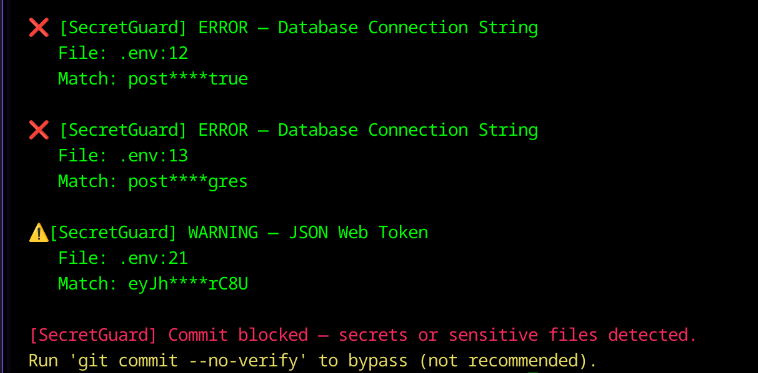
3. Commit blocker
$ git commit -m "add config"

❌ [SecretGuard] ERROR — Stripe Live Secret Key
   File:  config.js:3
   Match: sk_live_****VwXy
   Rotate at: https://dashboard.stripe.com/apikeys

❌ Commit BLOCKED. Fix the issues above, then commit again.
SecretGuard vs. GitHub Push Protection
| Feature |
SecretGuard |
GitHub Push Protection |
| Catches secrets while typing |
✅ |
❌ |
| Catches secrets at commit |
✅ |
❌ |
| Catches secrets at push |
✅ |
✅ |
| Works offline |
✅ |
❌ |
| Works with GitLab, Bitbucket, etc. |
✅ |
❌ |
| Custom detection rules |
✅ |
⚠️ Enterprise only |
| Shows exact line in editor |
✅ |
❌ |
| Entropy-based detection |
✅ |
⚠️ Unknown |
| Git history audit |
✅ Last 500 commits |
⚠️ Push-time only |
| Export scan report |
✅ HTML + JSON |
❌ |
| Auto-gitignore helper |
✅ |
❌ |
| Remediation links per secret |
✅ |
❌ |
| Response time |
✅ Milliseconds (local) |
⚠️ Seconds (network) |
| Cost |
✅ Free / MIT |
✅ Free for public repos |
GitHub Push Protection is your last line of defense. SecretGuard is your first three.
Getting Started
Install from Marketplace
- Open VS Code
- Press
Ctrl+Shift+X to open Extensions
- Search SecretGuard
- Click Install
Install from VSIX
code --install-extension secretguard-git-protect-1.0.1.vsix
Enable the commit blocker
Open the command palette (Ctrl+Shift+P) and run:
SecretGuard: Install Git Pre-commit Hook
Configuration
Open VS Code Settings (Ctrl+,) and search secretguard:
| Setting |
Default |
Description |
secretguard.enableRealtime |
true |
Scan as you type |
secretguard.debounceMs |
800 |
Delay (ms) after keystroke before scanning |
secretguard.entropyThreshold |
3.5 |
Entropy cutoff — raise to reduce false positives |
secretguard.scanOnOpen |
true |
Full workspace scan when extension activates |
secretguard.maxFileSizeKb |
500 |
Skip files larger than this |
secretguard.excludePatterns |
node_modules, dist, .git |
Glob patterns to skip |
Commands
Ctrl+Shift+P → type SecretGuard:
| Command |
Description |
SecretGuard: Scan Entire Workspace |
Scan all files in the workspace |
SecretGuard: Scan Current File |
Scan only the active editor file |
SecretGuard: Scan Git History |
Audit the last 500 commits |
SecretGuard: Show All Findings |
Focus the sidebar findings panel |
SecretGuard: Export Scan Report |
Save HTML or JSON report to disk |
SecretGuard: Add Flagged Files to .gitignore |
Auto-gitignore sensitive files |
SecretGuard: Clear All Warnings |
Reset all findings |
SecretGuard: Toggle Real-time Scanning |
Enable or disable live scanning |
Testing
Test Suites: 2 passed
Tests:       43 passed ✓

Coverage:
  ✓ AWS key detection + redaction
  ✓ GitHub PAT detection
  ✓ Stripe live / test keys
  ✓ PostgreSQL + MongoDB URLs
  ✓ PEM / SSH key headers
  ✓ Google API key
  ✓ OpenAI + Anthropic keys
  ✓ Slack + Discord webhooks
  ✓ Placeholder suppression (false positives)
  ✓ Custom entropy thresholds
  ✓ Filename blocklist (.env, id_rsa, etc.)
Tech Stack
| Layer |
Technology |
| Language |
TypeScript (strict mode) |
| Bundler |
esbuild — 31.7 KB output |
| Detection engine |
Regex + Shannon entropy |
| VS Code integration |
Diagnostics API, TreeDataProvider, StatusBar |
| Git integration |
Pre-commit hook (Node.js CLI) |
| Testing |
Jest + ts-jest (43 tests) |
For architecture details, see ARCHITECTURE.md.
Local Development
# Clone
git clone https://github.com/Dharaneswara-Reddy/secretguard-vscode.git
cd secretguard-vscode

# Install dependencies
npm install

# Build
npm run build

# Run tests
npm test

# Press F5 in VS Code to launch the Extension Development Host
Contributing
Contributions are welcome. To add a new secret pattern:
- Fork the repository
- Add your rule to
src/rules/contentRules.ts
- Add a test case to
test/scanner.test.ts
- Open a Pull Request
Known Limitations
| Limitation |
Notes |
| Desktop VS Code only |
No browser or web editor support |
| Text files only |
Binary files are skipped |
| Obfuscated secrets may pass |
Base64-encoded secrets won't match patterns |
| Entropy may flag long variable names |
Raise entropyThreshold to reduce false positives |
License
MIT © 2026 Palle Venkata Dharaneswara Reddy — see LICENSE
⭐ If SecretGuard saved you from a security breach, give it a star on GitHub and a review on the Marketplace.
Built to keep developer secrets safe.