See it in action
Compare your project against a live workspace — with a safety verdict on every change
Diff your .sql files against any live Unity Catalog workspace (or a built artifact) in any direction. Every proposed change gets a safety verdict — UNRECOVERABLE, DESTRUCTIVE, EXPENSIVE, WARNING, or SAFE — before anything touches Databricks. DDT knows UC-specific failure modes generic SQL tools miss: dropping a managed table deletes its files; dropping a streaming table loses its checkpoint.
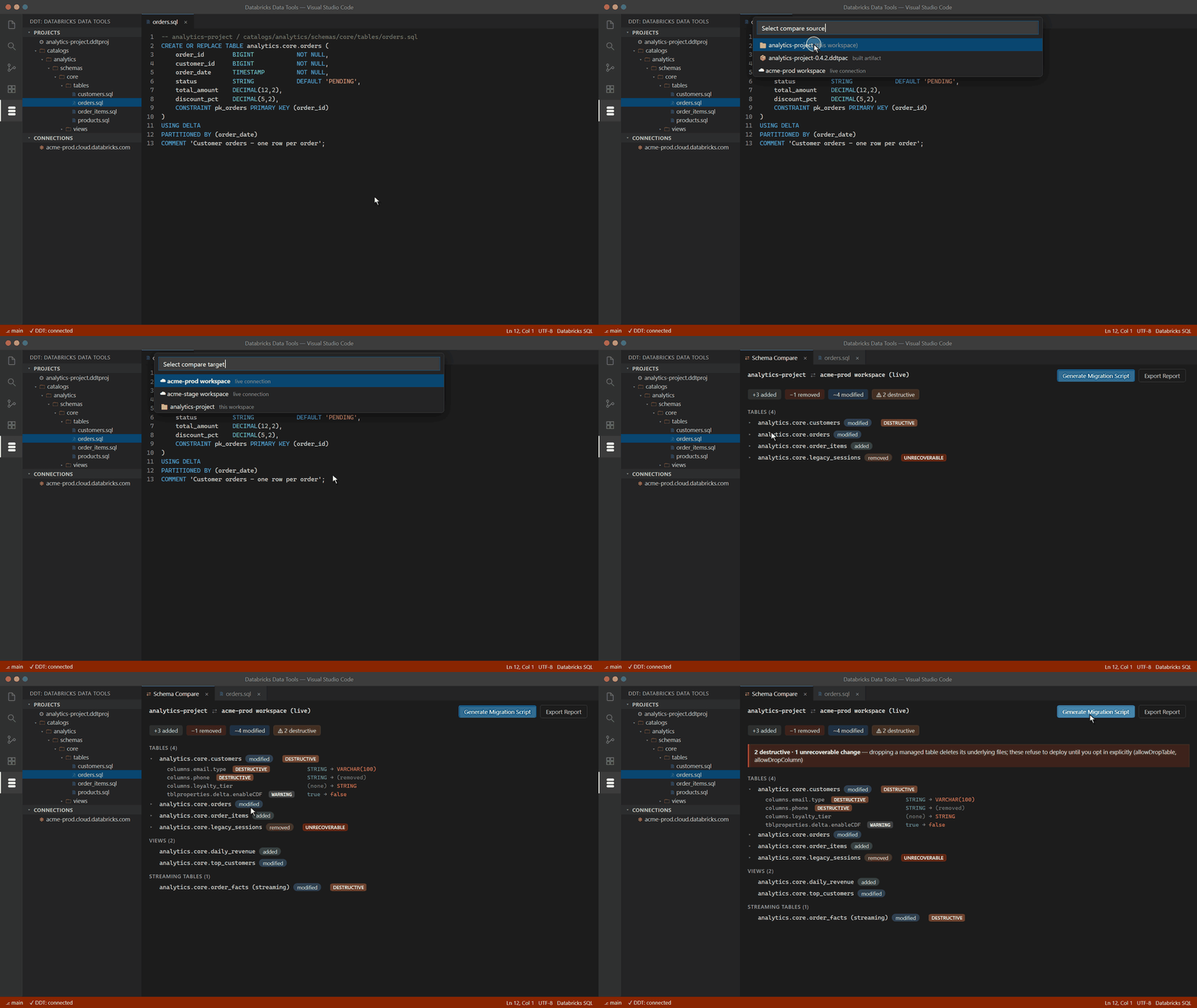
▶ Watch the 60-second demo on YouTube
Deploys that refuse to destroy data silently
Destructive operations come out blocked, as comments — they only deploy after an explicit opt-in in your project file. Turn on safety cloning and DDT pre-creates a DEEP CLONE so any deploy is one command away from rollback.
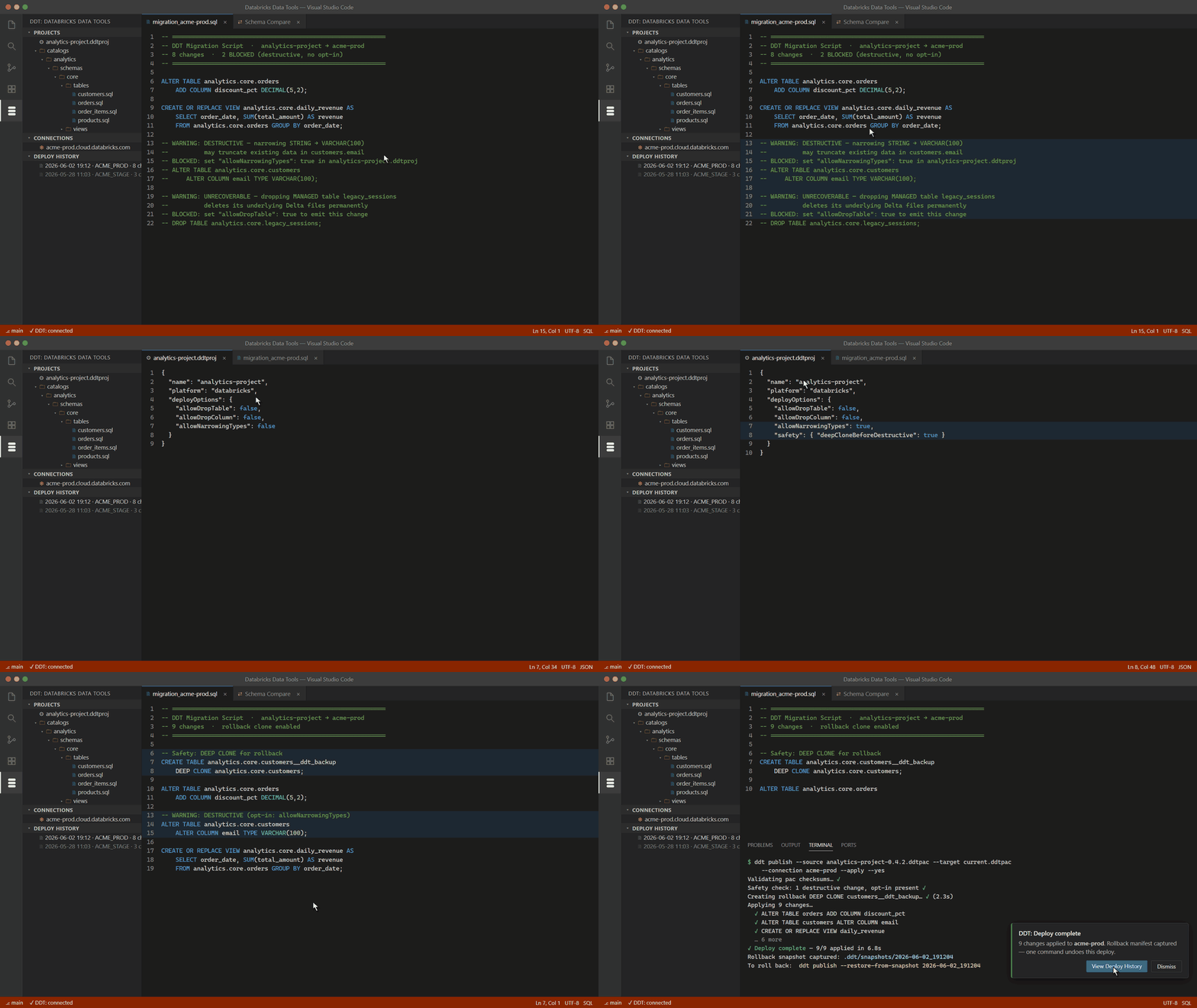
▶ Watch the 60-second demo on YouTube
Reverse-engineer an entire workspace in seconds
One command pulls every catalog, schema, and object into a project tree of .sql files — one file per object, ready for git.
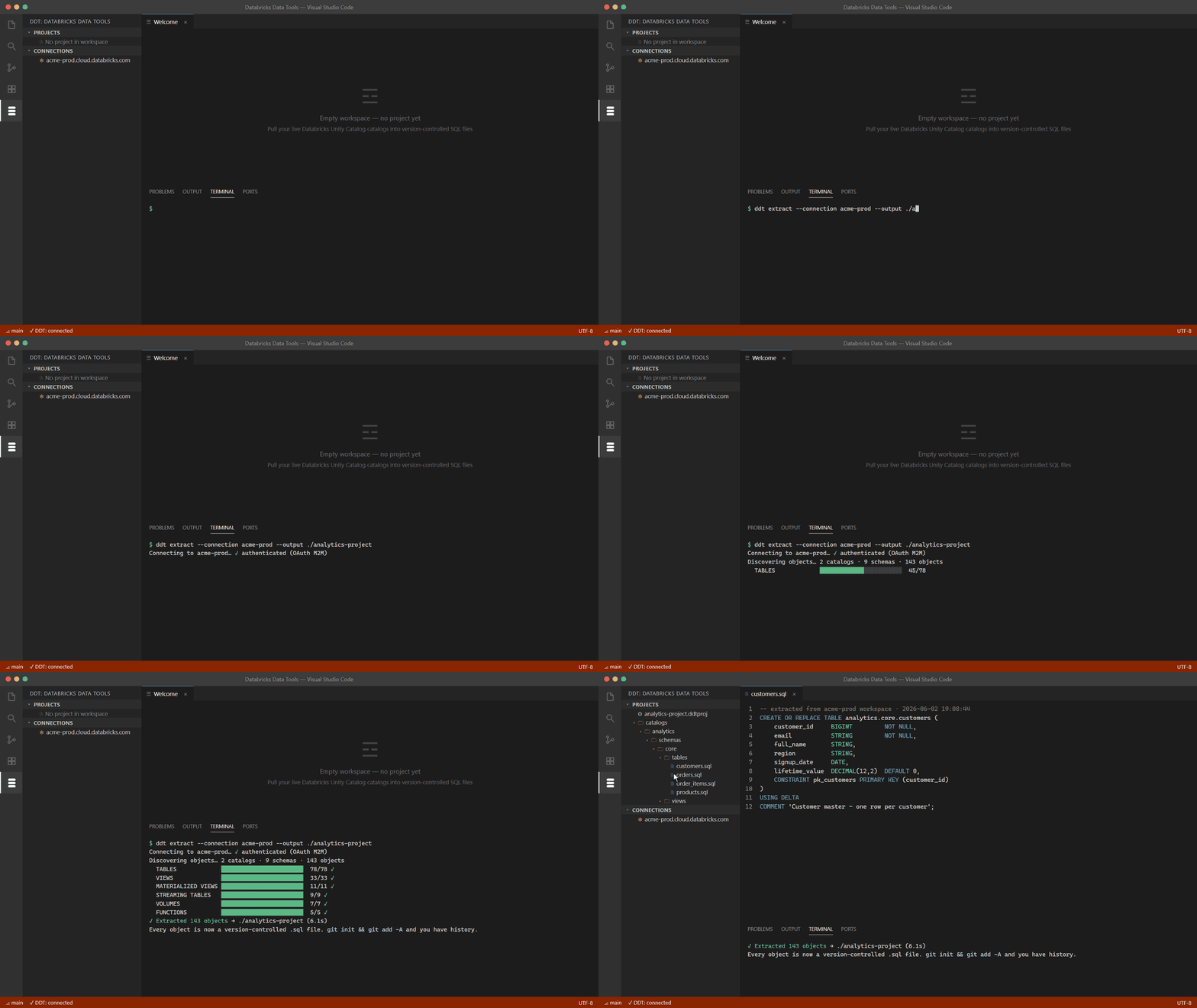
▶ Watch the 60-second demo on YouTube
📺 More demos on the SDT & DDT YouTube channel — subscribe to catch new ones.
Why DDT
Databricks ships building blocks — the SDK, the CLI, Terraform providers — but no end-to-end workflow for managing Unity Catalog schemas: no compare engine, no safety classification, no rollback story. DDT fills that gap. You author each UC object as a .sql file (a desired-state spec using CREATE OR REPLACE, the Databricks idiom), and DDT computes the deltas between your project and the live workspace — you never hand-write forward/backward migration files. Every proposed change is classified as UNRECOVERABLE, DESTRUCTIVE, EXPENSIVE, WARNING, or SAFE, and anything destructive refuses to run without an explicit opt-in. DDT understands UC-specific failure modes — dropping a streaming table loses its checkpoint cursor; dropping a managed table deletes its files — that generic SQL tools miss.
It is the Databricks counterpart to SDT (Snowflake Data Tools): same design, same CLI surface, so a team that knows one learns the other in a day.
Key features
| Area |
What you get |
| Schema compare |
Diff a project, a built .ddtpac, or a live Unity Catalog workspace against each other, with per-change safety classification surfaced inline. |
| Safe deploy |
Generate a migration script with destructive operations gated behind explicit opt-ins. UC-aware safety: managed-table file deletion, streaming-table checkpoint loss, and more. |
| Extract / reverse-engineer |
Pull a live Unity Catalog workspace into a project tree of .sql files — one file per object. |
| Projects & Suites |
Author .ddtproj projects and group several into a .ddtsuite for cross-project validation; build to a portable .ddtpac artifact. |
| Object Explorer |
Browse catalogs, schemas, and objects from a live connection. Right-click column refactors (rename, change type, drop) that preserve identity through compare. |
| Lint & format |
A Databricks-SQL-aware formatter (format-on-save) and a lint ruleset for project hygiene. |
| Lineage & diagrams |
Column-level lineage for views, materialized views, and streaming tables; an interactive schema diagram. |
| Drift check |
Detect when a live workspace has drifted from your project or pac. |
| Deploy history |
Review past deploys and their captured manifests from the activity bar. |
| AI assist (BYO key) |
Sketch objects from a description, suggest safer alternatives for risky changes, and an "Ask DDT" chat panel that proposes refactor operations. See AI features. |
All of this is reachable from the DDT activity-bar view (Suites, Object Explorer, Deploy History) and the command palette. Press Ctrl+K F (Cmd+K F on macOS) to Find a Feature.
Note: Databricks users predominantly drive DDT from the CLI and CI. The project-lifecycle commands (init / build / publish / extract) are available through the @ddt-tools/cli; the VS Code surface focuses on browsing, comparing, diagramming, and reviewing.
Quick start
- Install the extension and open a folder in VS Code.
- Configure a connection — run DDT: Open connection setup docs for the walkthrough, then add a PAT or OAuth-M2M profile to
~/.ddt/profiles.json.
- Validate the workspace — run
ddt validate in a terminal to confirm Unity Catalog is reachable and your profile resolves.
- Extract or author — pull a live workspace into
.sql files with ddt extract, or author objects by hand.
- Compare — diff your project against a target with
ddt compare (or browse and diff from the Object Explorer). Read the safety classification on each change.
- Deploy — build with
ddt build and publish with ddt publish. Destructive changes refuse to apply until you opt in explicitly.
A guided Get started with DDT walkthrough is available from the VS Code Welcome page.
AI features (bring your own key)
AI is a layer on top of the deterministic engine — every AI feature composes with the compare/safety core, so the product is fully useful without it. You supply your own API key; DDT never ships one.
Supported providers: Anthropic, OpenAI, Azure OpenAI, any OpenAI-compatible endpoint, and self-hosted models. Enterprise deployments can additionally route through Databricks Foundation Models so prompts stay inside the workspace boundary.
What it does in the extension:
- Sketch Object from Description — prose → idiomatic
CREATE DDL with a review-before-deploy header.
- Suggest Safer Alternative — right-click a destructive change and get a safer pattern (soft-delete, shallow-clone-then-swap, archive table).
- Ask DDT chat panel — converse with the engine as context (project model, target metadata, last compare). It proposes rename / change-type / drop / move operations you confirm via a modal before they touch your files.
AI features are in the Pro tier; the deterministic compare/safety/lint core is always free. Configure your provider and key from the DDT settings; calls are billed by your provider, not by DDT.
Pricing
- Free core, forever — schema compare, safe deploy with the safety classifier, extract, lint, format, lineage, Object Explorer, and the interactive schema diagram.
- Pro features keep working with warnings — there is no hard paywall that locks you out mid-workflow. Pro adds AI write-side features, multi-project/Slice+Suite ownership, and the column-refactor UX.
- AI features are always bring-your-own-key — you pay your AI provider directly; DDT adds no inference markup.
Full tier details live on the public repo: https://github.com/GVOrganization/ddt-tools.
Documentation
📚 Full documentation — every feature, end to end:
Reporting bugs & feedback
Four channels:
- In VS Code — run DDT: Send Feedback… from the command palette (bug reports, feature requests, or questions).
- CLI — run
ddt feedback if you have the @ddt-tools/cli installed.
- GitHub Issues — https://github.com/GVOrganization/ddt-tools/issues.
- Email — sdt.ddt.tools@gmail.com for anything you'd rather not post publicly.
Privacy
DDT includes opt-in automatic error reporting. When enabled, it sends only sanitized diagnostics — error fingerprints, stack traces with paths stripped, command name, and product version. It never transmits your SQL, identifiers, catalog / schema / table / column names, data, or credentials. Reporting is off until you consent on first run, and can be toggled at any time (ddt telemetry from the CLI). Full details: PRIVACY.md on the public repo.
- VS Code 1.90.0 or newer.
- Node.js 20+ (only needed if you also use the
ddt CLI; the extension bundles its runtime).
- Databricks — works against any workspace with Unity Catalog enabled (AWS, Azure, or GCP). Connection profiles support Personal Access Token (PAT) and OAuth machine-to-machine (M2M) auth. The
hive_metastore legacy is not the focus — DDT manages the UC schema layer.
- OS — Windows, macOS, and Linux (pure TypeScript, no .NET dependency).
SDT + DDT
DDT has a sibling: SDT — Snowflake Data Tools — the same design, CLI surface, and safety model for Snowflake. A team that knows one learns the other in a day.
DDT is an independent tool and is not affiliated with or endorsed by Databricks Inc. "Databricks", "Unity Catalog", and "Delta Lake" are trademarks of Databricks Inc., used here for descriptive purposes only.
License: Apache-2.0.