Pronounce — VS Code


🌐 English · 🇨🇳 中文说明 — the extension UI auto-switches to Chinese when VS Code's display language is zh-cn.
Stop guessing how to say kubectl, nginx, YAML, Ghostty. Hover any tech word — hear how engineers actually say it, right in your editor. Backed by the community-curated Pronounce.ai dictionary — 1880 sourced entries, every one tagged with confidence (creator-clarified · community-consensus · contested) and a citable URL.
Works in VS Code · Cursor · Windsurf · VSCodium · Gitpod · code-server — same extension ID everywhere. (Zed doesn't run VSIX extensions — Zed users: use the MCP server instead.)
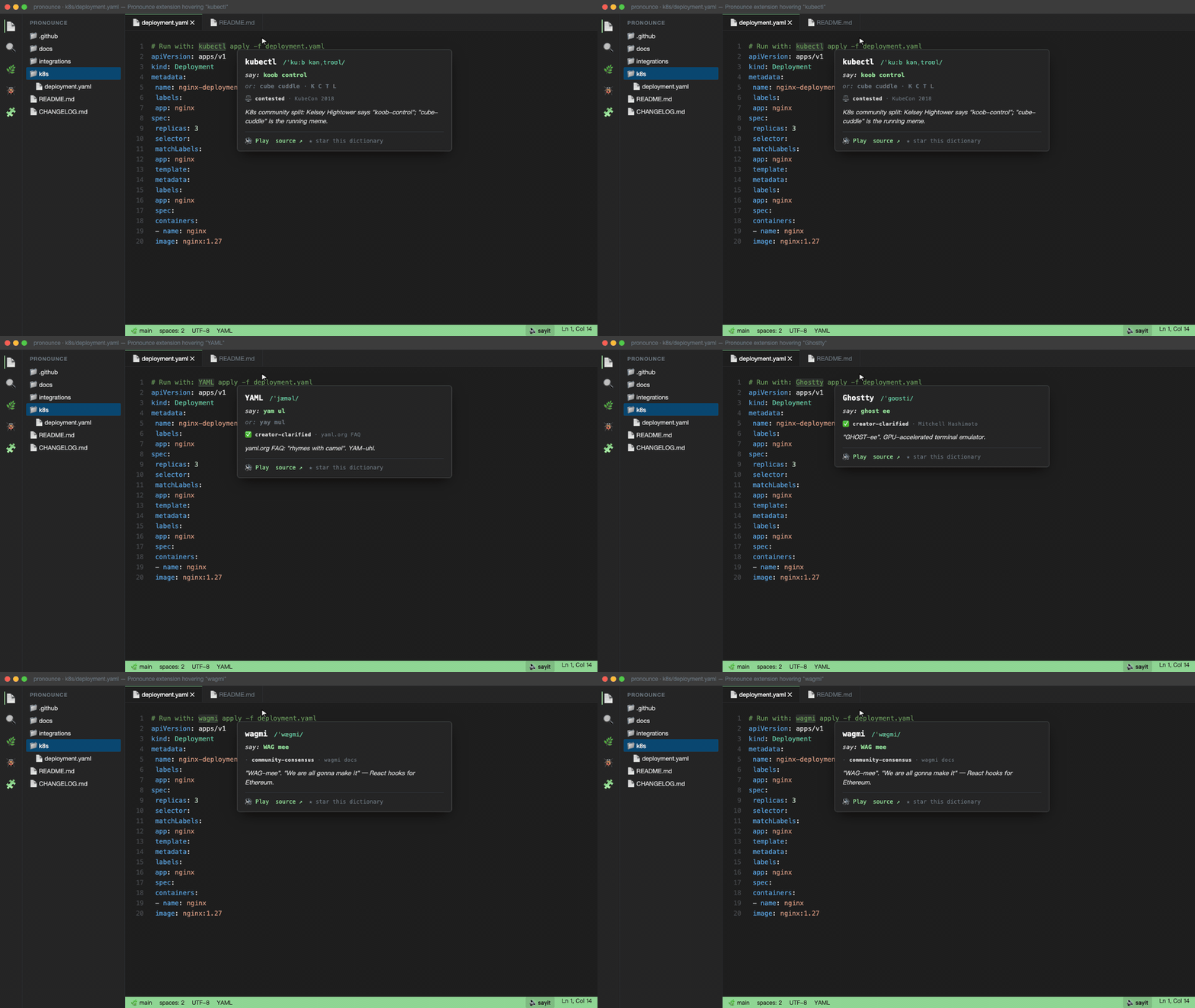
What you get
- Hover over
kubectl, nginx, GIF, YAML, TOML, Ghostty, wagmi, JSON, Affine, Logseq — popup with IPA, English-style respelling, both readings if contested, the source citation, and a 🔊 Play button.
- Speak selection — highlight any word, press
⌘⇧', hear it. Works on words not in the dictionary too (lower-quality TTS fallback).
- Search dictionary — fuzzy-find any of the 1880 entries from the command palette (
⌘⇧P → "Pronounce").
- Status bar
🔊 sayit — always-visible reminder; click to speak the current selection.
- Welcome walkthrough — on first install, a 4-step tour shows the hover, the search, and one-click hear-kubectl.
Install
# VS Code (Microsoft Marketplace)
code --install-extension sayit.pronounce
# Cursor (Open VSX — same ID)
cursor --install-extension sayit.pronounce
# VSCodium / Gitpod / Theia / code-server (Open VSX — same ID)
codium --install-extension sayit.pronounce
Or click through:
Cross-platform as of v0.3. macOS uses the built-in say; Linux uses espeak-ng (sudo apt install espeak-ng / brew install espeak-ng); Windows uses PowerShell's built-in System.Speech.Synthesis. macOS quality is best; the others are functional.
Why
Engineers mispronounce tools all day — kube-cuddle, engine-eks, Gee-son, yaymul, LOG-sek. Webster doesn't cover them; this does. Creator-clarified where possible (Wilhite on GIF, Crockford on JSON, GNU Project's own FAQ, Tom Preston-Werner on TOML, yaml.org's FAQ on YAML, IETF RFC 9000 on QUIC, Mitchell Hashimoto on Ghostty, EWD archive on Dijkstra) and community-consensus otherwise. The extension surfaces all that inline.
中文说明
程序员单词怎么读? 在 VS Code / Cursor / Windsurf 里悬停任意技术词 — kubectl、nginx、YAML、Pydantic、Ollama … — 直接听到工程师实际的读法,附 IPA、英式拼读和来源引用。1880 条社区维护词条,覆盖产品名、命令行工具、AI/ML 项目与研究者。
VS Code 显示语言设为简体中文时,插件界面(命令、设置、欢迎页、悬停标签)自动切换为中文。安装:在扩展面板搜 Pronounce,或运行 code --install-extension sayit.pronounce。完整中文词典:pronounce.renlab.ai/zh.html。
Settings
| Setting |
Default |
Purpose |
pronounce.voice |
Samantha |
Any macOS say voice. List with say -v '?'. Recommended: Samantha, Daniel, Karen, Moira, Tessa. |
pronounce.rate |
130 |
Words per minute (80–500). |
pronounce.repetitions |
1 |
Hover plays once; CLI default is 3 (more annoying on hover). |
pronounce.hoverEnabled |
true |
Master switch for hover popups. |
pronounce.hoverOnlyKnownWords |
true |
Set false to also hover unknown words (lower-quality letter-to-sound TTS). |
pronounce.statusBar |
true |
Show 🔊 sayit in the status bar. |
Companion CLI + web + skill + MCP
The same dictionary powers:
brew install anzy-renlab-ai/tap/say-it   # or ./install.sh from the repo
say-it kubernetes                        # speaks it 3x with cited pronunciation
- Web: pronounce.renlab.ai — full 1880-entry browser with Famous Moments + quiz.
- Claude Code skill: triggers on "how do you pronounce X" / "X 怎么读" — the AI plays sound instead of guessing.
- MCP server: drop into Cursor / Claude / any MCP client.
- Raycast / Alfred / Continue: integrations in the main repo.
Contributing
Wrong pronunciation? Missing word? Open a PR against data/pronunciations.tsv in the main repo. PRs flow into the next extension release — npm run build:dict regenerates the bundled JSON.
If this saves you one cringey standup moment — star the repo. It's how more devs find it.
License
MIT.

