Skip to content
| Marketplace
Sign in
Visual Studio Code>Other>Better Branch Name DisplayNew to Visual Studio Code? Get it now.
Better Branch Name Display

Better Branch Name Display

Sator Imaging

|
15 installs
| (0) | Free
Source Control input field placeholder to show full branch name first
Installation
Launch VS Code Quick Open (Ctrl+P), paste the following command, and press enter.
Copied to clipboard
More Info

Visual Studio Marketplace Version

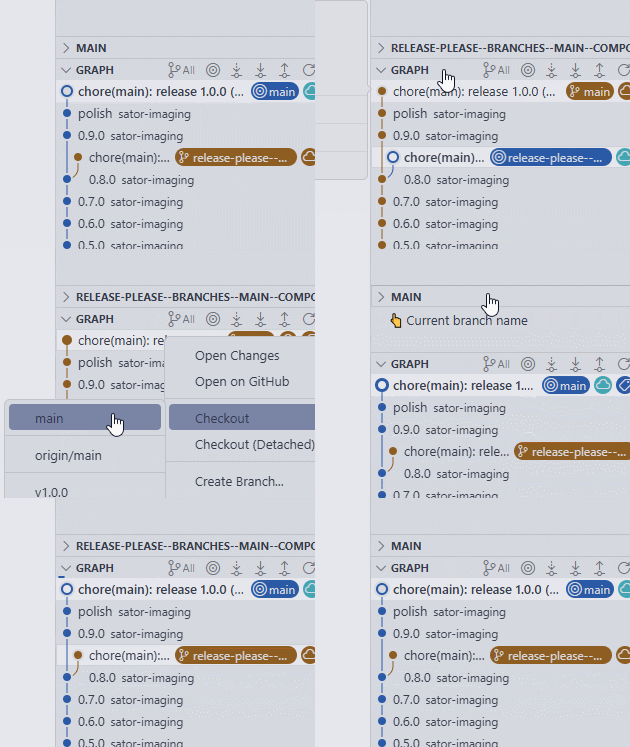
This Visual Studio Code extension enhances the Source Control view by prominently displaying the full name of the current branch. It helps you stay aware of the branch you are working on, reducing the risk of committing changes to the wrong branch.

Better Branch Name Display in Action

How to Use

  1. Install the extension from the Visual Studio Code Marketplace.
  2. Open a project that is a Git repository.
  3. Navigate to the Source Control view (Ctrl+Shift+G).
  4. The current branch name will be displayed in the "Current Branch" view.

Remarks

  • This extension requires Git to be installed and available in your system's PATH.
  • It is a UI-only extension and does not add any new commands.
  • The browser environment (e.g., github.dev) is not supported.
  • Changing the branch by using the git checkout ... command is also supported.
  • Contact us
  • Jobs
  • Privacy
  • Manage cookies
  • Terms of use
  • Trademarks
© 2026 Microsoft