Saropa Workspace
Pin any file as a favorite — single-click to open it, double-click to run it.
Developed by Saropa to make Flutter & Dart development faster.
💬 Have feedback on Saropa Workspace? Please share it by opening an issue on GitHub!
Saropa Workspace turns a VS Code activity-bar sidebar into a place for the files and scripts you reach for constantly. Pin a pubspec.yaml, a build script, a database seeder, or a deploy command, and keep them one click away. Files open on a single click; scripts run on a double-click. Pins can live with your repo (so the whole team gets them) or with your VS Code profile (so they follow you across projects), and scripts can run on a schedule while VS Code is open.
The marker for this extension is a referee's whistle — call the play, run the script.
Features
📌 Pin & open
Pin any file as a favorite from the editor title menu or the Explorer right-click menu. A single click on a pin opens the file in an editor — instant access to the configs, docs, and entry points you touch every day, without hunting through the file tree.
Pins appear in a dedicated Saropa Workspace sidebar (activity-bar view) with two groups:
- Project Pins — scoped to the current repository.
- Global Pins — scoped to your VS Code profile.
The activity-bar icon carries a badge counting the pins you haven't used yet — opened or run. Newly added pins stand out, and the count drops as you use them; the badge clears once you've touched everything (it never shows a zero).
▶️ Run scripts
A double click on a pinned script executes it. Each pin carries its own run configuration:
- Command prefix — the interpreter or runner (for example
python, node, bash).
- CLI arguments — passed to the script on every run.
- Working directory — where the command executes.
- Environment variables — applied to that run only.
By default scripts run in the integrated terminal so you see live output. Switch a run to a background output channel when you want it out of the way.
A command can carry placeholder tokens ($file, $workspaceRoot, …) and interactive tokens (${prompt:Label}, ${pick:a,b,c}) so one parameterized pin replaces a pin-per-variant — and it remembers your last answer. A background run is stoppable (with Force Kill) and shows its last-run status on the pin; a failed run offers one-click fixes (run the suggested install command, or free a busy port). Because tree views have no native double-click event, every script also has an inline play button and a Run context action. See Double-click vs inline run.
⏰ Schedule
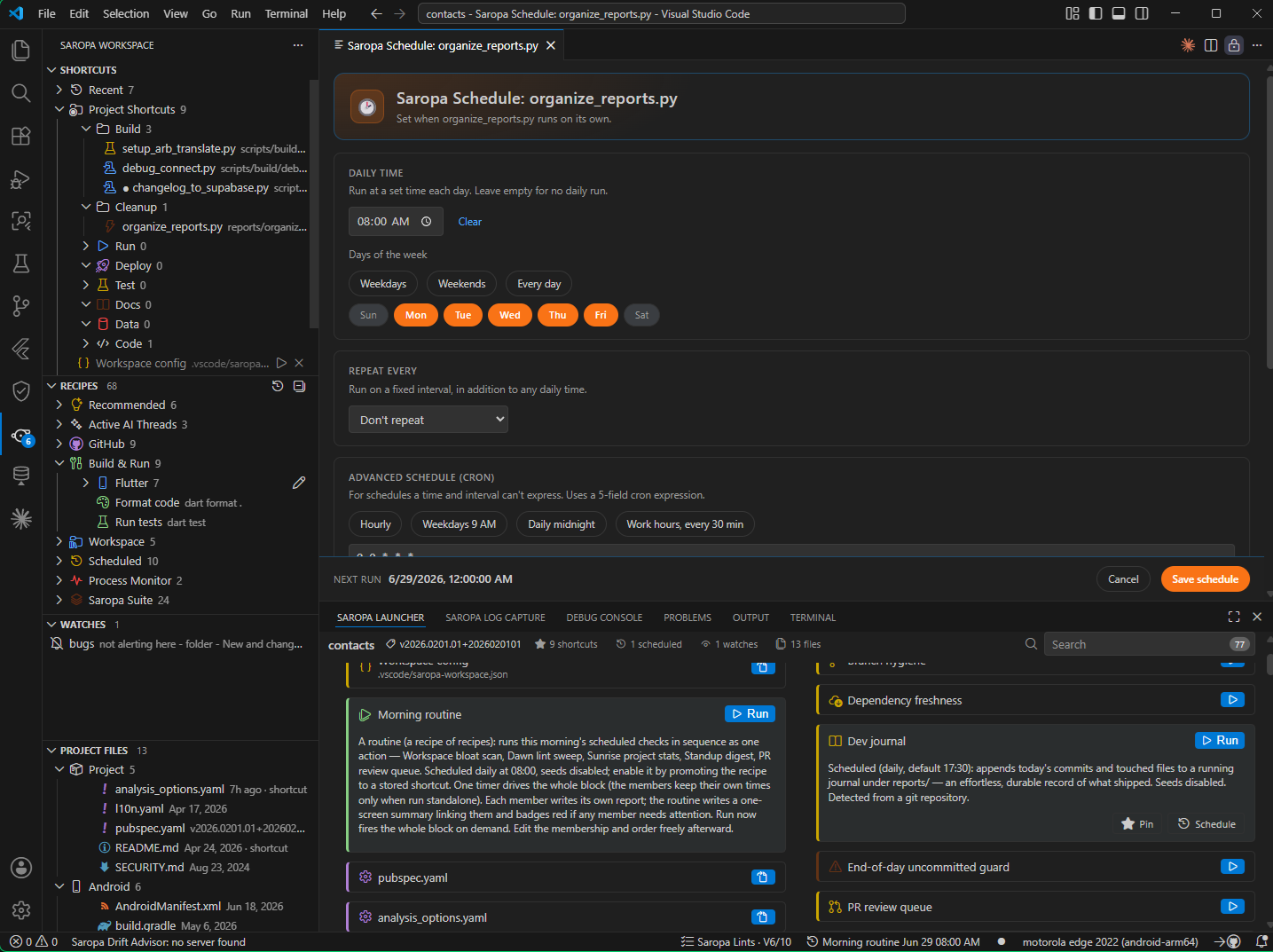
Run a pinned script at a time of day, on a repeating interval, on specific days of the week, every N minutes / hours / days, on a full cron expression, or when the workspace opens — for as long as VS Code is open. You rarely type cron: Configure Schedule includes a builder for the common patterns (every weekday at a time, the 1st of each month, every few minutes during work hours, every hour on the hour) and validates a hand-typed expression live before it can be saved. Scheduling runs in-process (it is not OS cron and does not survive a VS Code restart), which keeps it simple, project-local, and free of system configuration. A status-bar item shows the soonest upcoming scheduled run and reveals that pin when clicked, so what is queued is always visible.
The Schedule & Workflow Planner (Pins toolbar, or the Command Palette) adds a visual layer — a Day ruler, a Week calendar where each pin is a draggable block you retime by dragging, and a Workflow node graph where you wire pins to each other and to events. A pin can also chain off another pin or an event (build, publish, git commit, git push), run on save, run when another file changes (link it to a glob like **/*.graphql), run when idle, or wait on a prerequisite — see Chain & trigger runs.
🧩 Recipes
Saropa Workspace reads your project and offers auto-detected pins — never a blank "create" button. From your .git/config it surfaces one-click links to open the repo, the current branch, a pull request, Issues, CI, and Releases (GitHub, GitLab, or Bitbucket); from your manifests it offers run dev / test / lint / build / install, format code, clean build artifacts, upgrade dependencies, docker compose up, a database migrate, opening the entry point or all config files, open the README / CHANGELOG / LICENSE / contributing guide when they exist, and open commit history for the current branch — each detected for your ecosystem. When two or more Saropa Suite tools are present it adds Boot the Saropa suite, a one-action macro that brings them all up. Recipes appear in collapsed groups (GitHub, Build & Run, Workspace, Scheduled, Saropa Suite, and a Process Monitor group whose Snapshot the toolchain writes and opens a dated report of the current OS process table). Clicking a recipe shows what it does and which project file it was detected from; the same explanation appears on hover. Remove one and it stays gone; Restore Recipes brings them back; Promote to Pin turns a recipe into a stored, fully editable pin. Turn the groups off with saropaWorkspace.recipes.enabled.
Pins aren't limited to files: a pin's action can open a URL, run a shell command, invoke a VS Code command, run a macro (a sequence of steps), or run a routine (recipe pins back-to-back, including an auto-offered Morning routine). A Workspace bloat scan recipe catches the directory bloat that freezes VS Code on folder-open and offers one-click fixes. See Run recipes.
More capabilities
The full detail for every feature lives in the feature catalog. In brief:
- Organize — named groups with drag-and-drop, theme-aware icons and colors, and several named pin sets you switch between in a click.
- Fast access — a Run Pin… palette (recents first), one-off Run with Overrides…, and keybindings for the top pins.
- Recent & suggestions — a Recent group from on-device run history, plus offers to pin files you open often or keep pinned as a tab.
- Auto-pins & inference — common project files pinned on a fresh checkout, and the right run command inferred when you pin a
package.json / Makefile / shebang script.
- Import — bring in favorites from kdcro101, Bookmarks, Favorites Panel, Favorites Manager, and more.
- Project Files — a second view showing each key file's last-modified time and declared version.
- Live status — lint/test result badges and live file metrics on the pin, the Saropa Lints Code Health score, and the three-tab Saropa Dashboard (Processes / Analytics / Trends).
- Inspect before you run — Simulate Run, inline Peek, Diff Last Two Runs, and graceful handling of a deleted file.
- Tag, filter & focus — tag pins into modes, filter the tree by text and chips, and focus the Explorer on just your pins.
- Branch-linked pins — show a pin only on the git branch it belongs to.
- Pause, lock & expire — suspend a pin's automation, lock a file read-only on disk, or give a pin a self-removing expiry.
- One run at a time — single-instance runs by default, with an optional cross-process lock.
- Power tools — scratchpad, save/restore editor layouts,
.env profile switch, workspace boot sequence, pins from shell history, raw-JSON edit, and export/import.
- More pin kinds — line pins,
tail -f log follow, remote/external files, templates, shareable links, in-tree file management, and drop-a-file-to-run.
- Audio cues and an Active AI threads group.
Screenshots
Screenshots are coming. In the meantime, the Getting Started steps below walk through the full workflow.
Getting Started
- Install Saropa Workspace from the VS Code Marketplace.
- Open the Saropa Workspace view from the activity bar (the whistle icon).
- Pin a file:
- From an open editor — Pin Active File (Project) in the editor title context menu, or Pin Active File (Global).
- From the Explorer — right-click a file and choose Saropa: Pin File (Project) or Saropa: Pin File (Global).
- Single-click a pin to open the file. For a script, double-click (or use the inline play button) to run it.
On first use, common project files (pubspec.yaml, analysis_options.yaml) appear as auto-pins. Remove any you don't want — the removal sticks — or run Restore Auto-Pins to bring them back.
Usage
- Open a file — single-click its pin.
- Run a script — double-click its pin, click the inline play button, or use Run from the context menu.
- Configure a run — set the command prefix, CLI arguments, working directory, and environment variables per pin; choose the integrated terminal (default) or a background output channel.
- Schedule a script — give a pin a time of day and/or a repeating interval; it runs while VS Code is open.
- Rename / unpin — use the inline icons or the pin's context menu.
Project vs global pins
Pins are scoped, and the scope decides where they are stored:
| Scope |
Stored in |
Shared how |
| Project |
.vscode/saropa-workspace.json in the repository |
Commit the file — every teammate gets the same pins. |
| Global |
Your VS Code profile |
Synced across your machines via VS Code Settings Sync. |
Use Project pins for repo-specific entry points and scripts the whole team should share; use Global pins for personal shortcuts you want on every project.
Double-click vs inline run
VS Code tree views do not emit a native double-click event, so Saropa Workspace times two clicks itself. Within the window set by saropaWorkspace.doubleClickMs (default 400 ms), a second click runs the pinned script; a single click opens the file.
Click timing can feel different across machines and input devices, so there are two unambiguous ways to run that never depend on it:
- the inline play button on each pinned script, and
- Run in the pin's context menu.
If a double-click ever feels unreliable, use the play button — it is the deterministic run path.
Settings reference
All settings live under the saropaWorkspace.* namespace.
| Setting |
Default |
Description |
saropaWorkspace.autoPins.patterns |
["pubspec.yaml", "analysis_options.yaml"] |
Filenames or globs auto-pinned per project (removable). Removing an auto-pin keeps it removed. |
saropaWorkspace.doubleClickMs |
400 |
Window in milliseconds for detecting a double-click on a pin (range 150–1000). A second click within this window runs the file; a single click opens it. |
saropaWorkspace.defaultUseIntegratedTerminal |
true |
Run pinned scripts in the integrated terminal by default (so output is visible). When off, runs in the background and streams to an output channel. |
saropaWorkspace.terminalName |
"Saropa Workspace" |
Name of the reused integrated terminal for pinned scripts. |
saropaWorkspace.interpreterDefaults |
see below |
Default command prefix per file extension, used when a pin has no explicit command set. An explicit per-pin command always wins. |
saropaWorkspace.projectFiles.enabled |
true |
Show the Project Files view, listing files like README, CHANGELOG, and package manifests with their last-modified time and declared version. |
saropaWorkspace.projectFiles.files |
see docs |
Root-relative file names surfaced in the Project Files view. Each is shown only when it exists. |
saropaWorkspace.recipes.enabled |
true |
Show the auto-detected Recipes group derived from the project's own files. |
saropaWorkspace.aiContext.enabled |
true |
Scan the configured chat folders for active Claude/AI conversations and surface the most recent ones in an Active AI Threads group. |
saropaWorkspace.aiContext.claudeChatFolders |
[".claude", ".cline/tasks", "docs/chats"] |
Workspace-relative folders scanned (top level only) for chat transcripts (.md / .json); the 10 most recently modified are offered as pins. |
saropaWorkspace.telemetry.enabled |
true |
Keep a local, on-device run history (the Recent group and palette recents). Never transmitted. |
saropaWorkspace.suggestions.enabled |
true |
Offer to pin a file you open often but have not pinned. |
saropaWorkspace.suggestions.openThreshold |
6 |
How many opens of an unpinned file trigger the pin suggestion. |
saropaWorkspace.suggestPinnedTab.enabled |
true |
Offer to add a file to your pins when its editor tab has stayed pinned past the threshold. |
saropaWorkspace.suggestPinnedTab.afterHours |
2 |
How many hours a tab must stay pinned before the suggestion is offered. |
saropaWorkspace.sound.enabled |
false |
Play a short OS sound when a run starts, succeeds, or fails. Per-event toggles (onStart / onSuccess / onFailure) choose which moments chime. |
saropaWorkspace.previewMode.enabled |
false |
Open a single-clicked file in a transient Preview tab (reused as you click through pins) instead of a new permanent tab. |
saropaWorkspace.hygiene.* |
see docs |
Scope, mode, and size/file-count ceilings for the empty/oversized file scan and the workspace bloat scan; hygiene.roots extends the bloat scan across sibling projects. |
saropaWorkspace.processMonitor.heartbeat.enabled |
false |
Sample the toolchain on a timer into reports/process-trend.csv and warn when a tool crosses a RAM or process-count ceiling. |
Default interpreterDefaults map:
{
".py": "python",
".js": "node",
".mjs": "node",
".cjs": "node",
".ts": "ts-node",
".ps1": "pwsh -File",
".sh": "bash",
".rb": "ruby"
}
A pin's own command prefix always overrides the per-extension default.
Commands
The everyday commands, from the Command Palette and the view's context menus. Every command listed in the feature catalog is also searchable in the Command Palette (type "Saropa").
| Command |
What it does |
| Pin Active File (Project) / (Global) |
Pin the file in the active editor to project or global scope. |
| Open / Run |
Open a pinned file (single-click); execute a pinned script (double-click / play button). |
| Run Pin… / Run Pin with Overrides… |
Quick-pick any pin (recents first); run one with one-off args / cwd / env. |
| Configure Run… |
Edit command prefix, args, cwd, env, run location, run-on-save, depends-on, and concurrency. |
| Configure Schedule… / Configure Triggers… |
Set time / days / interval / cron / run-on-open; chain a pin off another pin or an event. |
| Run This Pin When a File Changes… |
Link a pin to files or globs (e.g. **/*.graphql); saving a match runs the pin in the background. |
| Open Schedule & Workflow Planner / Open Saropa Dashboard |
The visual Day / Week / Workflow planner; the Processes / Analytics / Trends dashboard. |
| Set Icon & Color… / New Group / Rename / Unpin |
Customize a pin; create a group; rename; remove. |
| Promote to Pin / Restore Recipes / Restore Auto-Pins |
Store a recipe as a pin; bring removed recipes or auto-pins back. |
| Import Favorites… / Scan Sibling Projects for Favorites… |
Import other extensions' favorites; import from sibling projects. |
| Show Output / Refresh / Copy Path |
Reveal the output channel; reload a view; copy a file's full path. |
Many more pin-level actions (tag, filter, branch link, pause, lock, expiry, simulate, peek, diff, live metric, the file-manager actions, pin sets, export/import, and the workspace power tools) live on each pin's right-click menu and in the feature catalog.
Documentation
| Guide |
Covers |
| Feature catalog |
The full detail behind every feature in the overview above. |
| FAQ |
Common questions — scopes, storage, double-click, the views. |
| Project Files view |
The last-modified / version overview and how to configure it. |
| Run recipes |
Run configurations, interpreter defaults, and placeholder tokens. |
| Scheduling |
Daily times, intervals, and what a scheduled run does. |
| Keybindings |
Binding shortcuts to run pins. |
| Pin icons and colors |
Customizing a pin's tree icon and color. |
| Privacy |
What is stored, where, and why nothing is transmitted. |
| Architecture |
How the extension is put together (for contributors). |
Roadmap
Planned work and the current backlog live in ROADMAP.md.
Contributing
Issues and pull requests are welcome. See CONTRIBUTING.md to get started.
Building from source
The extension lives in the extension/ folder.
cd extension
npm install
npm run build # one-off bundle
npm run watch # rebuild on change
Press F5 in VS Code to launch the Extension Development Host with the extension loaded.
Part of the Saropa Suite
Saropa Workspace is part of the Saropa Suite — a developer toolkit for fortifying your Flutter and Dart workflow.
| Extension |
Purpose |
| Saropa Workspace |
Pin files and scripts as favorites; single-click open, double-click run, scheduling. |
| Saropa Lints |
Strict behavioral and security static analysis for Flutter & Dart. |
| Saropa Log Capture |
Persistent, searchable runtime logging inside VS Code. |
| Saropa Drift Advisor |
Deep SQLite/Drift database diagnostics and query profiling. |
Install the Saropa Suite to get the full toolkit in one click.
Email: dev@saropa.com
License: MIT — use it however you like.
GitHub | Issues | Saropa Suite | Saropa