LectorGPT ✍️


LectorGPT is a professional-grade writing assistant for Visual Studio Code.
It empowers authors and creative writers to refine their prose using world-class
AI models from OpenAI and Google Gemini.
👀 Demo
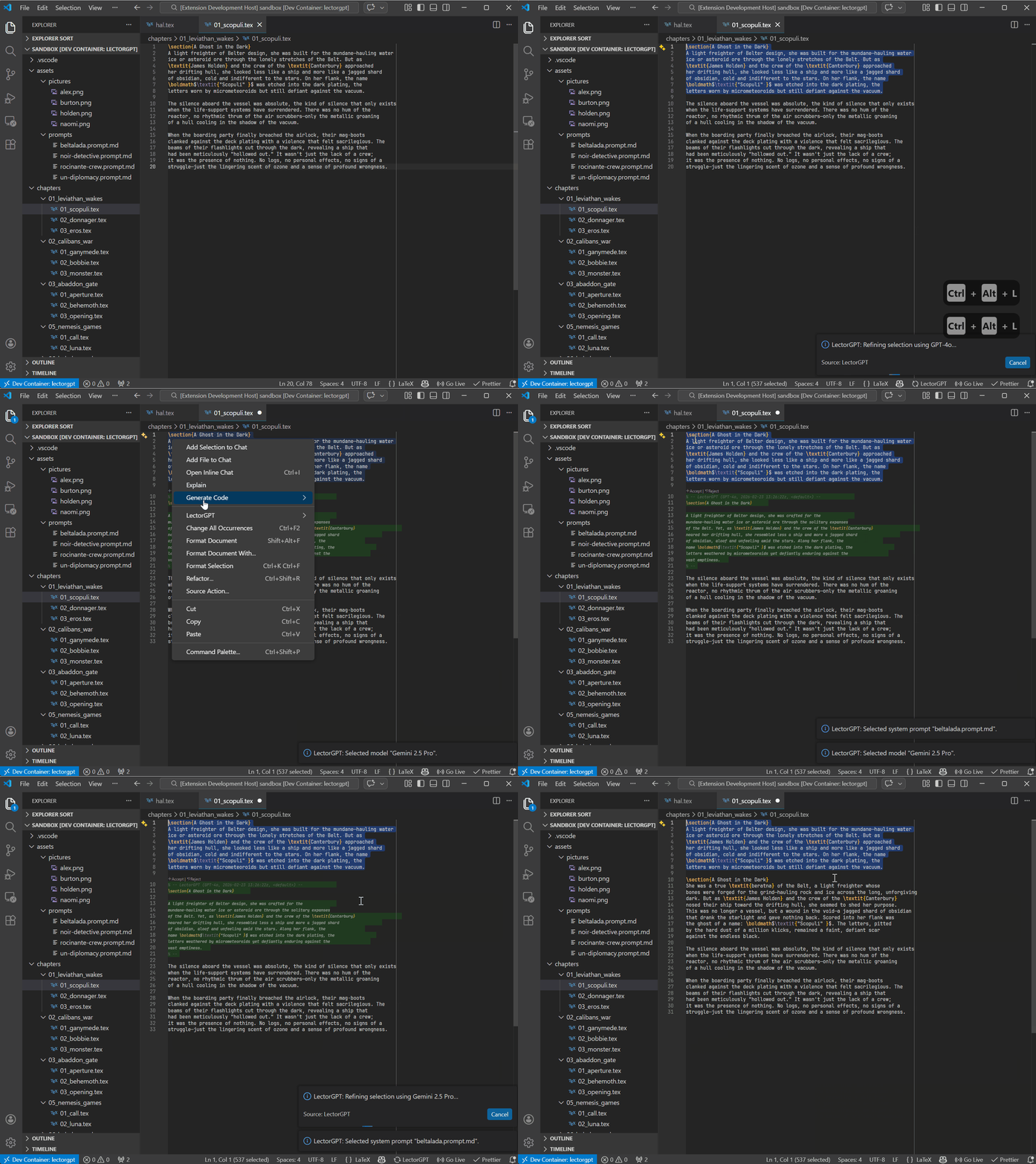
Refining creative prose directly within the editor using the
Refine Active Selection command.
✨ Features
- Dual-Vendor Integration: Seamlessly switch between OpenAI and Google
Gemini.
- Contextual Refinement: Enhance your active text selections with a single
command.
- Granular Model Control: Select specific models (e.g., GPT-4o, Gemini 1.5
Pro) to balance speed and creativity.
- Customizable Personas: Choose your system prompt source to define the
"voice" of your digital editor.
- Secure Configuration: Manage your API keys safely through the native VS
Code command palette.
- Secure Configuration: Manage your API keys safely through the native VS
Code command palette. Keys are stored encrypted using the VS Code
SecretStorage API.
- Fully Customizable System Prompts: Beyond presets, you can define your own
global system prompts to transform LectorGPT into a translator, a technical
reviewer, or a specialized style editor.
🎓 Academic & LaTeX Focus
LectorGPT is designed with the needs of researchers and technical writers in
mind. Unlike generic writing tools, it understands the importance of maintaining
document structure:
- Preserve Commands: Optimized to respect LaTeX commands like
\cite{...},
\ref{...}, and environment delimiters.
- Mathematical Integrity: Refine the surrounding prose without mangling your
inline or block equations.
- Academic Tone: Use specialized system prompts to shift from "creative" to
"formal-academic" styles instantly.
- Perfect Companion: Designed to work seamlessly alongside
LaTeX Workshop.
Tip: When using the Refine Active Selection command on LaTeX snippets,
LectorGPT focuses on improving your flow and grammar while keeping your
technical syntax intact.
⚠️ Technical Note on LaTeX & Models
LectorGPT uses advanced system prompts to protect LaTeX commands (like \cite,
\ref, or math environments). However, AI performance varies by model:
- Recommended: Use GPT-4o or Gemini 2.5 Pro for complex LaTeX
documents. These models have a high "syntax-awareness" and reliably preserve
your structure.
- Legacy Models: Older or smaller models (like GPT-3.5 Turbo) may
occasionally alter LaTeX commands. We recommend reviewing changes or using
them primarily for plain prose.
- Pro Tip: Always select smaller text blocks for refinement to ensure the
highest precision in your document's structure.
⚙️ Dynamic System Prompts (.prompt.md)
LectorGPT offers unprecedented control through project-specific prompt files.
Instead of a single static setting, you can create multiple "personas" directly
in your workspace.
- File-Based: Create files ending in
.prompt.md anywhere in your project.
- Markdown Ready: Write your instructions using standard Markdown. The file
name (e.g.,
academic-review.prompt.md) will appear in the selection menu.
- Easy Switching: Use
Ctrl+L+ Ctrl+P to instantly toggle between your
custom prompts and the default settings.
Example editor.prompt.md:
"Act as a senior editor for a sci-fi novel. Enhance the atmosphere and sensory
details while maintaining a dark, brooding tone."
🚀 Getting Started
- Install the Extension: Find LectorGPT in the VS Code Marketplace.
- Register your API Key: Open the Command Palette (
Ctrl+Shift+P /
Cmd+Shift+P) and run: LectorGPT: Register New API Key
- Configure your Setup:
- Run
LectorGPT: Select Active Vendor Setup to pick your provider.
- Run
LectorGPT: Select Active Model to choose your AI engine.
- Refine your Prose: Highlight any text in your editor and execute:
LectorGPT: Refine Active Selection
🛠 Commands
| Command Title |
Command ID |
| Refine Active Selection |
lectorgpt.refine-active-selection |
| Select Vendor Setup |
lectorgpt.select-active-vendors |
| Select Language Model |
lectorgpt.select-active-model |
| Register New API Key |
lectorgpt.register-new-api-key |
| Unregister API Key |
lectorgpt.unregister-api-key |
| Select System Prompt |
lectorgpt.select-active-system-prompt-source |
⌨️ Keyboard Shortcuts
For maximum productivity, LectorGPT uses an ergonomic "Right-Hand-Chord". Press
Ctrl+L followed by a second key:
Shortcut,Action Ctrl+L + Ctrl+L,Lector selected text Ctrl+L + Ctrl+M,Select
active Model Ctrl+L + Ctrl+P,Select system Prompt source
| Shortcut |
Action |
Ctrl+Alt+L + Ctrl+Alt+L |
Lector selected text |
Ctrl+Alt+L + Ctrl+Alt+O |
Select active Model |
Ctrl+Alt+L + Ctrl+Alt+P |
Select system Prompt source |
⚙️ Requirements
📝 License
This project is licensed under the MIT License.
🔗 Links
Developed with ❤️ for creative writers.

