rein for VS Code




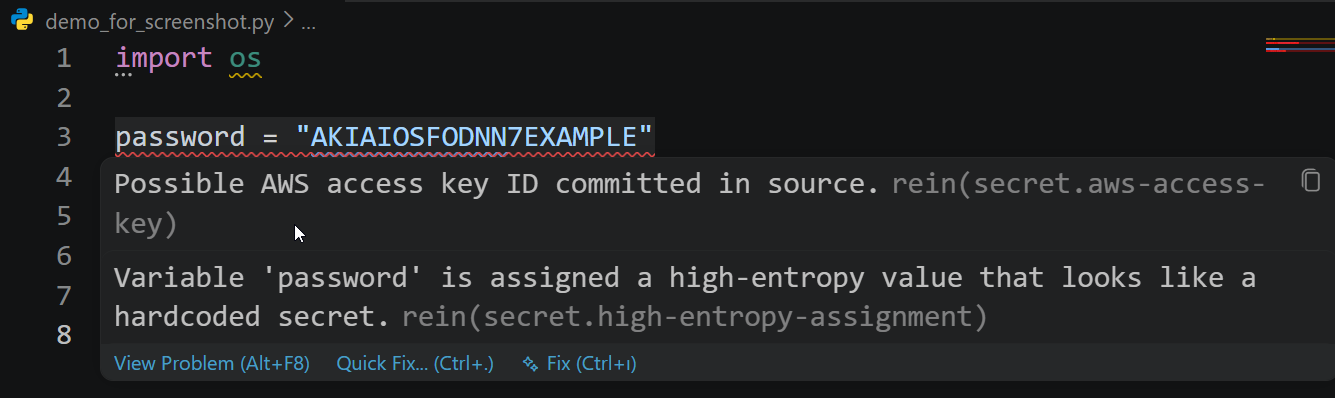
You write Python with Copilot, Cursor, and other AI assistants. rein checks what
they produce - leaked secrets, unsafe-code patterns, and imports that do not
resolve (a common AI hallucination) - inline in your files and in the AI chat
itself, before you commit or run. It is deterministic and makes no network or
LLM calls: a reproducible gate, not another model second-guessing the first.
Ask @rein review in the chat panel, or let a coding agent call the rein_review
tool on the code it writes, and rein checks it the same way it checks a file.
This extension is a thin client over the rein engine. It
shells out to the local rein binary and renders exactly what rein reports on
the command line or in CI. No detection logic lives in the extension.
Requirements
The engine is not bundled. Install it once:
pipx install rein-engine
If rein is not on your PATH, set rein.path to its location. When the engine
is absent the extension stays quiet and offers the install command; it never
blocks the editor.
What it does
- Reviews Python as you work - on open and on save (configurable), and on
demand via
rein: Review Current File - so AI-written code is checked before
it lands in a commit or runs.
- Flags leaked secrets, unsafe-code patterns, lint issues, and unresolved or
hallucinated imports, mapped to editor diagnostics by severity: CRITICAL and
HIGH to Error, MEDIUM to Warning, LOW to Information, INFO to Hint. A
status-bar item shows the active file's count.
- Gates the staged git diff and the Source Control commit message on demand, so
generated code is checked before it ships.
- Reviews code in the AI conversation:
@rein review in the chat panel, and a
rein_review tool (#rein) the agent can call on code it writes.
- Fails open: a missing, slow, or failing engine yields no diagnostics rather
than an error.
Commands
| Command |
Action |
rein: Review Current File |
Review the active Python file. |
rein: Review Workspace |
Review every Python file in the workspace. |
rein: Review Staged Changes |
Review added lines in the staged git diff. |
rein: Check Commit Message |
Check the Source Control commit message. |
rein: Show Log |
Open the rein output channel. |
Beyond these palette commands, @rein review works in the chat panel (below).
In the AI chat
These need a chat host (GitHub Copilot Chat), VS Code 1.95 or newer, and
rein-engine 0.3.2 or newer.
@rein review - in the Chat view, ask @rein review to review code in the
conversation. It reviews, in priority order, a fenced code block in your
message, the editor selection, or the current file, and replies with rein's
findings (rule, severity, line). It reviews the code you give it; it does not
claim to detect whether code was written by an AI.#rein tool - in Copilot agent mode, the agent can call the rein_review
tool (referenced as #rein) to check code it just wrote against rein before
finalizing. Same engine, same findings.
Settings
| Setting |
Default |
Description |
rein.enable |
true |
Enable diagnostics. |
rein.path |
"" |
Path to rein (empty searches PATH). |
rein.run |
onSaveAndOpen |
When to review: onSaveAndOpen, onSave, or manual. |
rein.explain |
true |
Include remediation guidance (--explain). |
rein.severityThreshold |
info |
Hide findings below this severity. |
rein.extraArgs |
[] |
Extra arguments for rein review, e.g. ["--bandit"]. |
rein.baseline |
"" |
A baseline file to suppress known findings. |
rein.configPath |
"" |
A .rein.toml config file. |
rein.maxFileSizeKB |
1024 |
Skip files larger than this. |
How it works
The extension calls rein review --format json for files and the workspace,
rein review --diff for the staged diff, rein review --stdin for the chat
participant and the agent tool, and rein commit-check for the commit message,
then renders the JSON findings as diagnostics or chat replies. Because every
verdict comes from the engine, the editor shows exactly what rein would report
on the command line or in CI.
Links
License
Apache-2.0.

