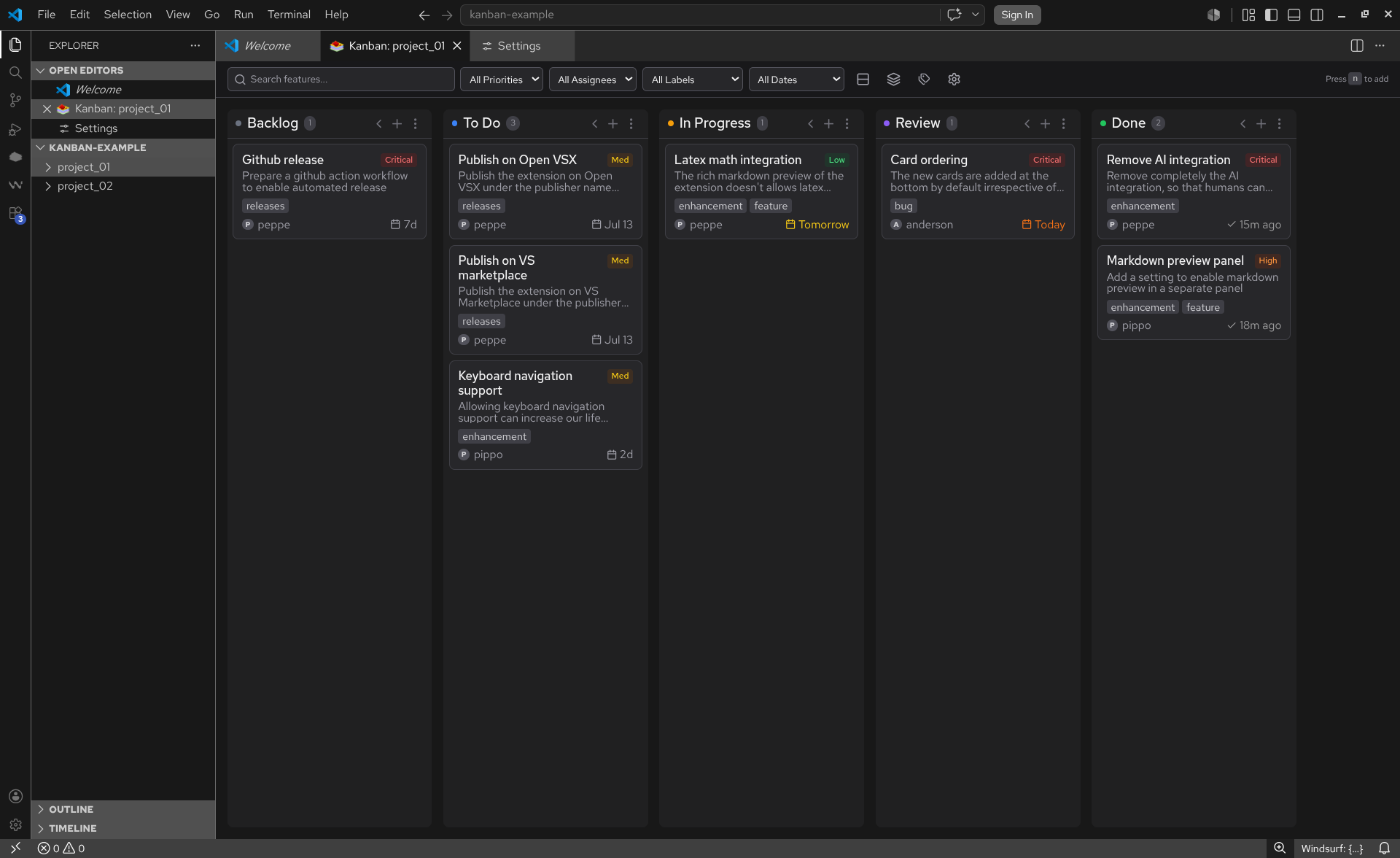
Kanban Sauce is a powerful, privacy-first project and notes management extension for VS Code, similar to tools like Trello and Notion but built directly into your editor. It stores your tasks, notes, and ideas as simple, version-controllable Markdown files with YAML frontmatter. No external accounts, no cloud dependencies, no telemetry - just pure, local productivity that integrates seamlessly with your workflow.
Quick Start
- Install: Search for "Kanban Sauce" in the VS Code Extensions view (VS Marketplace / Open VSX).
- Open: Run
Open Kanban Board from the command palette (Cmd+Shift+P or Ctrl+Shift+P), or right-click any folder in your file explorer and choose Open as Kanban Board.
- Create: Click
+ New Feature in the sidebar, or use the + sign next to column headers to add a new card.
Key Features
Dynamic, Folder-Focused Boards: Kanban Sauce isn't restricted to a single hidden folder. You can open any folder in your workspace as an independent board. Files are saved precisely where you want them, organized neatly into subfolders by their status or category.
Multiple Concurrent Boards & Sidebar Tracking: Open two or more boards side-by-side in separate editor tabs. The Available Boards sidebar view tracks all known boards in your workspace, letting you jump between them with a single click. It automatically updates when you switch tabs and includes right-click options to safely rename or remove boards from your history.
Fully Customizable, Board-Specific Columns: Because columns are fully customizable, you can use Kanban Sauce for anything from agile development to personal note-taking or content planning. Customize column IDs, names, and colors on a per-board basis using the intuitive Column Manager UI.
Board & Workflow:
- Drag & Drop: Easily move cards between and within columns.
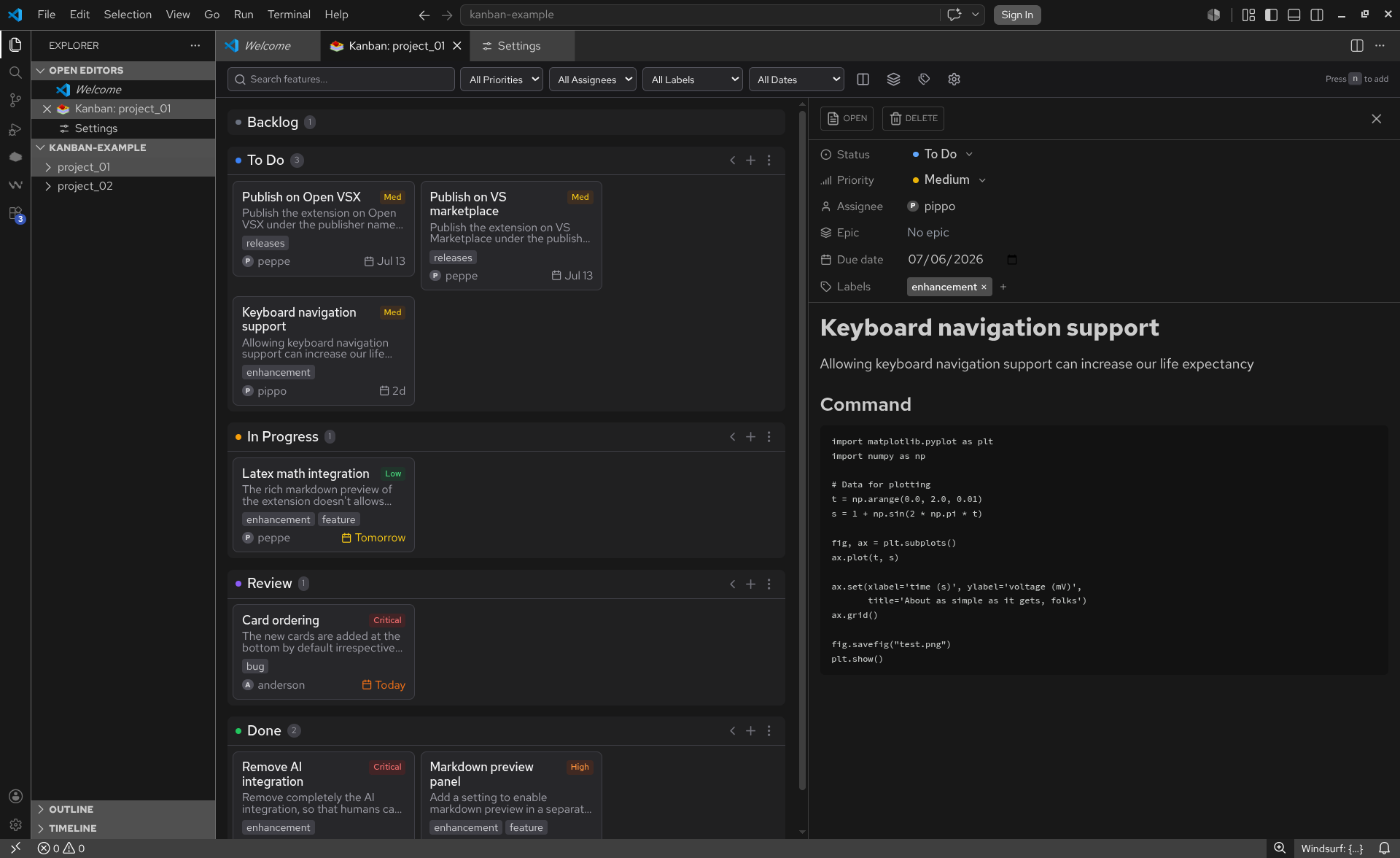
- Split-View Editor: Keep the board on the left while editing a card inline on the right.
- Flexible Layouts: Supports horizontal and vertical layouts, and a compact mode for dense boards.
- Keyboard Shortcuts:
N (new feature), Esc (close dialogs), Cmd/Ctrl+Enter (submit).
- Auto-Sync: Auto-saves your changes as you type, and auto-refreshes the board when files are modified externally.
Cards as Markdown Files: Each card on your board is just a standard Markdown file with YAML frontmatter. Edit them in the extension's rich-text editor, or open them in VS Code's native text editor.
- Priority Badge: Visual color-coded badges for Critical, High, Medium, Low.
- Smart Due Dates: Easily set and read relative dates like "Overdue," "Today," "Tomorrow," or "+5d".
- Rich Metadata: Support for assignees, multi-labels, epic grouping, and automatic timestamps (
created, modified, completedAt).
Advanced Search, Filtering & Sorting: Find what you need instantly.
- Full-text search across card content, IDs, assignees, and labels.
- Native sort capabilities for boards and cards (by name, last modified, ascending/descending) straight from the Activity Bar.
- Dynamic column filtering in the sidebar to only show cards in specific stages or categories.
Configuration
Tailor Kanban Sauce to your exact liking. Settings can be found under kanban-sauce.* in your VS Code preferences.
| Setting |
Default |
Description |
filenamePattern |
name-date |
Filename pattern for new cards (name-date, date-name, name-datetime, datetime-name) |
defaultPriority |
medium |
Default priority for new features |
defaultStatus |
backlog |
Default status for new features |
columns |
see below |
Customize column IDs, names, and colors |
showPriorityBadges |
true |
Show priority badges on cards |
showAssignee |
true |
Show assignee on cards |
showDueDate |
true |
Show due date on cards |
showLabels |
true |
Show labels on cards and in editors |
showFileName |
false |
Show the source markdown filename on cards |
showEpic |
true |
Show epic (parent grouping) on cards and in editors |
compactMode |
false |
Use compact card layout |
addNewCardsToTop |
false |
Add new cards to the top of the column |
markdownEditorMode |
false |
Open files in VS Code's native text editor instead of the inline rich-text editor |
fontSizeColumnHeader |
16px |
Font size for column headers in the Kanban board (e.g. 16px, 1.1rem) |
fontSizeCardTitle |
14px |
Font size for card titles in the Kanban board (e.g. 14px, 1rem) |
fontSizeCardDescription |
14px |
Font size for the feature card body/description text in the Kanban board (e.g. 14px, 0.9rem) |
fontSizeCardLabel |
12px |
Font size for custom label tags on cards (e.g. 12px, 0.8rem) |
fontSizeCardMeta |
13px |
Font size for card metadata like assignee, due date, epic, filename, and priority (e.g. 13px, 0.8rem) |
fontSizeEditorHeader |
18px |
Font size for headings in the markdown editor/preview panel (e.g. 18px, 1.5rem) |
fontSizeEditorBody |
16px |
Font size for body text, lists, and tables in the editor/preview panel (e.g. 16px, 1.1rem) |
fontSizeEditorMeta |
14px |
Font size for elements in the metadata block above the editor/preview (e.g. 14px, 0.9rem) |
language |
auto |
Language for the Kanban Sauce UI (auto, en - English, es - Español, pt - Português) |
hideScrollbar |
false |
Hide scrollbars in the Kanban board (scrolling still works) |
Default columns:
[
  { "id": "backlog", "name": "Backlog", "color": "#6b7280" },
  { "id": "todo", "name": "To Do", "color": "#3b82f6" },
  { "id": "in-progress", "name": "In Progress", "color": "#f59e0b" },
  { "id": "review", "name": "Review", "color": "#8b5cf6" },
  { "id": "done", "name": "Done", "color": "#22c55e" }
]
You can override the columns configuration/list for a specific board easily from the Kanban board UI by clicking the Manage Columns button in the top toolbar. This will automatically create or update a .kanbansauce file (in JSON format) at the root of the board directory. This allows you to have different column configurations for different boards, and since the file lives in the board folder, it is version-controllable and easily reproducible.
Example .kanbansauce file:
{
  "columns": [
    { "id": "backlog", "name": "Backlog", "color": "#6b7280" },
    { "id": "in-progress", "name": "In Progress", "color": "#f59e0b" },
    { "id": "done", "name": "Done", "color": "#22c55e" }
  ]
}
Because your data is yours, a typical Kanban Sauce card looks like this on disk:
---
id: "remove-ai-integration-2026-07-04"
status: "done"
priority: "critical"
assignee: "peppe"
epic: null
dueDate: "2026-07-04"
created: "2026-07-04T09:27:55.052Z"
modified: "2026-07-04T09:27:55.052Z"
completedAt: "2026-07-04T09:27:55.052Z"
labels: ["enhancement"]
order: "Zz"
---
# Remove AI integration

Remove completely the AI integration, so that humans can waste a bit more time
Installation
Choose your preferred method:
- VS Code Marketplace: Install from the Marketplace directly.
- Open VSX: Great for VSCodium and Cursor. Install from Open VSX.
- Manual (VSIX): Download the
.vsix from our Releases, open VS Code, go to Extensions > ... > Install from VSIX.
Development
Want to contribute? Contributions are welcome!
Prerequisites: Node.js 18+ and pnpm.
pnpm install       # Install dependencies
pnpm dev           # Start development (watch mode)
pnpm build         # Build for production
pnpm test          # Run unit/component tests
See CONTRIBUTING.md for deeper architecture and testing details.
Tech Stack
Extension Host: TypeScript, VS Code API, esbuild
Webview UI: React 18, Vite, Tailwind CSS, Zustand, Tiptap
Acknowledgements
Kanban Sauce is a proud, heavily-evolved fork of Kanban Markdown. We owe a huge thanks to the original contributors:
@LachyFS, @luciopaiva, @ungive, @hodanli, and @SuperbDotHub.
Kanban Sauce builds on their fantastic foundation to offer a more dynamic, multi-board, and entirely private experience.
License
Released under the MIT License.