Robotron: Go Live
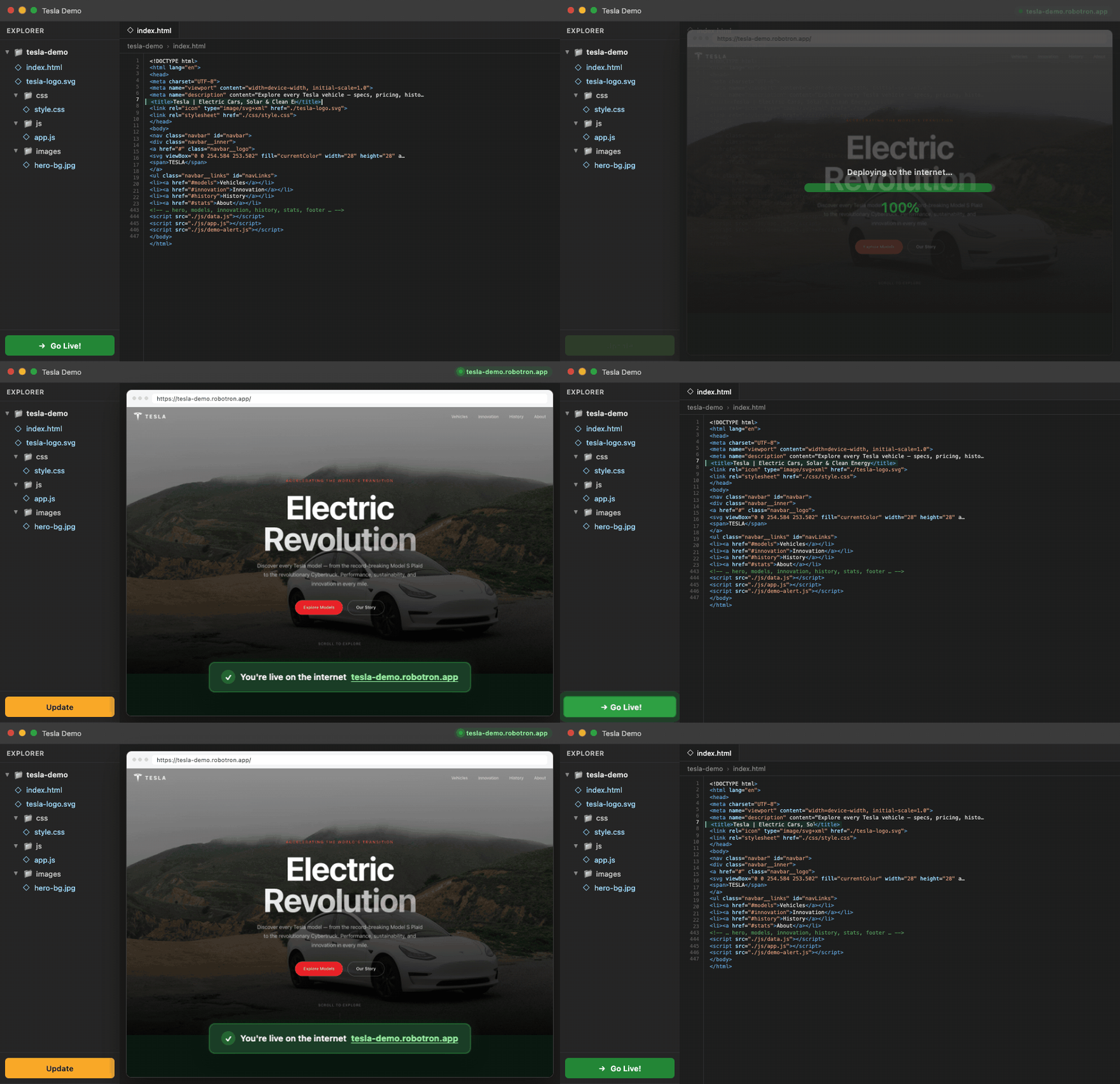
Deploy front-end and back-end apps to a live HTTPS website with one click.
Robotron is the easiest way to publish projects built with Cursor, VS Code, ChatGPT, Claude, Lovable, Bolt, Windsurf, and other AI coding tools.
No servers. No DevOps. No deployment knowledge required.
Front-end or back-end — both free
|
Static sites |
Back-end apps |
| Examples |
HTML, CSS, JS, landing pages |
PHP, Laravel, Python, Django, WordPress, PrestaShop |
| How it runs |
Served directly over HTTPS |
Isolated Docker container with the exact PHP or Python version your project needs |
| Database |
Not required |
MySQL provisioned automatically when your stack needs it |
| From the editor |
Click Go Live! |
Same one click — Robotron detects your stack |
Robotron scans your project, picks the right runtime (for example PHP 8.2 vs 8.3, Python 3.11 vs 3.12), builds a container image, and reverse-proxies your live URL to it. You do not configure Docker, Apache, or PHP-FPM yourself.
What you get
- Free hosting — front-end and back-end extension deploys
- 1-click deploy from VS Code or Cursor
- Live HTTPS website in minutes
- Free subdomain included
- Docker back-end runtime — pinned PHP & Python versions, Composer, extensions, and dependencies baked in
- MySQL when Laravel, Django, WordPress, PrestaShop, or similar needs a database
- Use your own TLD domain for free — connect a domain you already own, or register a new one through Robotron. Popular examples:
.com, .net, .org, .io, .app, .dev, .ai, .co, .xyz, .shop, .store, .me, .tech, .online — any!
- Works directly from VS Code and Cursor
- Perfect for AI-generated and vibe-coded apps
Supported stacks
Launch without wrestling with server versions:
- PHP — plain PHP apps and APIs
- Laravel — including Vite builds when needed
- Python — Flask, FastAPI, and similar
- Django — with database migrations on deploy
- WordPress — classic PHP CMS
- PrestaShop — e-commerce on PHP
- Static HTML/CSS/JS — landing pages and prototypes
If your project uses composer.json, requirements.txt, manage.py, or common CMS layouts, Robotron routes it to the right Docker image and runtime.
Robotron vs Vercel & Netlify
|
Robotron |
Vercel |
Netlify |
| One-click Deploy Extension |
✅ |
❌ |
❌ |
| PHP / Laravel / WordPress / PrestaShop |
✅ |
⚠️ Limited |
⚠️ Limited |
| Python / Django in Docker |
✅ |
⚠️ Often |
⚠️ Often |
| Account not needed to start |
✅ |
❌ |
❌ |
| No terminal commands needed |
✅ |
⚠️ Often |
⚠️ Often |
| Public URL |
✅ |
✅ |
✅ |
How it works
- Install the extension
- Open your project (static site or back-end app)
- Click Go Live!
- Robotron provisions hosting, builds your Docker container when needed, and your app is live
Ideal for
- Vibe coders
- Indie hackers
- Founders
- Designers
- Students
- Anyone building with AI — whether a landing page or a full Laravel / Django app
Demo sites
Generated with Cursor and launched with Robotron: Go Live!
FAQ
More answers: Q & A on robotron.app
Got a blank page instead of the website?
After Go Live!, deploy can succeed while the live URL still shows a blank page or directory listing. Robotron auto-detects back-end apps (PHP/Laravel, Python/Django, WordPress, etc.) from markers like composer.json or manage.py at the project root, and uses static Apache hosting for everything else.
Back-end app? Open the app root folder — the one that contains composer.json, artisan, manage.py, requirements.txt, or wp-config.php — not a parent or subfolder. Click Go Live! again; Robotron deploys back-end stacks to Docker.
Static front-end or still stuck? Send this prompt to your AI editor:
Prepare this project for Robotron Go Live (VS Code/Cursor).

Back-end (Laravel/PHP, Python/Django, WordPress, PrestaShop): keep normal app layout at this folder root (composer.json, artisan, manage.py, requirements.txt, or wp-config.php). Robotron auto-detects and deploys to Docker — do not convert to static HTML.

Static front-end: put index.html at the project root with css/, js/, and images/ beside it; relative asset paths (./css/style.css); ship ready-to-serve files — Robotron static hosting does not run npm install or npm run build.

Do not start a new project. Fix whatever causes a blank page or directory listing after deploy.
Support
License
MIT — free for commercial and non-commercial use. See the LICENSE file included in the extension package.

