MK4
Markdown but a little bit better !



Combine the simplicity of Markdown with the typographic excellence of Typst.
Write your engineering reports, technical documentation, and scientific articles in standard Markdown while instantly generating high-quality PDFs.
French version available: README.fr.md
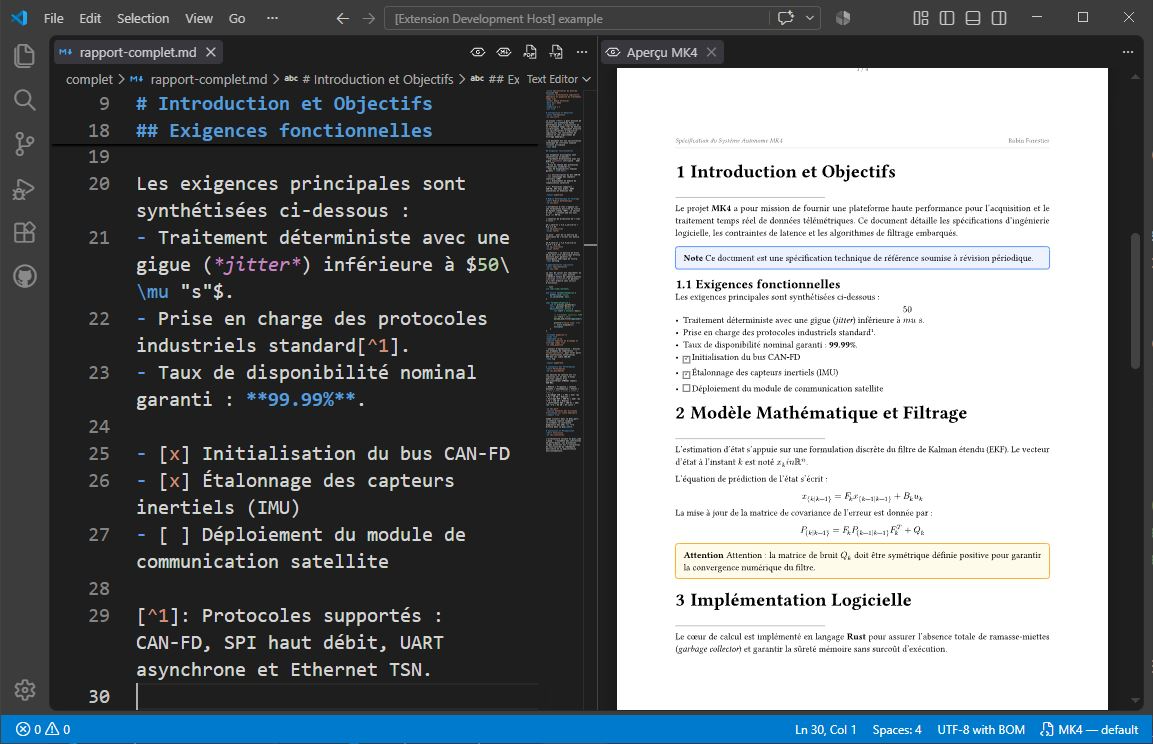 Live Markdown editing on the left, instant Typst vector preview with bidirectional scroll sync on the right.
Why MK4 ?
Classic Markdown is universal and fast to write, but falls short when it comes to producing polished PDFs (page management, headers, captions, figures). Typst offers a modern and ultra-fast typographic engine, but requires a dedicated programming syntax and moves away from Markdown's portability.
MK4 offers a balanced approach: keep readable Markdown files that are compatible with your usual tools (Git, Obsidian, static site generators), while harnessing the power of Typst through lightweight annotations (:key value).
Comparison table
| Criteria |
Standard Markdown (+ HTML/CSS) |
Native Typst |
MK4 (Markdown + Typst) |
| Raw source readability |
High (plain text) |
Medium (functional syntax) |
High (standard Markdown) |
| PDF typographic quality |
Basic (browser rendering) |
Excellent (vector engine) |
Excellent (native Typst engine) |
| Layout control |
Limited or via complex HTML/CSS |
Full but verbose |
Simple and semantic via annotations |
| Callouts & Alert blocks |
Unstyled blockquotes |
Manual #rect() functions |
Semantic (> text + :type warning) |
| Advanced code blocks |
No native highlighting |
Advanced #show raw config |
Header, numbering and targeted highlighting |
| Document portability |
Universal |
Proprietary .typ format |
100% portable .md files |
| Learning curve |
Immediate |
Requires learning a language |
Immediate |
Syntax comparison
1. Images: sizing, caption and alignment
View code comparison
Standard Markdown (requires intrusive HTML)
<figure align="center">
  <img src="https://github.com/Forestierr/mk4/raw/HEAD/logo.png" width="50%" />
  <figcaption>MK4 Logo</figcaption>
</figure>
Native Typst (programmatic syntax)
#align(center)[
  #figure(
    image("logo.png", width: 50%),
    caption: [MK4 Logo]
  )
]
MK4 (natural Markdown + targeted annotations)

:width 50%
:align center
:caption MK4 Logo
MK4 advantage: You keep the standard Markdown image syntax () without cluttering the document with HTML markup.
2. Warning blocks (Callouts / Admonitions)
View code comparison
Standard Markdown (monochrome blockquote)
> **Warning**
>
> Check the board power supply before flashing.
Native Typst (manually styled box)
#rect(
  fill: rgb("fffbeb"),
  stroke: rgb("f59e0b"),
  radius: 4pt,
  width: 100%,
  inset: 10pt
)[
  *Warning*
  Check the board power supply before flashing.
]
MK4 (blockquote with semantic typing)
> Check the board power supply before flashing.
:type warning
MK4 advantage: A simple Markdown blockquote is translated into a professional colored box (types: note, info, tip, warning, error).
3. Code blocks: filename, line numbers and highlighting
View code comparison
Standard Markdown (raw, non-configurable block)
```rust
fn main() {
    println!("Hello Typst!");
}
```
Native Typst (grid definitions and context rules)
#rect(fill: luma(250), stroke: luma(200), radius: 4pt, width: 100%)[
  #rect(fill: luma(230), width: 100%, inset: 6pt)[*main.rs*]
  #show raw.where(block: true): it => grid(
    columns: (auto, 1fr),
    gutter: 1em,
    ..it.lines.enumerate().map(...)
  )
  ```rust
  fn main() {
      println!("Hello Typst!");
  }
  ```
]
MK4 (standard block enriched with attributes)
```rust
fn main() {
    println!("Hello Typst!");
}
```
:filename main.rs
:lines true
:highlight 2
MK4 advantage: You get a styled block with a file header, line numbering and precise highlighting without writing any Typst script.
Key features
- Live Preview: Instant SVG vector rendering recalculated on every keystroke with incremental DOM updates.
- Scroll synchronization: The preview panel and the editor stay perfectly in sync in both directions.
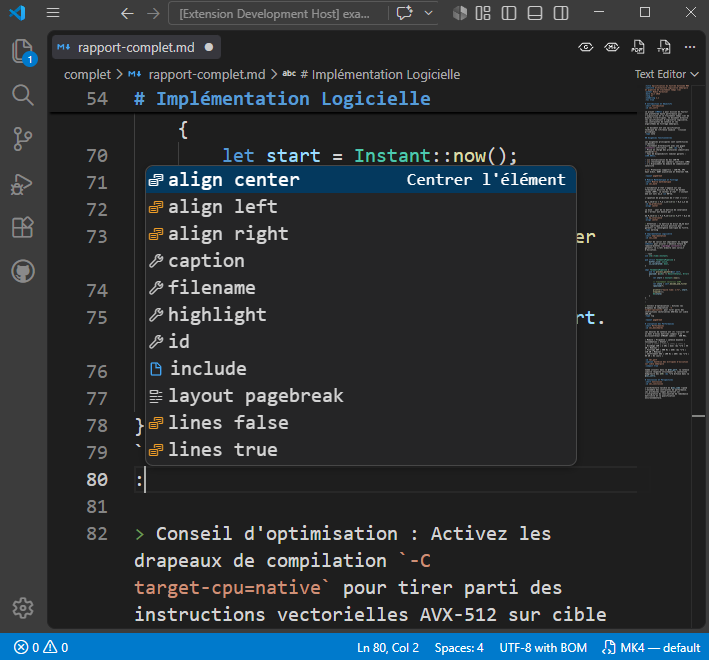
- Smart autocomplete: Assisted input for annotations as soon as you type the
: prefix under an element.
- Math formulas: Native conversion of inline equations (
$E=mc^2$) and display blocks ($$\int_0^\infty f(x) dx$$).
- Advanced tables: Support for GFM tables with column alignment, compact mode and captions.
- Customizable themes: Inject full Typst templates (
:theme ./report.typ) to define margins, fonts, headers and footers.
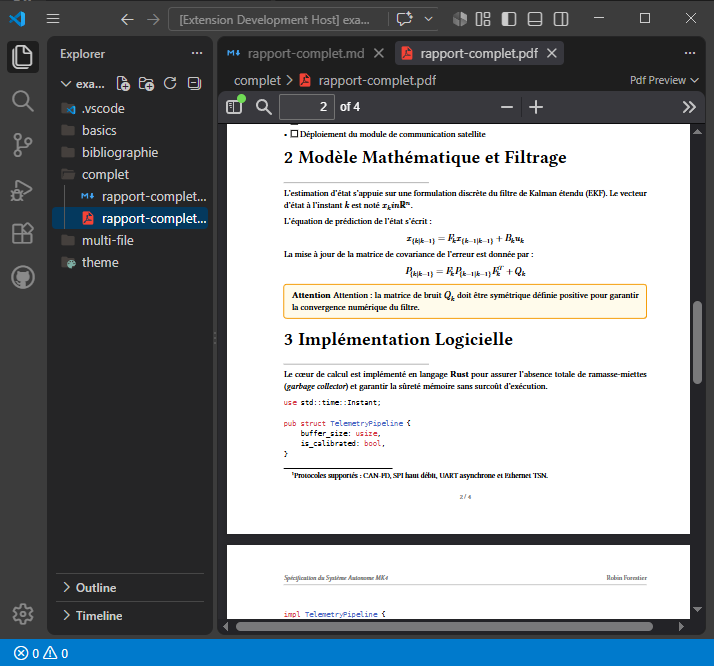
- Multiple export formats: Direct generation of the final high-resolution PDF or the
.typ source file.
| Smart autocomplete |
PDF Export & Themes |
 |
 |
Quick start
1. Prerequisites
The Typst CLI compiler is bundled directly inside the extension — no manual installation required.
2. Install the extension
Install MK4 from the VS Code Marketplace or search for MK4 in the Extensions panel (Ctrl+Shift+X or Cmd+Shift+X).
3. Available commands
Open a .md file and use the action buttons at the top right of the editor:
| Command |
Command ID |
Action |
| Typst Preview |
mk4.showPreview |
Opens the live preview panel |
| Markdown Preview |
mk4.showMarkdownPreview |
Shows the HTML preview with annotation badges |
| Export to Typst |
mk4.exportTypst |
Generates and opens the .typ source file |
| Export to PDF |
mk4.exportPdf |
Compiles and saves the final document as PDF |
Configuration
You can configure MK4 global options in your VS Code settings (settings.json):
{
  // Default theme applied when no :theme annotation is specified
  // Available options: "default" | "modern" | "academic"
  "mk4.typst.defaultTheme": "default",

  // Absolute path to a global custom Typst theme file (.typ)
  // If set, this theme overrides the default theme for all your documents
  "mk4.typst.customThemePath": ""
}
Theme priority order:
:theme ./my_theme.typ annotation in the Markdown document (highest priority).mk4.typst.customThemePath setting in user/workspace settings.- Default theme defined by
mk4.typst.defaultTheme (default, modern, academic).
Place at the very beginning of the Markdown file:
:theme ./template.typ
:title Technical Specifications
:subtitle Embedded Software Architecture
:author Robin Forestier
:date August 2026
:lang en
:numbering 1.1
:toc true
Headings
# System Detection Architecture
:short Architecture
:numbering false
:id sec_architecture
:short <text>: Abbreviated title for the table of contents (TOC).:numbering false: Hides the section number for this heading.:id <name>: Defines an identifier for cross-references (@sec_architecture).

:width 75%
:align center
:caption Data flow diagram
:id fig_schema
Code blocks
```rust
fn main() {
    println!("Hello Typst!");
}
```
:filename main.rs
:lines true
:highlight 2
:caption Program entry point
:align center
:filename <name>: Displays a header banner with the file name.:lines true: Enables line numbering.:highlight <lines>: Highlights a selection of lines (e.g. 2, 1-3, 2,5,8-10).
Tables
| Component | Role | Status |
| :--- | :--- | :---: |
| Microcontroller | Real-time processing | Operational |
| RF Transmitter | Telemetry transmission | Under testing |
:caption Hardware component matrix
:compact true
:align center
Blockquotes and warnings
> Remember to check the supply voltage before powering on.
:type warning
Supported types: note (blue), info (cyan), tip (green), warning (orange), error (red). Classic blockquotes also accept :author <name> and :link <url>.
Bibliography and BibTeX citations
Automatically generate a references section from a BibTeX .bib file:
:bibliography ./references.bib
:bib-style ieee
:bibliography (or :biblio): Path to the .bib file.:bib-style (or :bibStyle): Citation style (ieee by default, apa, chicago, mla, vancouver).- Cite your references in the text using the Typst syntax
@citation_key (e.g. According to @knuth1984...).
Multi-file and includes
Split large documents or report chapters into multiple sub-files:
:include ./chapters/01-introduction.md
:include ./chapters/02-architecture.md
- Live update (Watch mode): The Typst preview refreshes instantly when any included sub-file or theme file is modified (even before saving).
- Click-to-navigate: Click on any paragraph or section in the Typst preview to open the corresponding source file in VS Code at the exact line.
- Smart error reporting: If a sub-file contains a Typst error (e.g. missing citation or invalid syntax), the
:include line in the parent document is automatically underlined in red with an explanatory message.
- Recursive inclusion & protection: Nested relative path resolution and circular loop detection.
- Document metadata (
:title, :theme...) from sub-files are automatically ignored to preserve those of the main document.
Control page orientation, columns, and page breaks using the :layout annotation.
If placed at the top of the file, it applies to the entire document. If placed under a specific block (paragraph, image, etc.), it applies only to that block.
:layout landscape
:layout columns 2
:layout pagebreak
:layout landscape / :layout portrait: Changes the page orientation. Useful to isolate a large table on a landscape page.:layout columns <n>: Formats the text into multiple columns (e.g., columns 2).:layout pagebreak: Inserts a manual page break.
MK4 integrates a suite of assistance tools directly into the editor:
- Interactive Preview to Source navigation: Click anywhere in the Typst preview to move the cursor in the editor to the corresponding source file line (or open the included sub-file).
- Hover documentation: Hover over any annotation (
:width, :type, :bib-style…) or cross-reference (@my_anchor) to display an interactive tooltip with description, accepted values and target.
- Smart autocomplete (IntelliSense): Type
: at the start of a line to display the list of valid annotations adapted to the context (heading, image, code, table, blockquote or document header).
- Navigation & Cross-references:
Ctrl + Click (or F12) on a @anchor reference takes you directly to its :id anchor declaration line (including across multiple sub-files).
- Quick theme picker: Click the theme name in the status bar (bottom right) to instantly switch between
default, modern, academic or a custom .typ theme.
- Ultra-lightweight packaging (
esbuild): Instant extension startup and optimized VSIX package (< 200 KB).
Custom themes
MK4 includes 3 built-in themes (default, modern, academic) and allows you to inject any custom Typst template via :theme ./template.typ.
See the Complete Theme Creation Guide to learn how to build your own corporate or academic templates.
#let conf(
  title: none,
  subtitle: none,
  author: none,
  date: none,
  lang: "en",
  toc: false,
  doc,
) = {
  // Page configuration
  set page(
    paper: "a4",
    margin: (x: 2.5cm, y: 3cm),
    header: align(right)[_ #title _],
    footer: locate(loc => align(center)[#loc.page() / #counter(page).final(loc).at(0)])
  )

  // Document header
  if title != none {
    align(center)[
      #text(20pt, weight: "bold")[#title] \
      #if subtitle != none { text(13pt, fill: luma(100))[#subtitle] }
    ]
  }

  if toc { outline(depth: 3, indent: true) }

  // Document body
  doc
}
Temporary files
To ensure immediate resolution of local image paths and fonts, MK4 generates discrete temporary files (.mk4-temp-*) in the working directory.
These files are automatically cleaned up when the preview is closed or the extension disconnects.
Roadmap
Discover upcoming features currently being planned or developed (multi-file, bibliography, extended layout annotations) by checking the ROADMAP.md file.
Contributing
Contributions are welcome. See CONTRIBUTING.md for details on the architecture and local development instructions.
License
This project is distributed under the MIT license. See the LICENSE file for more details.

