Upfly - Image Optimizer & Cloud Uploader 🚀
The complete image optimization workflow for VS Code.
Paste, convert, compress, and upload—all without leaving your editor.


Why Upfly?
| Without Upfly 😫 |
With Upfly ✨ |
| Open browser → Find converter → Upload → Download → Rename → Move to folder. (Plus, your Downloads folder becomes a chaotic graveyard of random files 🗑️) |
Just paste. Done. |
| Manually upload to cloud storage → Copy URL → Update code |
Automatic upload. URL ready. |
| Install multiple tools for different formats |
One extension. All formats. |
⚡ Features at a Glance
⚡ Auto-Magic Folder Watching
The heart of Upfly. Automate your entire image pipeline by defining smart watch targets.
When you watch a folder, Upfly doesn't just watch that single directory—it recursively monitors every subfolder inside it. Whether you paste an image into the root or a deeply nested subdirectory, Upfly detects it instantly.
Example:
If you watch "public", Upfly automatically handles the entire tree:
- ✅
public/hero.png
- ✅
public/blog/posts/2024/image.jpg
- ✅
public/assets/ui/icons/logo.png
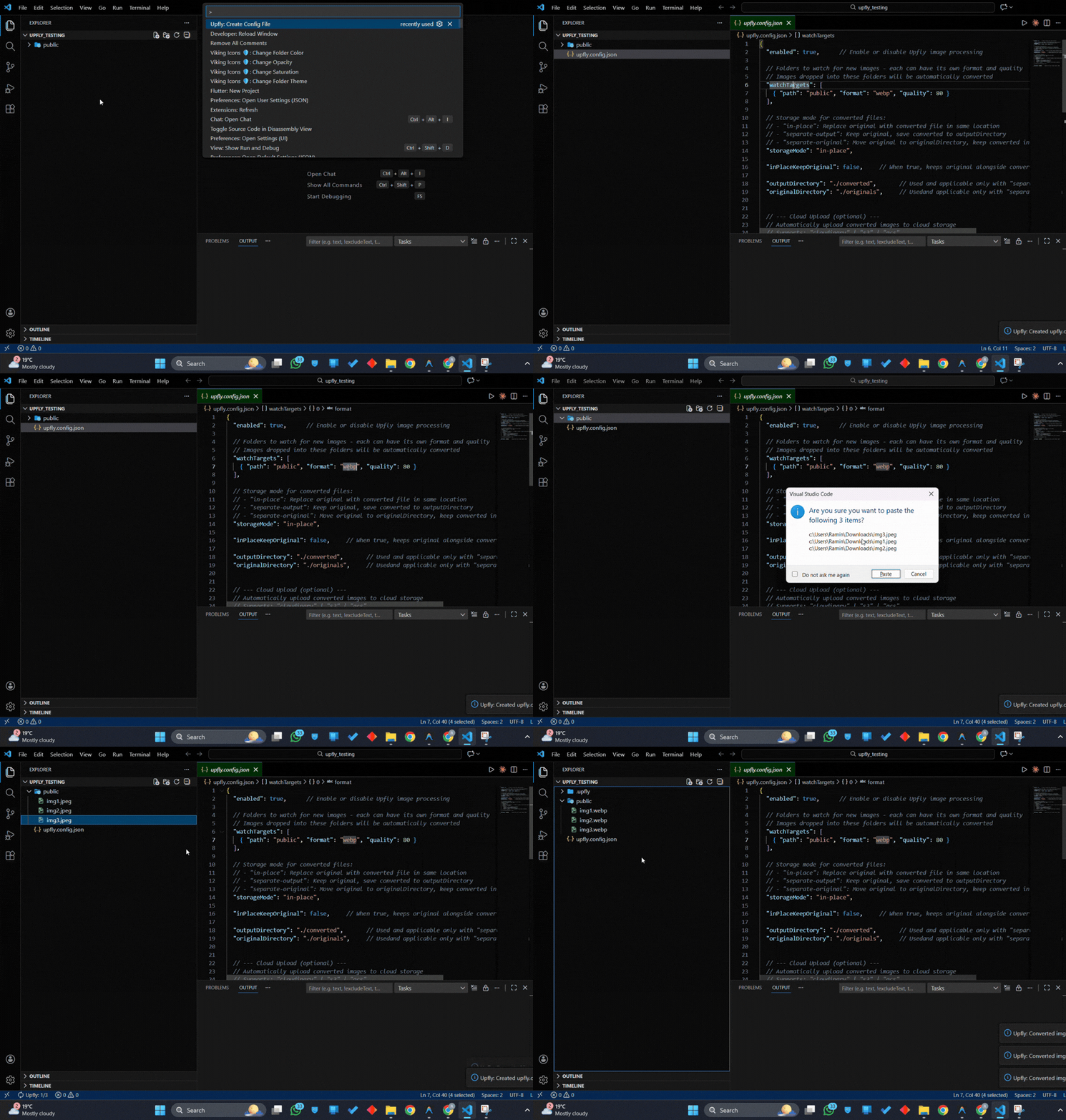
Powerful Configuration:
"watchTargets": [
  // recursive: true by default!
  // Any image added to 'public' or its subfolders gets converted to WebP
  { "path": "public", "format": "webp", "quality": 80 }
]
🖱️ Right-Click Convert
Convert any image instantly from the context menu. Select one or multiple files, right-click, and choose your format.
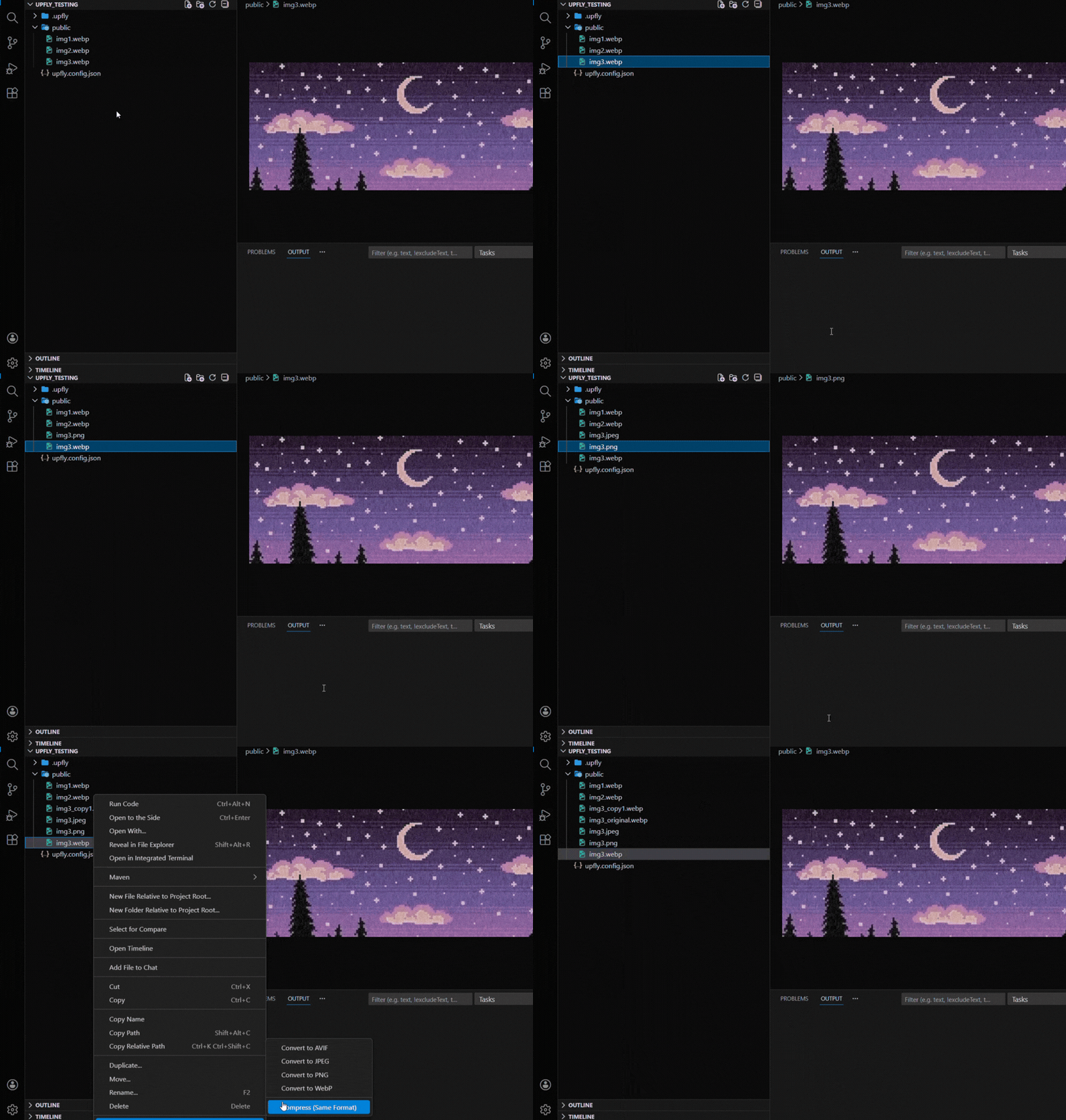
Supported conversions:
- Convert to WebP (best for web)
- Convert to AVIF (next-gen, smallest)
- Convert to PNG (lossless)
- Convert to JPEG (universal)
- Compress (same format, reduced size)
☁️ Direct Cloud Upload
Convert and upload in one step. Images are processed locally and uploaded directly to your cloud storage—no manual steps required.
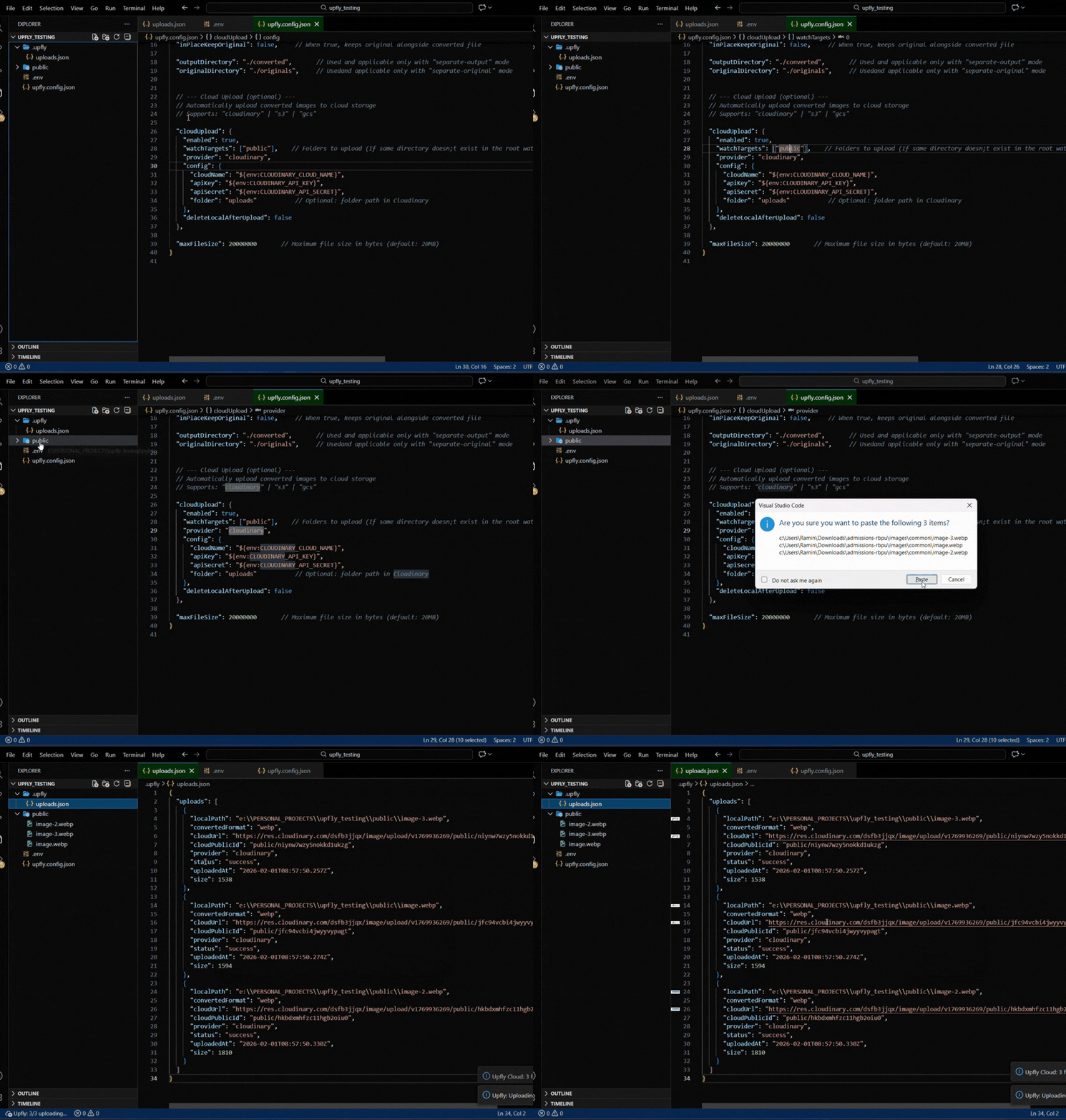
Supported providers:
- ☁️ Cloudinary
- 🪣 AWS S3
- 🌐 Google Cloud Storage
All uploads are logged to .upfly/uploads.json with URLs ready to copy.
🚀 Quick Start
1. Install
Search "Upfly" in VS Code Extensions or install from the Marketplace.
2. Create Config
Open Command Palette (Ctrl+Shift+P) → Upfly: Create Config File
3. Use It!
Option A: Right-click any image → Upfly 🚀 → Choose format
Option B: Drop images into a watched folder → Auto-converted!
📝 Configuration
Basic Setup (Local Conversion)
{
  "enabled": true,

  "watchTargets": [{ "path": "public", "format": "webp", "quality": 80 }],

  "storageMode": "in-place",
}
Storage Modes
| Mode |
Description |
in-place |
Replace original with converted file |
separate-output |
Keep original, save converted to outputDirectory |
separate-original |
Move original to originalDirectory, keep converted in place |
☁️ Cloud Upload Configuration
Add your credentials to a .env file in your workspace root:
CLOUDINARY_CLOUD_NAME=your-cloud-name
CLOUDINARY_API_KEY=123456789
CLOUDINARY_API_SECRET=your-secret
Then configure upfly.config.json:
Cloudinary
"cloudUpload": {
  "enabled": true,
  "watchTargets": ["public"],
  "provider": "cloudinary",
  "config": {
    "cloudName": "${env:CLOUDINARY_CLOUD_NAME}",
    "apiKey": "${env:CLOUDINARY_API_KEY}",
    "apiSecret": "${env:CLOUDINARY_API_SECRET}",
    "folder": "uploads"
  },
  "deleteLocalAfterUpload": false
}
AWS S3
"cloudUpload": {
  "enabled": true,
  "watchTargets": ["public"],
  "provider": "s3",
  "config": {
    "region": "${env:AWS_REGION}",
    "bucket": "${env:AWS_BUCKET}",
    "accessKeyId": "${env:AWS_ACCESS_KEY_ID}",
    "secretAccessKey": "${env:AWS_SECRET_ACCESS_KEY}"
  },
  "deleteLocalAfterUpload": false
}
Google Cloud Storage
"cloudUpload": {
  "enabled": true,
  "watchTargets": ["public"],
  "provider": "gcs",
  "config": {
    "bucket": "${env:GCS_BUCKET}",
    "projectId": "${env:GCS_PROJECT_ID}",
    "keyFilename": "./gcs-service-account.json"
  },
  "deleteLocalAfterUpload": false
}
� Commands
| Command |
Description |
Upfly: Create Config File |
Create upfly.config.json in workspace root |
Upfly 🚀 → Convert to WebP |
Convert selected images to WebP |
Upfly 🚀 → Convert to AVIF |
Convert selected images to AVIF |
Upfly 🚀 → Convert to PNG |
Convert selected images to PNG |
Upfly 🚀 → Convert to JPEG |
Convert selected images to JPEG |
Upfly 🚀 → Compress |
Compress without changing format |
Input: PNG, JPEG, WebP, AVIF, GIF, TIFF
Output: WebP, AVIF, PNG, JPEG
🔒 Security
- ✅ Use
${env:VAR_NAME} syntax for credentials
- ✅ Loads
.env automatically from workspace root
- ✅ Never commit secrets to your repository
- ✅ All processing happens locally
- Bundled with esbuild for fast startup
- In-memory processing (no temp files)
- Queue-based batch processing
- Minimal dependencies
🤝 Contributing
Found a bug or have a feature request? Open an issue!
📦 Powered by Upfly Core
Complete File Handling Solution. Just One Middleware.
Love this extension? It's built on top of Upfly, the ultimate file handling library for Node.js.
Handle file uploads from interception to storage. Stream-based processing, automatic image optimization, multi-cloud storage, and built-in reliability.
- ⚡ Stream-Based Architecture: Non-blocking I/O for large files
- ☁️ Multi-Cloud Support: AWS S3, Cloudinary, Google Cloud Storage
- 🛡️ Reliable Fallback System: Automatic backup streams for failed conversions
- 🎨 Auto Image Optimization: WebP conversion with Sharp quality control


👉 Visit Website • View on GitHub
📄 License
MIT © Ramin
Made with ❤️ for developers who value their time.

