
VSFlow
YAML-driven task automation for VS Code — define shell commands and multi-step workflows, schedule them with cron, and track every run from a built-in sidebar panel.
VSFlow reads a vsflow.yaml file from your workspace root.


Demo
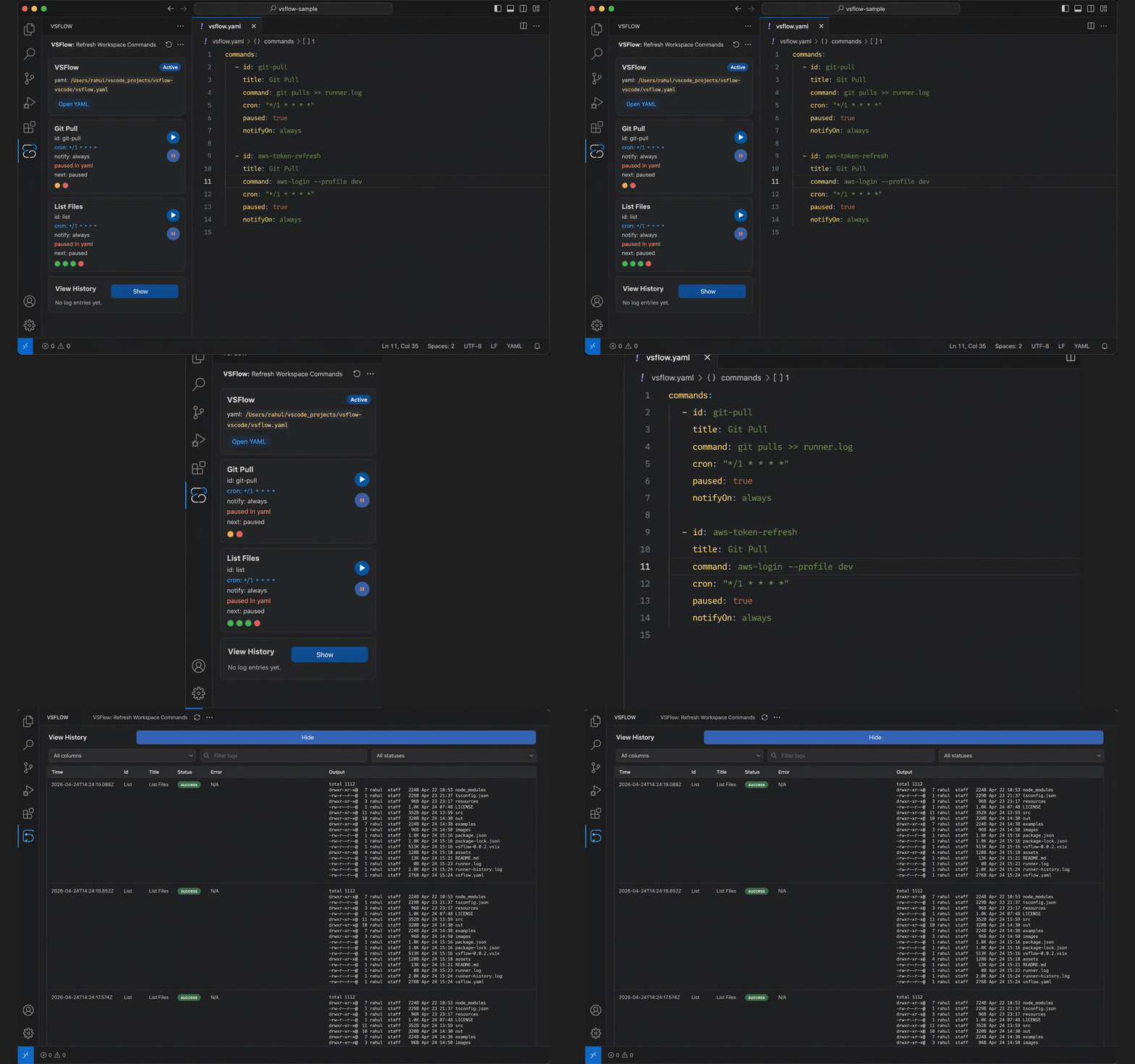
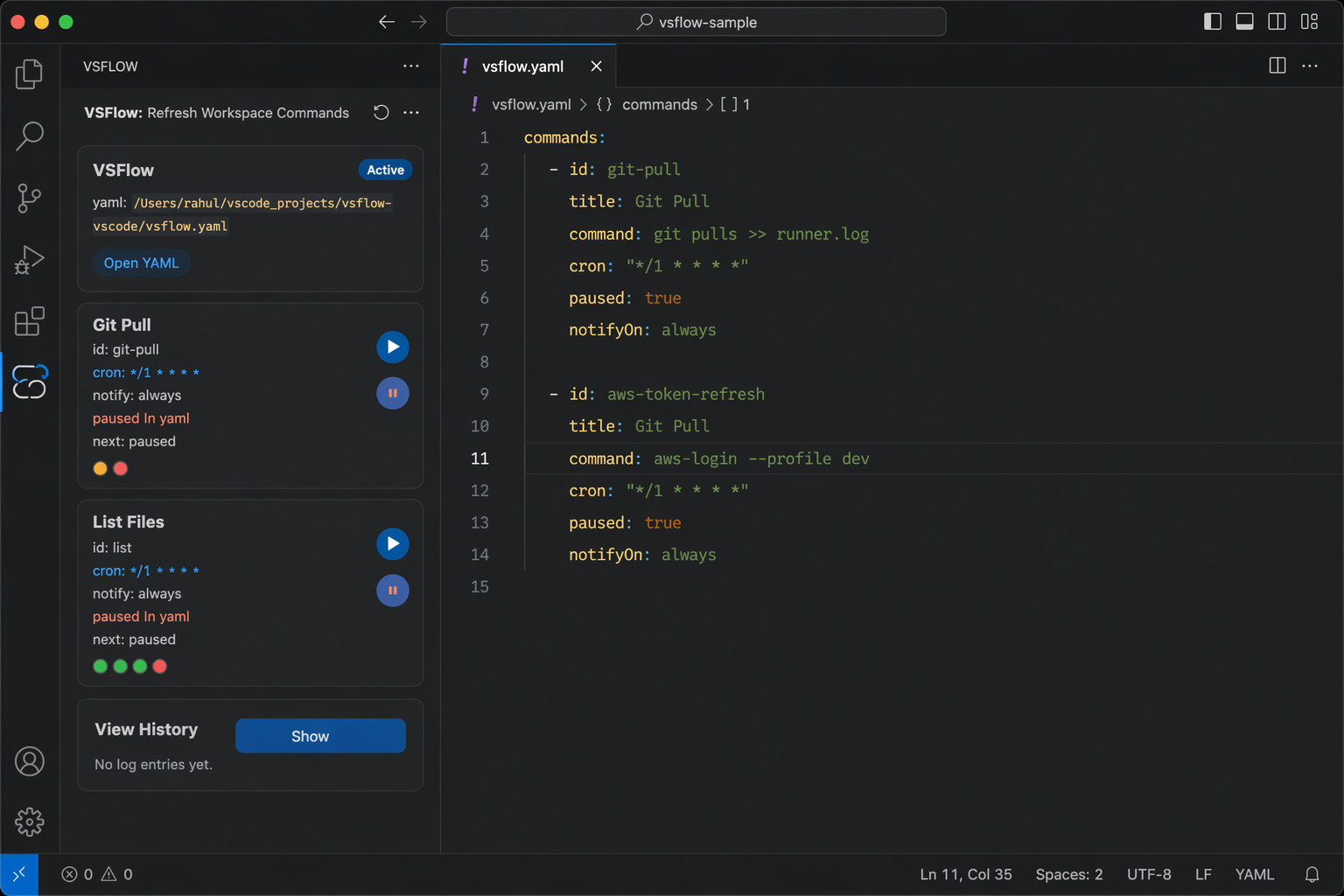
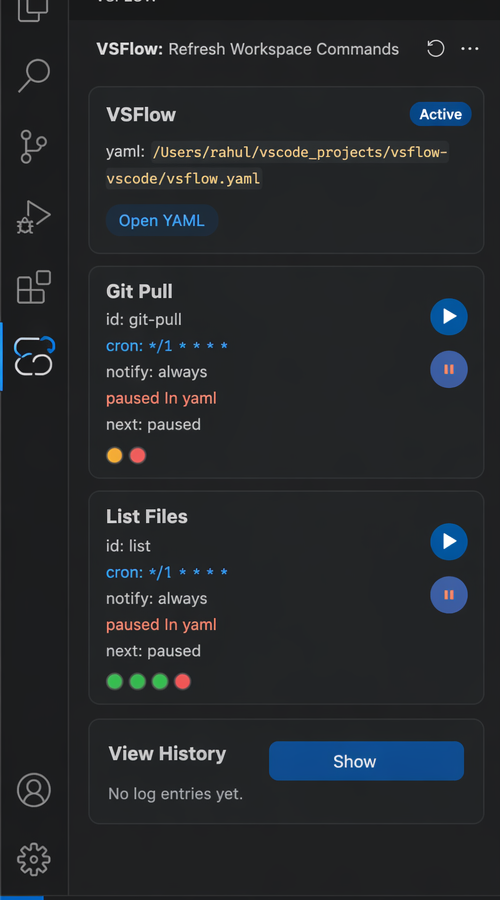
Features
- YAML-first config — everything lives in a
vsflow.yaml file at your workspace root; no GUI setup needed.
- Workflows — compose shell steps in
sequence or parallel modes, with unlimited nesting.
- Cron scheduling — attach any 5-field cron expression to a command and VSFlow fires it automatically inside VS Code.
- On-save triggers — attach a glob pattern via
onSave and the command fires whenever a matching file is saved.
- Per-command pause — suspend a scheduled/on-save command without deleting its trigger; paused state persists back into your YAML.
- Global scheduler toggle — one click pauses every scheduled command from the sidebar.
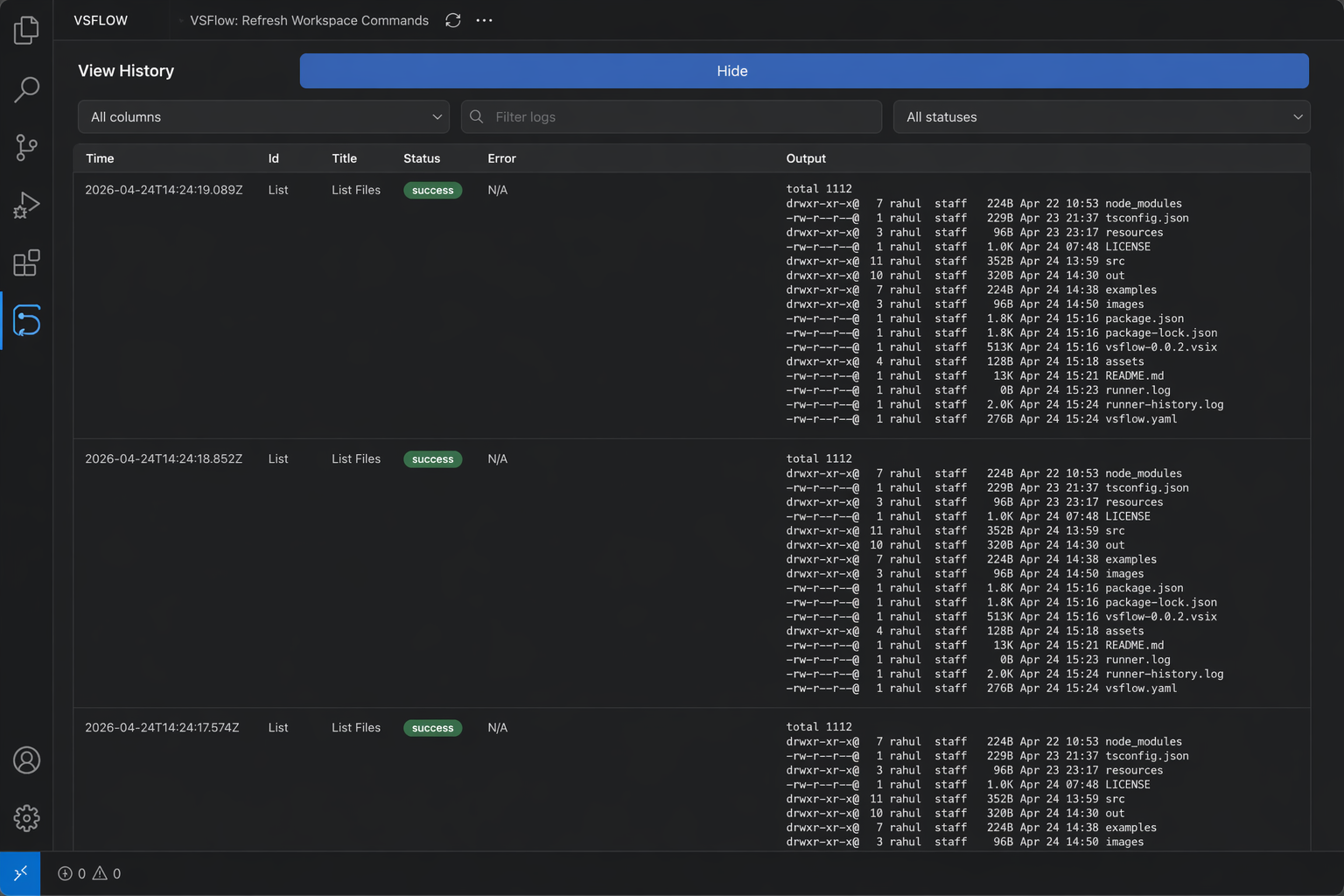
- Run history — every execution appends a JSONL line to
runner-history.log with status, stdout/stderr, and timestamp.
- Configurable notifications — choose
always, failure, success, or never per command.
- Zero runtime dependencies — pure TypeScript with a hand-written YAML parser; nothing to install beyond VS Code.
Requirements
| Requirement |
Version |
| VS Code |
≥ 1.85 |
| Workspace folder |
at least one must be open |
| Config file |
vsflow.yaml must exist at the workspace root |
Installation
From the VS Code Marketplace:
- Open the Extensions panel (
⇧⌘X / Ctrl+Shift+X)
- Search for VSFlow
- Click Install
From a VSIX (local build):
npm install
npx vsce package        # produces vsflow-*.vsix
code --install-extension vsflow-*.vsix
Quick Start
1. Create vsflow.yaml in your workspace root:
commands:
  - title: Hello World
    command: echo "Hello from VSFlow!"
    notifyOn: always
2. Open the VSFlow sidebar via the Activity Bar icon (or run VSFlow: Refresh Workspace Commands from the command palette).
3. Click ▶ on the card to run the command. The output appears in a VS Code notification and is saved to runner-history.log.
YAML Reference
Top-level structure
commands:
  - <command-or-workflow>
  - <command-or-workflow>
Shell command fields
| Field |
Type |
Required |
Description |
title |
string |
yes |
Display name shown in the sidebar and notifications |
command |
string |
yes (for commands) |
Shell command to execute |
id |
string |
no |
Stable identifier; auto-derived from title if omitted |
description |
string |
no |
Subtitle shown in the sidebar card |
cwd |
string |
no |
Working directory relative to workspace root |
cron |
string |
no |
5-field cron expression (* * * * *) |
onSave |
string |
no |
Glob pattern — fires the command whenever a matching file is saved |
paused |
boolean |
no |
Suspend cron/onSave execution without removing the trigger |
notifyOn |
enum |
no |
always · failure · success · never |
Workflow fields
A command becomes a workflow when it has a steps list instead of a command string.
| Field |
Type |
Required |
Description |
title |
string |
yes |
Display name |
mode |
sequence | parallel |
yes (for workflows) |
Run steps in order or all at once |
steps |
list |
yes (for workflows) |
Child tasks (each can be a command or nested workflow) |
id, description, cwd, cron, paused, notifyOn |
— |
no |
Same as above |
Notification defaults
| Run source |
Default notifyOn |
| Manual (button / palette) |
always |
| Scheduled (cron) |
failure |
Cron syntax
VSFlow uses standard 5-field cron with no seconds field:
┌───── minute      (0–59)
│ ┌─── hour        (0–23)
│ │ ┌─ day-of-month (1–31)
│ │ │ ┌ month       (1–12)
│ │ │ │ ┌ day-of-week (0–6, Sun=0)
│ │ │ │ │
* * * * *
The scheduler ticks every 30 seconds and deduplicates within the same minute.
Full example
commands:
  # Simple shell command, runs every minute, only notify on failure
  - id: git-pull
    title: Git Pull
    description: Pull latest from origin
    command: git pull
    cron: "* * * * *"
    notifyOn: failure

  # Sequence workflow (steps run one after another)
  - id: dev-check
    title: Dev Check
    description: Install and compile in sequence
    mode: sequence
    steps:
      - title: Install Dependencies
        command: npm install
      - title: Compile TypeScript
        command: npm run compile

  # Nested workflow (parallel inside sequence)
  - id: build-and-pull
    title: Build and Pull
    mode: sequence
    steps:
      - title: Parallel Phase
        mode: parallel
        steps:
          - title: TypeScript Build
            command: npm run compile
          - title: Pull Latest
            command: git pull
      - title: Run Tests
        command: npm test

  # Scheduled compile, alert only on success
  - id: nightly-build
    title: Nightly Build
    command: npm run compile
    cron: "0 2 * * *"
    notifyOn: success

  # Run ESLint whenever a TypeScript file is saved
  - id: lint-on-save
    title: Lint on Save
    command: npx eslint src --ext .ts
    onSave: "src/**/*.ts"
    notifyOn: failure
Examples
Ready-to-copy YAML files are in the examples/ folder:
| File |
What it shows |
| simple.yaml |
Minimal commands, id, description, cwd, all notifyOn values |
| workflows.yaml |
Sequence, parallel, nested parallel-in-sequence, and multi-pipeline patterns |
| scheduled.yaml |
Common cron expressions — every minute, hourly, daily, weekdays, nightly, paused |
| on-save.yaml |
Glob patterns for .ts, .tsx, .json, .md, .css, a single file, and combined onSave + cron |
| fullstack.yaml |
Realistic Next.js project combining on-save linting, manual dev commands, scheduled pulls, and a full nightly CI workflow |
Copy the file that best matches your stack to your workspace root and rename it vsflow.yaml.
How It Works
Activation flow
When VS Code loads the extension it wires up all components and starts the scheduler:
flowchart LR
    A([activate]) --> B[createRunNamedCommand\nshared runner closure]
    B --> C[new CronScheduler\npasses runner as callback]
    B --> D[new SidebarViewProvider\n6 callbacks injected]
    C --> E[scheduler.start\ntick every 30 s]
    D --> F[registerWebviewViewProvider]
    B --> G[registerCommand\nvsflow.runCommand]
    B --> H[registerCommand\nvsflow.refreshCommands]
    E & F & G & H --> I([context.subscriptions])
Command execution flow
Triggered by the sidebar play button, the command palette, the cron scheduler, or an onSave file-save event:
sequenceDiagram
    participant U as User / Scheduler
    participant E as Extension Host
    participant W as vsflow.yaml
    participant S as Shell
    participant L as runner-history.log

    U->>E: runNamedCommand(id?, source)
    E->>W: loadCommandConfig()
    W-->>E: RunnerCommand[]
    alt id provided
        E->>E: find command by id
    else no id (manual)
        E->>U: showQuickPick()
        U-->>E: selected command
    end
    E->>S: execAsync(command, cwd)
    S-->>E: stdout / stderr / exit code
    E->>L: appendRunLog (JSONL line)
    E->>E: shouldNotify(source, notifyOn)
    opt notification
        E->>U: showInformationMessage / showErrorMessage
    end
    E->>E: refreshSidebarView()
Scheduler loop
A single setInterval(30_000) drives all cron runs. Per-minute deduplication prevents double-firing:
flowchart TD
    A([setInterval 30 s]) --> B[tick]
    B --> C[loadCommandConfig]
    C --> D{for each command\nwhere cron is set}
    D --> E{globalPaused\nor cmd.paused?}
    E -- yes --> D
    E -- no --> F[matchesCronExpression\nnow]
    F --> G{expression\nmatches?}
    G -- no --> D
    G -- yes --> H{minuteKey\nalready ran?}
    H -- yes --> D
    H -- no --> I[record minuteKey\nrunCommand scheduled]
    I --> D
flowchart LR
    A([resolveWebviewView]) --> B[onDidReceiveMessage\nregister handler]
    B --> C[refresh]
    C --> D[loadCommandConfig]
    C --> E[readRunLogs]
    D & E --> F[getSidebarHtml\nfull HTML rebuild]
    F --> G[webview.html = ...]

    H([user action in webview]) --> I{message.command}
    I -- run --> J[runNamedCommand]
    I -- refresh --> C
    I -- togglePause --> K[scheduler.setPaused]
    I -- setCommandPaused --> L[updateCommandPaused\nin YAML]
    I -- openConfig --> M[open vsflow.yaml\nin editor]
    I -- openLogEntry --> N[open runner-history.log\nat line number]
    J & K & L --> C
Commands
| Command |
Palette title |
Description |
vsflow.runCommand |
VSFlow: Run Workspace Command |
Pick a command from a quick-pick list and run it |
vsflow.refreshCommands |
VSFlow: Refresh Workspace Commands |
Reload the sidebar from vsflow.yaml |
Run Log
Every execution appends one JSON line to runner-history.log in your workspace root:
{
  "time": "2024-03-15T10:30:00.000Z",
  "id": "git-pull",
  "title": "Git Pull",
  "command": "git pull",
  "status": "success",        // "success" | "failed"
  "error": "N/A",
  "output": "Already up to date."
}
Click a colored run-dot in the sidebar to jump directly to that line in the log file.
Architecture
src/
├── extension.ts              Main entry — wires all components, registers commands
├── config/
│   └── commandConfig.ts      YAML loader, hand-written parser, paused-flag writer
├── execution/
│   └── commandRunner.ts      Shell executor, workflow orchestrator, notification logic
├── logging/
│   └── runLogStore.ts        JSONL append and read
├── scheduling/
│   └── scheduler.ts          CronScheduler — setInterval tick, cron matching, dedup
├── ui/
│   ├── sidebarHtml.ts        Full HTML/CSS/JS string renderer for the webview
│   └── sidebarViewProvider.ts  WebviewViewProvider — bridges webview messages to host
└── workspace/
    └── workspaceHelpers.ts   openConfig, openLogEntry, setCommandPaused
Key design decisions:
- Dependency injection via callbacks —
SidebarViewProvider receives six typed callbacks in its constructor rather than importing extension modules. This decouples the UI layer from host logic and makes both independently testable.
- Full HTML regeneration — every
refresh() rebuilds the entire webview HTML string. Simpler than incremental DOM diffing; acceptable since refreshes are infrequent.
- No third-party YAML parser — a purpose-built recursive-descent parser handles only the extension's constrained key set, keeping the runtime dependency tree empty.
- JSONL append-only log — logs travel with the workspace (committed or gitignored by the user's choice) and require no migration across extension updates.
- CSP nonce — the webview HTML uses a per-render random nonce and
default-src 'none' to prevent script injection.
License
MIT © rahrajlat

