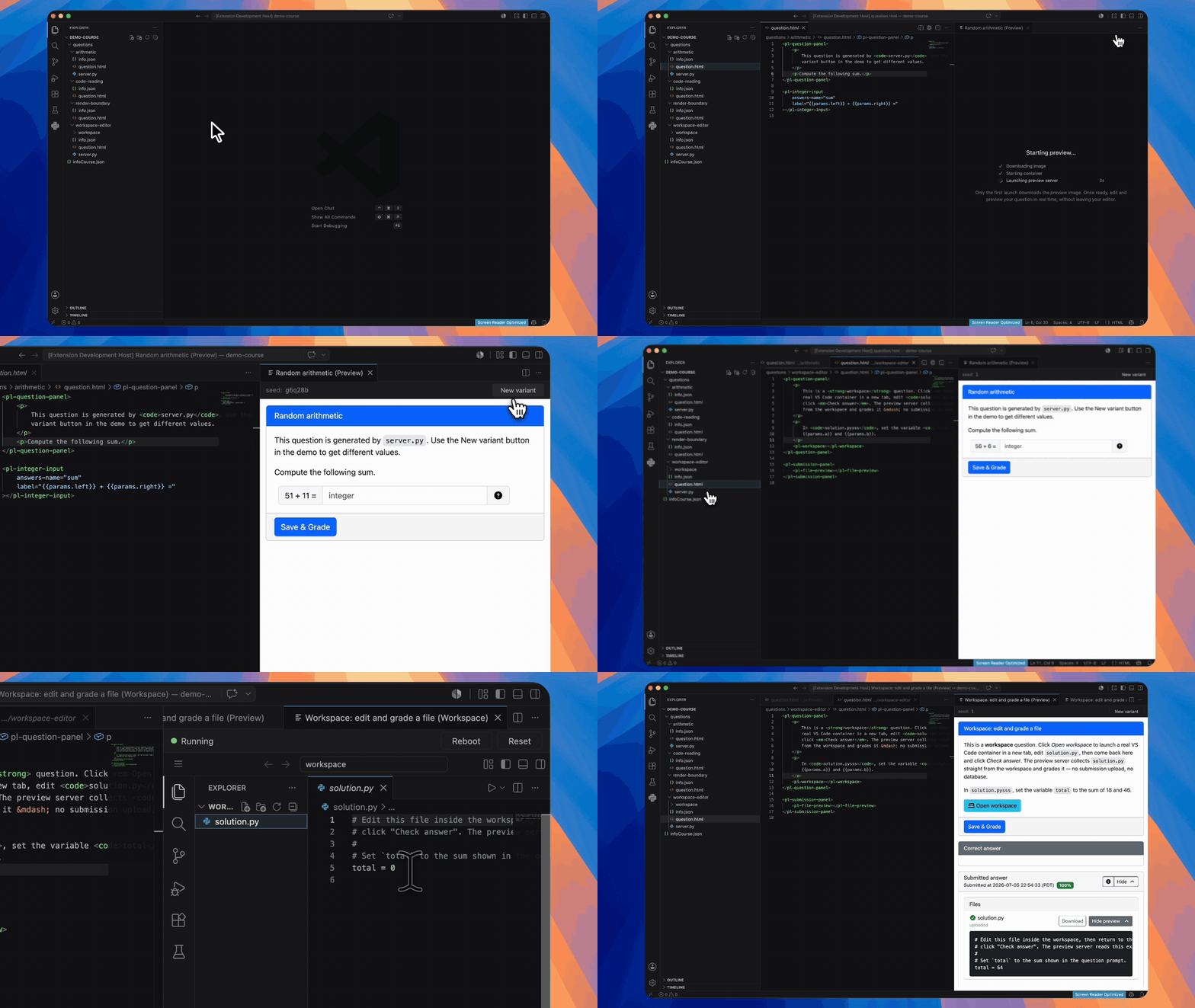
Quesal brings a faster PrairieLearn authoring loop into VS Code: browse a course,
open a question beside its source, save an edit, and see the rendered result
refresh immediately. A native course-map view also lets course staff build and
maintain TreeTag hierarchies manually or with an optional AI provider.
Quesal is an independent authoring tool and is not an official PrairieLearn
extension.
Interested in Quesal for VS Code? Join the Quesal Slack workspace
to discuss the extension, ask questions, and share feedback.
Features
- Preview all six PrairieLearn Source Question Types:
v3, Calculation,
MultipleChoice, Checkbox, File, and MultipleTrueFalse.
- Follow the active editor and refresh the rendered question automatically after
a save.
- Keep a stable variant seed across refreshes, or reroll with New variant.
- Use stateless Preview Answer Check and open interactive Preview Workspaces.
- Run through Docker Desktop, Podman, Colima, Rancher Desktop, or OrbStack.
- Keep one local preview server warm while moving between courses.
- Browse every question in the native Quesal Course Map Explorer view.
- Build and edit a course-level TreeTag hierarchy without an account or AI model.
- Optionally generate and organize maps with GitHub Copilot, OpenAI, Anthropic,
Google Gemini, or an OpenAI-compatible endpoint.
- Store the portable map at
<course root>/.quesal/course-map.json without
modifying existing PrairieLearn question files.
Requirements
- VS Code 1.101.0 or newer
- A running Docker Engine API-compatible container runtime
- One or more PrairieLearn course folders containing
infoCourse.json
Install
Install Quesal from the Visual Studio Marketplace:
Quesal activates when the workspace contains a PrairieLearn infoCourse.json.
Quick start
- Open a PrairieLearn course folder.
- Open a file inside a question directory, such as
questions/my-question/question.html.
- Click the preview button in the editor title bar.
- Save source edits to refresh the preview.
- Open Quesal Course Map in Explorer to navigate or organize the course.
The first preview may take a few minutes while the container runtime downloads
the pinned preview image. Later previews reuse both the image and a warm server.
Course map
The Quesal Course Map discovers courses and questions without starting a
container. Choose Create Hierarchy Manually to build a private TreeTag draft,
then add, rename, move, or remove tags. Saving the hierarchy enables manual
question assignment. This workflow requires neither a Quesal account nor an AI
provider.
Generate Course Map with AI is optional. Manage AI Providers… can use
GitHub Copilot or securely store your own provider key in VS Code SecretStorage.
Keys are never written to workspace settings or course files. The model picker
uses Models.dev when available, with bundled and manual fallbacks.
Before the first request to a destination, Quesal discloses the bounded saved
course fields that may be sent and lets you choose sanitized rendered question
bodies or metadata only. Server code, answer/grader files, assets, raw
info.json.options, absolute paths, and credentials are excluded. AI output
remains a reviewable candidate until you explicitly save the hierarchy or accept
question assignments.
Once a hierarchy is saved, Quesal can organize only unassigned questions,
reconsider changed questions, or explicitly reorganize the entire course.
Existing assignments remain unchanged until their proposed replacements are
accepted.
The sidecar at <course root>/.quesal/course-map.json contains schema-versioned
TreeTags, question-to-tag IDs, fingerprints, and limited provenance. It is
suitable for version control. Multi-course workspaces can group discoveries and
store a local Focus Courses… filter without changing course files.
How preview works
Quesal resolves the active question by walking up to its nearest info.json and
course infoCourse.json. On first use it starts a hardened local container from
a digest-pinned image built from the
PrairieLearn fork. Every discovered
course is mounted independently and read-only; unrelated workspace files are not
mounted.
The extension authenticates the Standalone Preview Server control plane, creates
or deliberately reuses a course-scoped Local Preview Session, and points a VS
Code webview at a loopback-only proxy. One warm server can host multiple isolated
course sessions. The bearer token and Local Preview Session IDs are never exposed
as browser authorization decisions.
flowchart LR
  subgraph vscode["VS Code"]
    map["Quesal Course Map"]
    editor["Question source"]
    panel["Preview panel"]
  end
  extension["Quesal extension"]
  runtime["Docker-compatible runtime"]
  server["PrairieLearn Standalone Preview Server"]

  map --> editor
  editor -->|"active question + saved edits"| extension
  extension -->|"start or reuse"| runtime
  runtime --> server
  extension -->|"authenticated session"| server
  server -->|"loopback rendered preview"| panel
Commands
All commands appear under the Quesal category in the Command Palette.
| Command |
What it does |
| Quesal: Open Preview |
Opens the side-by-side preview for the active question. |
| Quesal: Refresh preview |
Re-renders the current preview. |
| Quesal: New variant |
Rerolls the current variant seed. |
| Quesal: Show logs |
Opens the Quesal Output channel. |
| Quesal: Stop preview server |
Stops the shared local server. |
| Quesal: Delete old preview images |
Removes superseded images after confirmation. |
| Quesal: Create Hierarchy Manually |
Starts a private TreeTag draft. |
| Quesal: Focus Courses… |
Chooses the courses visible in the map. |
| Quesal: Manage AI Providers… |
Configures or removes encrypted BYOK providers. |
| Quesal: Select AI Model… |
Chooses the default configured model. |
| Quesal: Generate Course Map with AI |
Creates a reviewable TreeTag draft. |
| Quesal: Organize Unassigned Questions with AI |
Suggests tags for unassigned questions. |
| Quesal: Reorganize Changed Questions with AI… |
Suggests replacements for changed questions. |
| Quesal: Reorganize All Questions with AI… |
Proposes replacements for the whole course. |
| Quesal: Refresh Course Map |
Rediscovers questions and reloads the sidecar. |
Container runtime settings
| Setting |
Behavior |
quesal.containerRuntime |
auto (default), docker, podman, or custom. |
quesal.containerHost |
Explicit Docker-compatible endpoint. Required for custom; overrides detection with auto. |
quesal.enableWorkspaces |
Enables workspace-question previews in trusted workspaces; defaults to true. |
With auto, Quesal prefers Docker when both Docker and Podman are reachable.
Set quesal.containerRuntime to podman to force Podman. On macOS or Windows,
set CONTAINER_HOST or quesal.containerHost when the Podman machine socket is
not discoverable.
Workspace questions
Interactive workspace questions require the preview server to launch another
container, so Quesal mounts the selected runtime socket into the preview
container. This grants previewed course code container-runtime access, which can
be root-equivalent with a rootful daemon. Workspace previews therefore require a
trusted workspace and a local socket-based runtime. Set
quesal.enableWorkspaces: false to disable them completely. Rootless Podman is
preferred where available.
Troubleshooting
The preview button is missing. Ensure the active file is below
questions/ and the workspace contains the course's infoCourse.json.
No runtime is available. Install and start Docker Desktop, Podman, or another
Docker-compatible runtime, then open the preview again. For a Podman machine,
configure CONTAINER_HOST or quesal.containerHost.
The server contract is incompatible. Delete superseded preview images,
ensure PL_PREVIEW_IMAGE is not pointing at an old proof-of-concept build, and
reopen the preview.
A preview failed. Run Quesal: Show logs and inspect the Quesal Output
channel for the full render or container error.
Development
pnpm install
pnpm run typecheck
pnpm run test
pnpm run build
Press F5 and choose Run Extension to launch an Extension
Development Host. PL_PREVIEW_IMAGE can point development builds at a locally
built preview image.
The environment-gated server contract requires an immutable image reference:
PL_PREVIEW_CONTRACT_IMAGE='ghcr.io/runjuu/prairielearn:<tag>@sha256:<digest>' \
  pnpm run test:contract
Also set PL_PREVIEW_CONTRACT_SOCKET to exercise Preview Workspace launch
capability through a local Docker-compatible socket.
Release
- Move release notes out of Unreleased and use the intended release date.
- Run the appropriate
pnpm run release:* command when preparing a later bump.
- Push the release commit and matching
v<version> tag.
- The publish workflow packages
quesal-vscode-<version>.vsix and publishes it
to the quesal publisher on the Visual Studio Marketplace. The repository
secret VSCE_PAT must be authorized for that publisher.