

QA PandaAI-powered QA agents for your codebase — test, fix, and ship with confidence GitHub Repository • Report Issues • Features • Quick Start • Agents • Configuration
An open-source AI QA engineer that lives inside VSCode.
|
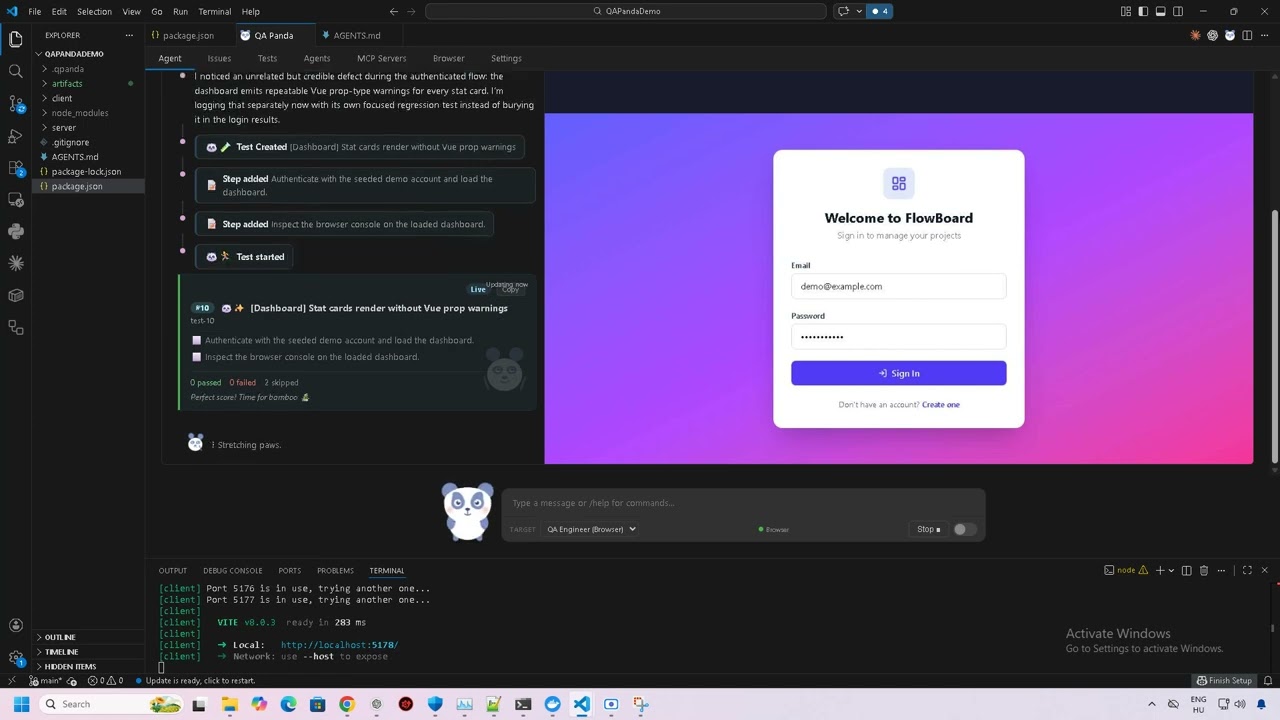
| Mode | How it works | Best for |
|---|---|---|
| Send | Direct message to the selected agent | Quick tasks, specific questions |
| Continue | Controller picks the next step, delegates to an agent, and reports back | Single-pass tasks, iterating on feedback |
| Orchestrate | Controller runs agents autonomously until done | End-to-end testing, complex tasks |
The Loop toggle works with Continue mode — after each Continue pass completes, it automatically sends another one, so the controller keeps driving work forward without you pressing Continue each time. Orchestrate mode already loops automatically until it decides to stop.
Agent Delegation
In Orchestrate mode, the controller can chain agents together. For example, QA finds bugs, then the controller delegates to Developer to fix them, then back to QA to verify:
🎯 Orchestrator
  "QA found 2 bugs. Delegating to Developer to fix them."

💻 Developer
  "Fixed the validation bug in signup.js and the CSS overflow in navbar.css."

🎯 Orchestrator
  "Fixes applied. Delegating back to QA to re-test."

🔍 QA Engineer
  ● Re-testing signup validation... ✅ PASS
  ● Re-testing navbar overflow... ✅ PASS
  "All bugs verified fixed."
MCP Server Ecosystem
QA Panda comes with built-in MCP servers and supports adding your own:
Built-in:
| Server | Purpose |
|---|---|
| detached-command | Run shell commands safely from agents |
| cc-tests | Test case CRUD, execution, and reporting |
| cc-tasks | Task/bug tracking with kanban workflow |
| chrome-devtools | Browser automation via Chrome DevTools Protocol |
| cc-agent-delegate | Agent-to-agent delegation |
Add your own on the MCP Servers tab — project-level (.qpanda/mcp.json) or global (~/.qpanda/mcp.json). Any MCP server that follows the protocol works (stdio or HTTP).
Example — add a filesystem MCP:
{
  "filesystem": {
    "command": "npx",
    "args": ["-y", "@modelcontextprotocol/server-filesystem", "/path/to/dir"]
  }
}
Multi-Tab Interface
| Tab | What it does |
|---|---|
| Agent | Chat interface with Send / Continue / Orchestrate controls |
| Tasks | Kanban board for bugs and tasks |
| Tests | Test case board with run history |
| Agents | View and configure AI agents |
| MCP Servers | Add and manage MCP tool servers |
| Browser | Live Chrome screencast with navigation controls |
| Settings | Developer settings and prompt customization |
Smart Setup Wizard
First-time setup detects your environment and helps you get started:
- Codex CLI — checks installation, version, and login status
- Google Chrome — checks installation and version (v120+ for headless debugging)
- Node.js — checks version (v18+ required)
- Auto-fix — click "Fix automatically" to install Codex or log in without leaving the editor
- Manual steps — OS-specific instructions (Windows, macOS, Linux) for manual setup
- Re-check — verify your fixes worked with one click
Standalone Web App
Run the same UI outside VSCode:
npm run web
# Opens at http://localhost:3000
Same features, same agents, same MCP servers — just in a browser tab. Hot-reloads when you change the source code.
Agents
QA Engineer (Browser)
A professional QA engineer that tests web applications using headless Chrome:
- Creates structured test plans before testing
- Takes screenshots before and after every action
- Verifies results visually and via DOM/console/network inspection
- Logs bugs immediately when found — with screenshot evidence
- Covers happy path, edge cases, error states, validation, accessibility, and security basics
- Reports findings with a professional summary
Developer (Secondary)
A software developer agent available for bug fixing and code changes. Works best when paired with QA — the orchestrator can delegate bugs found by QA to the Developer for fixes, then send them back to QA for re-testing.
- Reads and understands your codebase before making changes
- Follows existing patterns, naming conventions, and code style
- Makes focused, minimal changes
Custom Agents
Create your own agents on the Agents tab or in config files:
{
  "my-agent": {
    "name": "My Custom Agent",
    "description": "Does something specific",
    "system_prompt": "You are a specialist in...",
    "cli": "codex",
    "enabled": true,
    "mcps": {}
  }
}
Save in .qpanda/agents.json (project) or ~/.qpanda/agents.json (global).
Prompt Tags
Use @@filename in any agent's system_prompt to include the contents of a markdown file:
{
  "system_prompt": "@@my_custom_prompt"
}
This loads my_custom_prompt.md from .qpanda/prompts/ (project), ~/.qpanda/prompts/ (global), or the built-in prompts/ directory.
CLI
Commands
qapanda                          # Start interactive shell
qapanda run <message>            # One-shot run
qapanda run --print --agent QA-Browser <msg>  # Single turn, print result, exit
qapanda resume <run-id>          # Resume existing run
qapanda status <run-id>          # Show run status
qapanda logs <run-id>            # Show recent events
qapanda list                     # List saved runs
qapanda doctor                   # Check dependencies
qapanda setup                    # Run setup wizard
qapanda agents                   # List available agents
qapanda modes                    # List available modes
Interactive Shell
/help                    Show help
/new <message>           Start a new run
/resume <run-id>         Attach to existing run
/run                     Continue interrupted request
/status                  Show run status
/list                    List saved runs
/agents                  List available agents
/agent <id>              Switch to direct agent mode
/controller-cli [cli]    Show or set controller CLI
/worker-cli [cli]        Show or set worker CLI
/tasks                   List tasks
/task add <title>        Create a task
/task done <id>          Mark task done
/mcp                     List MCP servers
/config                  Show current config
/clear                   Clear and reset
/quit                    Exit
CLI Options
--agent <id>              Direct to specific agent
--mode <id>               Select mode (test, dev, dev-test, test-fix)
--controller-model <name> Controller model
--worker-model <name>     Worker model
--wait <delay>            Auto-continue delay (1m, 5m, 1h, etc.)
--print                   One-shot mode
--quiet                   Minimal output
--raw-events              Show raw streaming events
Configuration
Project-Level
Place files in .qpanda/ at your project root:
| File | Purpose |
|---|---|
.qpanda/agents.json |
Project-specific agents |
.qpanda/mcp.json |
Project MCP server configs |
.qpanda/prompts/*.md |
Prompt templates for @@tag syntax |
QAPANDA.md |
Project instructions appended to controller prompt |
Global
Place files in ~/.qpanda/:
| File | Purpose |
|---|---|
~/.qpanda/agents.json |
Global agents (available in all projects) |
~/.qpanda/mcp.json |
Global MCP server configs |
~/.qpanda/prompts/*.md |
Global prompt templates |
~/.qpanda/settings.json |
Global settings |
Workflows
Create reusable workflows in .qpanda/workflows/ or ~/.qpanda/workflows/:
.qpanda/workflows/
  my-workflow/
    WORKFLOW.md      # YAML frontmatter with name + description
Run with /workflow my-workflow in the interactive shell.
Architecture
User Input
  → Codex CLI (controller) decides what to do
    → Codex CLI (worker/agent) executes the task
      → Controller reviews result, loops or stops
State is stored in .qpanda/runs/<run-id>/ with manifests, events, transcripts, and per-request logs.
MCP servers (tasks, tests, detached-command) run as HTTP servers on localhost, auto-injected into every agent session.
Chrome is managed by the extension — launched headless on demand with a debug port for DevTools Protocol access.
Development
# Install dependencies
npm install

# Run tests
npm run test:unit      # Unit tests
npm run test:ui        # UI tests (JSDOM-based)
npm test               # All tests

# VSCode extension
npm run ext:build      # Build .vsix package
npm run ext:install    # Build + install to VSCode

# Standalone web app (same UI as extension)
npm run web            # Start at http://localhost:3000
Cross-Platform Support
QA Panda works on Windows, macOS, and Linux. CI runs on all three platforms with every push.
| Feature | Windows | macOS | Linux |
|---|---|---|---|
| VSCode Extension | ✅ | ✅ | ✅ |
| Terminal CLI | ✅ | ✅ | ✅ |
| Browser Testing | ✅ | ✅ | ✅ |
| Setup Wizard | ✅ | ✅ | ✅ |
| Auto-fix Install | ✅ | ✅ | ✅ |
Requirements
| Dependency | Required | Purpose |
|---|---|---|
| Node.js >= 18 | Yes | Runtime |
| Codex CLI | Yes | AI agent backend |
| Google Chrome | No | Browser testing (recommended) |
| VSCode >= 1.85 | No | Extension UI (CLI works standalone) |
License
MIT