DevSentinel 🛡️


AI Code Hallucination & Security Proxy — A VS Code extension that validates AI-generated imports against npm/PyPI registries in real-time, checks for known CVEs via the NVD API, and enforces license compliance before you commit.
Problem It Solves
AI coding assistants (Copilot, ChatGPT) frequently hallucinate non-existent package names. Bad actors register these "hallucinated" package names on npm/PyPI to distribute malware — a rising attack vector called slopsquatting. DevSentinel catches these before they reach your codebase.
Features
- Real-time import scanning — watches Python and JavaScript/TypeScript files as you type
- Hallucination detection — flags packages that don't exist on npm or PyPI
- CVE checking — queries the NVD API for known vulnerabilities in every imported package
- License compliance — validates package licenses against an allowlist (configurable in settings)
- Red underlines — hallucinated or vulnerable packages are marked with diagnostic severity
Error
- Rich hover tooltips — hover over any flagged package to see risk score, CVE list, license, and latest version
- Caching — registry responses are cached locally so repeated imports don't trigger duplicate API calls
- Configurable — toggle real-time scanning, set your NVD API key, customize the allowed license list
Visual Showcase
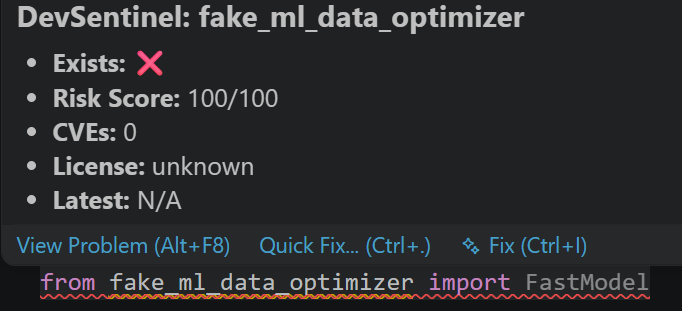
1. 🚨 Catching AI Hallucinations & Slopsquatting
When an AI assistant suggests a non-existent package, DevSentinel immediately alerts you with an inline diagnostic red underline and assigns a maximum 100/100 risk score:

2. 🛡️ Live CVE Vulnerability Lookups & CVSS Scoring
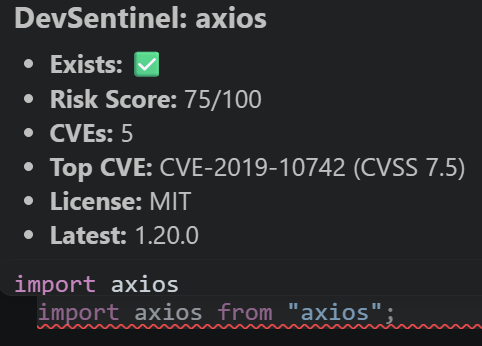
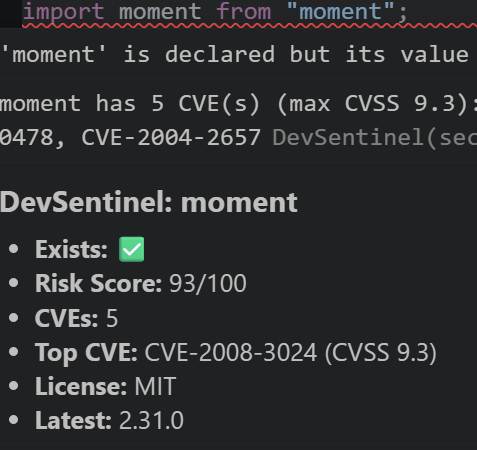
Hover over any imported library to inspect active CVE vulnerabilities fetched directly from NIST's National Vulnerability Database:
Single Vulnerability Alert (axios) |
High-Severity CVE Warning (moment) |
 |
 |
| CVSS Score 7.5, license verification, registry status |
CVSS 9.3 High alert with top CVE references |
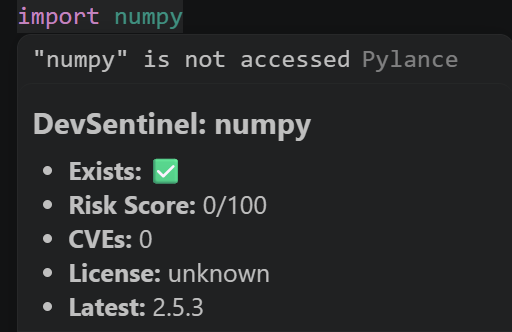
3. ✅ Safe Dependency Confirmation
Verified packages with zero known vulnerabilities pass cleanly with a 0/100 Risk Score:
Quick Start
- Install DevSentinel from the VS Code Marketplace or search
DevSentinel in Extensions (Ctrl+Shift+X).
- Open any
.js, .jsx, .ts, .tsx, or .py file.
- Start typing or importing packages.
- Hover over any flagged import to view its safety risk score, CVE details, license status, and latest registry version.
Without an API key, NVD requests are rate-limited to 5 requests per 30 seconds. Get a free key at https://nvd.nist.gov/developers/request-api-key and add it to your VS Code settings:
{
  "devsentinel.nvdApiKey": "YOUR_API_KEY_HERE"
}
Allowed Licenses
By default, DevSentinel considers these licenses safe: MIT, Apache-2.0, BSD-3-Clause, ISC, 0BSD, CC0-1.0.
Override in settings:
{
  "devsentinel.allowedLicenses": ["MIT", "Apache-2.0", "BSD-2-Clause"]
}
Commands
| Command |
Description |
DevSentinel: Scan Current Document |
Force a full re-scan of the active file |
DevSentinel: Toggle Enablement |
Enable/disable real-time scanning |
How It Works
Document change
    │
    ▼
┌─────────────────────┐
│  Parse Imports      │  Extract package names from JS/TS/Python imports
└──────┬──────────────┘
       │
       ▼
┌─────────────────────┐
│  Registry Check     │  npm registry + PyPI JSON API — does the package exist?
└──────┬──────────────┘
       │
       ▼
┌─────────────────────┐
│  NVD CVE Lookup     │  Query NVD API for known CVEs on this package
└──────┬──────────────┘
       │
       ▼
┌─────────────────────┐
│  License Check      │  Compare license against allowlist
└──────┬──────────────┘
       │
       ▼
┌─────────────────────┐
│  Diagnose & Display │  Red underlines + hover tooltip with safety metrics
└─────────────────────┘
Architecture
src/packageParser.ts — Extracts import names from JS/TS and Python source textsrc/registryClient.ts — Queries npm and PyPI registries to verify package existencesrc/nvdClient.ts — Queries the NVD API for CVEs, parses CVSS scoressrc/licenseChecker.ts — Validates licenses against the configured allowlistsrc/extension.ts — VS Code extension entry point: registers diagnostic collection, hover provider, commands, and event listenerssrc/types.ts — Shared TypeScript interfaces
Technologies
- TypeScript + VS Code Extension API
- Node.js backend with
node-fetch
- National Vulnerability Database (NVD) REST API v2.0
- npm and PyPI public JSON APIs
Development & Testing
If you want to contribute or run the extension locally:
- Clone the repository:
git clone https://github.com/Prateek10465/devsentinel.git
cd devsentinel
- Install dependencies:
npm install
- Compile and build:
npm run compile
- Run tests:
npm test
- Press
F5 in VS Code to launch the Extension Development Host window for live debugging.
License
MIT

