PheroPath 🐜
Digital Stigmergy for the Agentic Age

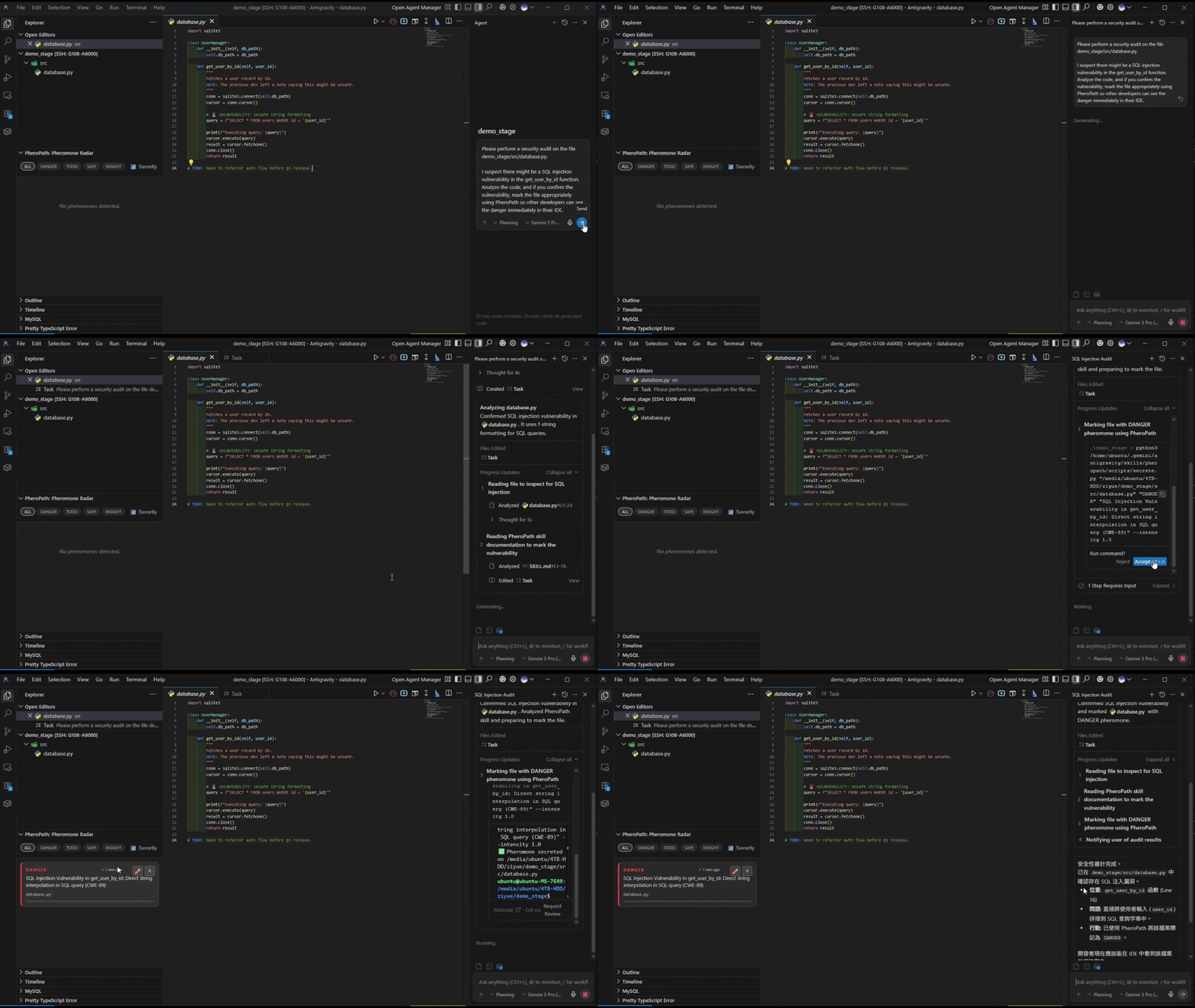
🧠 The Missing Link in AI Collaboration
In the era of Autonomous Agents, Chat Context is Fleeting, but Code is Permanent.
When you work with an AI Agent (like Claude, ChatGPT, or Cursor), the context—decisions, warnings, and architectural intent—often lives and dies within the chat window. Once the session ends, that intelligence is lost.
PheroPath solves this by implementing Digital Stigmergy: a biological communication protocol used by ants. It allows Agents and Humans to leave "invisible scents" (metadata signals) directly on the file system.
Why You Need This?
1. 🛡️ Human-Agent Guardrails (The "Don't Touch" Problem)
- Without PheroPath: You tell the Agent "Don't edit
core.ts!" The Agent forgets 10 messages later or in a new session, potentially breaking the build.
- With PheroPath: You mark
core.ts with a DANGER pheromone. The Agent "sniffs" the file before writing, sees the danger signal, and implicitly understands the boundary. Context is attached to the file, not the prompt.
2. 🤖 Multi-Agent Coordination (The Handoff)
- Scenario: Architect Agent designs a system but doesn't write code. Coder Agent implements it.
- With PheroPath: Architect Agent leaves TODO and INSIGHT pheromones on specific file paths. Coder Agent scans the directory, "smells" the work needed, and executes. No complex inter-process message passing required.
3. 👁️ Asynchronous Human Review & Meaning
- An Agent can mark complex code with INSIGHT pheromones explaining why it made a change (e.g., "Refactored for thread-safety").
- You, the human, see these light up on your PheroPath Radar in VS Code, allowing for rapid, high-level review without digging into diffs or reading 500 lines of chat logs.
✨ Features
- 🚫 Zero Pollution: Signals are stored in Extended Attributes (xattr) or sidecar JSONs. Your clean code stays clean. No comments cluttering your source.
- ⚡ Live Radar: Real-time VS Code dashboard to visualize the "scent landscape" of your project.
- 🔄 Temporal Decay: Signals can fade over time, ensuring outdated noise doesn't persist.
- 🔧 Agent-First Design: CLI tools (
sniff, secrete) designed specifically for LLM tool-use.
- 🌍 Cross-Platform: Works on Linux, macOS, and Windows (via fallback).
🚀 Quick Start
1. Install Extension (For Humans)
Search for "PheroPath" in the VS Code Marketplace and click Install.
(Requires Python 3.x installed)
2. Install Core (For Agents)
To give your AI agents (like Claude/AutoGPT) access to the Pheromone Protocol:
git clone https://github.com/pheropath/pheropath.git
pip install -r pheropath/requirements.txt
1. Secrete (Leave a Signal)
# Mark a file as dangerous
python3 scripts/secrete.py "src/main.py" "DANGER" "Race condition risk. Do not refactor without tests."

# Leave a persistent insight
python3 scripts/secrete.py "src/core.py" "INSIGHT" "Core logic implementation of Protocol v2"
2. Sniff (Read Signals)
# Check a file before editing
python3 scripts/sniff.py "src/main.py"

# Scan a directory for tasks
python3 scripts/sniff.py "src/"
3. Cleanse (Remove Signals)
# Remove signal
python3 scripts/cleanse.py "src/main.py"
Using the Pheromone Radar (VS Code)
- Open the PheroPath sidebar (Ant icon).
- View: Signals are auto-refreshed every 2 seconds.
- Filter: Click chips (
DANGER, TODO, etc.) to filter the list.
- Edit: Click the Pencil (✏️) icon on a card to change its type or message.
- Cleanse: Click the Cross (×) icon to remove a signal.
⚡ Supercharge Your Agentic Stack
1. For Claude Code & Antigravity Users
PheroPath acts as the "long-term memory" or "spatial memory" for your Antigravity workflows.
Add this to your Agent's system prompt:
"You possess the PheroPath skill. Always check for 'DANGER' pheromones on files before executing critical file operations. Scan for 'TODO' pheromones to find tasks."
2. For Cursor Users
Enhancing your .cursorrules? Use PheroPath to dynamically mark files as 'DANGER' or 'TODO', allowing the AI to see context that static rules can't capture.
3. For MCP (Model Context Protocol) Enthusiasts
(Coming Soon) We are working on a native MCP Server implementation to expose pheromones directly to supported LLM clients.
📡 Signal Types (Protocol)
| Type |
Color |
Meaning |
| DANGER |
🔴 |
Critical bugs, security risks. STOP and check. |
| TODO |
🟡 |
Incomplete features, technical debt. |
| SAFE |
🟢 |
Verified, stable, audited code. |
| INSIGHT |
🔵 |
Context, architectural decisions, and "why". |
🛠️ Project Structure
scripts/: Python core logic (secrete.py, sniff.py, cleanse.py, storage.py).extension/: VS Code extension source code (TypeScript/React).PROTOCOL.md: Detailed protocol specification.SKILL.md: Agent Skill documentation for LLMs.
🧪 Testing
# Run acceptance flow
python3 tests/test_flow.py

# Run integration test (Agent <-> Extension)
./tests/integration_test.sh
📄 License
MIT

