🐳dsh-launcher-panel
   
English | 简体中文 | GitHub
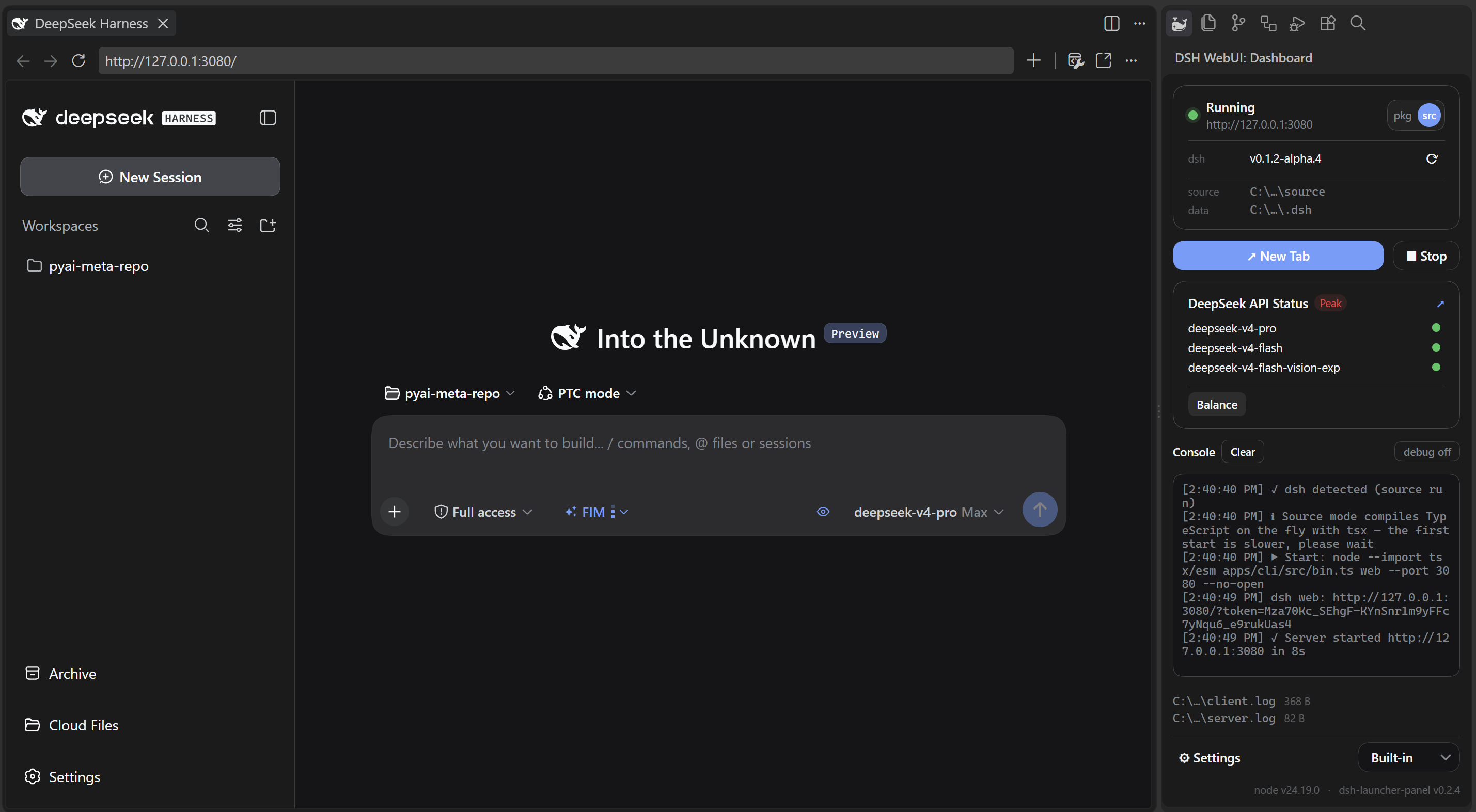
Start DeepSeek Harness (dsh) inside VS Code and open its web UI in the built-in browser.
This extension does not ship an LLM model, DeepSeek Harness itself, or a DeepSeek API key.
Principles
- Loose coupling — the extension starts dsh only through its public entry points (a launcher-managed pnpm install or a source checkout) and reads only the stable
~/.dsh data. It never depends on dsh internals, so your dsh plugins keep working, and the launcher keeps working across dsh upgrades.
Features
- Start / Stop — installs dsh into a launcher-managed location on first run, then runs it and opens the web UI once it is ready.
- Source run — clones deepseek-harness into a managed location and runs it (
dsh.srcPath overrides the location; an existing checkout there is reused). Installs deps and builds when they are missing, stale, or the checkout moved past its last build; the build runs pnpm run clean first and uses dsh's official profile so the web UI carries the same branding as the packaged dsh.
- Dashboard panel — server status, a live console (log files are clickable), DeepSeek's official API status with Peak / Off-peak pricing (weekends and Chinese public holidays bill at off-peak), and your account balance.
- DSH Update — the ⟳ button checks for a new version and reveals Update when there is one (pkg reinstalls the channel's latest; source checks out the newest official
dsh-v… tag, never upstream master). The check only lists tags and compares commits, so it downloads nothing; the actual source update fetches that tag first and can take a while on a checkout that is far behind.
- Browser choice — built-in or system browser.
Usage
Click the 🐳DSH WebUI whale icon in the activity bar, then click Start. The status bar whale icon mirrors the launcher state (blue pill while running, pulsing spout while starting) — click it for a quick menu: Open Web UI / Open Dashboard / Stop / Open Settings.
Settings
Settings → search "dsh":
| Key |
Default |
Description |
| dsh.runMode |
pnpm |
pnpm installs dsh into a launcher-managed location and runs pnpm exec dsh web; source runs a local checkout via tsx |
| dsh.npmChannel |
latest |
npm dist-tag pkg mode installs from, and what the Update button targets: latest, next (rc), or alpha. An installed dsh always starts as-is — the channel never downgrades or auto-upgrades it. Source mode ignores this and tracks the newest official dsh-v… tag instead. |
| dsh.pkgPath |
empty |
Optional: custom directory where pkg mode installs dsh. Empty uses a managed default. |
| dsh.srcPath |
empty |
Optional: path to an existing deepseek-harness clone for source mode. Empty clones automatically. |
| dsh.nodePath |
empty |
Path to node.exe; empty uses the node on PATH |
| dsh.port |
3080 |
Web UI port |
| dsh.autoOpenBrowser |
true |
Open the browser automatically after Start. Turn off to keep your current tab; the Start button's "New Tab" click still opens one per dsh.browser. |
| dsh.browser |
built-in |
built-in uses VS Code's Simple Browser (falling back to the system browser if unavailable); external opens the system browser |
| dsh.hideConsole |
true |
Hide the console window on Windows (also keeps dsh's own tool subprocesses from flashing one) |
| dsh.clearServerLogOnStart |
true |
Clear the server log at each launch, so it holds only the current run |
| dsh.sourceDebug |
false |
Print module-loading progress in source mode (NODE_DEBUG=module). Very verbose: the console shows a periodic count, the full detail goes to the server log. |
Notes
- pkg mode installs dsh with pnpm (the tool the dsh repo itself uses) and runs it directly.
npx is not offered: npm's peer resolver can hang indefinitely on dsh's dependency graph. The first install records where it went in dsh.pkgPath / dsh.srcPath, so it shows up in Settings and stays pinned.
- The panel's mode pill uses short labels:
pkg = the pnpm mode, src = the source mode. When dsh.srcPath does not point at an existing checkout, the launcher asks where to clone.
- The panel shows where dsh lives (
package or source) and the data (~/.dsh) locations; the dsh row carries Update and Check updates.
- Start and Stop are idempotent: Start probes the port first and does not start twice.
- Closing VS Code does not stop the server. Stop it from the panel or the command palette.
- The API Status card supports DeepSeek only, and appears only when a DeepSeek model is configured in dsh.
- Log files:
~/.dsh-launcher-panel/logs/client.log (launcher activity) and server.log (server output), next to the managed package/source dirs. Both are clickable in the panel. Those dirs live directly under your home directory (%USERPROFILE% on Windows).
- The 🐳 artwork (activity bar icon and status bar icon font) is Twemoji's spouting whale (Twitter, Inc., CC-BY 4.0), rendered as a monochrome silhouette — see NOTICE.
Known limitations
- Voice input does not work in the built-in browser. If you enable dsh's voice input plugin, recording in VS Code's built-in browser fails with Unable to decode audio data when you stop, so no text is inserted; the microphone itself works (the level meter reacts while you speak). This is a limitation of the built-in browser's audio decoding, not of this extension or of dsh's speech recognition — reproduced on VS Code 1.139.1 (Windows x64), where the same dsh dictates fine in the system browser. Set
dsh.browser to external until this is fixed upstream.
Environment
- Node.js — 22.x (22.19 or later) or >= 24 (the 23.x line is not supported)
- pnpm — required for the default pnpm mode; if missing, the extension installs it automatically (
npm install -g pnpm) on first start
- VS Code — 1.85+
- PowerShell 7 — optional; recommended on Windows (dsh's tool subprocesses use
pwsh). The launcher itself never runs a shell.
- C toolchain — source mode on macOS/Linux only: dsh's build compiles a small native helper, so
cc and Node's development headers (include/node, shipped by official Node installs) must be present. Windows builds skip the native step, and pkg mode never needs a compiler.
License
MIT
| |

