Kimi Credit Status — API Balance Monitor




Track your Moonshot AI Kimi API account balance and remaining credits right
from the VS Code status bar. Never get caught with an empty balance during a
coding session again.
Ideal for developers using Kimi with
OpenCode, Claude Code, or any other AI coding tool
inside VS Code. Monitor your balance without leaving the editor.

The extension talks only to Moonshot's
/v1/users/me/balance endpoint
over HTTPS. No other APIs, analytics, telemetry, or third-party services are
involved.
Features
- Live balance in the status bar — your available Kimi credits displayed
at a glance, auto-refreshed at a configurable interval (default 5 minutes).
The status bar turns yellow when your balance is low and red when it is
critically low or depleted
- International and China platforms — works with both
platform.kimi.ai (
api.moonshot.ai, USD) and
platform.kimi.com (api.moonshot.cn, CNY)
via the kimi-usage.region setting
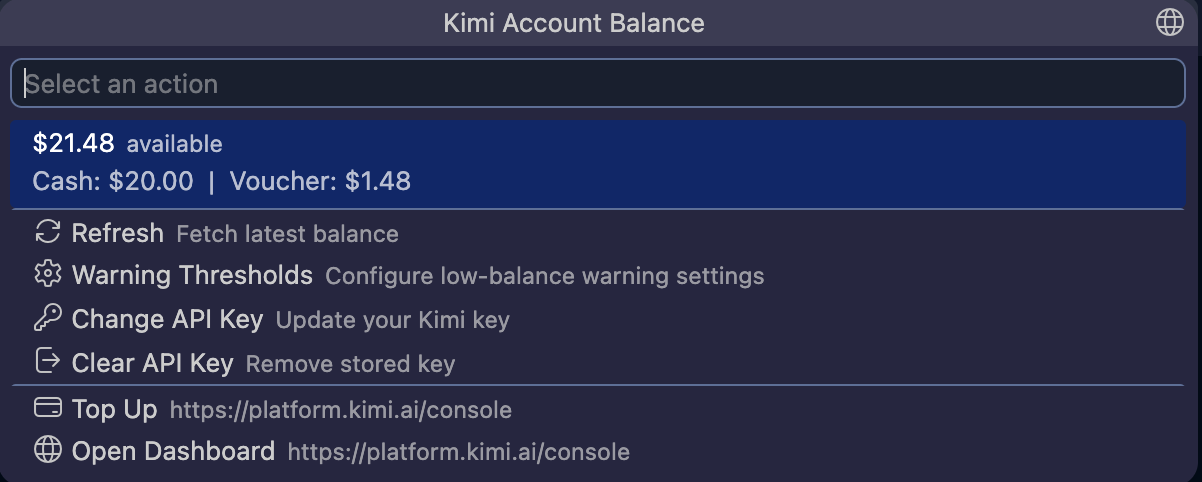
- Cash and voucher breakdown — the tooltip shows your available balance
split into cash and voucher amounts, and flags a negative cash balance
(amount owed)
- Mandatory low-credit alert — a modal warning always fires below $1 / ¥7
and when credits run out, so you can never silently hit an empty balance.
Every alert includes a one-click "Top Up" button
- Low-balance warnings — configurable alerts when your credits drop below
preset thresholds ($20, $10, $5, $1) or any custom amounts you enter. Tap
the notification to adjust settings immediately
- Spend-rate estimate — the tooltip shows your estimated daily spend and
roughly how long your credits will last, computed locally from balance
history (no extra API calls)
- Spend summaries — see exactly how much you spent today and over the
last 7 days, aggregated from local balance history with top-ups excluded
- Top-up notification — a small popup when your balance increases, so
you know a top-up or voucher grant landed
- Available in English and 简体中文 — the UI follows VS Code's display
language
- Command Palette integration —
Kimi: Refresh Balance, Kimi: Set API Key, Kimi: Configure Warning Thresholds, and Kimi: Open Balance Menu
- QuickPick menu — click the status bar to refresh the balance, configure
warning thresholds, change or clear your API key, top up, or open the Kimi
console
- Secure by default — your API key is stored in VS Code SecretStorage
(macOS Keychain, Windows Credential Manager, or Linux
libsecret/gnome-keyring)
- Zero runtime dependencies — built entirely on the VS Code Extension API
and Node.js
https module. No npm packages at runtime, nothing phoning home
Usage
- Install the extension
- Click
Kimi: Not logged in in the status bar
- Enter your Kimi API key (from
platform.kimi.ai/console/api-keys
or
platform.kimi.com/console/api-keys)
- Your balance appears in the status bar and refreshes every 5 minutes
(adjustable via the
kimi-usage.refreshIntervalMinutes setting)
API keys are platform-specific: a key created on one platform returns 401 on
the other. If your key comes from the China platform, set
kimi-usage.region to china.
Click the status bar at any time to refresh, configure warning thresholds,
change or clear your key, or open the Kimi console.
Settings
| Setting |
Default |
Description |
kimi-usage.region |
international |
Which Kimi platform your API key belongs to (international / china) |
kimi-usage.warningThresholds |
[10, 5, 1] |
Balance amounts that trigger a low-balance warning |
kimi-usage.refreshIntervalMinutes |
5 |
How often the balance refreshes, in minutes (1–120) |
Privacy
This extension makes exactly one outbound network call:
GET https://api.moonshot.ai/v1/users/me/balance (or api.moonshot.cn for
the China platform) with your API key in the Authorization header. Your key
never leaves your machine except for that single request to Moonshot. No
analytics, telemetry, or third-party services are involved.
Requirements
License
MIT
| |

