DeepSeek Credit Status — API Balance Monitor




Track your DeepSeek API account balance and remaining credits right from the
VS Code status bar, with peak/off-peak pricing monitoring and a live countdown
to the next price change. Never get caught with an empty balance or an
unexpected peak rate during a coding session.
Updated for DeepSeek's API pricing changes effective August 23, 2026: peak
windows now apply on weekdays only, while every Saturday and Sunday is billed
at the off-peak rate all day (Beijing time).
Ideal for developers using DeepSeek with
OpenCode or any other AI coding tool inside VS Code.
Monitor your usage without leaving the editor.
The extension talks only to DeepSeek's
/user/balance endpoint over HTTPS.
No other APIs, analytics, telemetry, or third-party services are involved.
What's new in 1.3.0
- All-weekend off-peak pricing — updated for DeepSeek's August 23, 2026
billing change; peak windows now run Monday–Friday only
- Official Peak/Off-peak terminology throughout the status bar, balance
menu, tooltips, and notifications
- Weekend-aware countdowns — after Friday's final peak window, the next
peak correctly points to Monday (e.g.
DeepSeek: $0.92 · Off-peak · Peak in 2d 15h)
- Weekend notification — Friday's peak-end message confirms that off-peak
pricing remains active through the weekend
- One request per refresh — opening the balance menu and updating the
status bar now share one DeepSeek balance request; overlapping refreshes
reuse the same in-flight request
- Actionable connection errors — invalid keys, rate limits, timeouts,
network failures, invalid responses, and DeepSeek service errors now have
distinct status-bar and balance-menu messages
- Updated English and Simplified Chinese copy, using UTC for English and
Beijing time for 中文
Features
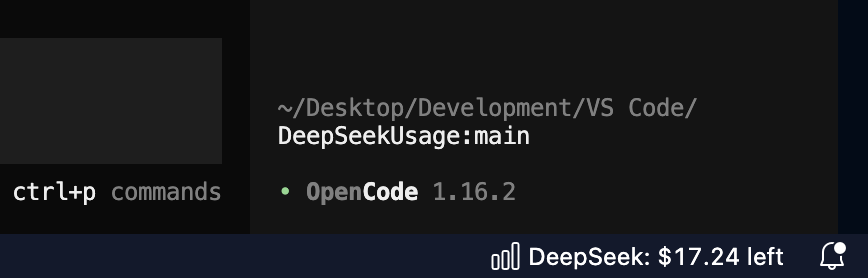
- Live balance in the status bar — your DeepSeek credits displayed at a
glance, auto-refreshed at a configurable interval (default 5 minutes). The
status bar turns yellow when your balance is low and red when it is
critically low or depleted
- Peak/off-peak pricing awareness — the status bar shows the current
DeepSeek API pricing tier with a live countdown to the next transition,
turns amber while peak pricing is active, and displays a notification when
peak pricing starts or ends. Peak windows are 09:00–12:00 and 14:00–18:00
Beijing time, Monday–Friday; weekends are off-peak all day. Transition times
are shown in UTC for English and Beijing time for Chinese. Everything is
computed locally with no extra API calls
- Mandatory low-credit alert — a modal warning always fires below $1 / ¥7
and when credits run out, so you can never silently hit an empty balance.
Every alert includes a one-click "Top Up" button
- Low-balance warnings — configurable alerts when your credits drop below
preset thresholds ($20, $10, $5, $1) or any custom amounts you enter. Tap
the notification to adjust settings immediately
- Spend-rate estimate — the tooltip shows your estimated daily spend and
roughly how long your credits will last, computed locally from balance
history (no extra API calls)
- Multi-currency support — USD and CNY balances, switchable with one click
- Available in English and 简体中文 — the UI follows VS Code's display
language
- Command Palette integration —
DeepSeek: Refresh Balance, DeepSeek: Set API Key, DeepSeek: Configure Warning Thresholds, and DeepSeek: Open Balance Menu
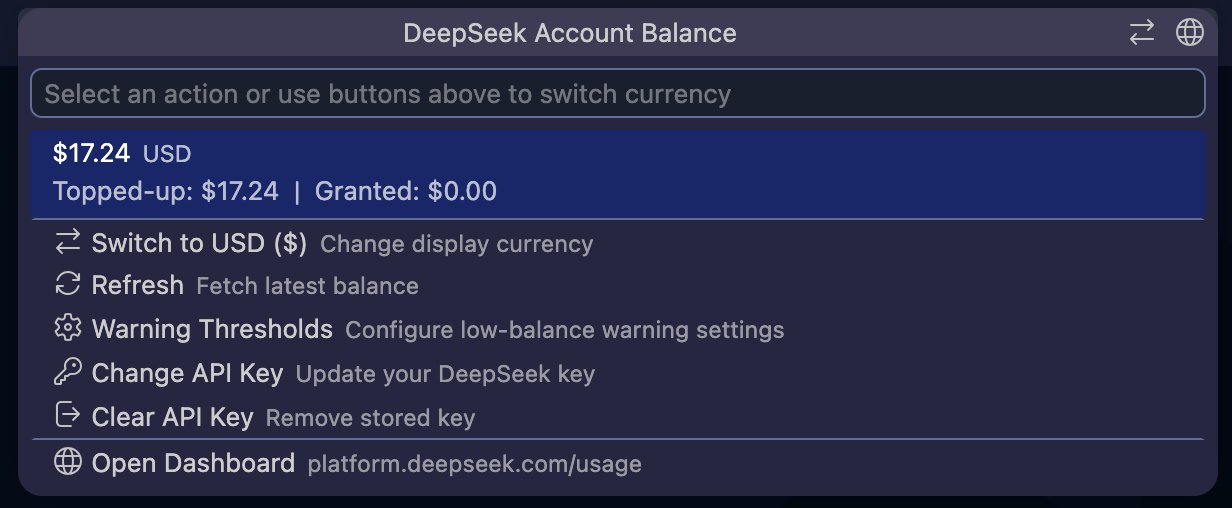
- QuickPick menu — click the status bar to refresh balance, switch
currencies, configure warning thresholds, change or clear your API key, top
up, or open the DeepSeek billing dashboard. Balance failures appear directly
in the menu instead of leaving it stuck on a loading state
- Secure by default — your API key is stored in VS Code SecretStorage (macOS
Keychain, Windows Credential Manager, or Linux libsecret/gnome-keyring)
- Zero runtime dependencies — built entirely on the VS Code Extension API
and Node.js
https module. No npm packages at runtime, nothing phoning home
Current DeepSeek API pricing
Prices below are in USD per 1 million tokens and were current when version
1.3.0 was prepared on August 25, 2026. See DeepSeek's
Models & Pricing page for
the authoritative current prices.
| Model |
Tier |
Input (cache hit) |
Input (cache miss) |
Output |
deepseek-v4-flash |
Off-peak |
$0.007 |
$0.22 |
$0.66 |
deepseek-v4-flash |
Peak |
$0.014 |
$0.44 |
$1.32 |
deepseek-v4-pro |
Off-peak |
$0.022 |
$0.66 |
$1.98 |
deepseek-v4-pro |
Peak |
$0.044 |
$1.32 |
$3.96 |
deepseek-v4-flash-vision-exp |
Off-peak |
$0.007 |
$0.22 |
$0.66 |
deepseek-v4-flash-vision-exp |
Peak |
$0.014 |
$0.44 |
$1.32 |
Peak hours are 09:00–12:00 and 14:00–18:00 Beijing time (01:00–04:00 and
06:00–10:00 UTC), Monday through Friday. All other hours—including every
Saturday and Sunday—use the off-peak rates.
Usage
- Install the extension
- Click
DeepSeek: Not logged in in the status bar
- Enter your DeepSeek API key (from
platform.deepseek.com/api_keys)
- Your balance appears in the status bar and refreshes every 5 minutes
(adjustable via the
deepseek-usage.refreshIntervalMinutes setting)
Click the status bar at any time to refresh, switch currencies, configure
warning thresholds, change or clear your key, or open the DeepSeek usage
dashboard.
The extension retains its original deepseek-usage.* command and setting IDs
for compatibility with existing settings and keybindings. Its Marketplace
package ID remains pantsari.deepseek-credit-status.
Privacy
The extension's only outbound endpoint is
GET https://api.deepseek.com/user/balance. Each refresh uses one shared
request, even when the balance menu and status bar update together. Your API
key is sent only to DeepSeek in the Authorization header. No analytics,
telemetry, or third-party services are involved.
Requirements
License
MIT

