
Claude Agent Map & UsageAgent map of every Claude Code session on your machine - sessions, sub-agents, workflows, prompt cache - plus your plan usage with reset countdowns in the sidebar and the status bar. Read-only access to ~/.claude. Installation Launch VS Code Quick Open ( Ctrl+P), paste the following command, and press enter.Copied to clipboard |

|
 Claude Agent Map & Usage



| Setting | Default | Effect |
|---|---|---|
claudeAgents.showFinishedAgents |
temporarily |
Finished agents: always · temporarily · never |
claudeAgents.finishedAgentRetentionSeconds |
60 |
How long they stay in temporarily mode |
claudeAgents.inactiveSessionRetentionMinutes |
10 |
Hide a session after this inactivity (0 = never) |
claudeAgents.alwaysShowWorkspaceSessions |
true |
Keep the open workspace's sessions visible |
claudeAgents.showUsage |
true |
Show the plan usage card |
claudeAgents.usageFile |
"" |
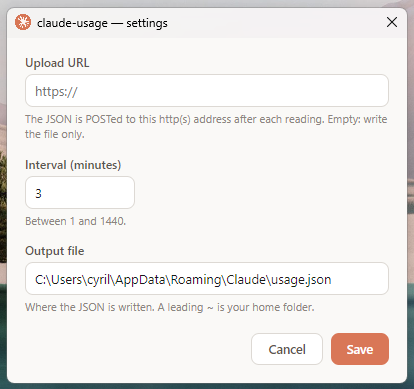
Path of the JSON file written by Claude Usage |
claudeAgents.usageStatusBar |
text |
Usage in the status bar: text · rings · off |
claudeAgents.usageStatusBarSide |
right |
Status bar side: right · left |
What's new in 0.9.4
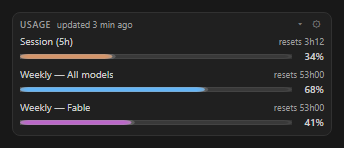
- Which account - the usage card (
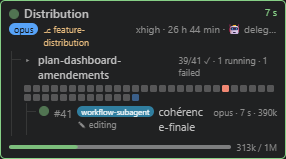
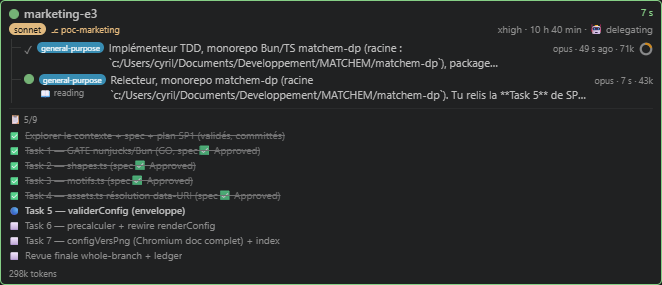
USAGE · you@example.com · updated 7 min ago) and the status bar tooltip name the Claude Usage account the gauges belong to. - Plans - tasks not started yet show as small empty squares, and a task added to a plan along the way counts in its total (no more
15/14), titled from its brief. - A spinning hourglass while the first scan runs, instead of "No Claude session" before anything was read.
- Plain hyphens everywhere the extension writes: no more long dashes in labels, tooltips or the CSV.
- Much lighter on big sessions - a session with hundreds of agents used to freeze the extension host for seconds at start-up and cost a slice of CPU every 2 s.
- The scan now runs in a worker thread, which only starts once the view is opened.
- It remembers what it read across restarts, in a cache in VS Code's global storage checked against each file's modification time.
- It checks a settled agent every 30 s instead of every 2 s, opens each transcript once, and no longer searches every sub-folder of your project for plans on each scan.
- A resumed session (
claude --resume) is no longer read again from scratch.
- Many windows open - each window now uses about half the CPU and a quarter less memory:
- A window without the focus refreshes its cards every 10 s instead of 2 s. Durations keep ticking, and the cards catch up as soon as you click back in.
- A hidden view only reads the sessions themselves, to keep the badge right: no agent transcript is touched until you open it.
- Pulsing dots and squares pause in a window without the focus, and when your system asks to reduce motion.
- The view redraws once per second instead of four times, only gets a new state when something changed, and no longer receives the sessions it hides. Nothing is redrawn in a minimized window.
- The retention ring of a finished agent moves once per second instead of animating continuously.
- The shared cache is half its former size, and only one window at a time rewrites it, once an agent has settled.
- Faster CSV export - it no longer loads every transcript at once: exporting a session of hundreds of agents takes a fraction of the time and memory.
What's new in 0.9.3
- Session statistics -
⤓at the end of a session's title line exports every agent of the session to CSV: tokens by kind (input, cache writes 5 min and 1 h, cache reads, output) and what each would have cost on the Claude API, kind by kind, with a total line. - Cost on hover - task and agent lines show time and tokens; hover one to add its agents and API cost (an agent counts the sub-agents it launched), or click to show them on every line. The cost stays blank until every transcript involved has been read and priced.
What's new in 0.9.2
- Marketplace rating in the top banner - the real average as stars, the number of reviews on their left.
- The stars now light up one by one, go dark, then show the real rating.
What's new in 0.9.1
- Superpowers plans - a session running a superpowers subagent-driven plan shows its tasks as squares: done, running, in review, to do. Click
📋 Planor the squares for the list. - Time and tokens per task - each task adds up the agents that worked on it, from the first start to the last finish.
- Finished plans step aside once you talk to Claude about something else;
‹›browse the folder's earlier plans. - Agent rows: the current activity sits right after the title, and the agent type moved to the tooltip.
What's new in 0.9.0
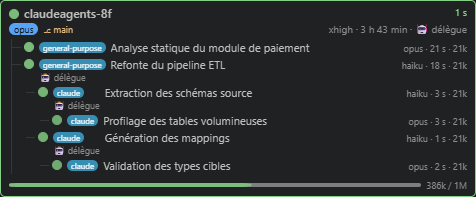
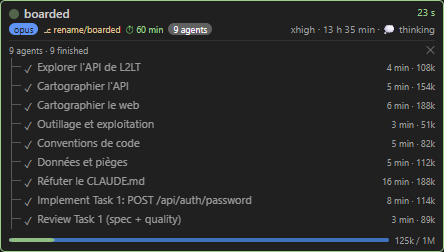
- Agent map - click
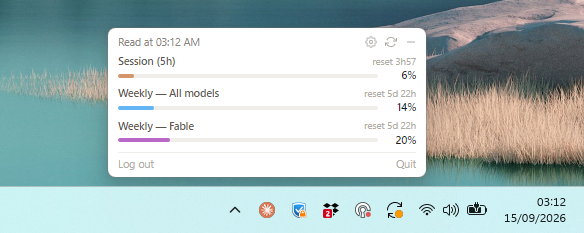
N agentsfor every agent of the session, with exact duration and tokens. - Plan usage - gauges at the bottom of the view, with the new Claude Usage app.
- Plan usage in the status bar - session and weekly limits with a live countdown to the reset, or as rings.
- Per-session effort, prompt cache ⏱, and why an agent failed on hover.
- Settings gear in the view title, next to the project filter.
- Sessions of the open workspace stay visible.
Privacy
Read-only on ~/.claude, never touches .credentials.json; to name the usage account it also reads Claude Usage's own settings and account list (the output file path, the active account's name), nothing else. The only files it writes are the statistics CSV you ask for, where you choose, and its own scan cache in VS Code's global storage for the extension (what it last read from your transcripts, so the next start does not read them again; a transcript is forgotten 48 hours after it was last seen). Two network calls only: a TCP check on 127.0.0.1 to tell a live dev server from a dead one, and - while the view is open, at most every 6 hours - a read of the Marketplace's public reviews to show the extension's rating. Nothing is sent.
⭐ Useful? Star it on GitHub or leave a review · Report an issue
Development: npm install · npm test · npm run dev (live preview on your real ~/.claude) · npm run package · MIT