Agent Contracts


Agent Contracts is a VS Code extension for repositories that use AI coding tools, MCP servers, and automation but still want explicit review boundaries.
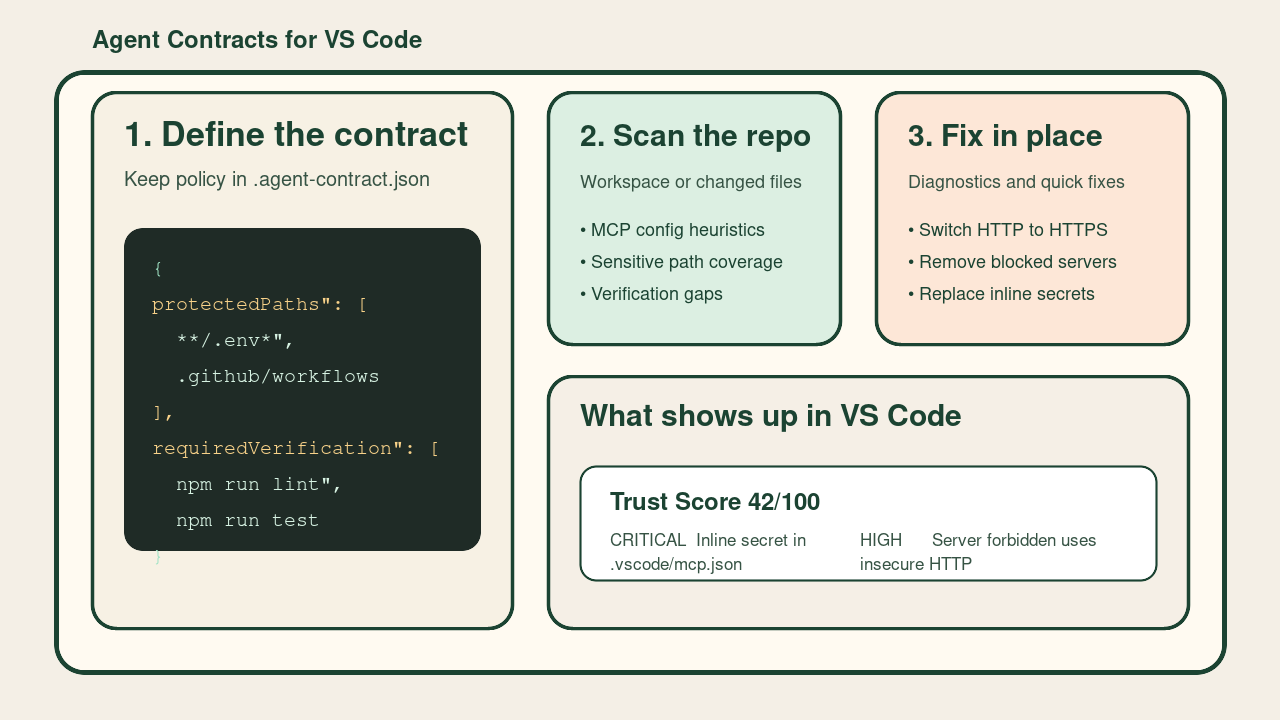
It keeps a small policy file in the repo and uses it to answer practical questions:
- which files should be treated as sensitive
- which checks should run before changes are trusted
- which MCP setups look risky or need review
What it does
- creates a repo-local
.agent-contract.json
- analyzes MCP config files in the workspace
- prioritizes changed files when you want a branch-focused review
- highlights exactly which MCP server entries changed in a branch scan
- adds inline editor diagnostics for changed MCP server blocks during branch scans
- checks whether sensitive files are covered by protected path rules
- compares your contract with the verification scripts your repo already exposes
- can add missing verification commands to the contract
- can add current sensitive files to the contract as protected paths
- adds line-precise diagnostics for MCP findings when the file is open
- offers quick fixes for safe MCP cleanup cases
- can apply safe fixes across the current scan in one pass
- can approve reviewed MCP hosts and runner targets in the contract
- can approve MCP hosts and runner targets directly from the editor warning
- can tune finding severity from the repo contract for stricter or softer local policy
- generates a readable report inside VS Code
- shows findings and shortcuts in a dedicated Activity Bar view
How it works
The extension scans the current workspace and builds findings from four sources.
1. Contract file
If .agent-contract.json is missing, Agent Contracts reports that the repository has no explicit trust policy yet.
2. Verification rules
The extension reads package.json and looks for common quality gates such as:
linttypechecktestbuild
If those scripts exist but are not listed in requiredVerification, it reports the gap.
3. Sensitive paths
The extension searches for files that usually deserve extra review, such as:
.env**.pem*.key- secret config files
If those files are not covered by protectedPaths, it reports them.
4. MCP risk
The extension scans workspace MCP configs and flags patterns such as:
- shell wrappers like
bash -c
- shell chains like
curl ... | sh
- package runners like
npx, pnpm, or docker
- unpinned runner targets
- insecure
http:// MCP URLs
- remote MCP endpoints outside the local machine
- remote hosts and runner targets that are not approved in the contract
- inline secrets in environment variables
- MCP servers blocked by the contract but still configured
The contract can also tune the severity of specific finding classes. For example, a repository can raise
all remote MCP findings from medium to critical, or soften low-priority noise that the team has
already accepted.
Getting started
- Open a repository in VS Code.
- Run
Agent Contracts: Initialize Contract.
- Review the generated
.agent-contract.json.
- Run
Agent Contracts: Analyze Workspace.
- Open the Agent Contracts Activity Bar view or run
Agent Contracts: Open Report.
There is also a built-in Agent Contracts: How It Works command if you want the short product guide inside VS Code.
If you are reviewing an active branch, run Agent Contracts: Analyze Changed Files instead of the full workspace scan.
If you want a faster setup, run Agent Contracts: Apply Contract Preset and start from the built-in Node, Python, or Terraform policy.
What the workflow feels like
- Create or open
.agent-contract.json.
- Run a workspace scan to establish a baseline.
- Use changed-file scans while reviewing a branch and start with the review queue at the top of the report.
- Use the MCP server change queue to see which exact server blocks were added or modified.
- Fix MCP issues directly from diagnostics when a safe quick fix is available.
- Apply safe fixes from the sidebar when the scan offers a batch cleanup.
- Keep the contract in version control so the repo explains its own trust boundaries.
Example contract
The extension stores its policy in .agent-contract.json.
{
  "protectedPaths": [
    "**/.env*",
    "**/*.pem",
    ".github/workflows/**"
  ],
  "requiredVerification": [
    "npm run lint",
    "npm run test"
  ],
  "blockedCommands": [
    "git push --force",
    "rm -rf /",
    "curl | sh"
  ],
  "blockedMcpServers": [],
  "allowedMcpHosts": [],
  "allowedMcpRunnerTargets": [],
  "severityOverrides": [
    {
      "match": "mcp-remote-*",
      "severity": "high",
      "note": "Remote MCP connections require explicit security review in this repo."
    }
  ]
}
Example findings
Examples of things the extension will report:
No agent contract file foundSensitive-looking files are not covered by protected pathsServer github runs through a shell wrapperServer deployment uses insecure HTTPCommon verification steps are not covered by the contract
Commands
Agent Contracts: Initialize ContractAgent Contracts: Analyze WorkspaceAgent Contracts: Analyze Changed FilesAgent Contracts: Open ReportAgent Contracts: How It WorksAgent Contracts: Add Recommended VerificationAgent Contracts: Protect Sensitive PathsAgent Contracts: Apply Contract PresetAgent Contracts: Apply Safe FixesAgent Contracts: Allow Observed MCP HostsAgent Contracts: Allow Observed Runner Targets
View
The Activity Bar view shows:
- current trust score
- whether the last scan covered the whole workspace or only changed files
- a shortcut to the report
- shortcuts for common contract updates
- top findings from the latest scan
- a changed review queue during branch-focused scans
- a changed MCP server queue for branch-focused MCP edits
- inline diagnostics on changed MCP server blocks while reviewing branch changes
Diagnostics and autofixes
Findings tied to files are also surfaced as editor diagnostics.
The first autofix commands currently supported are:
- add inferred verification commands into
requiredVerification
- add currently detected sensitive files into
protectedPaths
- merge starter policies for Node, Python, and Terraform repos
- apply all safe fixes from the current scan in one pass
- write reviewed MCP hosts and runner targets into the contract
- approve reviewed MCP hosts and runner targets from the exact MCP finding in the editor
- raise or lower matching finding classes with
severityOverrides
For MCP config files, the current quick fixes cover:
- switching
http:// MCP URLs to https://
- removing MCP servers blocked by the contract
- replacing inline secret values with
${ENV_VAR} style references
The trust score is only a prioritization signal. The detailed findings matter more than the number.
Feedback
If you hit issues or have product wishes, please tell us:
Current scope
This version focuses on analysis and shared policy. It does not intercept agent actions or replace CI and code review.

