Modern Image Inspector


Modern Image Inspector — Inspect image compression potential and convert images to WebP or AVIF directly in VS Code.
✨ Features
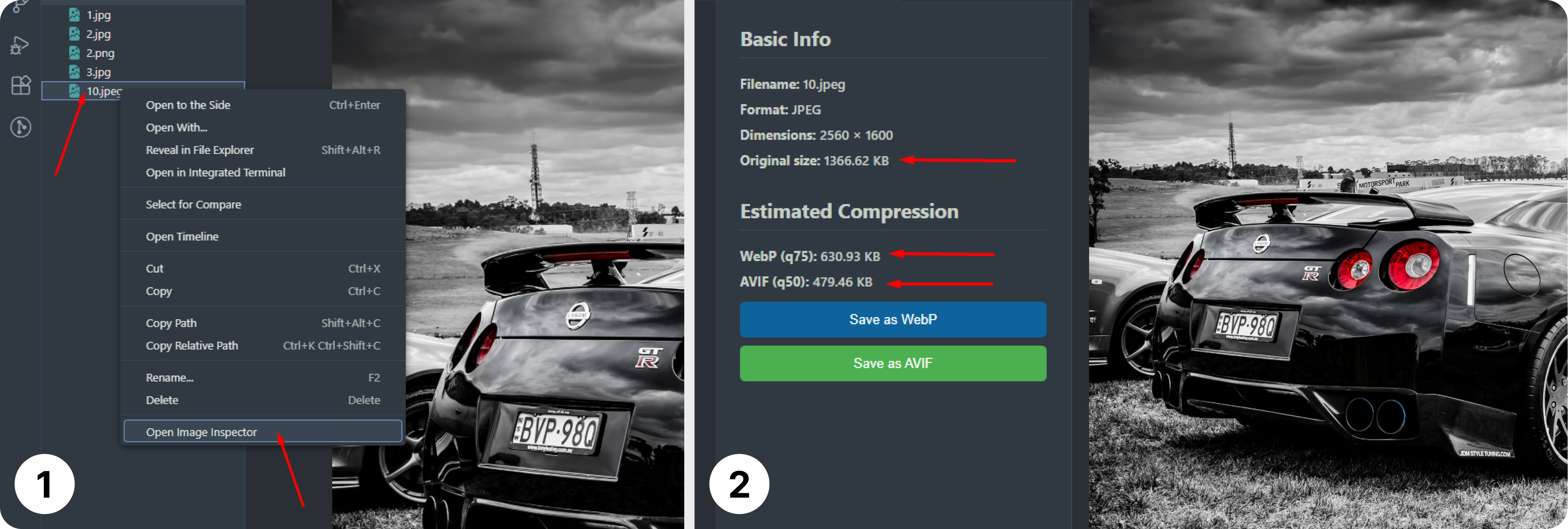
- 🖼 Image Inspection — Inspect PNG and JPG images and view filename, format, dimensions, and original file size.
- 📏 Size Comparison — Compare the original image size with estimated sizes for WebP (q75) and AVIF (q50).
- 🛠 Convert & Save — Convert and save images as WebP or AVIF directly from the inspector panel.
- 🖼 Side-by-side Preview — Clear layout with image information on the left and image preview on the right.
- 🛡 Local & Secure — All image processing is done locally using Sharp. No uploads, no tracking.
Screenshot
🛠 Installation
- Open VS Code → Extensions (
Ctrl+Shift+X / Cmd+Shift+X).
- Search for Modern Image Inspector and click Install.
🎨 Usage
To inspect an image:
- Right-click a PNG or JPG file in the Explorer and select Open Image Inspector.
- The Webview panel will display:
- Basic Info: filename, image format, dimensions, original file size.
- Estimated Compression: predicted file sizes for WebP (q75) and AVIF (q50).
- Click the buttons to Save as WebP or Save as AVIF.
- Left side shows info and buttons; right side shows the image.
- All operations are performed locally and safely—no files are uploaded.
🧩 Contributing
Found a bug or want to suggest an improvement?
Open an issue or pull request on GitHub.
👤 Author

Andriy Ovcharov
📧 ovcharovcoder@gmail.com
☕ Support
If you enjoy Modern Image Inspector, consider supporting the author:
Donate via PayPal
🪪 License
Released under the MIT License
| |

