R Lab
  
An RStudio-inspired development environment for R in VS Code.
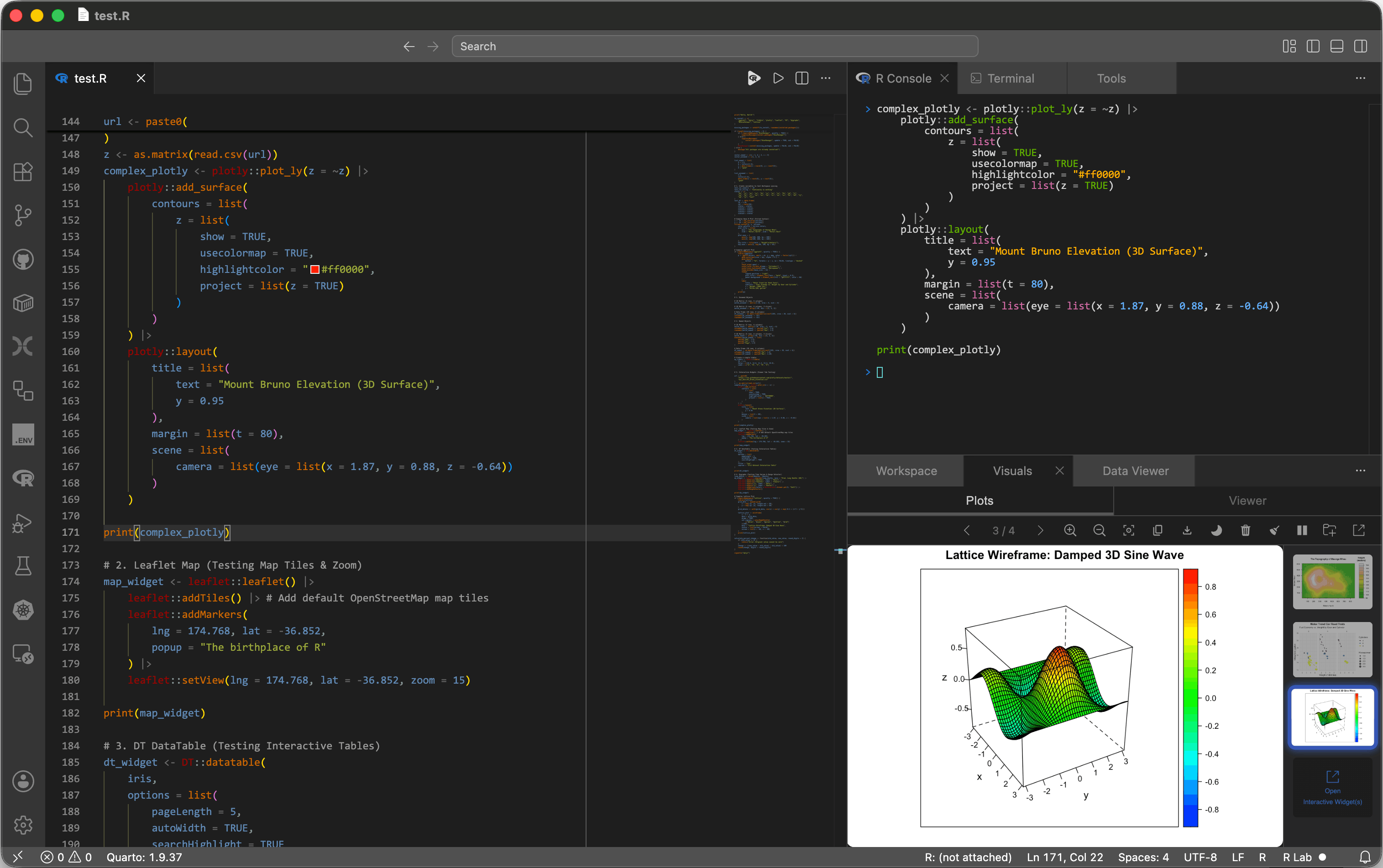
Bring the cohesive development experience of RStudio to VS Code with a single click. Optimized for data science, R Lab integrates a live variable explorer, a high-performance data viewer, and a unified Visuals workspace directly into your editor.
Core Features
- Unified Development Environment: Instantly organizes your workspace into a professional 3-pane layout (Source Editor, Terminal/Console/Tools, and Workspace/Visuals/Data Viewer).
- Workspace & Package Manager: Live variable inspector, dictionary-style object previews, and a 1-click interactive data frame viewer. Includes a dedicated tab to search, attach, and detach R packages.
- Visuals: Combined Plots and Viewer subtabs for plot navigation, export, comparison, R
viewer() output, Shiny apps, htmlwidgets, Quarto previews, and vignettes.
- Plot Export: Advanced export settings for PDF, SVG, EPS, PNG, and JPG with smart file size estimation.
- Tools & Smart Execution: Combined R Help and Problems tab, KaTeX help rendering, cross-reference linking, and dynamic code execution (Run Source / Run Selection).
Getting Started
- Prerequisites: Ensure you have the official vscode-R extension installed and configured on your system. R Lab leverages
vscode-R strictly for static editor features (syntax highlighting, autocompletion, and diagnostics). R Lab's execution runtime, console, and session watchers are completely decoupled from vscode-R to maximize performance and ensure stability against external updates.
- Installation: Install R Lab from the VS Code Marketplace or the Open VSX Registry.
- Activation & Reactivation: Open a workspace and click
R Lab in the Status Bar, or run Toggle R Lab from the Command Palette to initialize (or return to) the 3-pane layout.
- Deactivation: To turn off R Lab and restore your standard editor layout, click
R Lab ● (the active status indicator showing a filled circle) in the Status Bar, or run Toggle R Lab again from the Command Palette.
- Execution: For
.R scripts, click the source icon in the editor title bar to run the entire file, or highlight and run a selected block of code. For .Rmd, .qmd, or Markdown files, select a code chunk or line and run the selection.
Key Settings & Commands
| Feature |
Description |
r-lab.rConsoleType |
Select console type (Auto Detect, Standard R, arf/radian) to enforce bracketed paste. |
r-lab.rConsolePath |
Command or full path for the R Console terminal. Supports names (if on PATH), absolute paths, and inline flags (e.g., radian --no-history, arf --with-r-version 4.6.0). Defaults to "R". |
r-lab.restoreCustomPanelPositions |
If true, restores panels to custom dragged locations instead of strict 3-pane. |
r-lab.protectLayoutTabs |
Automatically restores accidentally closed R Lab webview tabs and the owned shell Terminal while the layout is active. Defaults to true. |
r-lab.plotOutputDir |
Custom directory for R Lab plot images. Defaults to .R-lab/plots in the workspace or home directory. |
Toggle R Lab |
Activate or deactivate the 3-pane development environment. |
Maximize Top Pane |
Maximize the R Console / Tools pane and minimize the bottom-right panels. |
Restore Pane Split |
Restore the standard split between the top-right and bottom-right panes. |
Contributing
Interested in building the layout, fixing bugs, or reviewing our architecture? See our detailed Contributing Guidelines for environment setup and project structure.
Trademarks & License
- R Logo: Copyright The R Foundation (CC-BY-SA 4.0)
- Tidyverse: Trademark of Posit Software, PBC.
- Bioconductor: Trademark of the Bioconductor Project.
- RDocumentation: Copyright DataCamp, Inc.
- License: MIT License
| |

