RSpec Outline View VS Code Extension
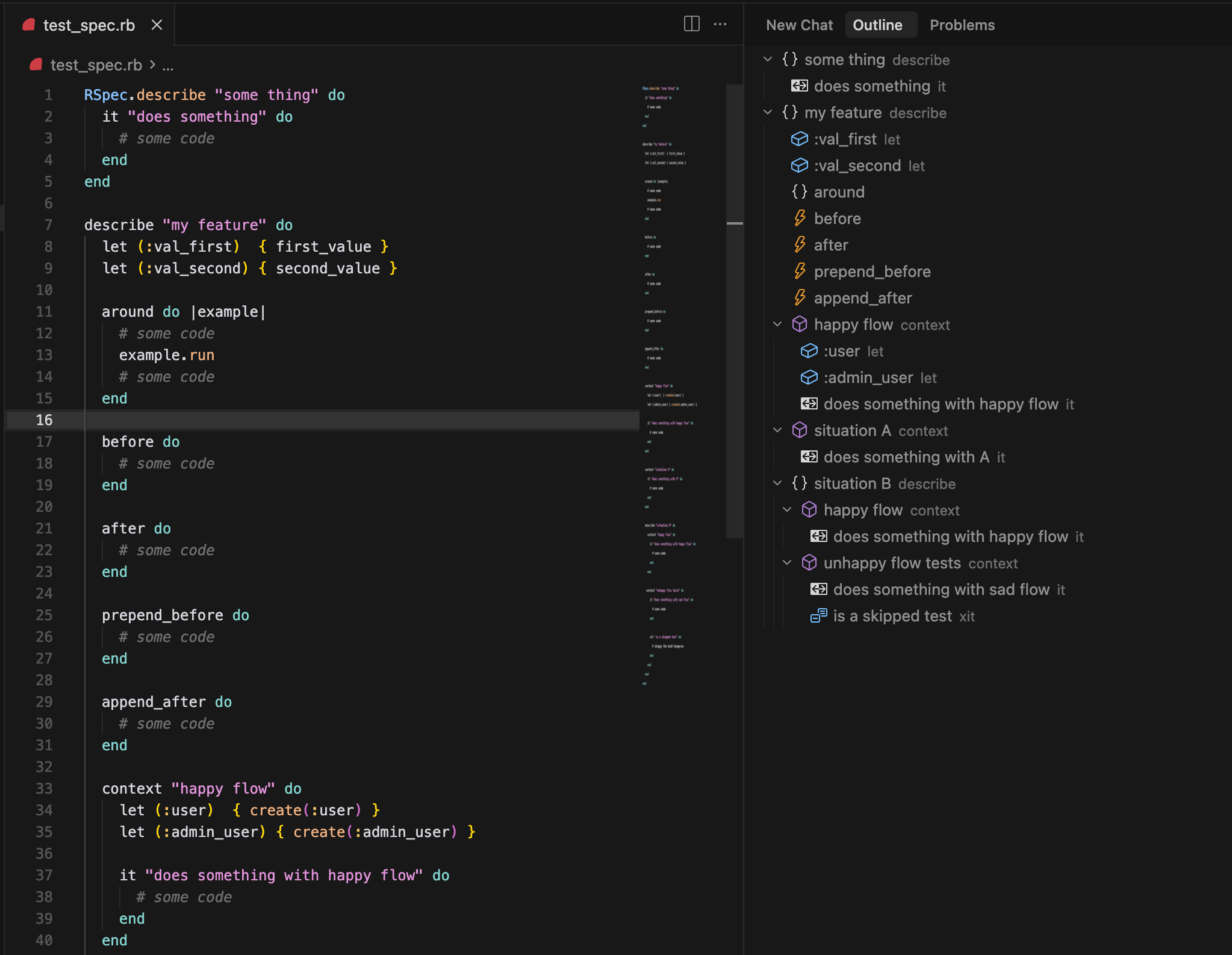
A VS Code extension that provides an outline view for RSpec files (*_spec.rb). It parses Ruby RSpec files and creates a hierarchical tree view showing the structure of your tests.
Features
- 📋 Outline View: See the structure of your RSpec files in a tree view
- 🔍 Navigation: Click on any node to jump directly to that line in the file
- 🎯 Smart Detection: Automatically detects
*_spec.rb files and updates the outline
- 🚫 Skipped Tests: Visual distinction for skipped tests (
xdescribe, xcontext, xit)
- 🔄 Real-time Updates: Outline updates automatically as you edit the file
- 🎨 Visual Icons: Different icons for different RSpec block types
Screenshots
Supported RSpec Elements
The extension recognizes the following RSpec elements:
describe - Top-level test groupscontext - Nested test groupsit - Individual test casesbefore - Setup hooksafter - Teardown hookslet - Memoized helper methodsxdescribe, xcontext, xit - Skipped variants (shown in italics)
Installation
- Open VS Code
- Go to Extensions (Ctrl+Shift+X or Cmd+Shift+X)
- Search for "RSpec Outline View"
- Click Install
Or install from the marketplace: RSpec Outline View
Usage
- Open an RSpec file (
*_spec.rb)
- The outline view will automatically appear in the Explorer panel
- Click on any node in the outline to navigate to that location
- Use the refresh button to manually update the outline
Example RSpec File
describe "User authentication" do
  let(:user) { User.new(email: "test@example.com") }

  before do
    # Setup code
  end

  context "with valid credentials" do
    it "allows login" do
      # Test implementation
    end

    it "redirects to dashboard" do
      # Test implementation
    end
  end

  context "with invalid credentials" do
    it "shows error message" do
      # Test implementation
    end
  end

  after do
    # Cleanup code
  end
end
Development
Prerequisites
Getting Started
Clone the repository:
git clone https://github.com/opensourceame/rspec-outline-vscode-extension.git
cd rspec-outline-vscode-extension
Install dependencies:
npm install
Open in VS Code:
code .
Run the extension in development mode:
- Press F5 or go to Run > Start Debugging
- This will open a new VS Code window with the extension loaded
Build and Test
# Compile TypeScript
npm run compile

# Run in watch mode for development
npm run dev

# Run tests
npm test

# Lint code
npm run lint

# Format code
npm run format

# Build extension package
npm run build
Project Structure
src/
├── extension.ts              # Main extension entry point
├── rspecParser.ts            # RSpec file parsing logic
├── rspecOutlineProvider.ts   # Tree data provider for outline view
├── types.ts                  # TypeScript type definitions
└── test/
    ├── suite/
    │   ├── rspecParser.test.ts
    │   └── index.ts
    └── runTest.ts
Contributing
- Fork the repository
- Create a feature branch:
git checkout -b feature-name
- Make your changes and ensure tests pass
- Submit a pull request
License
MIT License - see LICENSE file for details.
Changelog
0.0.1
- Initial release
- Basic outline view for RSpec files
- Support for describe, context, it, before, after, let blocks
- Skipped test detection
- Navigation functionality
Issues
Please report issues on the GitHub repository.
Support
If you find this extension helpful, please consider ⭐ starring the repository!

