Skip to content
| Marketplace
Sign in
Visual Studio Code>Programming Languages>API StudioNew to Visual Studio Code? Get it now.
API Studio

API Studio

open-post

|
67 installs
| (3) | Free
Lightweight REST & GraphQL API client for VS Code — completely offline with collections, environments, code generation, auth and built-in MCP support
Installation
Launch VS Code Quick Open (Ctrl+P), paste the following command, and press enter.
Copied to clipboard
More Info

⚡ API Studio

VS Code Marketplace Installs Rating

Lightweight REST & GraphQL API client for VS Code — a fully offline API client.

API Studio — API Testing inside VS Code

Current extension version: 1.3.65
Minimum VS Code version: 1.85.0

Highlights

  • 🔒 Fully offline — no cloud, no accounts, no telemetry. Your data stays on your machine.
  • 🔑 Encrypted secret vault — AES-256-GCM local vault for secrets and certificates, with {{variable}} integration.
  • 📦 Postman import — bring your existing collections and environments over in one click.
  • 💻 Code export in 14 languages — cURL (Unix/Windows), PowerShell, JavaScript, Python, Go, Java, C#, Ruby, PHP, Rust, Swift.
  • 🧪 Pre-request & test scripts — automate workflows with sandboxed JavaScript.
  • 📁 Git-friendly — all data stored as plain JSON in .openpost/, ready to commit and share.
  • 🌐 Global shared state — collections, environments, and history shared across workspaces.
  • 🍪 Cookies & proxies — persistent cookie jar and named proxy profiles.
  • 🔌 WebSocket client — connect to ws:// / wss:// endpoints, send and receive messages in real-time.
  • 📡 Full GraphQL client — CodeMirror 6 editor with syntax highlighting, schema-aware autocomplete and lint; introspection, SDL import, visual query builder, docs panel, multi-operation picker, prettify, and graphql-transport-ws subscriptions with a live event stream.
  • 🖥️ Mock + MCP servers — multi-instance mock servers with logs, Swagger, and optional MCP tool exposure for AI clients.
  • 🤖 AI integration — built-in Management MCP server lets any AI client (Copilot, Cursor, Kiro, Amazon Q, Claude Desktop) manage your workspace via natural language.

Quick Start

  1. Click the ⚡ API Studio icon in the Activity Bar (or press Cmd+Alt+P / Ctrl+Alt+P)
  2. The webview panel opens automatically alongside the sidebar tree views
  3. Enter a URL and click Send (or Cmd+Enter / Ctrl+Enter)

Try it now:

GET  https://jsonplaceholder.typicode.com/posts/1
GET  https://jsonplaceholder.typicode.com/users
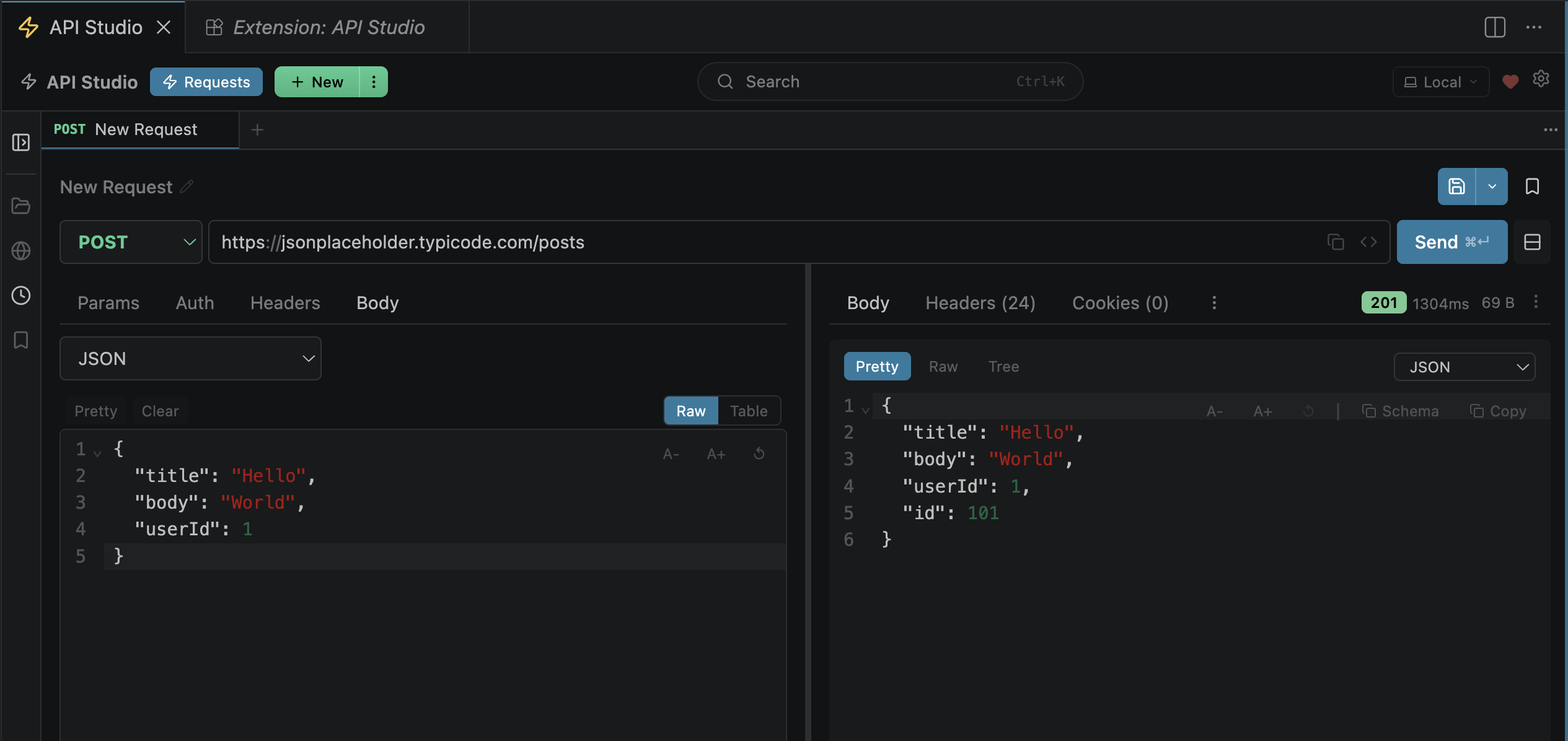
POST https://jsonplaceholder.typicode.com/posts
     Body (JSON): { "title": "Hello", "body": "World", "userId": 1 }

Try SSE streaming:

GET  https://sse.dev/test

Or test with OpenAI (add your API key in Auth → Bearer Token):

POST https://api.openai.com/v1/chat/completions
     Headers: Content-Type: application/json
     Body (JSON): { "model": "gpt-4", "messages": [{"role": "user", "content": "Say hello"}], "stream": true }

The button changes to Stream when SSE is detected. Events appear live in the Stream tab. Click Stop to cancel mid-stream.

Try WebSocket:

wss://echo.websocket.org
wss://ws.postman-echo.com/raw

The button changes to Connect when a ws:// or wss:// URL is detected. Messages appear in the ws tab with ↑ sent / ↓ received indicators. Type a message and click Send to test two-way communication.

Try GraphQL:

https://countries.trevorblades.com/graphql

Set protocol to graphql, click Fetch Schema — the schema panel populates with the Builder, Docs, and Schema tabs. The CodeMirror editor provides syntax highlighting, field autocomplete (Ctrl+Space), and inline lint. Click Subscribe on a subscription operation to open a live event stream.

5-minute workflow:

  1. Create an environment — click Environments tab → New Environment → add base_url = https://jsonplaceholder.typicode.com
  2. Create a collection — click Collections tab → type a name → press Enter
  3. Build a request — enter {{base_url}}/posts/1, click Send
  4. Save it — click Save in the request builder, pick your collection
  5. Export code — click the </> button to generate code in 12 languages

Features

🚀 HTTP Client

  • All methods: GET, POST, PUT, PATCH, DELETE, HEAD, OPTIONS, plus custom methods
  • HTTP/2 auto-negotiation — uses HTTP/2 when the server supports it, falls back to HTTP/1.1 automatically. Protocol shown in the Actual Request tab.
  • Server-Sent Events (SSE) — real-time streaming with live event viewer. Auto-detects text/event-stream responses, displays events as they arrive in a dedicated Stream tab. Cancel mid-stream. Works with OpenAI, Anthropic, and any SSE endpoint.
  • WebSocket client — connect to ws:// and wss:// endpoints for real-time two-way communication. Send and receive messages with direction indicators (↑ sent / ↓ received), timestamps, and JSON pretty-printing. Supports custom headers and auth on the handshake.
  • GraphQL client — full Postman/Insomnia parity. See GraphQL below.
  • Query parameters with bidirectional URL sync
  • Custom headers with autocomplete for standard HTTP headers
  • Multi-tab interface with session persistence — tabs restore when you reopen the panel

📡 GraphQL Client

Full Postman/Insomnia parity for GraphQL APIs.

Editor

  • CodeMirror 6 with GraphQL syntax highlighting, line numbers, and code folding
  • Schema-aware autocomplete — Ctrl+Space completes field names, arguments, types, and directives against the fetched schema
  • Inline lint — squiggles under invalid fields, wrong argument types, and missing required args
  • Prettify — formats query and variables with one click (idempotent)

Schema loading

  • Introspection — click Fetch Schema to introspect any endpoint; result is cached and shown with a last-fetched timestamp and source badge
  • SDL import — paste or browse a .graphql / .gql file; the schema is parsed locally without a network request
  • Schema URL override — point the schema fetch at a different endpoint than the one used for request execution
  • Clear schema — reset the cache for the current URL

Visual query builder

  • Checkbox-driven field tree grouped by Query / Mutation / Subscription root
  • Auto-generates argument variables for every selected field's args
  • Preserves manually-entered variable values across operation switches

Docs panel (Builder tab → Docs)

  • Searchable type browser — find any type or field by name
  • Clickable type references with breadcrumb navigation
  • Field descriptions and argument signatures inline

Multi-operation support

  • When the document contains more than one named operation, a picker dropdown appears above the editor
  • Only the selected operation is sent; operationName is included in the request body and cURL export
  • Switching to a single-operation document automatically clears any stale operationName

Subscriptions (graphql-transport-ws)

  • When the active operation is a subscription, the Send button becomes Subscribe
  • Connection goes over WebSocket using the modern graphql-transport-ws subprotocol
  • A live event panel shows connection status, elapsed time, event count, and each next payload pretty-printed
  • Click Unsubscribe to send a complete frame and close the stream

Quick start:

  1. Enter https://countries.trevorblades.com/graphql, set protocol to graphql
  2. Click Fetch Schema — Builder and Docs tabs populate
  3. In Builder, tick countries > name, capital, emoji → query auto-fills and click Send
  4. Or type directly in the editor — autocomplete and lint activate immediately

📝 Body Types

Type Use Case
JSON Most REST APIs
Form Data File uploads, multipart forms
URL Encoded Simple form submissions
Raw Text Plain text payloads
XML SOAP or XML-based APIs
GraphQL Queries and mutations
Binary Binary file uploads

All text-based body types support inline comments — comment out lines to temporarily exclude them from the request. Comments are syntax-highlighted in the editor and automatically stripped before sending.

Body Type Comment Syntax
JSON // single-line, /* */ multi-line
Raw // single-line, /* */ multi-line
XML <!-- -->
GraphQL Query # single-line
GraphQL Variables // single-line, /* */ multi-line

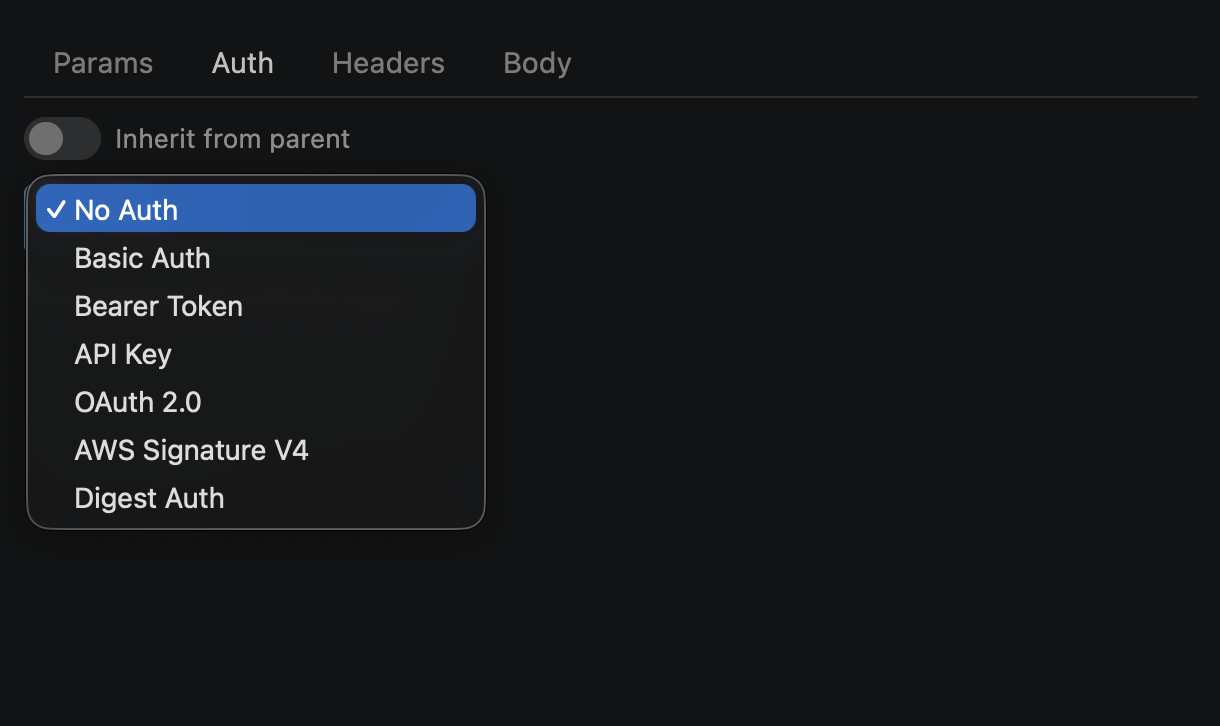
🔐 Authentication

  • Basic Auth — username & password (supports {{variables}})
  • Bearer Token — paste your token
  • API Key — header or query param
  • OAuth 2.0 — authorization code & client credentials flows
  • AWS Signature V4 — access key, secret, region, service
  • Digest Auth — username & password (RFC 7616, MD5/SHA-256/SHA-256-sess, supports {{variables}})

All auth types support {{variable}} placeholders resolved from the active environment. Auth is automatically injected into generated code exports.

🔑 Secret Vault

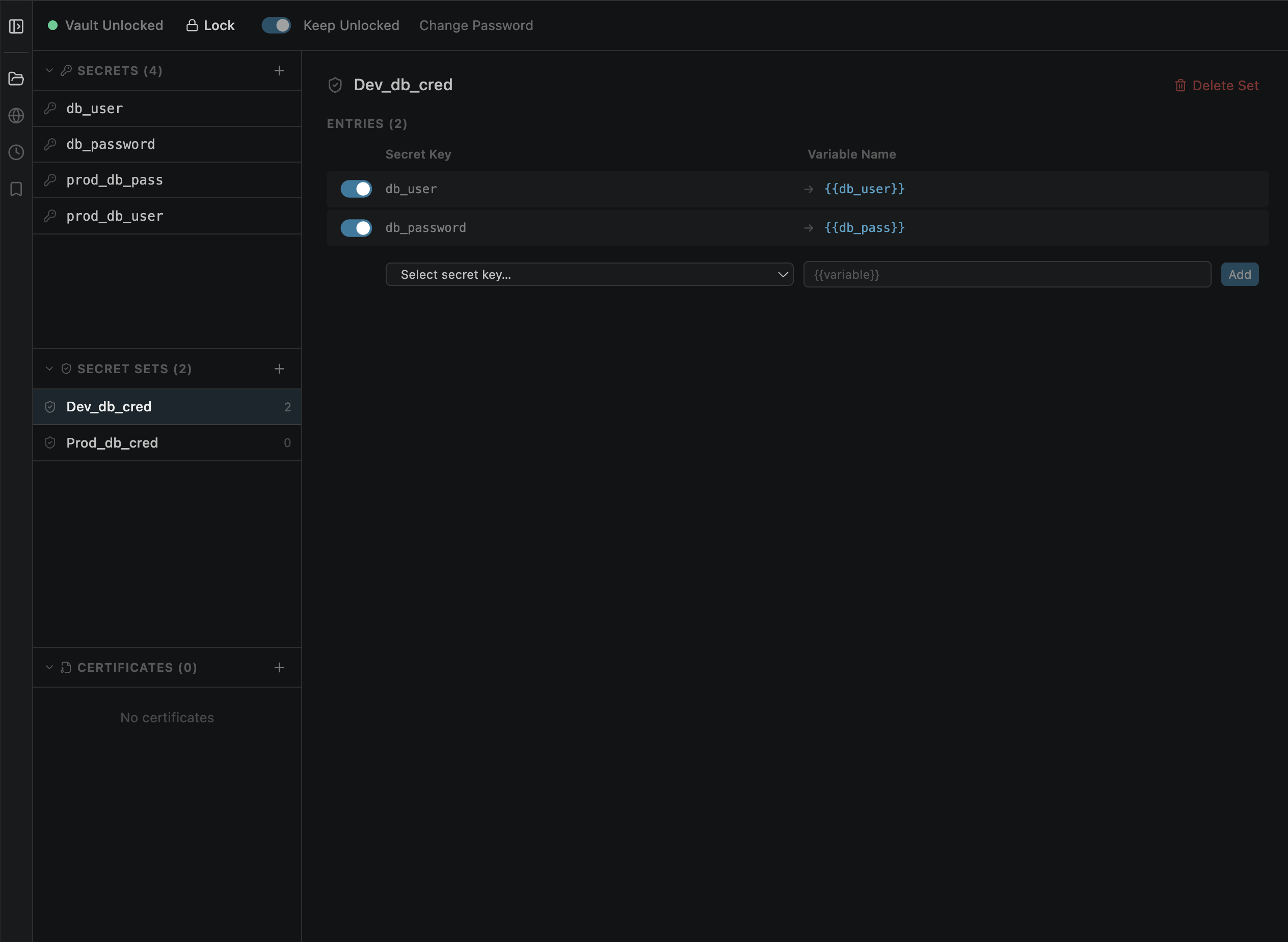
A built-in encrypted vault for storing secrets and certificates — no external services required.

  • AES-256-GCM encryption — secrets encrypted at rest with PBKDF2 key derivation (SHA-512, 100k iterations)
  • Master password — create, unlock, lock, and change password; auto-locks when VS Code closes
  • Keep Unlocked — optional toggle to persist the master password in the OS keychain so the vault auto-unlocks on startup
  • Secret CRUD — add, edit, delete key-value secrets with masked value display
  • Secret sets — group secrets and map vault keys to {{variable}} placeholder names
  • Automatic resolution — vault secrets resolve during request execution, just like environment variables
  • Priority chain — collection vars < global env < vault secrets < local env (local env always wins)
  • Certificate storage — store PEM, PFX/PKCS12, and DER certificates with metadata (client-cert, private-key, ca-bundle) and optional passphrase
  • Per-request TLS certificates — select client certificate, private key, and CA bundle from the vault for mTLS; configurable at collection, folder, or request level with full inheritance; shown in the Actual Request tab
  • File import — pick certificate files from disk; binary formats auto Base64-encoded
  • Global scope — vault data stored at ~/.openpost/global/vault.enc, available across all workspaces
  • Dedicated tab — "Vault" tab in the main panel next to "Mock + MCP"

Usage:

  1. Open the Vault tab → create a vault with a master password
  2. Add secrets (e.g., key: my-api-key, value: sk-abc123...)
  3. Create a Secret Set → map my-api-key → {{apiKey}}
  4. Use {{apiKey}} in your requests — it resolves automatically on send

External vault providers (Azure Key Vault, AWS Secrets Manager, HashiCorp Vault) are coming in a future release.

🌍 Environments

Create environments (Dev, Staging, Production) with key-value variables. Use {{variable}} syntax anywhere — URL, headers, body, auth fields. Switch environments from the top bar dropdown.

URL:    {{base_url}}/users/{{user_id}}
Header: Authorization: Bearer {{token}}
Body:   { "api_key": "{{api_key}}" }

📁 Collections & Folders

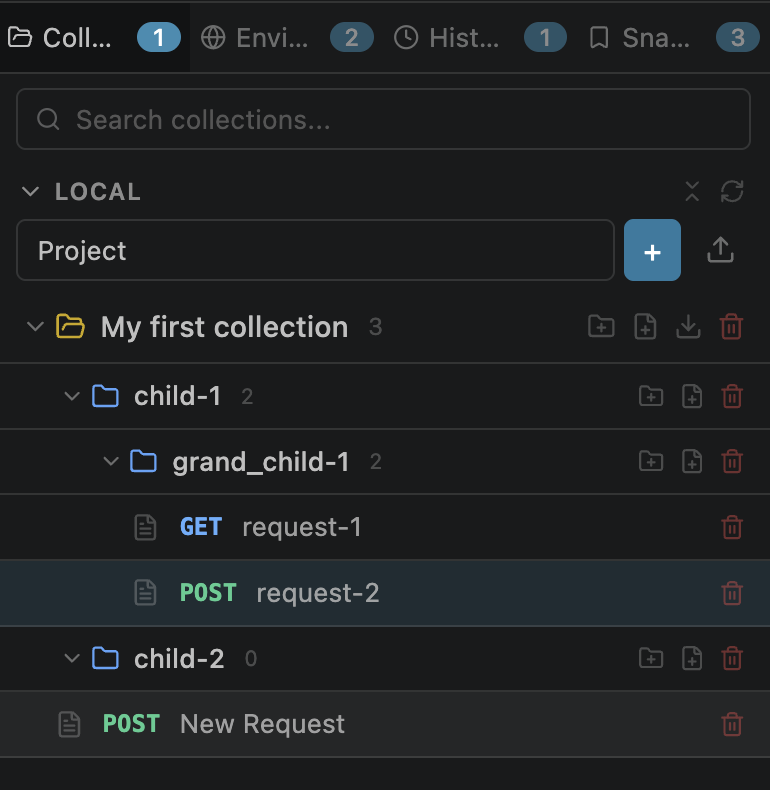
  • Organize requests into collections with nested folder trees
  • Collection editor — click a collection name to open an editor tab with Overview (markdown description + stats), Auth, Scripts, Runs, and MCP sub-tabs
  • Folder editor — click a folder name to open an editor tab with Auth and Scripts sub-tabs; breadcrumb trail shows Collection / Parent Folder /
  • Inline rename — click the name in a collection or folder editor to rename it
  • Auth inheritance — set auth at collection or folder level; requests inherit via "Inherit from parent" toggle (walks up: request → folder → ... → collection)
  • Script inheritance — pre-request and test scripts cascade from collection → folders → request
  • Collection runs — run all requests in a collection sequentially (shared env context) or in parallel (configurable concurrency)
  • Drag-and-drop reordering — reorder collections, folders, and requests by dragging in both the webview sidebar and VS Code native tree view
  • Drag-and-drop reparenting — move requests between folders/collections, move folders between parents
  • Deep search — sidebar search finds requests inside nested folders by name or URL
  • Local collections — stored per workspace in .openpost/
  • Global collections — stored in ~/.openpost/global/, shared across all workspaces
  • Import/export as API Studio JSON or Postman v2.1 format
  • Import from OpenAPI / Swagger specs (auto-creates collection + environment)
  • Full CRUD from both the sidebar and VS Code native tree views

🖥️ Mock + MCP Servers

  • Multi-instance mock servers — create multiple mock servers with independent routes, ports, and settings
  • Route editor — define routes with method, path, status, headers, and response body; snapshot and file-based responses
  • Request log — live log of incoming requests with matched/unmatched status; resizable log pane
  • Swagger/OpenAPI — auto-generated OpenAPI 3.0 docs at /_openapi.json and interactive Swagger UI at /_swagger
  • Auto-start — servers with auto-start enabled start automatically when the extension loads
  • Import/export — export mock server configs as JSON, import to share with your team
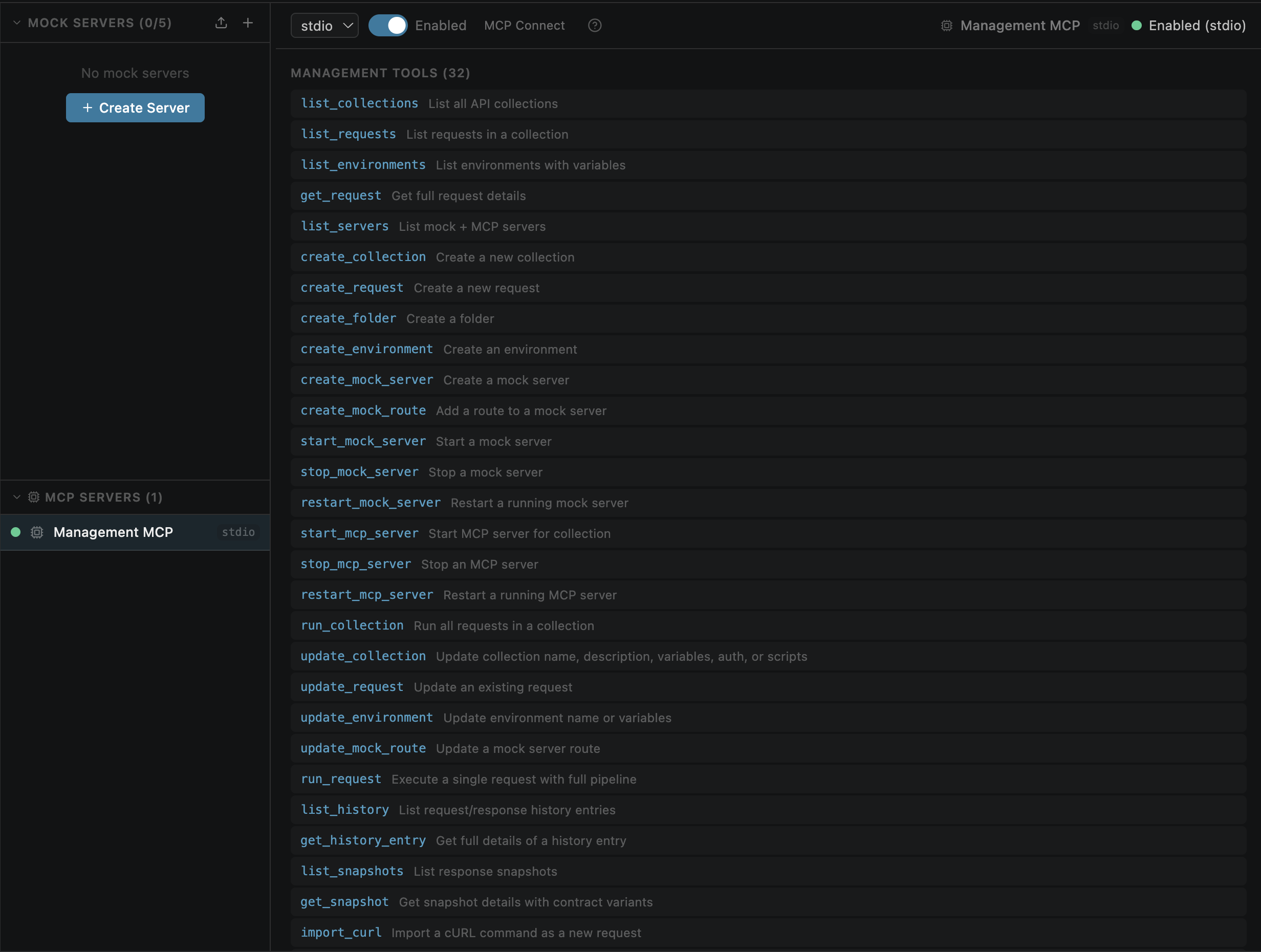
  • MCP server (collection-sourced) — expose collection requests as MCP tools for AI clients (Claude Desktop, Cursor, VS Code Copilot); per-request description and input schema; auto-generated or custom JSON Schema; persisted configs with auto-start and swagger support
  • Mock MCP server — enable "MCP" toggle on a mock server to expose routes with MCP fields as tools at /mcp; tool calls return canned mock responses
  • MCP tool fields on routes — add description and JSON Schema to mock routes via the RouteEditor "MCP Tool" section
  • MCP server panel — left sidebar split into "Mock Servers" and "MCP Servers" sections; click to see detail view with controls, tool list, and resizable call history
  • MCP Connect — expandable connection instructions with URL, Claude Desktop config, Cursor setup, and curl test command
  • MCP call logging — every tools/list and tools/call request is logged with timestamp, method, path, and status

🤖 AI Integration (Management MCP Server)

API Studio includes a built-in Management MCP server that can be enabled in VS Code settings. Any MCP-compatible AI client can connect and manage your workspace via natural language.

Connect your AI client to: http://127.0.0.1:3199/mcp

Client Setup
Claude Desktop Add "open-post": { "url": "http://127.0.0.1:3199/mcp" } to mcpServers config
Cursor / Kiro Settings → MCP → Add Server → URL
Amazon Q MCP settings → Add server → URL
VS Code Copilot Connects automatically via MCP

30 management tools available:

  • list_collections, list_requests, list_environments, get_request, list_servers
  • create_collection, create_request, create_folder, create_environment
  • create_mock_server, create_mock_route, start_mock_server, stop_mock_server
  • start_mcp_server, stop_mcp_server, run_collection, update_collection
  • update_request, update_environment, update_mock_route
  • run_request, list_history, get_history_entry, list_snapshots, get_snapshot
  • import_curl, import_openapi, export_curl, export_openapi, security_scan

Configure in VS Code Settings → Extensions → API Studio:

  • Management MCP Enabled — master toggle (default: off)
  • Management MCP Port — default 3199

🌐 Global Storage & Cross-Window Sync

  • Global collections, environments, and history live in ~/.openpost/global/
  • Changes sync across VS Code windows automatically via file system watcher
  • Both the webview sidebar and VS Code tree views show Local and Global groups
  • Requests track their source scope so saves go back to the right place

📊 Response Viewer

  • Status code with color indicator (green/yellow/red)
  • Response time and body size
  • Syntax highlighting with line numbers and code folding
  • Pretty-printed JSON, raw body, and collapsible tree view
  • Response headers table and cookies tab
  • Schema extraction for JSON responses
  • History dropdown — browse or delete past responses per URL
  • Actual Request tab — inspect the fully resolved request as sent over the wire (formatted and raw HTTP views)

📚 History & Snapshots

  • Request history — every send is stored locally, browsable from the sidebar
  • Global history — shared across workspaces
  • Snapshot contracts — track response structure changes over time
  • Automatic snapshot records — every send for a saved request is captured
  • Variant detection — notifies when a response returns a new JSON structure
  • Rename, delete, and browse snapshots from the sidebar or tree view

🍪 Cookie Jar

  • Automatic cookie storage and sending across requests
  • Cookie manager accessible from the settings menu
  • Toggle cookies on/off per workspace

💻 Code Export

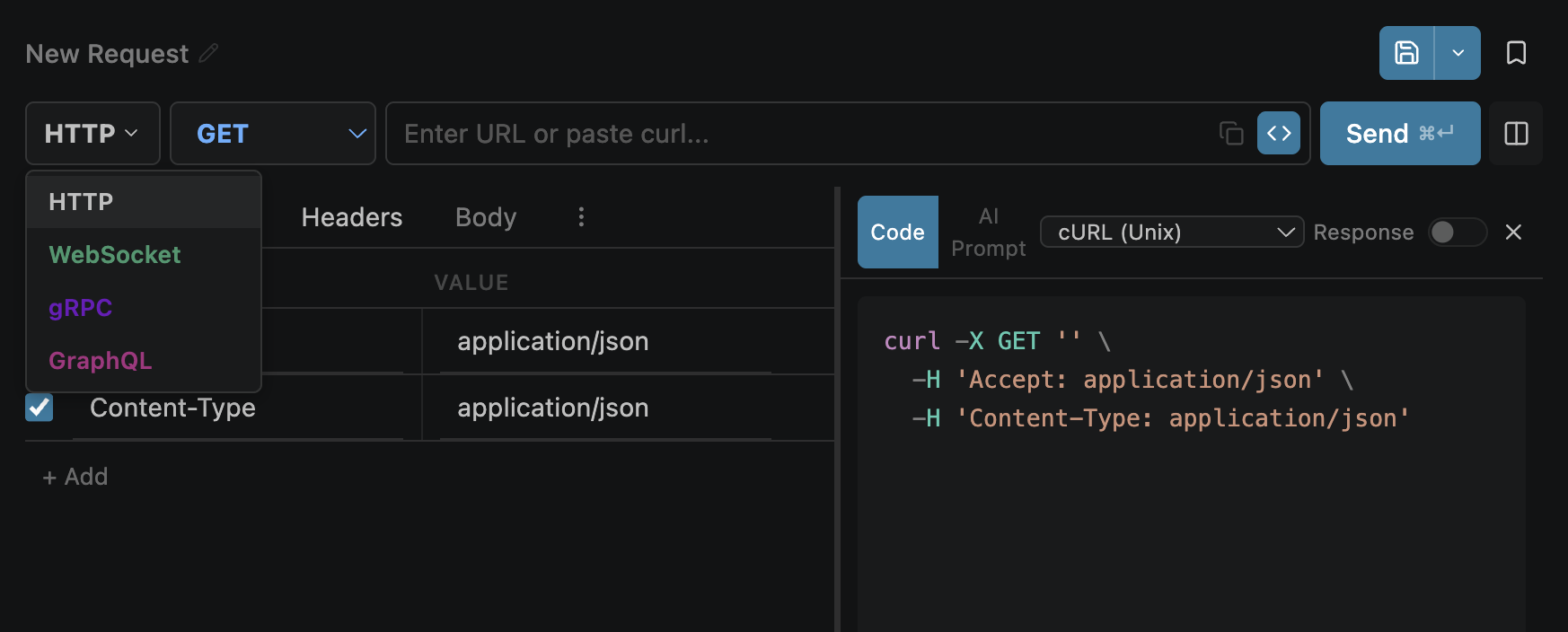
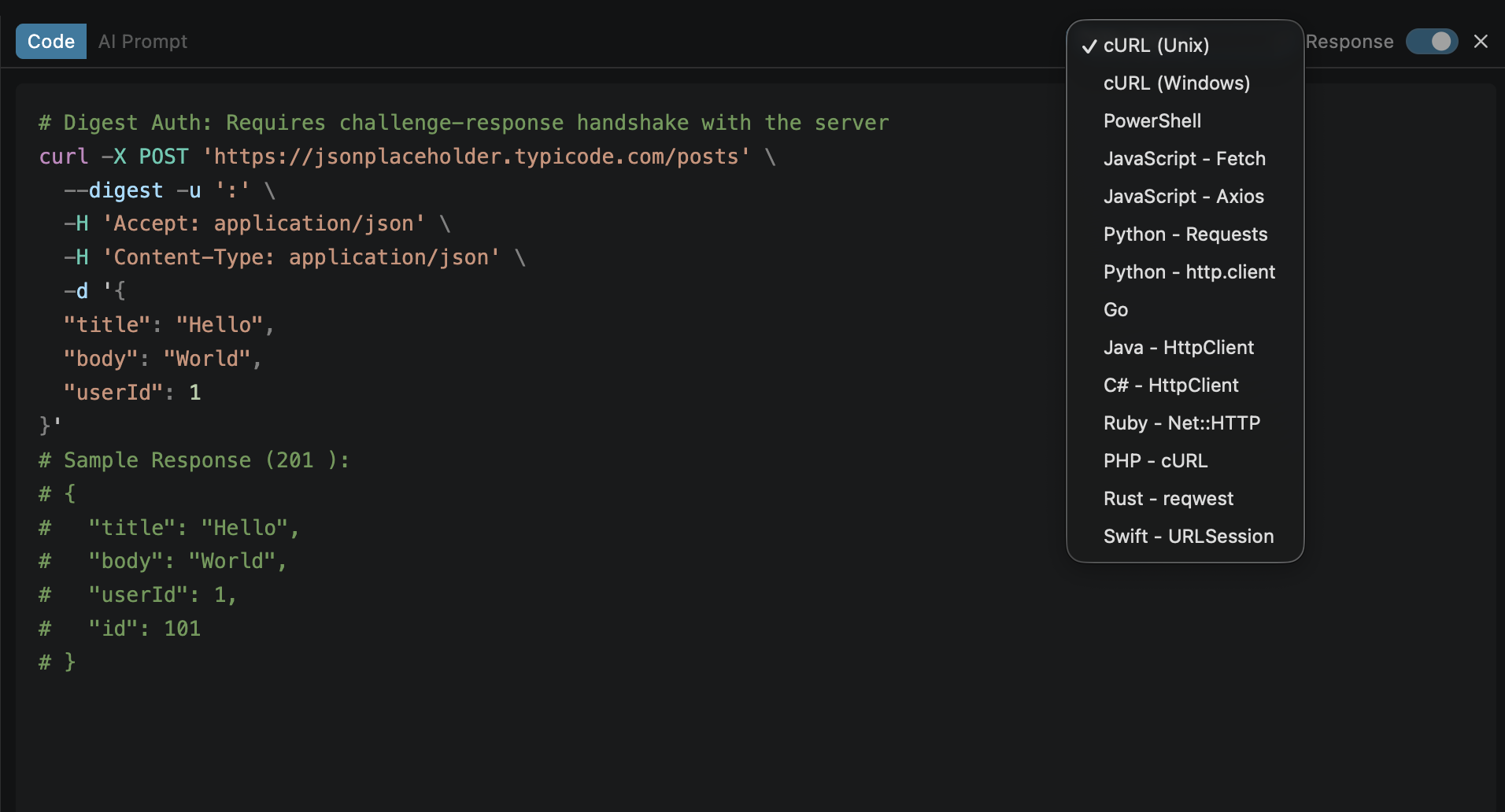
Generate ready-to-use code from your request in 14 languages:

cURL (Unix) · cURL (Windows) · PowerShell · JavaScript (Fetch) · JavaScript (Axios) · Python (Requests) · Python (http.client) · Go · Java · C# · Ruby · PHP · Rust · Swift

  • Environment variables are resolved in generated code
  • Auth headers/params are injected automatically
  • Toggle the code panel with the </> button next to Send

🤖 AI Prompt Generator

Generate copy-paste-ready prompts for AI tools with 5 dialects:

  • Explain API — understand what an endpoint does
  • Write Integration — get production-ready code
  • Debug Response — troubleshoot issues
  • Write Tests — generate test cases
  • Generate Docs — create API documentation

Includes full request context: method, URL, auth, headers, body, and response.

📜 Pre-Request & Test Scripts

Write JavaScript that runs before or after requests:

// Pre-request: set dynamic header
request.headers["X-Timestamp"] = Date.now().toString();

// Test: assert response
console.assert(response.status === 200, "Expected 200");
const body = response.json();
console.assert(body.id !== undefined, "Should have id");

📥 Import & Export

  • Postman v2.1 — import and export collections
  • OpenAPI / Swagger — import specs (JSON or YAML) to auto-generate collections and environments
  • cURL — import cURL commands
  • API Studio JSON — native format, git-friendly

⚙️ Settings

All settings available in two places:

  • Webview popup — gear icon in the top bar
  • VS Code Settings — Settings → Extensions → API Studio
Setting Default Description
Simple Mode ✅ On Hides Mock+MCP, Vault, and advanced request tabs (tests, scripts, mcp, settings) for a cleaner UI
SSL Verification ✅ On Disable for self-signed certificates
Cookies Enabled ✅ On Auto-store and send cookies
Collapsed Tabs Off Compact tab bar view
Grouped Tabs ✅ On Group tabs by collection
Subtle Contracts Off Non-intrusive contract change notifications
Auto-hide Sidebar Off Auto-hide native sidebar when webview panel opens
Proxy Profiles — Create HTTP/HTTPS proxies with optional auth, set a default, select per-request

🎨 Theme Integration

Adapts to your VS Code theme — dark, light, and high contrast. All colors use native VS Code CSS variables.

Installation

From Marketplace

Search for API Studio in the VS Code Extensions panel and click Install.

From VSIX

  1. Cmd+Shift+P / Ctrl+Shift+P → Extensions: Install from VSIX...
  2. Select the .vsix file
  3. Reload VS Code

Data Storage

.openpost/                    ← per workspace (local)
  ├── collections.json
  ├── environments.json
  ├── history.json
  ├── snapshots.json
  ├── cookies.json
  ├── session.json
  └── config.json

~/.openpost/global/           ← shared across workspaces (global)
  ├── collections.json
  ├── environments.json
  ├── history.json
  └── config.json
  • No cloud sync — your data stays on your machine
  • Git-friendly — commit .openpost/ to share with your team
  • No telemetry, no analytics

Keyboard Shortcuts

Action Windows/Linux macOS
Open API Studio Ctrl+Alt+P Cmd+Alt+P
Send Request Ctrl+Enter Cmd+Enter

Documentation

Internal project docs live in docs/README.md.

Key references:

  • docs/ARCHITECTURE.md
  • docs/FEATURES.md
  • docs/API_REFERENCE.md
  • docs/scripts-guide.md
  • docs/DEVELOPMENT.md
  • docs/CODEBASE_GUIDE.md

Known Issues

  • Management MCP and local collections across multiple windows — The built-in Management MCP server runs as a single global instance (first window wins). Local scope operations (create_collection, create_request, etc. without scope: "global") always target the workspace where the Management MCP started. If you have multiple VS Code windows open with different workspaces, AI clients connected to the Management MCP will create/modify local collections in the primary window's workspace only. Workaround: Use scope: "global" for collections you want accessible across all workspaces, or close the primary window and reload the target window so the Management MCP starts there.

Third-Party Notices

Bundled third-party dependency licenses are listed in THIRD_PARTY_NOTICES.md.

Trademarks

Postman® is a registered trademark of Postman, Inc. Thunder Client is a trademark of Ranga Vadhineni. Visual Studio Code is a trademark of Microsoft Corporation. API Studio is not affiliated with, endorsed by, or sponsored by any of these companies. All other trademarks are the property of their respective owners. Any references to third-party products are for interoperability and informational purposes only.

  • Contact us
  • Jobs
  • Privacy
  • Manage cookies
  • Terms of use
  • Trademarks
© 2026 Microsoft