Nsight Visual Studio Code Edition
Nsight Visual Studio Code edition is an extension for
Visual Studio Code that
provides support for CUDA
development, including features such as Intellisense, debugging, debugger views,
and productivity enhancements.
The extension is available on the Visual Studio Marketplace and on the
Open VSX Registry
for VSCodium and other compatible editors. Linux x86_64 and Linux arm64
hosts are supported.
Benefits
Higher Productivity
Using CUDA-aware code completion improves the overall development experience
and enables users to save time and effort when writing code.
Interactivity
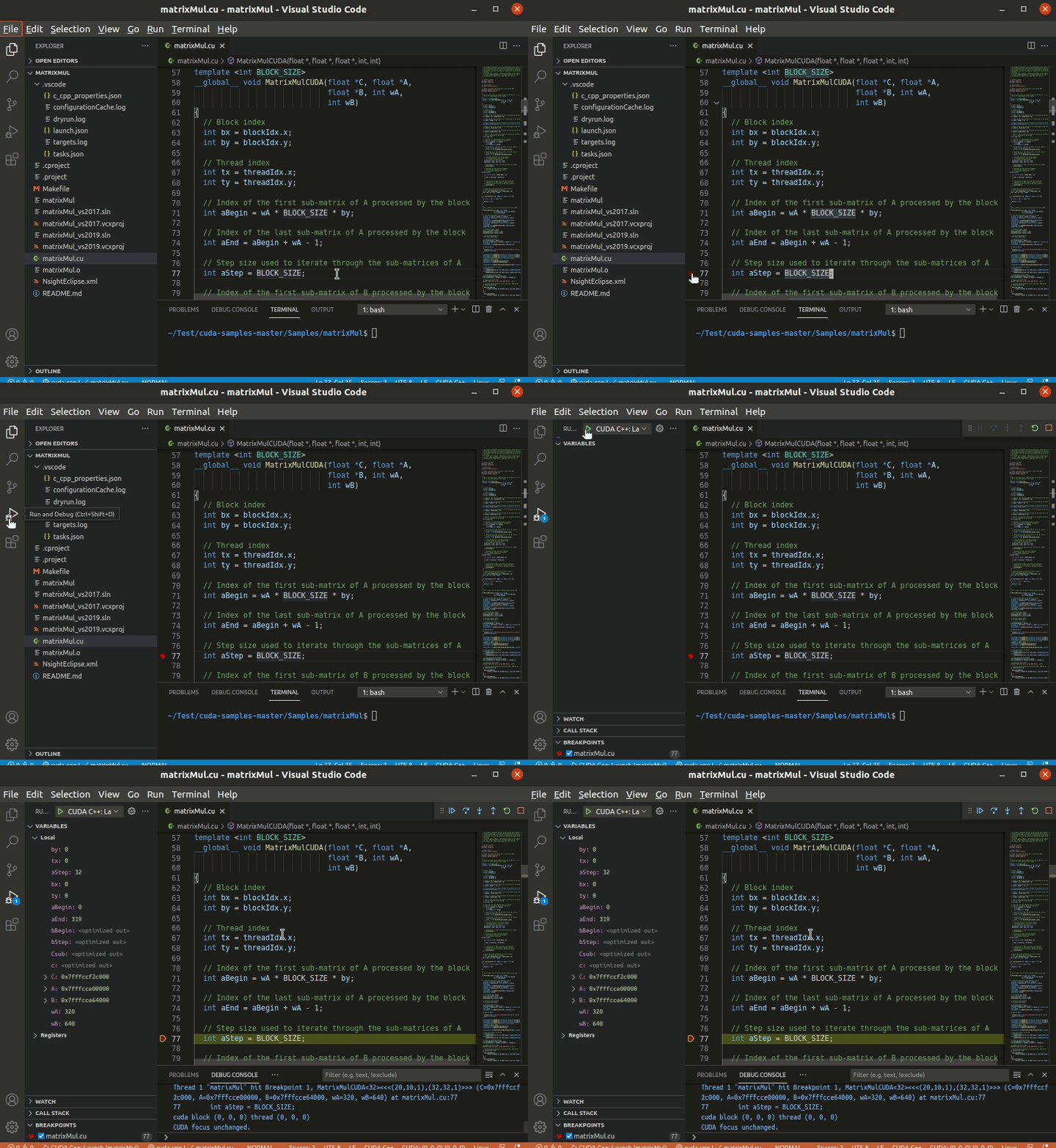
Debug CPU and GPU code in the same session using familiar editor controls
and debugger views. Investigate CUDA application behavior alongside your
source code without switching to a separate debugger interface.
Remote Development Support
Nsight Visual Studio Code Edition enables developers to implement CUDA code in
various cluster environments such as Virtual Machines or remote Docker
containers. It also supports code development for Linux systems via the Remote
– WSL extension. For supported remote debugging configurations, Nsight VSCE
can automatically start cuda-gdbserver.
Free
As with other Nsight tools from NVIDIA, Nsight Visual Studio Code Edition is
offered free of charge. We love it when your code works better and is
delivered sooner. Enjoy!
Key Features
CUDA C++ Language Support
Edit CUDA C++ with syntax highlighting and CUDA-aware code completion,
navigation, references, and rename support using either Microsoft's C/C++
extension or clangd.
CUDA Kernel Breakpoint Support and Kernel Execution Control
Break into a debugging session in CPU or GPU device code using standard
breakpoints, including support for conditional breakpoints with expression
evaluation. Breakpoints can also be set on individual instructions in the
Disassembly view. GUI controls allow you to step over, into, or out of
statements in the source code, just like normal CPU debugging. Breakpoints are
evaluated for every kernel thread and will halt execution when any thread
encounters them.
GPU and Kernel State Inspection
When your application is paused in the debugger, inspect call stacks,
application variables, CUDA built-in variables, and registers, including PTX
special registers. Use the Watch view to track expressions and focus controls
to select the CUDA thread being inspected.
Want to know more?
Requirements
Visual Studio Code 1.101 or later (or a compatible editor such as
VSCodium).
CUDA Toolkit: Install the CUDA Toolkit (13.3 recommended) to get
important tools for CUDA application development including the
NVCC compiler driver and
cuda-gdb, the NVIDIA tool for debugging CUDA.
Optional CUDA C++ language provider: for code intelligence, install
either clangd or
Microsoft's C/C++ extension.
Neither is a hard dependency; Nsight guides the setup for whichever is
available.
Quick Start
Open or create a new CUDA application.
Configure CUDA C++ editing support
Open a workspace that contains .cu or .cuh files. Nsight can automatically
prompt to configure CUDA C++ language support, or you can run CUDA: Configure
CUDA C++ Language Support from the Command Palette.
For clangd, Nsight can generate a project-owned .clangd file and will not
overwrite an existing one. If a .clangd file already exists, run CUDA:
Generate .clangd and confirm the prompt to create a .clangd.nsight.example
file for comparison (only created if one does not already exist).
For Microsoft's C/C++ extension, Nsight uses compile_commands.json when
available and leaves existing C/C++ settings in place.
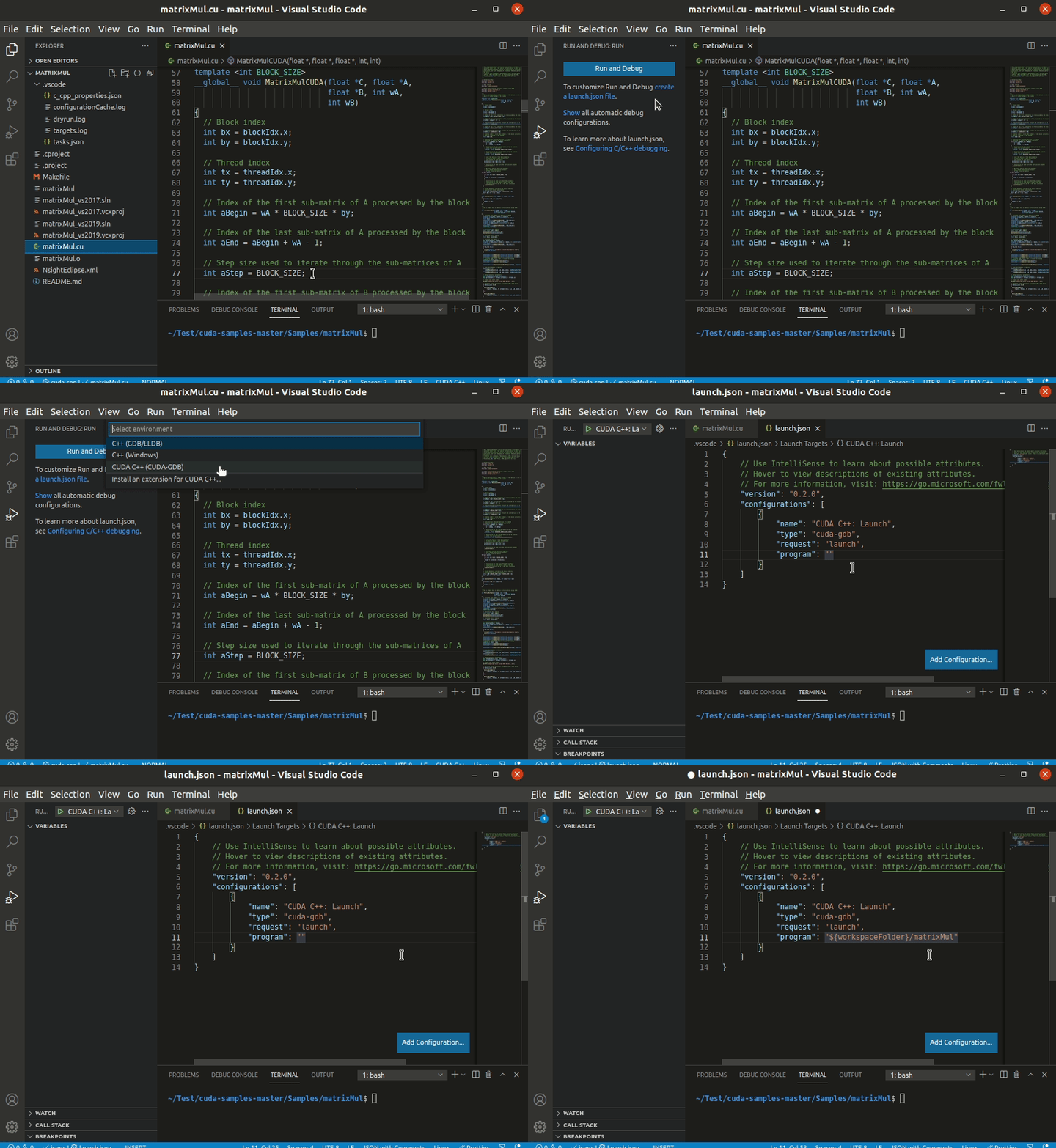
Configure the debugging connection
by creating a launch configuration to launch and debug your application, or
an attach configuration if the target application is already running
Start debugging!
Support
Reach out to us for feedback and questions via our developer forum.
Data and telemetry
This extension collects usage data and sends it to NVIDIA to help improve our products. This
extension respects the "telemetry.telemetryLevel" setting, for more info see
Visual Studio Code Telemetry.


