Claude Code LaTeX
Adds LaTeX math rendering to the Claude Code VSCode extension. Rendered with KaTeX.


Temporary workaround for anthropics/claude-code#16446 until native LaTeX rendering is added.
Renders inline math ($...$, \(...\)) and display math ($$...$$, \[...\]) in Claude's chat responses — including matrices and multi-line environments like aligned, cases, and bmatrix.
Copy as LaTeX: select any rendered equation and copy it — the clipboard gets the original LaTeX source (inline as $...$, display as $$...$$), ready to paste into a .tex file, Overleaf, or another chat.
Reveal the source: hover a display equation and click the code
icon on its right edge to show its $$...$$ source. Click the eye
icon to restore the rendered formula. The control is keyboard accessible;
inline math stays uncluttered.
Old Demo
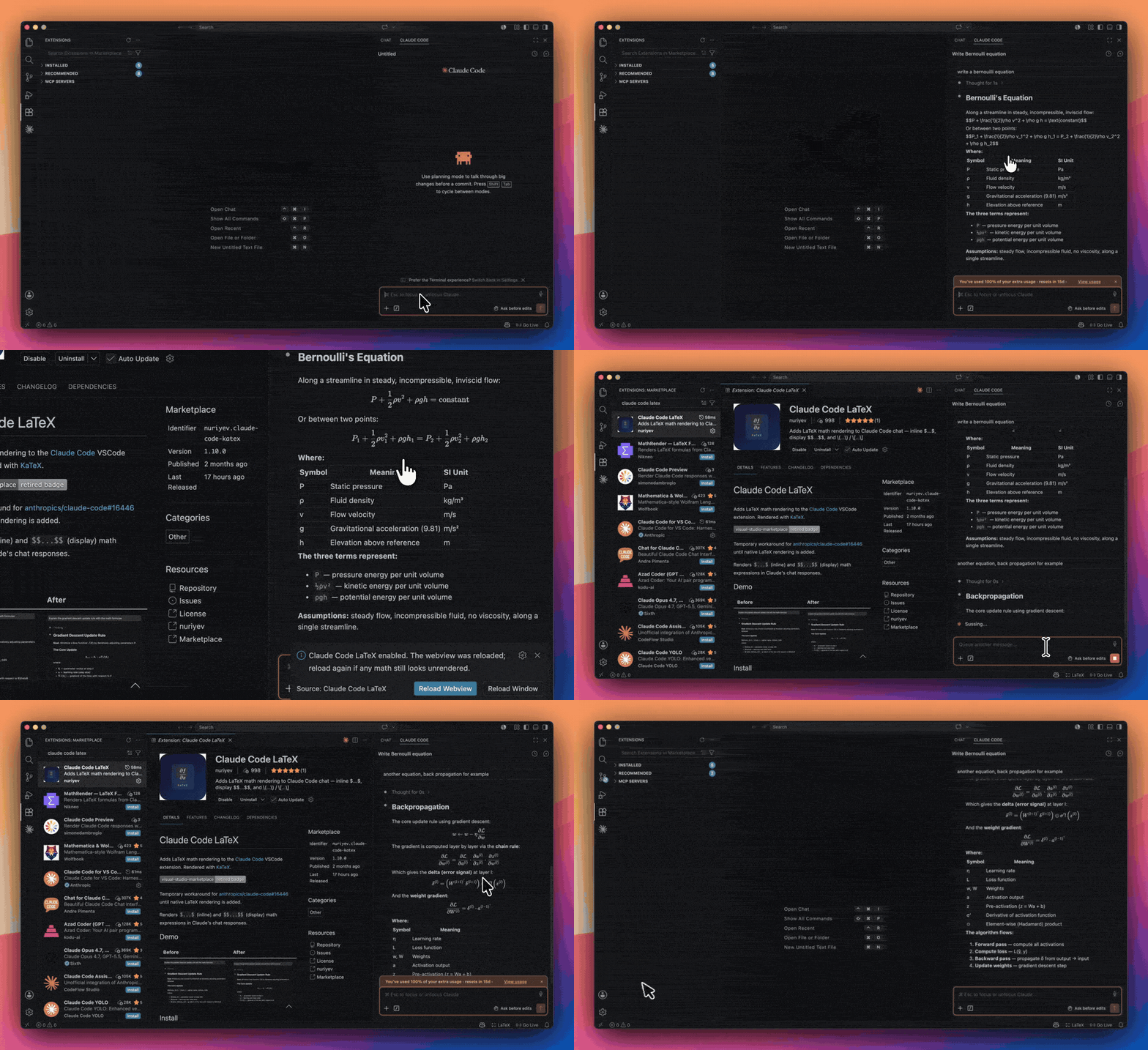
Claude Code's raw $$...$$ → rendered math, the moment the extension is installed.
Before / After
| Before |
After |
 |
 |
Install
From VS Code Marketplace
Search for "Claude Code LaTeX" in the Extensions tab, or:
code --install-extension nuriyev.claude-code-katex
From Open VSX
For editors that cannot use the Microsoft Marketplace, such as VSCodium, Cursor
and Code OSS builds, the extension is published to
Open VSX under the
same nuriyev.claude-code-katex id. Search for "Claude Code LaTeX" in the
Extensions tab, or:
codium --install-extension nuriyev.claude-code-katex
From .vsix file
- Download the latest
.vsix from Releases
- In VSCode:
Ctrl+Shift+P → Extensions: Install from VSIX...
- Reload when prompted
Usage
The extension patches Claude Code automatically on startup. If you need manual control:
Ctrl+Shift+P → Claude Code LaTeX: EnableCtrl+Shift+P → Claude Code LaTeX: DisableCtrl+Shift+P → Claude Code LaTeX: StatusCtrl+Shift+P → Claude Code LaTeX: Reload Macros
Your own macros
If you keep macros in a .tex file, point the extension at it and Claude's
math will use them instead of showing red errors:
{
  // Supports ~, ${workspaceFolder} and ${userHome}.
  "claudeCodeKatex.macroFiles": ["~/tex/macros.tex", "${workspaceFolder}/preamble.tex"],

  // Or define a few inline, in KaTeX's own form. These win on a shared name.
  "claudeCodeKatex.macros": {
    "\\RR": "\\mathbb{R}",
    "\\vv": "\\mathbf{#1}"
  }
}
The file can be a slice of a real paper preamble. Comments, \usepackage
lines and prose are ignored, and a definition KaTeX cannot handle is skipped
without affecting the rest. \newcommand, \renewcommand, \providecommand,
\def, \let and \DeclareMathOperator are all understood, and your
definition wins over a KaTeX built-in of the same name (\vec, \argmax).
Macros are read when the window loads. After editing a macro file, run
Claude Code LaTeX: Reload Macros (also a button in the status popup, which
reports how many macros loaded and names any file it could not read).
Two things KaTeX itself cannot do, so neither can this:
- macros with an optional argument,
\newcommand{\x}[2][default]{...}
\newenvironment
How it works
The extension injects remark-math and rehype-katex into Claude Code's own Markdown rendering pipeline. Math is tokenized while Claude Code parses the Markdown — before the parser can alter it — so the LaTeX reaches KaTeX exactly as written. This is what lets backslash-heavy expressions (matrix row breaks \\, spacing macros \, \; \!, escaped braces) and multi-line environments render correctly.
It patches Claude Code's webview bundle on startup and reloads the webview so rendering takes effect immediately. When Claude Code updates, the patch is automatically re-applied. If a future Claude Code build changes its internals so the patch no longer fits, the extension leaves Claude Code untouched and notifies you to update.
The plan approval view
The plan Claude opens on the side is a second, separate view. Claude Code
renders its Markdown outside the webview, so the chat pipeline above cannot
reach it, and math there stayed unrendered
(#17).
For that view the extension lifts the math out of the plan text before Markdown
parsing and hands it to KaTeX afterwards, which preserves the LaTeX just as
faithfully. $...$, $$...$$, \(...\), \[...\], your own macros and
copying math as LaTeX all work there too.
This integration is experimental and off by default because it is the one
place the extension modifies a file of Claude Code other than the webview
bundle. Enable claudeCodeKatex.renderPlanPreview in Settings and use the
offered Reload Window action. Turning the setting off restores the original
host file and prompts for another reload.
The extension backs up the original first, checks the patched file is valid
JavaScript before writing it, and writes it atomically. If anything does not
line up, it changes nothing and the plan view keeps behaving exactly as it does
today. Both files are also restored when you disable or uninstall the
extension.
Disabling / Uninstalling
To temporarily disable LaTeX rendering, use the command:
Ctrl+Shift+P → Claude Code LaTeX: Disable. The webview reloads automatically.
To re-enable, use Claude Code LaTeX: Enable.
Uninstalling the extension from the Extensions panel automatically cleans up the patch.
Why not the Disable button in the Extensions panel? The patch lives in Claude Code's webview files on disk. Claude Code loads its webview before this extension activates, so if we removed the patch on deactivate, the webview would load unpatched files before we could re-apply. Keeping files patched on disk ensures it works reliably across restarts.
Known Limitations
- Math renders in chat and, when
claudeCodeKatex.renderPlanPreview is enabled,
in the experimental plan approval integration. Other Claude Code surfaces
(for example the terminal) are outside what an extension can reach.
- Rendering covers everything KaTeX supports — essentially all standard math notation. A few full-LaTeX features outside its scope (such as TikZ diagrams) are not rendered.
- Code blocks are never affected.
$variable inside `code` or code fences is left alone.
- This is a temporary workaround until anthropics/claude-code#16446 is resolved. Once Claude Code ships native LaTeX support, this extension can be uninstalled.
Bugs & Feedback
Found a rendering issue? Something not displaying correctly?
Please open an issue with:
- The LaTeX expression that failed
- A screenshot of how it rendered (or didn't)
- Your VS Code and Claude Code extension versions
Every report helps improve the extension for everyone.
License
MIT

