Claude Trace: Claude & Codex Sessions, Cost & Agent WorkflowsLocal Claude Code and Codex session dashboard with conversation history, token usage, diffs, and interactive resume, plus a bounded multi-session terminal cockpit and visual Claude workflows. No telemetry. Session data stays local. Installation Launch VS Code Quick Open ( Ctrl+P), paste the following command, and press enter.Copied to clipboard |

Claude Trace
When Claude Code and Codex spread across projects and terminals, it becomes hard to see what needs you, what changed, and where to resume. Claude Trace brings their local sessions into one private dashboard and multi-session cockpit, then adds a visual Claude workflow builder and a home for Claude skills and agents. It reads the logs the assistants already write to disk. Claude Trace does not upload transcripts or send telemetry.
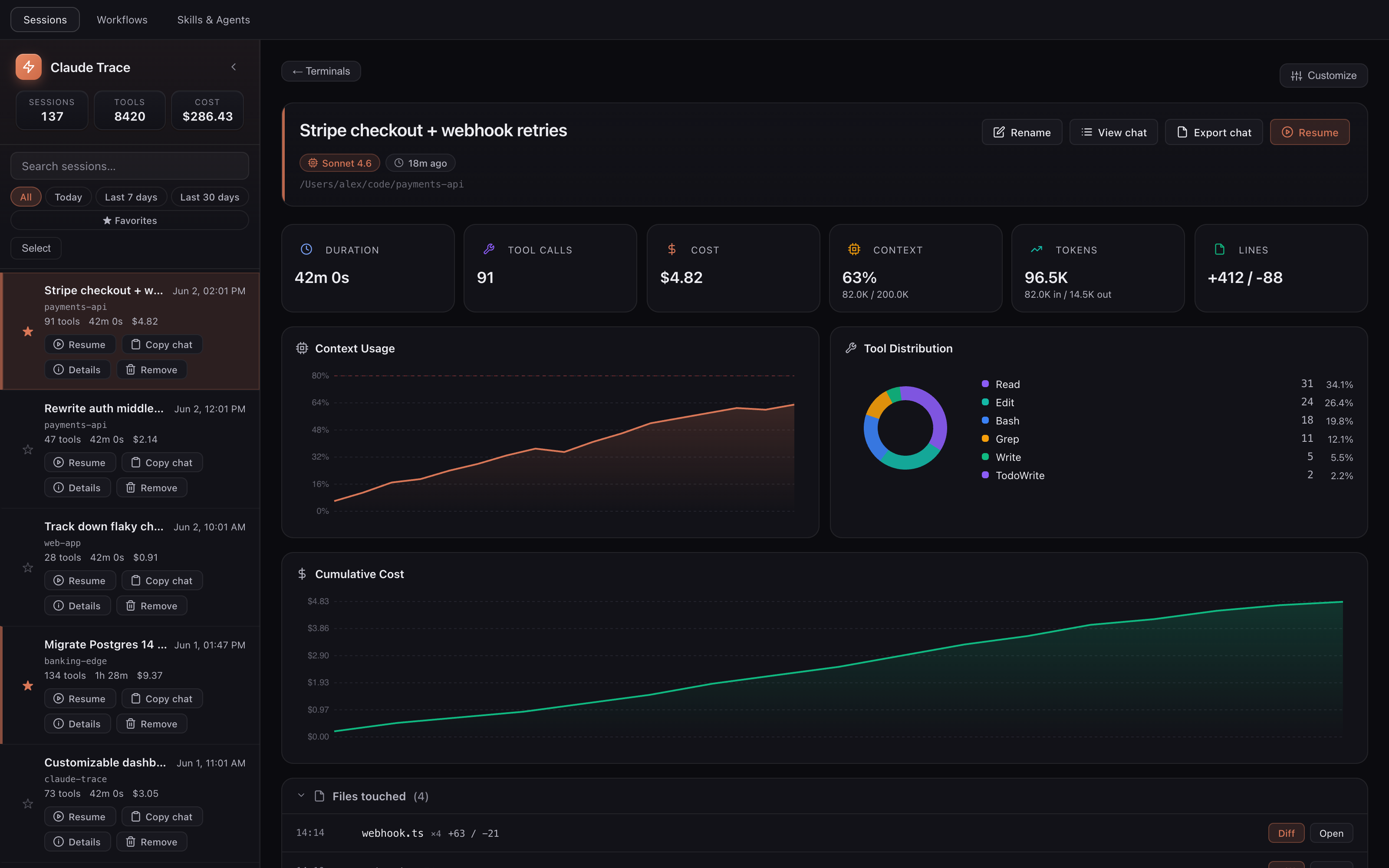
The problemLocal coding assistants are hard to follow once several sessions run at the same time. You lose track of which conversation changed a file, which terminal needs input, how much context remains, and how to reopen the right session. Claude also does not show a live local API-equivalent counter, while Codex subscription sessions do not expose a trustworthy dollar amount per local transcript. There is also no built in way to chain Claude agents together so one's output feeds the next. Claude Trace fixes all three from one panel. Press No manual config, hook setup, or API keys. Inspect Claude and Codex sessionsWhen Claude and Codex work is split across projects, finding the conversation that changed a file or still holds the context becomes its own search problem. The Sessions view keeps both histories in one place. While the Sessions view is visible, the status bar shows today's Claude base API equivalent. It turns amber at 80 percent of the threshold you choose and red when you cross it. This is a local comparison value, not an account bill. Evaluation and its indicator stop when the panel is hidden or you leave the Sessions view, so no transcript scan runs without a visible consumer. The list combines interactive root sessions from Claude Code and Codex, with an All, Claude, and Codex filter. Open a session to review its conversation, tool activity, token and context usage, and the files it touched. View Chat pages through the complete readable Claude or Codex conversation directly from its source transcript, in the order the events were written, without loading the whole file or conversation into the webview. It reports malformed or oversized source lines instead of hiding them. You can rename, pin, copy, export, delete, and resume either provider from the same interface. A custom name immediately replaces transcript-provided titles in the sidebar, open detail, and cockpit, then survives panel and editor reloads. Codex resumes through the real interactive Claude diffs survive after the terminal closes, the context compacts, or the laptop reboots, so you can review what changed whenever you get to it. Codex patch records are converted into reviewable diffs when the retained trace is sufficient. Failed Codex patches are kept as errors and are not counted as file changes. Cross project search, date filters, pinned favorites, and custom names turn resume into something you click instead of a guessing game across folders. Codex list search covers bounded catalog metadata such as title, project path, and model. Detailed Codex conversation content is parsed only when you open that session. Claude Trace recalculates each session locally from its token counts, model, and event timestamps. The versioned table follows the published Anthropic pricing, OpenAI model pricing, and Codex credit rate card. It covers current and historical Claude models, the 5 minute and 1 hour Claude cache write tiers, cache reads, and scheduled price changes. Codex sessions show input, cached-input, and output base API equivalents plus the current token-based Codex rate-card equivalent when OpenAI publishes them. OpenAI cache writes are not added because retained Codex rollouts do not expose a separate cache-write token count. Unknown models and unpublished preview rates stay visibly unpriced instead of falling back to an invented family price. This is a pure in-memory lookup during parsing and refresh, with no pricing request, subprocess, or polling loop. Run a cockpit of Claude and Codex sessions
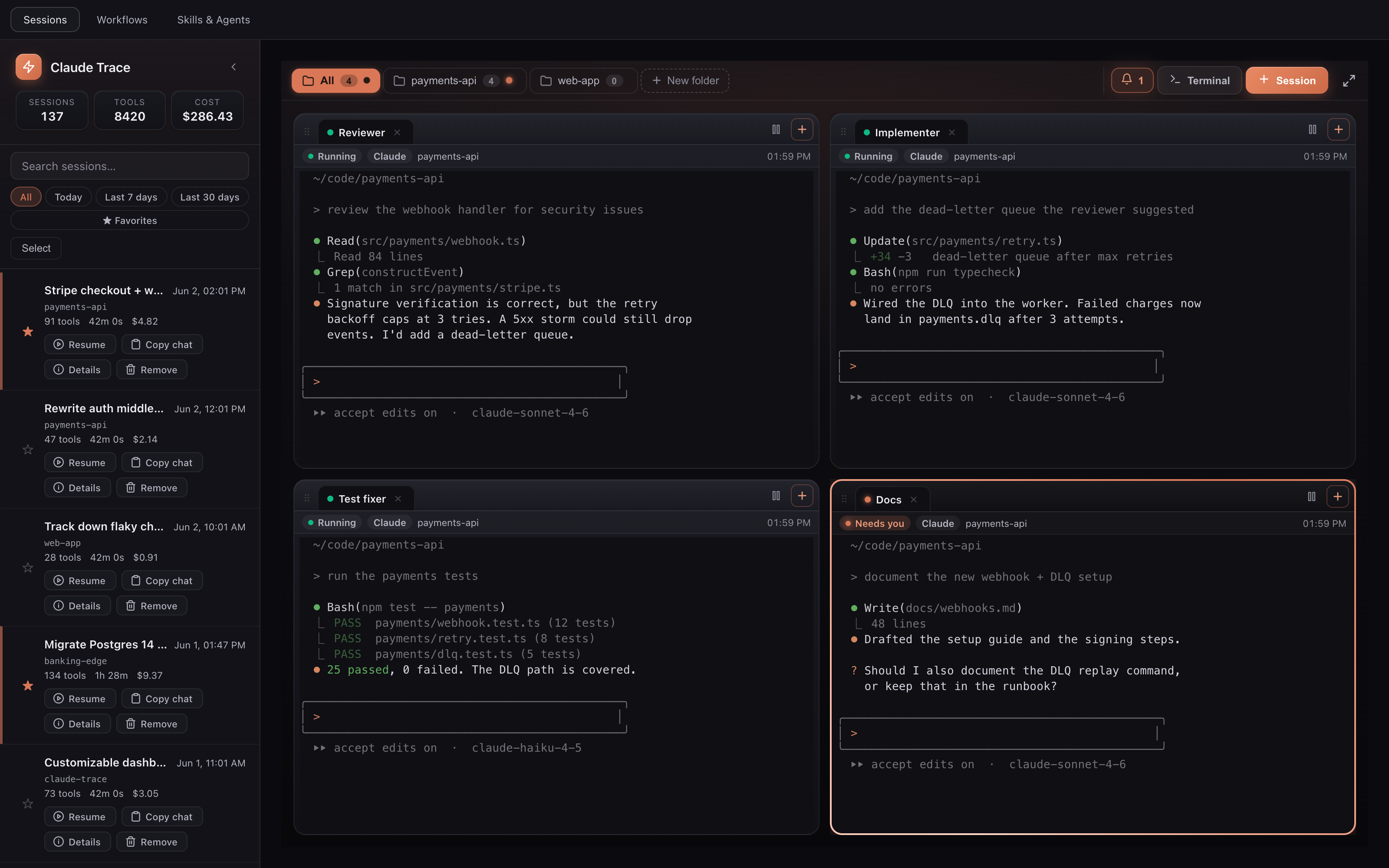
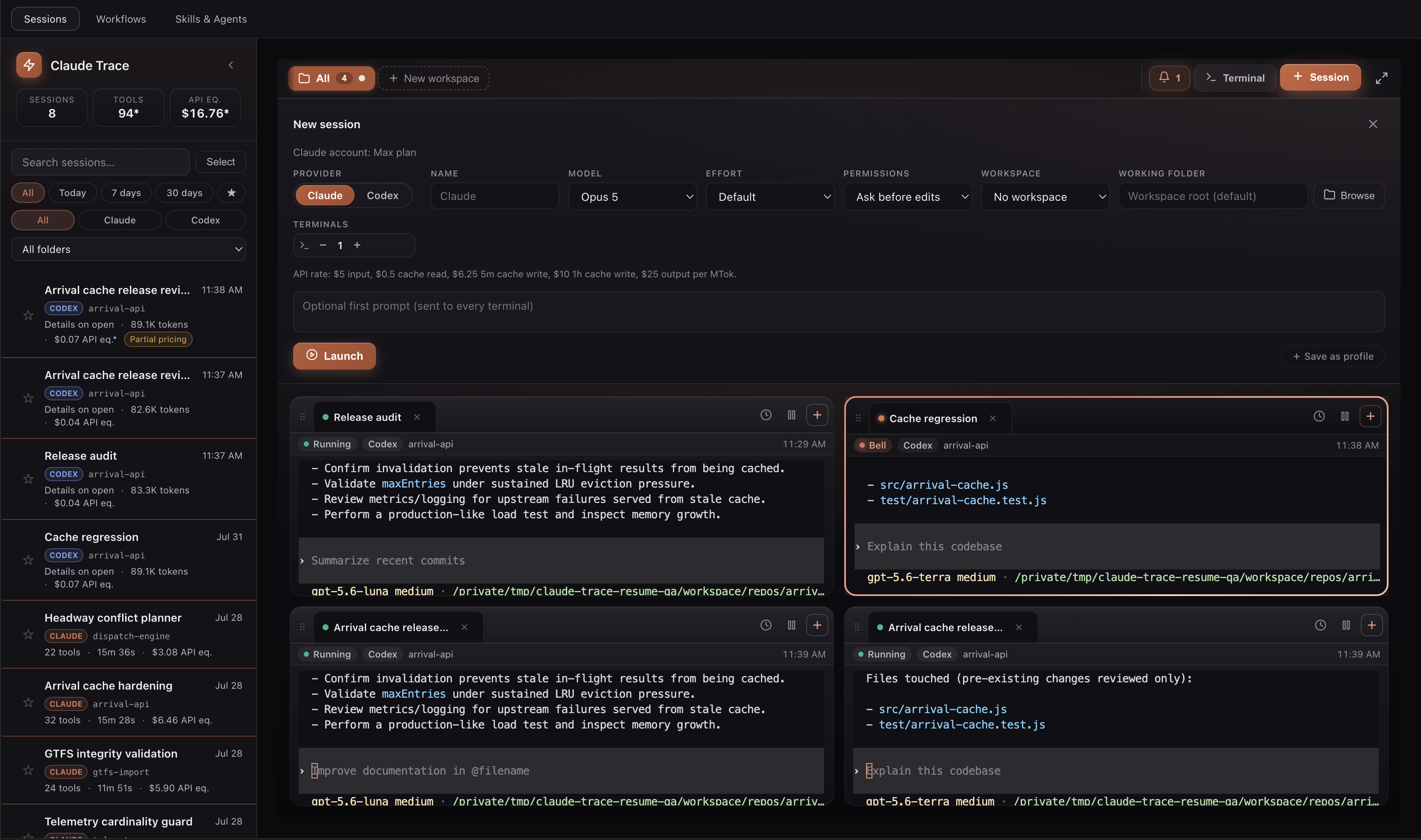
The more Claude and Codex sessions you run, the easier it is to miss the terminal that finished, stalled, or needs input. Launch them as tiled terminals in one view, like tmux but native to the editor. Group them into folders by project. Claude sessions and their folders light up when a turn finishes or needs your input. Codex terminals are available in the same cockpit, but do not yet emit Claude Trace attention signals. An editor reload or panel restoration should not turn a live terminal into a blank tile stuck on New Session starts either provider from the same form. For Claude, choose among the current Opus 5, Sonnet 5, Fable 5, and Haiku 4.5 launch models, then set effort and permissions. Claude Trace reads
For a new Codex session, one short-lived local App Server allocates and persists the native thread UUID before the terminal opens. The cockpit then starts Launching from an editor window with no folder open no longer falls through to an invalid shell directory. An explicitly requested path is either validated as-is or replaced through the folder picker, never substituted with another workspace. Without an explicit path, Claude Trace checks the open workspace, then a remembered folder, and finally asks for one. If a newly selected folder becomes invalid, it asks once more. Cancellation creates no workflow run, terminal, or background process, and Claude Trace never silently falls back to the home directory or Pause is durable. A paused terminal stays paused after a panel or editor reload and only resumes after an explicit click. Resume is single-flight, revalidates the exact working folder, and returns the tile to a recoverable paused state when the folder picker is cancelled or a shell, broker, tmux, Claude, or Codex launch fails. Saved sessions from older Claude Trace releases are kept even when their previous model, effort, context, or permission setting is no longer available. Claude Trace preserves their identity and working folder, then normalizes only the unavailable option before Resume. If Codex already created the native thread before its terminal failed, Claude Trace keeps that UUID and the unsent first prompt for the next successful Resume instead of creating a duplicate conversation. A visible Claude or Codex tile is not declared ready just because its process exists. One first-frame gate waits for real provider output and performs one final capture after eight seconds. A captured frame is delivered, and the tile returns to Resume only when that capture confirms an empty screen with a bare shell in the foreground. An inconclusive capture, like a reconnect hiccup or a provider painting the alternate screen, never pauses a live session, and there is no recovery polling loop. Resuming a paused session reattaches its live output stream immediately, so the tile types and streams without a workspace switch. On broker reconnect, the captured screen is delivered before output that arrived during capture, overlap is removed, and each terminal keeps its own ordered queue. One stalled xterm is rebuilt without discarding or acknowledging another terminal's pending output. Stay responsive with many sessionsA cockpit stops being useful when every extra session makes typing, scrolling, or switching panels slower. Claude Trace applies explicit resource budgets before data enters long lived queues:
These limits are designed to contain memory growth and recover from stalled rendering. They reduce the blast radius of a busy session, but they are not a claim of infinite terminal history or that an editor or operating system can never fail. Existing tmux panes keep the history limit they were created with until they are paused and resumed or recreated. Use every surface with a keyboard across panel sizesClaude Trace applies the same interaction contract to Sessions, the cockpit, Workflows, and Skills & Agents. Every shared text color is gated at WCAG AA contrast against every shared surface, focus indicators meet a separate 3:1 contrast gate, and reduced-motion mode disables animation, transitions, and smooth scrolling. Dialogs have an accessible name, announce loading and errors, trap focus while open, close with Escape, and restore focus to the control that opened them. Workflow and library tabs use roving keyboard focus. Sidebar and cockpit splitters expose bounded separator values and respond to arrow keys. Workflow inspector controls, paused input cells, and icon buttons all have an accessible name. Dense destructive controls keep at least a 24 by 24 pixel pointer target, while Resume selectors and buttons keep at least 28 pixels of height in short tiles. Responsive gates cover phone, tablet, narrow editor, and desktop transitions. Side panels can collapse to the full available width, split cockpit rows stack when space runs out, and every stacked tile participates in one reachable vertical scroll instead of extending below an unscrollable split. The Resume form responds to the size of its own terminal tile instead of the operating system viewport. Its valid Claude and Codex fields remain in compact rows rather than being clipped when many sessions share the screen. Build workflows that chain agents
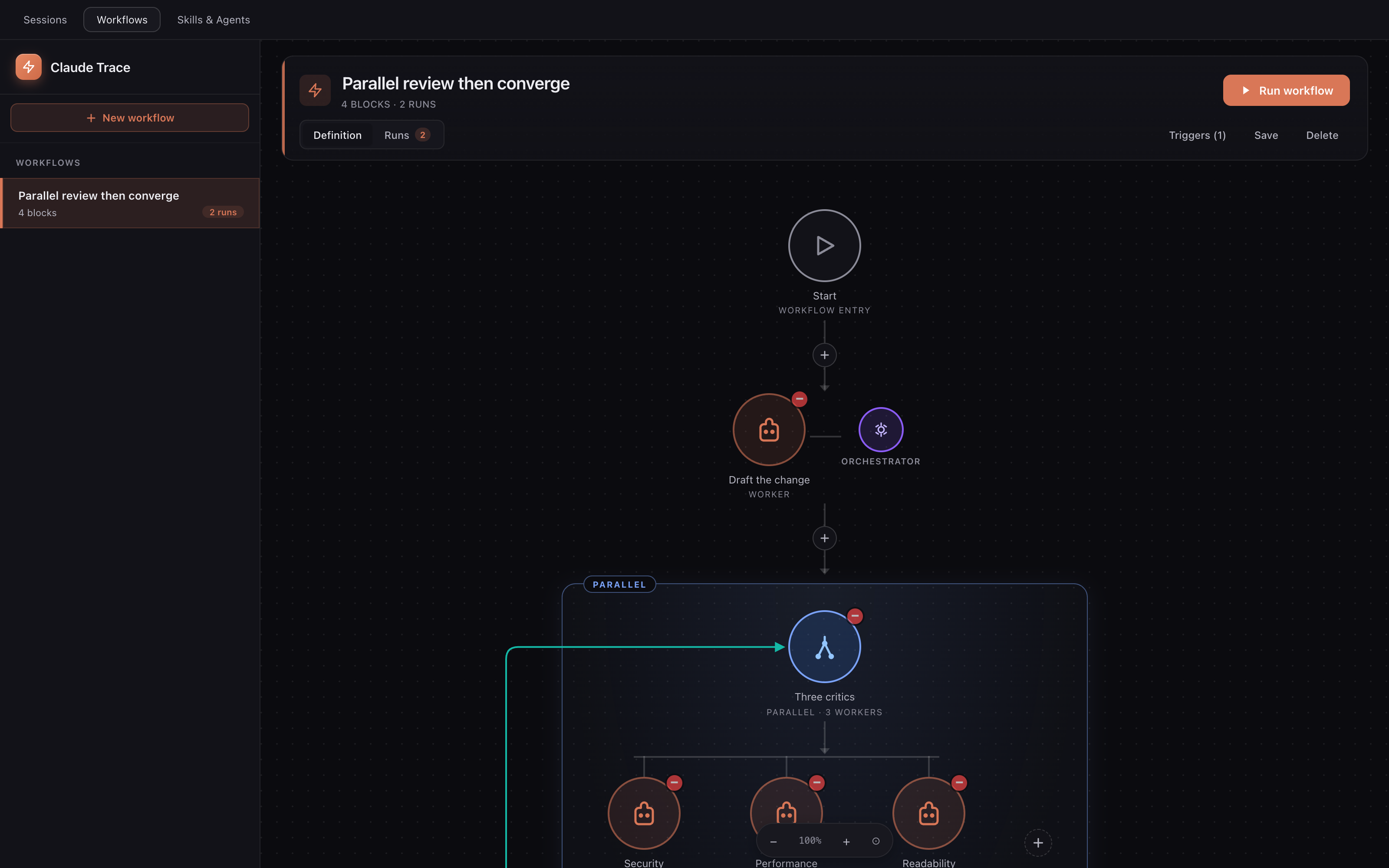
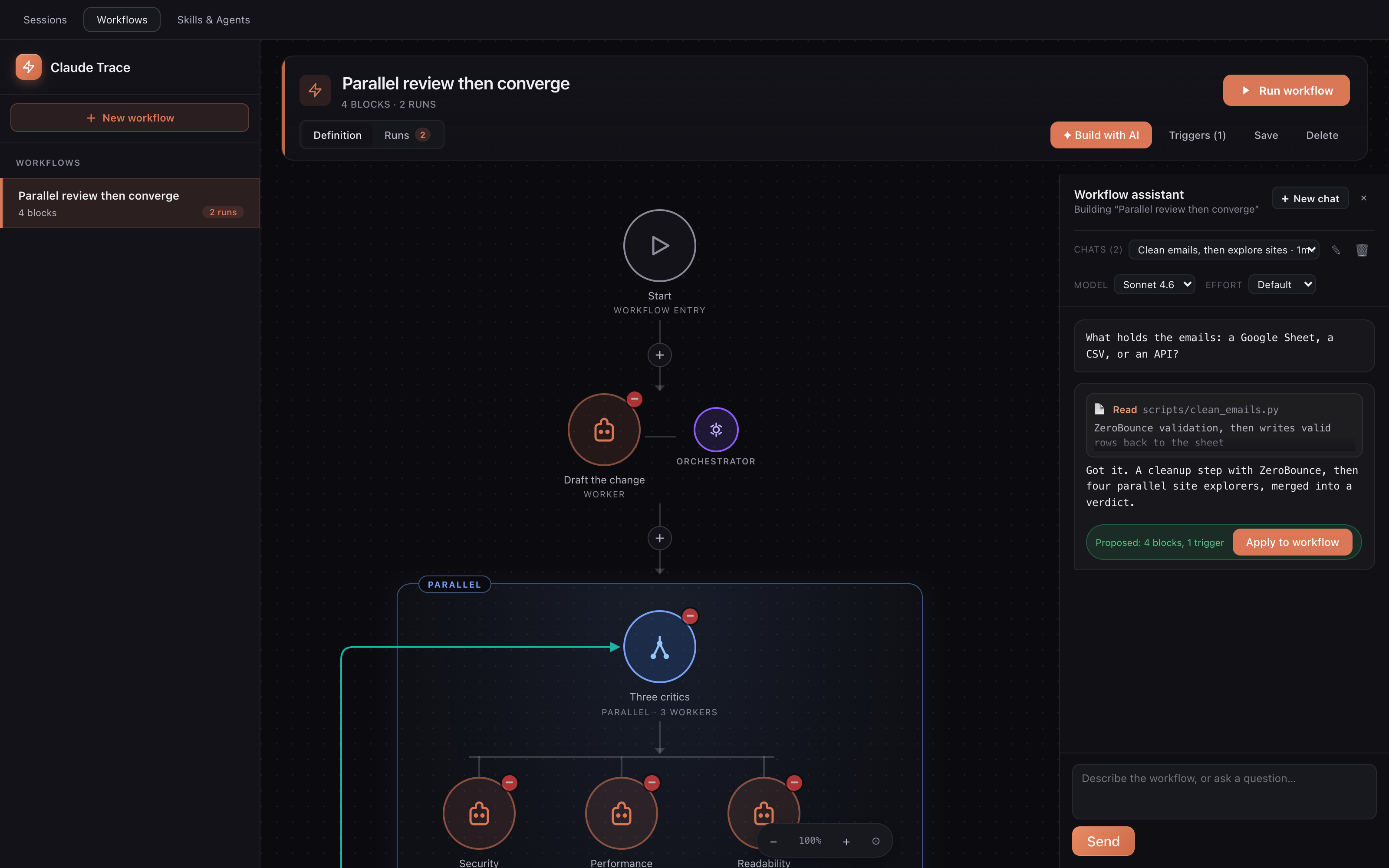
Wire several Claude sessions into a pipeline on a canvas. Run workers in sequence so each one picks up where the last left off. Fan out to parallel workers and merge their results. Loop a block until an evaluator decides the work is good enough. Add scripts, HTTP calls, file steps, and conditions between the agent steps. Kick a run off by hand, on a schedule, or with a webhook. Every step drives a real Claude Code session and passes its output to the next. The result is the kind of deterministic multi agent flow that subagents and agent teams don't give you, built visually instead of in code. Long runs fail in boring ways: a worker gets stuck, an agent says done when it quietly skipped the work, or one task in a busy pool crashes while its siblings are still running. So each worker pool has an orchestrator session that reads every worker's output and rules it passed or failed before the run moves on. A fatal pool error aborts and joins sibling work before the run settles. A parallel worker that never converges fails the block without sending incomplete output to the merger. Stopping a run kills every session it started, including a run paused for input, and a failed run reruns from the first step in one click with the answers you typed still in place. Workflow input, storage, and deterministic steps fail closed. Required cells and enum values are revalidated in the extension host, crafted IDs cannot escape the workflow data directory, and file steps reject lexical and symbolic-link escapes from the selected workspace. Script, HTTP, file, map, pool, parallel, timer, message, and output sizes have explicit bounds. Invalid workflows are rejected before execution, while randomized JSON parsing, cancellation, delayed events, non-converging workers, oversized collections, and partial failures are covered by adversarial tests. You don't have to draw every workflow by hand either. Press Build with AI, describe what you want or point it at the scripts you already have, and the assistant reads your repo, asks the questions it needs to get the design right, then proposes a complete workflow you drop onto the canvas in one click. Changed your mind? Undo puts the canvas back exactly as it was. The workflow and library assistants drive real interactive Claude Code sessions. Their
And it remembers. Every workflow keeps its own chats, named and resumable, so when you reopen one next week the whole design conversation is still there instead of gone the moment you closed the panel. Keep your skills and agents in one place
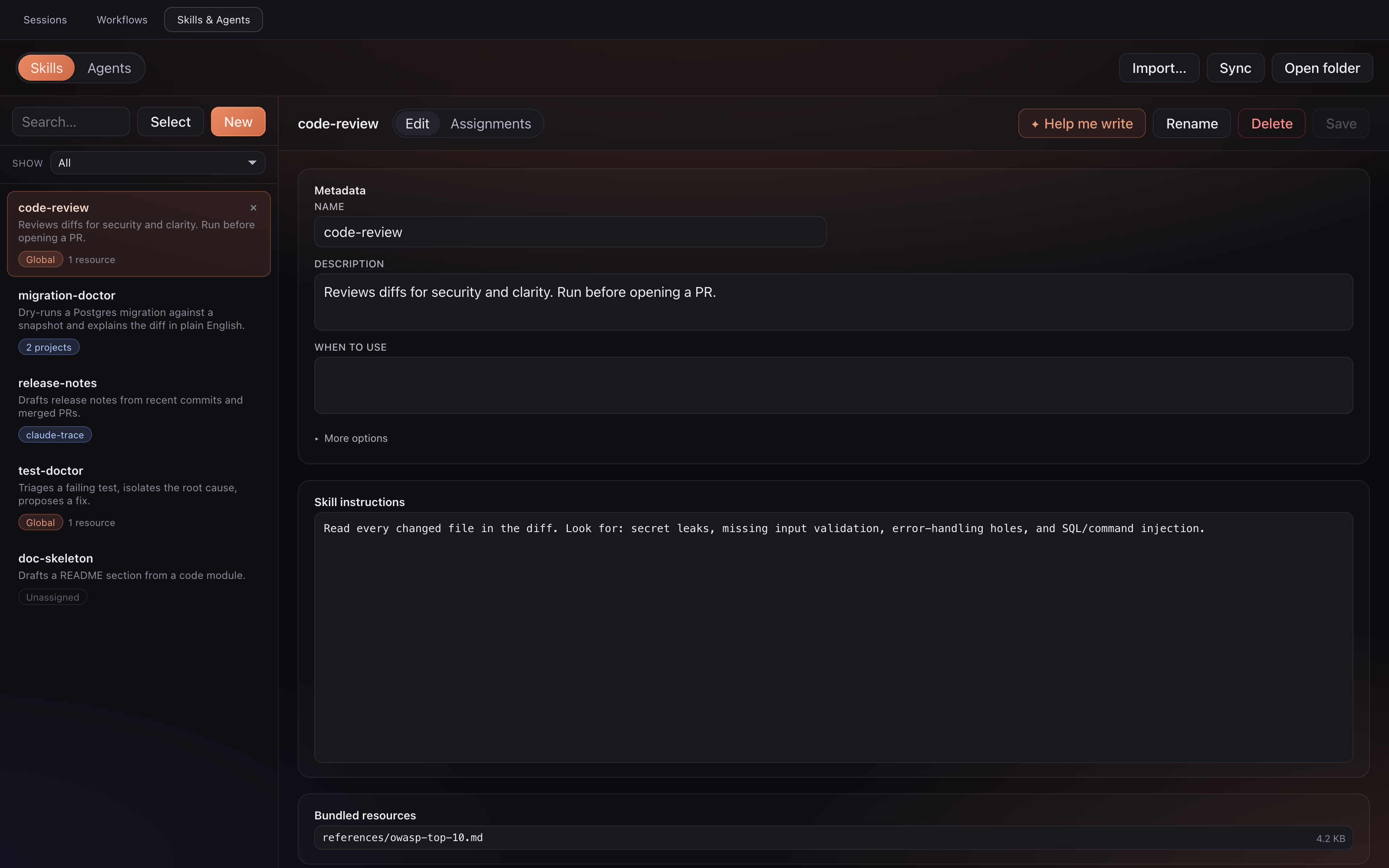
Skills and agents are the best part of Claude Code, and they sprawl. Some live in The library puts all of it on one screen. Every skill and every agent, with a real editor for the instructions, the description, the attached skills, and the bundled resources. No more digging through dotfiles to find the thing you wrote last month. Then you set the scope on each one, and Claude Trace writes the real files where they belong: global for Not sure how to word a skill? Press Help me write and a side panel drafts the body with you in a real Claude session, then drops it straight into the editor. Keep workflow sessions interactiveClaude Trace keeps workflows inside real interactive Claude Code sessions. It does not silently switch them to the Agent SDK or That distinction matters when you want a visual orchestrator without changing the execution path you already trust. Every agent step remains inspectable and resumable as a normal Claude session. Make the dashboard yours
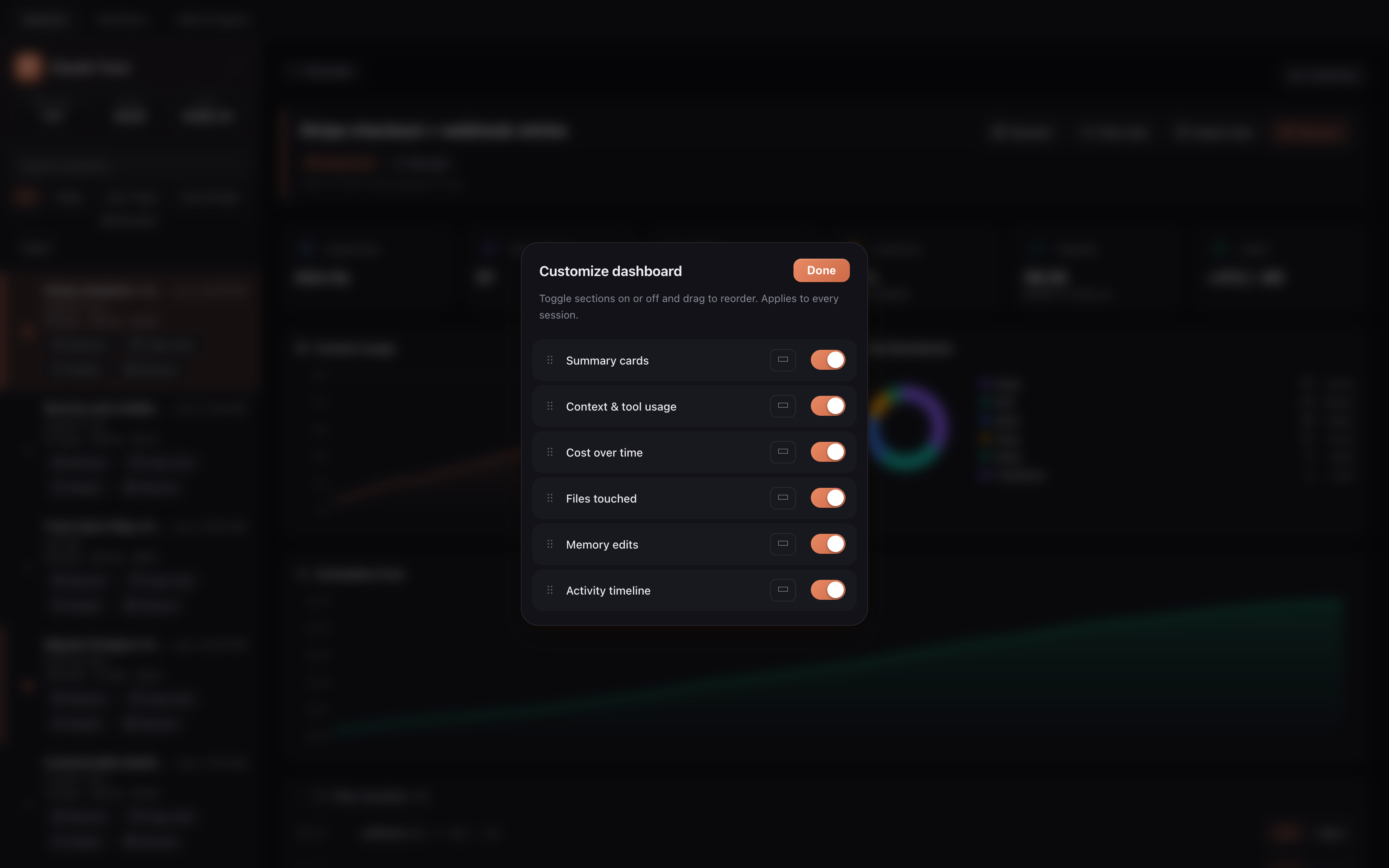
Hit Customize and toggle any section on or off: summary cards, context and tool usage, API-equivalent usage over time, files touched, memory edits, and the activity timeline. Set a section to half or full width and drag to reorder. The layout you pick applies to every session. How it worksClaude Code writes a complete JSONL transcript for every session under Codex writes rollout JSONL files under Claude Trace watches both session stores only while the Sessions view is visible. Claude files are read incrementally, and nested subagent files do not trigger full root-session rescans. A Claude transcript larger than 20 MiB is parsed from a 4 MiB beginning plus a recent tail capped at 16 MiB; ongoing appends trigger another bounded parse after at most 1 MiB of incremental growth. The UI marks its conversation and aggregate metrics as partial. Codex changes use targeted summary refreshes, while detailed content is loaded on demand. Updates batch through Terminal I/O crosses a bounded, versioned broker protocol. Heartbeats detect a dead connection, output backpressure triggers a history resync, and a stalled xterm write is destroyed and rebuilt instead of blocking later writes indefinitely. Webview readiness, panel visibility, and terminal membership are reconciled regardless of event order, while per-webview generation IDs reject delayed messages from an older page. Your data stays yoursClaude Trace does not upload your Claude or Codex transcripts or send telemetry. Everything it indexes is read from your local disk and rendered locally. It invokes the installed Claude and Codex CLIs for account metadata and the assistant actions you request; those CLIs keep their normal provider behavior. Claude Trace itself only makes an outbound request when you explicitly configure a workflow HTTP step. The optional workflow webhook listens on About the API-equivalent numbersClaude and Codex dollar figures are base API equivalents calculated from locally retained token counts and published model rates. Claude events also include recorded fast mode, US inference, cache tiers, and web search requests when those fields are present. Codex credit figures use the published token-based rate card and apply the recorded Fast tier when its session metadata is complete. Long-context supplements are applied only when the retained rollout exposes an exact per-request breakdown; cumulative sessions without that proof stay visibly partial. These values help compare sessions and catch runaway usage, but they are not account bills. Missing or mixed metadata, account discounts or subscription inclusion, legacy enterprise plans, partner charges, and unpublished rates can still create gaps. Claude Trace marks missing or partial pricing instead of guessing. The provider billing or usage page remains the authority. Settings
RequirementsVS Code 1.85 or newer. Claude Code 2.x is required for Claude features. A current Codex CLI with App Server and model catalog support is required to start new Codex terminals; existing local Codex sessions can still be inspected when its session store is present. Claude Trace ships target specific packages for macOS on Apple Silicon and Intel, Linux on arm64 and x64, and Windows on arm64 and x64. tmux is optional. It is preferred for durable terminal persistence on macOS and Linux when installed; the detached broker otherwise uses the native PTY backend. Building from sourceUse Node.js 22 or newer for the development and smoke-test toolchain. Press Every pull request, push to
The CI matrix produces six targets: UninstallLicenseMIT. See LICENSE. |