Guide Coding
No more vibe coding. Enter Guide Coding.
You write the code. AI guides you, one step at a time.
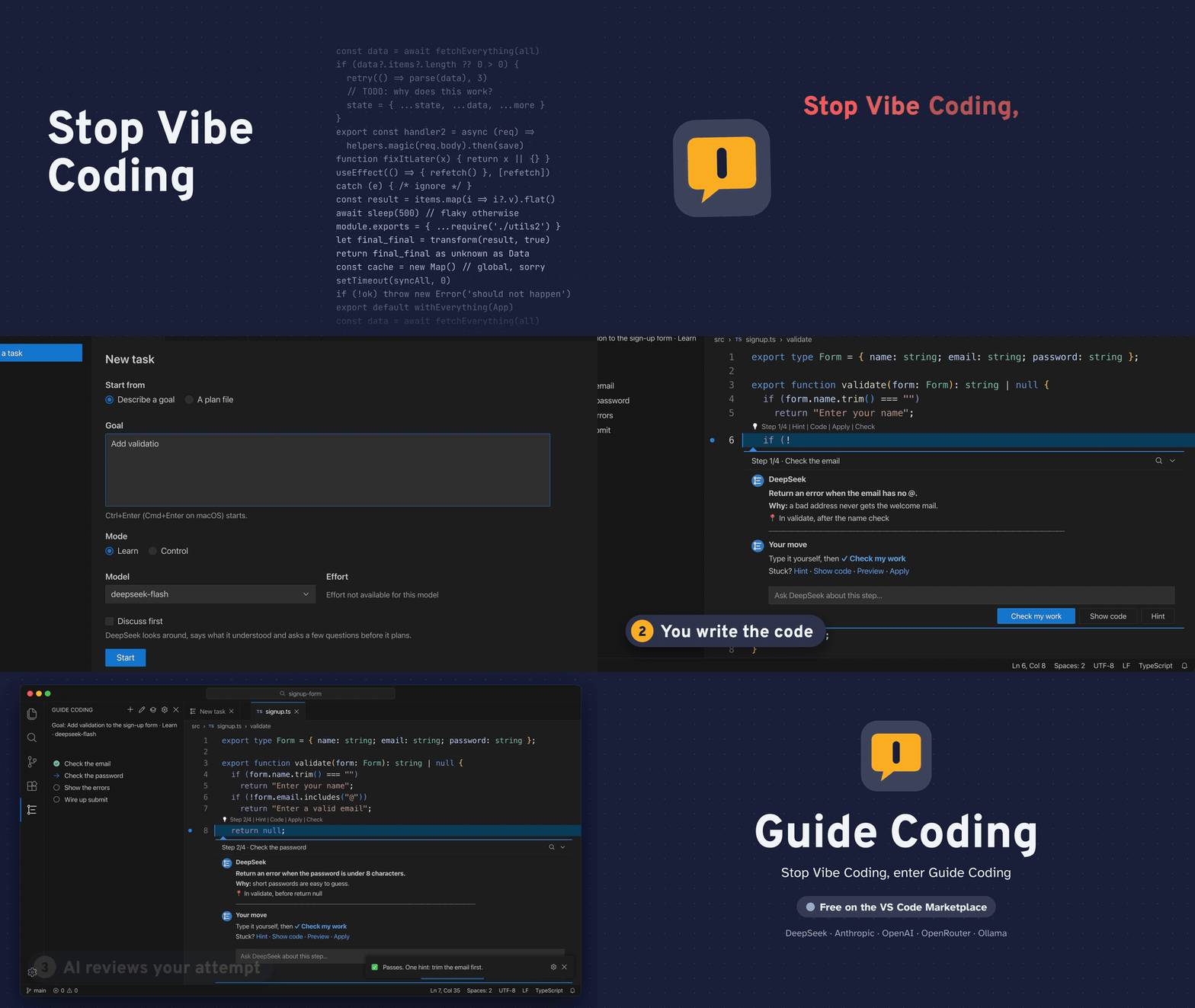
Guide Coding is a VS Code extension that plans a coding task with the model of your choice and then walks you through it. It does not write the code for you. Each step shows up in the editor, right where the code belongs: what to do, why, and where.
- The human writes, the AI guides. The model plans, explains, hints and reviews. You type.
- Understanding is the goal. You finish a task knowing why the code is the way it is, not only holding code that works.
- Generating code is a choice, not the default. Show code, Preview and Apply are there when you want them, one level at a time.
Your API key stays in your operating system's keychain and goes only to the provider you pick; nothing is sent to us. Want to try it without a key? Use a local model through Ollama, and nothing leaves your machine.
Preview. Guide Coding is an early release. It works, but expect rough edges. Please tell us what breaks.
Install
Search for Guide Coding in the Extensions view (publisher novian), or install it from the VS Code Marketplace (Open VSX: coming soon). Then open a folder you trust, and open Guide Coding in the activity bar.
Choose a provider
Guide Coding runs on your own model account. On first run, choose Choose provider (or run Guide: Choose model provider), pick one, and paste its API key. The key is checked for free (it only asks for the provider's model list), then stored in your operating system's keychain.
guide.provider |
Your code is sent to |
You need |
deepseek |
api.deepseek.com |
a DeepSeek API key |
anthropic |
api.anthropic.com (Claude models) |
an Anthropic Console API key |
openai |
api.openai.com |
an OpenAI API key; you pick the model at setup |
openrouter |
openrouter.ai, and the vendor of the model you pick |
an OpenRouter key; you pick the model at setup |
ollama |
nowhere: the model runs on your machine (localhost:11434) |
no key; you pick one of your installed models |
custom |
the endpoint in guide.baseUrl |
optional: a local server such as LM Studio takes no key |
- Anthropic with Claude Max or Team. Have Claude Max or Team? Your plan includes monthly API credits (Max 5x $100, Max 20x $200, Team up to $500 pooled). Claim them in claude.ai under Settings → Billing by linking a Claude Console organization, create an API key in that organization, and choose Anthropic. (Pro, Free and Enterprise plans don't include these credits.) Details.
- Ollama and context length. Ollama's default context is 4k tokens on machines with less than 24 GiB of VRAM, and it silently cuts long prompts from the front. Guide Coding needs at least 32k. Raise it with the Ollama app's context slider, or set
OLLAMA_CONTEXT_LENGTH (64k, 65536, is a good choice for coding tools). Pick a model that can call tools, for example ollama pull qwen3-coder.
- A custom endpoint. Set
guide.baseUrl (HTTPS, or plain HTTP only to localhost or 127.0.0.1) and guide.apiShape (openai or anthropic), then choose custom. Leave the key box empty if the endpoint takes no key (LM Studio, for one). Nothing is ever sent over plain HTTP to another machine.
- Cost. For a model whose price is known (Anthropic's, DeepSeek's) the cost is shown in dollars, and the task pauses at
guide.maxTaskCostUsd (default 5). For any other model, each turn's tokens are written to the log instead.
Your key, safely
- Where it lives. Keys are stored in your operating system's keychain (VS Code's secret storage), one per provider, and each is sent only to its own provider. Guide Coding has no server of its own and no telemetry.
- Give it a key of its own, with a cap. Create a key just for Guide Coding and limit what it can spend: DeepSeek is prepaid, so your balance is the cap; OpenRouter keys take a credit limit; Anthropic Console workspaces and OpenAI projects take spend limits. Revoke the key at your provider whenever you like.
- Change or remove it. Guide: Set API key replaces a key, and Guide: Clear API key deletes it from the keychain.
Your first task
- Open a folder, then choose Start a task in the Guide Coding view and say what you want to build.
- The model reads your code (read-only) and proposes a plan. For a bigger goal, the plan is split into milestones, each a slice that runs and shows something. The next milestone is planned only once you reach it, from the code as it is by then.
- The current step appears in the editor. Type it yourself, then choose Check my work: the model reviews what you changed.
- Stuck? Go one level further at a time:
- Hint: the shape of the code
- Ask: ask the model about the step, in the step's own balloon
- Show code, Preview (a diff of the file with the step applied) and Apply (one undoable edit)
- At the end of a milestone, a checkpoint asks you to try what you built before moving on.
You own the plan: edit, skip, reorder, add and delete steps, and the model adapts. Two more tools for when a step does not fit:
- Split step replaces the current step with smaller ones.
- Finish later keeps your stub for now; a later step finishes it.
Learn or Control
- Learn (the default) explains first: why the step is needed, how it works, where it goes.
- Control is terse and shows the code at once, for when you know the ground and want the model out of your way.
Switch any time from the Guide Coding view's title bar, or with the guide.mode setting.
Privacy
Guide Coding collects nothing and sends nothing to its author; it has no telemetry. Your goal, the files the model reads, the diff of your changes when you Check, and your messages go only to the model provider you chose, under that provider's terms (with Ollama they stay on your machine). The model can read your workspace but cannot change it: only your Apply and Create file write, and a path guard keeps it out of anything outside the folder and secrets such as .env*, *.pem and .ssh. Your keys live in your keychain, and the task and its conversation in VS Code's workspace storage on your machine. Read the full PRIVACY.md; the terms of use are in the EULA.md.
Requirements
- VS Code 1.101.2 or later (desktop).
- A folder you trust, opened in VS Code. Untrusted and virtual workspaces are not supported, because the model reads your files.
- An API key for one of the providers above, or a local model through Ollama.
Feedback
Found a bug, or have an idea? Open an issue at github.com/OnurGumus/guide-coding/issues. For a bug, please say your VS Code version, provider and model, and what you did. The Guide: Show log output helps, but remove any code and keys from it first.
| |

