Cursor Doctor
Diagnose and auto-fix your Cursor AI setup — right in your editor.
Health grade in your status bar. Inline diagnostics on save. One-click quick fixes.
Features
🏥 Health Grade in Status Bar
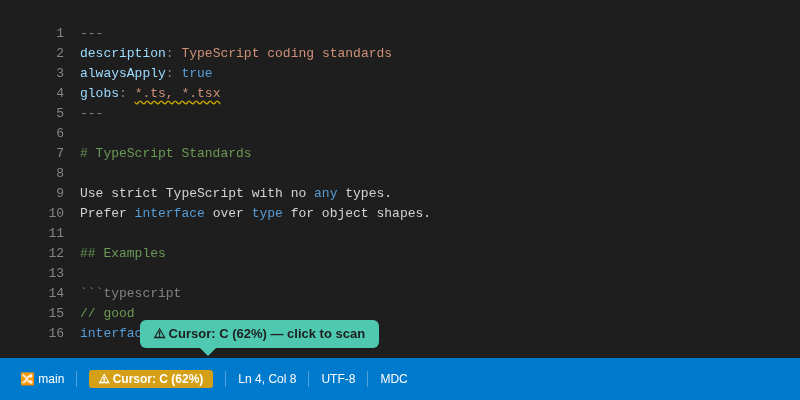
See your Cursor setup health at a glance — A through F — updated every time you save a rule file. Click it to see the full report.
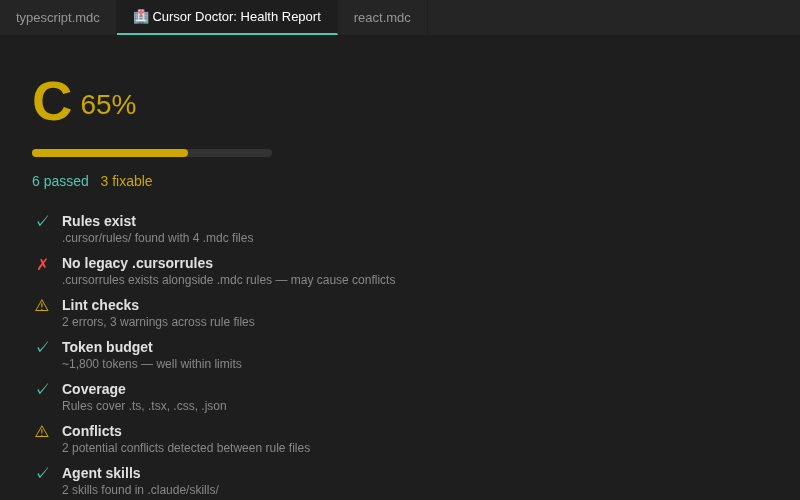
🔍 Full Scan Report
Run a scan to see every check, what passed, and what needs fixing.
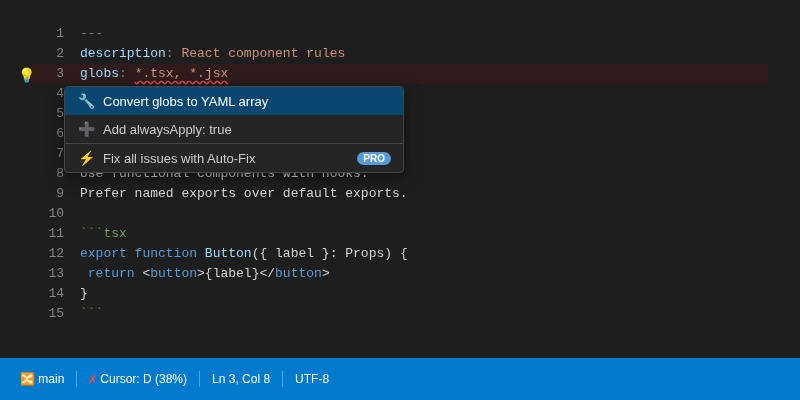
💡 Quick Fix Actions
Click the lightbulb on any issue to fix it instantly — add frontmatter, convert globs, add missing fields. No manual editing needed.
🔍 12 Health Checks
- ✅ Rules exist (.mdc format)
- ✅ No legacy .cursorrules conflicts
- ✅ Rule syntax (frontmatter, globs, dead rules, binary detection)
- ✅ Token budget (are your rules eating your context window?)
- ✅ Coverage gaps (file types without rules)
- ✅ File sizes (oversized context files)
- ✅ alwaysApply balance
- ✅ Agent skills detection
- ✅ Agent configs (CLAUDE.md, AGENTS.md validation)
- ✅ MCP config (mcp.json syntax, missing fields, secrets)
- ✅ Conflicts (contradictory instructions across rules)
- ✅ Redundancy (duplicate content between rules)
📋 Inline Diagnostics
Errors and warnings show directly in your .mdc files — in the Problems panel, with squiggly underlines, on save.
🔧 Auto-Fix (Pro)
One command to fix what the scan finds:
- Repair broken frontmatter
- Merge redundant rules
- Annotate conflicts
- Generate starter rules for your stack (React, Next.js, Python, Go, Rust, Vue, Svelte, and more)
🔄 Migrate
Convert legacy .cursorrules to modern .cursor/rules/*.mdc format.
Commands
Open the Command Palette (Ctrl+Shift+P / Cmd+Shift+P):
| Command |
Description |
Tier |
Cursor Doctor: Scan Health |
Full health report with grade |
Free |
Cursor Doctor: Lint Rules |
Detailed syntax checking |
Free |
Cursor Doctor: Migrate .cursorrules to .mdc |
Format conversion |
Free |
Cursor Doctor: Auto-Fix |
Fix all issues automatically |
Pro |
Cursor Doctor: Generate Starter Rules |
Stack-specific rule templates |
Pro |
Cursor Doctor: Activate Pro License |
Enter your license key |
— |
Free vs Pro
Free gives you the health grade, all diagnostics, and migration.
Pro ($9 one-time) unlocks auto-fix and template generation.
👉 Get Pro
Install
Or search "Cursor Doctor" in the extensions panel.
Also Available as CLI
npx cursor-doctor scan
cursor-doctor on npm | GitHub
- rule-gen — Generate rules from your codebase using Google Gemini.
npx rulegen-ai
- rule-porter — Convert your Cursor rules to CLAUDE.md, AGENTS.md, Copilot, or Windsurf (and back).
npx rule-porter --to agents-md
- cursor-doctor CLI — Same engine, runs from the terminal.
npx cursor-doctor scan
License
MIT

