👻 Ghost Line
Intent-aware, line-level undo & redo for VS Code.
Global undo (Ctrl + Z) is powerful — and often destructive.
Ghost Line gives you surgical undo: revert only the current line, without touching anything else.
Built for developers who think in intent, not timestamps.
Why Ghost Line Exists 😤
You’ve been here before:
- You’re editing multiple parts of a file
- You notice a typo on one line
- You press
Ctrl + Z
- Something unrelated disappears
Nothing is technically broken — but your flow is.
That’s because global undo is time-based.
It answers the question:
“What was the last edit operation?”
But developers think differently:
- “Undo this line”
- “Revert that typo”
- “Bring back what this line used to be”
This mismatch is exactly why Ghost Line exists.
What Ghost Line Does 👻
Ghost Line runs alongside native undo, without interfering with it.
Core idea:
Undo or redo only the current line, nothing else.
- No global rewind
- No collateral damage
- No broken mental context
Features ✨
Keyboard Shortcuts ⌨️
Designed to be muscle-memory friendly.
| Action |
Shortcut |
| Line Undo |
Ctrl + Alt + Z |
| Line Redo |
Ctrl + Alt + Y |
| List Line Undo History |
Ctrl + Shift + Alt + Z |
| List Line Redo History |
Ctrl + Shift + Alt + Y |
All shortcuts are fully configurable in VS Code.
Line-Level Undo / Redo in Action 🎥
Undoing and redoing only the current line, without affecting the rest of the file.
You can also open a line-level history picker to preview and restore previous versions of that line.

Configuration ⚙️
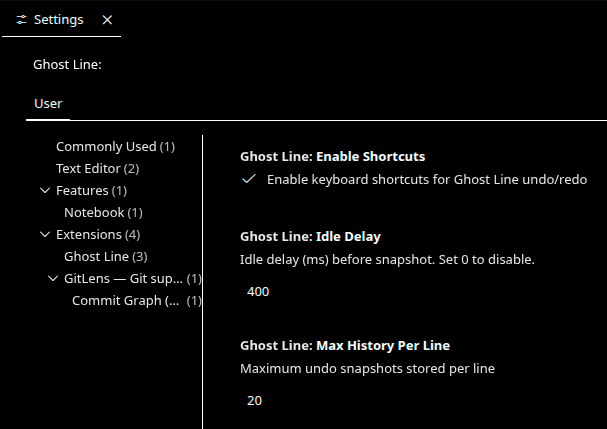
Ghost Line keeps configuration minimal and intentional.
Available settings:
- Max history per line
Limits how many snapshots are stored per line
- Idle delay
Controls how aggressively snapshots are captured
- Enable shortcuts
Toggle Ghost Line keybindings without uninstalling
No settings bloat.
No micromanagement.
How It Works (High-Level) 🧠
Each line maintains its own undo/redo history
History is snapshot-based, not diff-based
Snapshots are captured:
- after typing pauses (debounced)
- when you move the cursor onto a line
Undo/redo restores snapshots only for the active line
This design avoids VS Code API pitfalls and keeps behavior predictable.
Architectural Model
History is stored as:
Map<FileURI, Map<LineNumber, LineHistory>>
interface LineHistory {
  undoStack: string[];
  redoStack: string[];
  currentSnapshot: string;
}
- History is per file, per line
- Line history follows lines when they move
- Deleted lines have their history dropped
- Programmatic edits are guarded to avoid feedback loops
Explicit Non-Goals
Ghost Line does not guarantee deterministic behavior for:
- Multi-cursor edits
- Large refactors
- Format-on-save
- AI / agent-driven bulk edits
Behavior in these cases is:
- Best-effort
- Non-crashing
- Non-corrupting
These boundaries are intentional.
Stability Status
Verified
- Idle snapshot capture
- History cap enforcement
- Per-line undo / redo correctness
- Branching behavior
- History restore via QuickPick
- Shortcut gating
Known Limitations (Accepted)
- No multi-cursor semantics
- No agent-aware heuristics
Edge Cases & Limitations ⚠️
Handled Safely
- Line number shifts due to inserts or deletes
- Redo invalidation after new edits
- Safe no-ops when no history exists
- Zero interference with native undo
Current Limitations
- No block or range-based undo
- Multi-line edits are not first-class citizens
- History is session-scoped (not persisted across reloads)
These are intentional scope decisions, not oversights.
What’s Coming Next 🚧
Planned directions (no promises, just intent):
- Hover previews for undo / redo states
- Better multi-line awareness
Installation 📦
From VS Code Marketplace
👉 Ghost Line on VS Code Marketplace
From Source
git clone https://github.com/Namasivaayam-L/ghost-line
cd ghost-line
npm install
npm run compile
Press F5 in VS Code to launch the Extension Development Host.
Contributing & Feedback 🙌
Ghost Line is open-source and built in public.
If Ghost Line saves you even one unnecessary undo,
mission accomplished 👻✨

