AI Diff Viewer
Calm, in-place review of every file your AI CLI touches — inline hunks in the editor you already have open, with a split-view diff only when you ask for it.




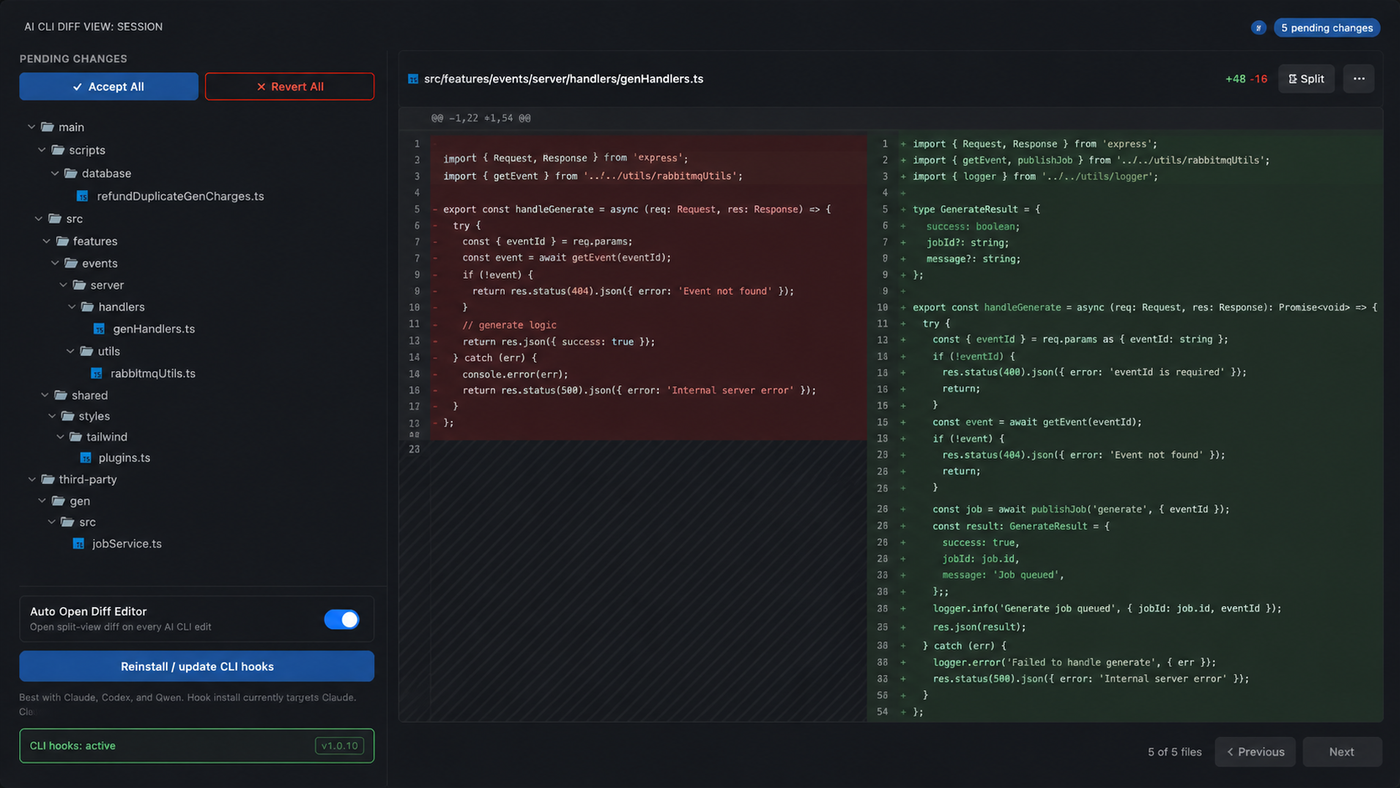
Works with Claude Code, Codex, Qwen, and any CLI that writes files to your workspace. Snapshot-based, hunk-aware, zero-config for non-Claude tools.
Why
Most "AI diff" tools open a split-view diff editor every time the model writes a file, then keep re-opening it whenever you focus back. In a real review session that turns into:
edit → diff pops → close → click file → diff pops → close → context-switch → diff pops → …
AI Diff Viewer flips the default: AI edits land as inline decorations inside your normal editor — green/red gutter, hunk markers, CodeLens accept/revert — and the split-view diff is something you open on demand. The classic auto-open behaviour is one setting away.
Features
|
|
| Inline review |
Hunks appear directly in the file. No editor hijacking, no popups, no extra tab. |
| Opt-in split-view |
Single setting (autoOpenDiffEditor) or in-panel toggle controls whether the diff editor opens automatically. |
| Session panel |
Tree of all pending files. Hover a row for Open file / Open diff / Accept / Revert. |
| Bulk actions |
Accept All / Revert All at the top of the pending list — one click to apply everything. |
| Hunk-level control |
CodeLens Accept / Revert above each hunk inside the diff editor (when you choose to open it). |
| Keyboard navigation |
Alt+H / Alt+L to jump between edited files; Cmd+Shift+Y / Cmd+Shift+Z to accept/revert active file. |
| Claude CLI hooks |
One-click install of pre/post hooks into ~/.claude/settings.json for precise snapshotting. |
| Multi-tool |
Codex, Qwen, and any other CLI work out of the box via the workspace file watcher — no hooks required. |
Install
Marketplace (recommended):
ext install mtglitch.ai-diff-viewer
Or search AI Diff Viewer in the Extensions sidebar.
Manual (.vsix):
code --install-extension ai-diff-viewer-X.Y.Z.vsix
After install: Developer: Reload Window (Cmd+Shift+P). The AI Diff Viewer activity-bar icon appears in the left dock.
If the icon isn't visible, right-click the activity bar → tick AI Diff Viewer. VS Code remembers hidden containers per-workspace.
Quick start
Claude Code
- Open the AI Diff Viewer view in the sidebar.
- Click Install CLI hooks once. This appends pre/post hooks to
~/.claude/settings.json so the extension can capture exact snapshots before/after each write.
- Run Claude as usual. Edited files show inline diff in the active editor; the Session panel lists them.
- Review each file:
- Hover the file row → click Open file (normal editor with inline diff) or Open diff (split-view).
- Hover →
✓ to accept the whole file, ✗ to revert.
- Or hit
Cmd+Shift+Y / Cmd+Shift+Z while focused on the file.
- When happy → Accept All at the top of the panel.
Codex / Qwen / other CLIs
No hook install needed. The workspace file watcher detects external writes and produces the same inline diff + Session panel entries. Slightly less precise on rapid multi-file writes (debounced 500 ms), but functional.
Configuration
| Setting |
Default |
Description |
ai-cli-diff-view.autoOpenDiffEditor |
false |
Open the split-view diff editor automatically when the AI CLI writes a file. When false, only inline decorations are shown; use the Session panel or AI Diff: Open Pending File (Diff) to open the diff editor manually. |
The same setting has a toggle at the bottom of the Session panel.
Commands
All commands are prefixed AI Diff: in the Command Palette.
| Command |
Action |
AI Diff: Open Pending File (Diff) |
Open file with pending changes in split-view diff. |
AI Diff: Open Pending File (Editor) |
Open file in a normal editor (inline diff only). |
AI Diff: Accept All Changes |
Accept all hunks in the active file. |
AI Diff: Accept All Changes (All Files) |
Accept everything pending across all files. |
AI Diff: Revert All Changes |
Revert all hunks in the active file. |
AI Diff: Accept Hunk / Revert Hunk |
Single-hunk actions (also via CodeLens). |
AI Diff: Next Edited File / Previous Edited File |
Cycle through pending files. |
AI Diff: Install Claude CLI Hooks |
Write pre/post hooks to ~/.claude/settings.json. |
AI Diff: Start Claude Session |
Launch Claude from the Session panel. |
Keybindings
| Action |
macOS |
Linux / Windows |
| Accept all hunks in file |
Cmd + Shift + Y |
Ctrl + Shift + Y |
| Revert all hunks in file |
Cmd + Shift + Z |
Ctrl + Shift + Z |
| Previous edited file |
Alt + H |
Alt + H |
| Next edited file |
Alt + L |
Alt + L |
| Start Claude session |
Cmd + Shift + A |
Ctrl + Shift + A |
How it works
- Snapshot — before the AI CLI writes a file, the extension records the original content (via Claude pre-hook or by reading from disk on
onDidChange).
- Detect — after the write, the post-write content is compared against the snapshot. Hunks are computed with a Myers-like diff.
- Render — inline decorations and CodeLens are drawn on top of the live document. The Session panel is updated. The split-view diff is opened only if
autoOpenDiffEditor is true or the user explicitly requested it.
- Resolve —
Accept removes the snapshot (changes stay). Revert writes the original content back to disk. Both fire the same internal event, so the panel and decorations refresh automatically.
State is persisted to extension storage, so pending diffs survive a window reload.
Fork of ai-cli-diff-view
This is a fork of konan-1947/ai-cli-diff-view at upstream v1.0.12. All credit for the snapshot/hunk/CodeLens engine and the Claude hook installer goes to the original author.
|
Upstream ai-cli-diff-view |
This fork (ai-diff-viewer) |
| Auto-open split-view diff |
Always |
Off by default, toggle |
| Session panel row click |
Opens diff editor |
Does nothing (intentional) |
| File row actions |
None |
Hover: Open file, Open diff, Accept, Revert |
| Bulk Accept/Revert |
Command palette only |
One-click in panel header |
openDiff(filePath, force) |
n/a |
New force flag for manual entry points |
If you want the classic upstream UX back, install this fork and set ai-cli-diff-view.autoOpenDiffEditor: true. The engine underneath is identical.
Troubleshooting
Activity-bar icon doesn't show after install.
Right-click the activity bar → tick AI Diff Viewer, or Developer: Reload Window.
Inline diff doesn't appear when Claude edits a file.
Click Install CLI hooks in the Session panel. Then check the panel footer — it should say CLI hooks: active.
Hooks say "incomplete" or "not installed for this extension".
Run AI Diff: Install Claude CLI Hooks again. It re-writes both pre and post hooks pointing at the current extension install.
Working with Codex/Qwen and miss some edits.
External writes are debounced 500 ms. Tools that batch-write 100+ files in a fast burst may have a couple of files coalesced. Hook-based detection (Claude) is exact.
Accidentally clicked Accept All and want it back.
Accept doesn't modify disk — it just clears the pending state. The current file content is what's on disk. Revert would write the snapshot back; if you accepted, the snapshot is gone. Use git.
Development
git clone https://github.com/EloWeld/ai-diff-viewer.git
cd ai-diff-viewer
npm install
npm run compile          # build once
npm run watch            # rebuild on save
In VS Code: F5 opens an Extension Development Host window with the extension loaded.
Package locally:
npx @vscode/vsce package --no-dependencies -o ai-diff-viewer.vsix
code --install-extension ai-diff-viewer.vsix
Roadmap
- [ ] Search/filter inside the Session pending tree.
- [ ] Per-language hunk grouping (jump straight to TS files, etc).
- [ ] Codex/Qwen-specific hook installers (parity with Claude).
- [ ] Optional Telegram/Slack ping when a session finishes.
PRs welcome.
Credits
Issues and feature requests → https://github.com/EloWeld/ai-diff-viewer/issues.
License
MIT — see LICENSE for the dual copyright notice.

