Sift
Turn one giant diff into reviewed, atomic commits, with the AI of your choice.
Sift asks an AI to plan your uncommitted changes into small commits, then walks you through each one in VS Code's own diff editor. Ask about any line, approve, commit.
Website Install Releases
Features
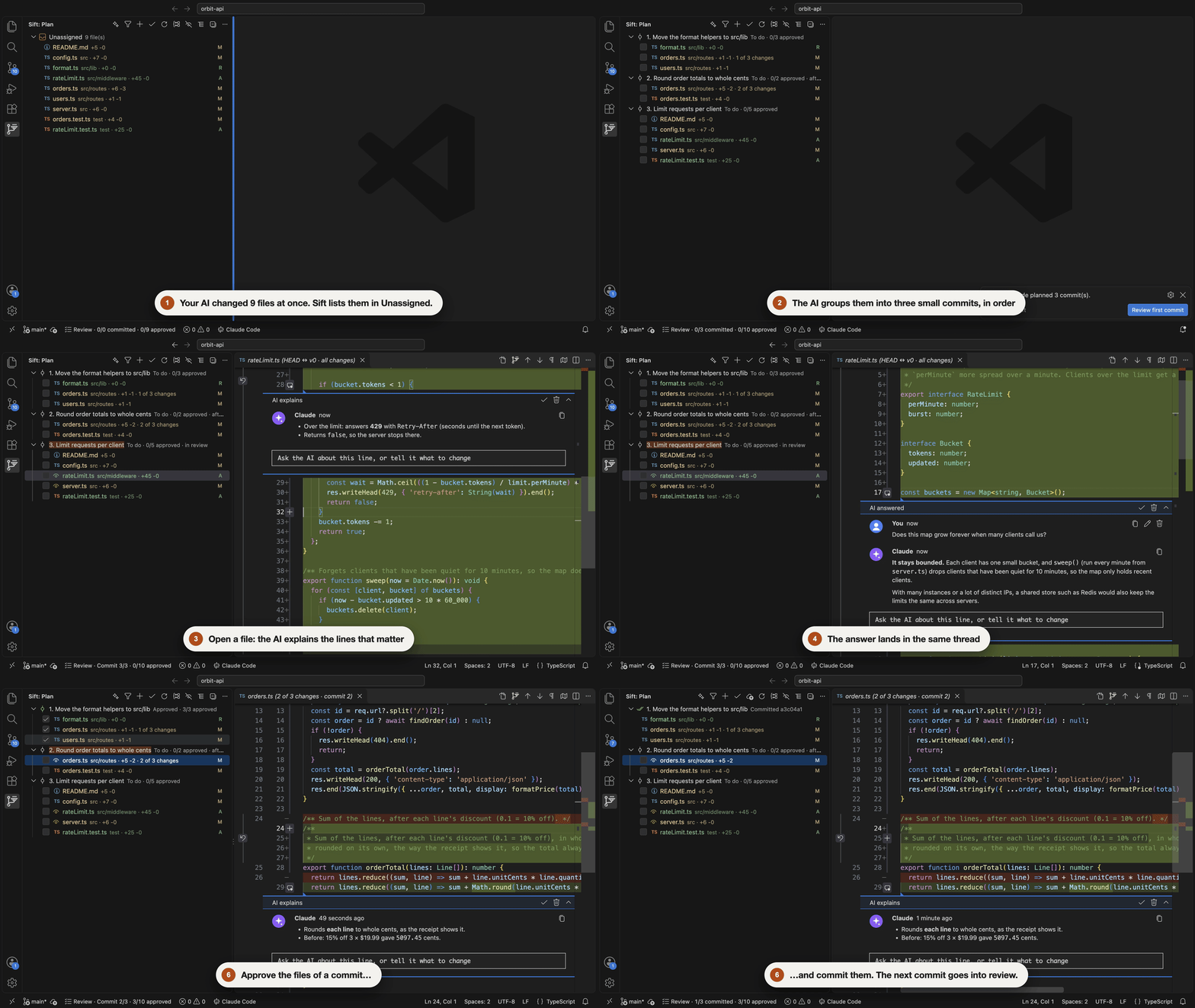
Commit plan in one click: ordered commits with an intent, risk notes and explanations on the lines that matter.Ask about any line: the AI answers in the comment thread, or edits the code.Any AI: Claude Code, Codex, Gemini CLI, GitHub Copilot and other VS Code models, or your own command.Split a file across commits, and see renames as one file.Versions per file: see only what changed since your last look or your approval.Commit, push, undo, revert and amend from the Sift view. What you staged stays staged.Agents can drive it too: Copilot tools, a sift skill and a plan file.
Install
Needs VS Code 1.95+, Git, and an AI (optional: Sift also works for manual reviews).
Quick start
Open a repo with uncommitted changes and click the Sift icon.
Click Plan commits with AI (✨). The AI groups your changes into commits.
Open a file: the AI's notes sit on the lines that matter.
Click + on a line to ask the AI. The answer lands in the thread.
Approve files with their checkbox, then click ✓ to commit.
To change the AI, click its name in the status bar.
Keys
Action
Mac
Windows / Linux
Approve file
Cmd+Alt+D
Ctrl+Alt+D
Next to do
Cmd+Alt+N
Ctrl+Alt+N
Latest / all changes
Cmd+Alt+M
Ctrl+Alt+M
Ask AI about open comments
Cmd+Alt+Enter
Ctrl+Alt+Enter
Send a comment
Cmd+Enter
Ctrl+Enter
Open Sift
Ctrl+Shift+S
Ctrl+Alt+S
Settings
Setting
What it does
sift.ai.providerclaude, codex, gemini, vscode or custom
sift.ai.modelModel to use; empty for the default
sift.ai.commandThe command for custom, or the path to a command line AI
sift.ai.additionalDirectoriesFolders outside the repo the AI may read
sift.ai.extraArgumentsExtra options for the command line AI
sift.agentSkillsAgents that get the sift skill
sift.stateLocationrepo (.sift/state.json) or workspaceStorage
sift.snapshotMaxFileSizeMBNew files larger than this are left out of snapshots
Privacy
No telemetry and no server. Your changes go only to the AI you chose, and only when you ask it to plan or answer.
Limitations
Binary and deleted files can't be split across commits.
AI edits from command line AIs aren't editor undo steps: use the Latest changes diff to get earlier text back.
License
MIT © 2026 Matheus Salmi