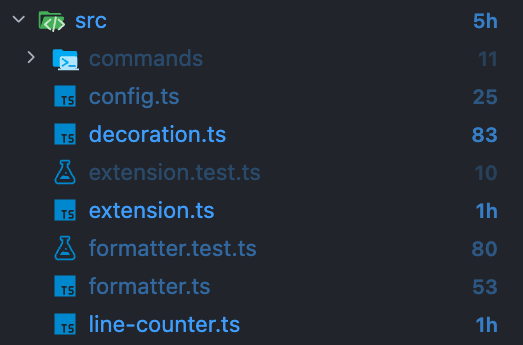
Display line counts as badges next to files and directories in the VS Code Explorer.
Files are color-coded by relative size within each directory — heavier files stand out at a glance.
Features
Line count badges — Every file and directory shows an abbreviated line count (e.g. 3h = 300s, 2k = 2000s). Hover to see the exact number.
Relative color coding — Siblings in the same directory are ranked and colored in three tiers:
Top ~33% (most lines) — strong blue
Mid ~33% — medium blue
Bottom ~33% — light blue
Directory totals — Directories display the sum of all descendant lines.
Auto-refresh — Badges update on file save, create, delete, and rename.
Gitignore support — Optionally excludes files matched by .gitignore.
Toggle on/off — Run LOC in File Tree: Toggle from the Command Palette.
Extension Settings
Setting
Type
Default
Description
locInFileTree.enabled
boolean
true
Show/hide line count badges
locInFileTree.excludePatterns
string[]
[]
Glob patterns to exclude (e.g. ["node_modules", "*.min.js"])
locInFileTree.respectGitignore
boolean
true
Exclude files listed in .gitignore
Theme Colors
You can customize the badge colors in your settings.json under workbench.colorCustomizations:
Color ID
Description
locInFileTree.top
Top ~33% (most lines)
locInFileTree.mid
Mid ~33%
locInFileTree.bottom
Bottom ~33% (fewest lines)
Known Limitations
Badges also appear in the Source Control (Git) view. This is a VS Code API limitation — FileDecorationProvider applies globally to all views and cannot be scoped to the Explorer only.