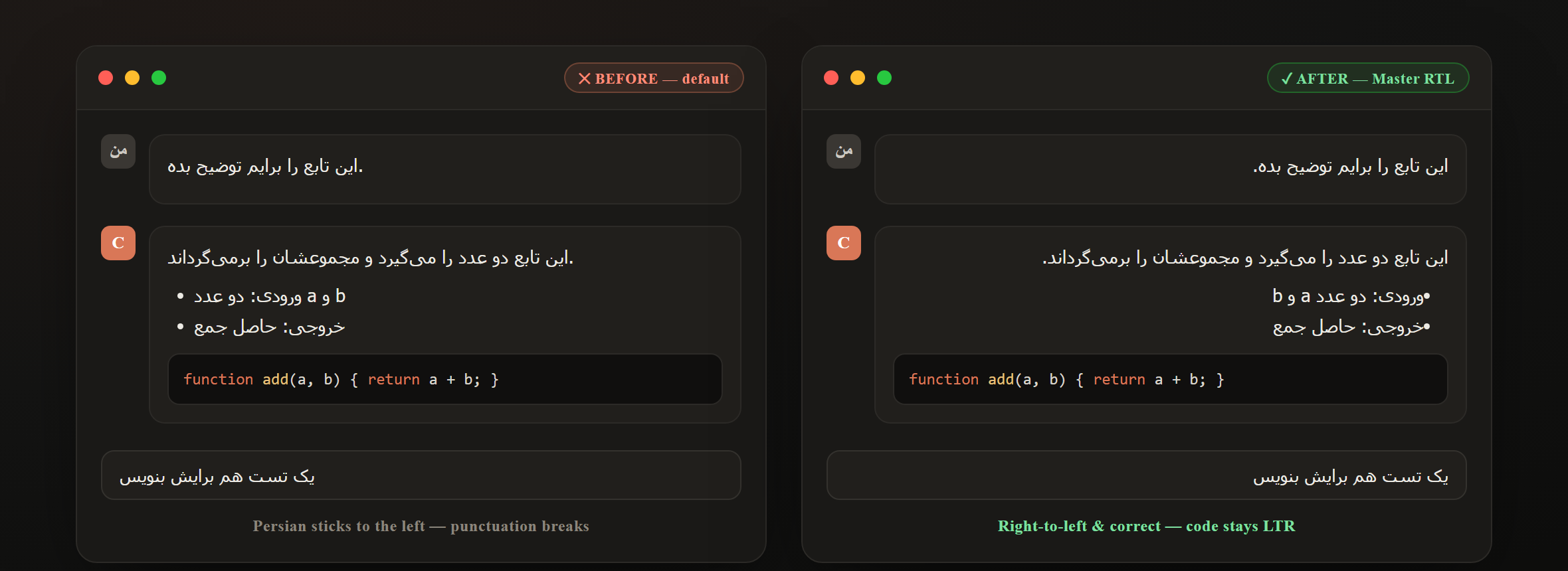
Before Persian sticks to the left and punctuation breaks · After Master RTL flips the chat right-to-left and keeps code LTR.
🚀 Why Master RTL?
VS Code — and the tools built on it — assume left-to-right. If you write Persian, Arabic, Hebrew, or Urdu, your AI chat and your Markdown come out misaligned, with punctuation in the wrong place and text glued to the left edge. Master RTL fixes that, end to end:
🤖 It flips the Claude Code chat to right-to-left — the first extension to do it — and gives you a real RTL Markdown editor, reading themes, and AI prompt templates. One install, the whole right-to-left workflow.
🤖
RTL Claude Code chat
Persian/Arabic/Hebrew/Urdu read right-to-left; English & code stay LTR — auto-detected per line.
|
🪶
True RTL Markdown editor
A real right-to-left custom editor for .md with live, synced preview.
|
🎨
Beautiful by default
11 reading themes, colorful offline code highlighting, a live outline & word stats.
|
✨ Features
- 🤖 Right-to-left Claude Code chat — one click; English & code stay LTR
- 🎨 11 color themes for Claude Code — Dracula, Nord, Tokyo Night, Catppuccin & more
- 🪶 True RTL editing — right-aligned, natural right-to-left base direction
- 🎨 Colorful code — offline syntax highlighting for 17+ languages, with a language badge and one-click Copy
- 📖 11 reading themes — Auto · GitHub · Sepia · Nord · Dracula · One Dark · Solarized Light/Dark · Rosé Pine · Gruvbox · Monokai
- 🤖 AI prompt templates — reusable prompts you paste into Claude Code & GitHub Copilot chat
|
- 🪞 Live preview — fully RTL, synced scrolling in Split mode
- 🧰 Formatting toolbar — bold, italic, headings, lists, tables & more (
Ctrl+B/I/K)
- 🧭 Live outline — auto table of contents with click-to-scroll
- 🔤 Smart direction — code stays LTR inside RTL text, automatically
- 📊 Status bar — word, character & line counts + reading time
- 🔌 Offline & Restricted-Mode friendly — no network, no trust needed
|
🤖 Make Claude Code right-to-left
This is the headline feature. After installing, the Claude Code chat is set to RTL out of the box.
1. Install Master RTL → 2. Reload the window → 3. Open Claude Code — it reads right-to-left
Toggle it anytime from the status-bar “Claude RTL” button, or the Command Palette → “Master RTL: Right-to-Left for Claude Code”.
🧠 How it works (click to expand)
Claude Code renders its chat inside a sandboxed webview, so no extension can style it from the outside — that is a real VS Code limitation. Master RTL works with it instead of around it:
- It adds a single, clearly-marked, fully-reversible stylesheet block to Claude Code’s own webview CSS.
- Direction is decided per paragraph with
unicode-bidi: plaintext, so:
- Persian / Arabic / Hebrew / Urdu → right-to-left, right-aligned, correct punctuation.
- English text & code blocks → stay left-to-right and left-aligned. Nothing English is disturbed.
- The block is re-applied automatically after Claude Code updates (which reset its files).
- Turn the feature off and Master RTL removes the block cleanly — your Claude Code is back to stock.
ℹ️ A window reload applies any change (VS Code only loads webview CSS at startup).
❓ Is this safe? Will it break Claude Code? (click to expand)
- Both the RTL and color-theme changes are CSS only — Master RTL never touches Claude Code’s JavaScript, so it can’t break functionality.
- Both are idempotent and reversible: exactly one marked block is added per feature; turning a feature off restores the original byte-for-byte.
- The RTL rules are scoped to chat text and the input — toolbars, buttons and icons keep their original positions.
- Verified by an offline test suite (
npm test, 27 assertions) and headless-browser render checks of every theme.
- GitHub Copilot’s chat is closed-source and not patched; use the prompt templates below with it.
🎨 Color themes for the Claude Code chat
Give the Claude Code chat a cohesive, professional look with one of 11 hand-tuned themes — and switch between them in a click.
Status-bar “Claude Theme” button → pick a theme → Reload Window
| Dark |
Light |
| Dracula · Nord · One Dark · Tokyo Night · Catppuccin Mocha · Gruvbox Dark · Solarized Dark · Rosé Pine · Synthwave |
Sepia (Paper) · GitHub Light |
- Each theme recolors backgrounds, message text, the code-block surface, accents and links — the whole panel, not just one piece.
- Code syntax tokens keep following your active VS Code editor theme, so code stays readable; the theme harmonizes everything around it.
- Set it from the status-bar Claude Theme button, the command Master RTL: Claude Code Chat Theme…, or the
rtlMarkdown.claudeCodeTheme setting (default Tokyo Night). Pick Default to restore Claude Code’s own colors.
- It’s CSS only, reversible, and re-applied automatically after Claude Code updates.
ℹ️ Like the RTL feature, a window reload applies a theme change.
📝 RTL Markdown editor
Open any .md, .markdown, or .mdx file — it opens in the Master RTL editor automatically.
| ✏️ Edit |
🔀 Split |
👁️ Preview |
| True RTL, right-aligned writing |
Editor + live preview, synced scroll |
Clean rendered, fully RTL |
Use the toolbar to switch modes, change the reading theme, or open the live outline.
💡 Prefer the plain editor for a file? Click “Open in Text Editor” in the toolbar, or right-click → Reopen Editor With… → Text Editor.
🤝 Use with Claude Code & GitHub Copilot
Master RTL is built for developers who code with AI and write right-to-left:
- 🤖 RTL Claude Code chat — described above.
- AI prompt templates — keep your favorite reusable prompts one click away (status-bar Prompts button, toolbar, or “Master RTL: Insert AI Prompt Template”). The template is copied to your clipboard so you can paste it straight into the chat (and inserted at the cursor if a text editor is focused). Edit your set via
rtlMarkdown.promptTemplates.
- Auto-RTL for AI-generated docs — any
.md / .markdown / .mdx that Claude Code or Copilot generates opens right-to-left automatically.
⚙️ Settings
| Setting |
Default |
Description |
rtlMarkdown.claudeCodeRtl |
true |
Make the Claude Code chat panel right-to-left (English & code stay LTR). Re-applies after Claude Code updates; needs a window reload |
rtlMarkdown.claudeCodeTheme |
tokyo-night |
Color theme for the Claude Code chat (default, dracula, nord, one-dark, tokyo-night, catppuccin, gruvbox, solarized-dark, rose-pine, synthwave, sepia, github-light). Needs a window reload |
rtlMarkdown.fontFamily |
Vazirmatn, Tahoma, 'Segoe UI', sans-serif |
Font family for editor & preview |
rtlMarkdown.fontSize |
16 |
Font size in pixels |
rtlMarkdown.lineHeight |
2 |
Line height |
rtlMarkdown.defaultMode |
preview |
View on open: edit, split, or preview |
rtlMarkdown.previewTheme |
auto |
Reading theme: auto, github, sepia, nord, dracula, one-dark, solarized-light, solarized-dark, rose-pine, gruvbox, monokai |
rtlMarkdown.promptTemplates |
6 starters |
Your reusable AI prompt templates for Claude Code / Copilot chat |
💡 For the best Persian/Arabic typography, install the free Vazirmatn font.
⌨️ Commands & Shortcuts
| Action |
How |
| Make Claude Code chat RTL |
Status-bar Claude RTL button · Master RTL: Right-to-Left for Claude Code |
| Theme the Claude Code chat |
Status-bar Claude Theme button · Master RTL: Claude Code Chat Theme… |
| Insert an AI prompt template |
Status-bar Prompts button · Master RTL: Insert AI Prompt Template |
| Toggle the RTL Markdown editor |
Status-bar RTL button · Master RTL: Toggle RTL Markdown Editor |
| Save |
Ctrl / Cmd + S |
| Bold / Italic / Link |
Ctrl / Cmd + B · I · K |
| Copy a code block |
Copy button on the block |
| Open in plain text editor |
Master RTL: Open in Text Editor |
🌍 Languages
Built and tuned for every right-to-left script, including documents that mix RTL and LTR:
فارسی (Persian) · العربية (Arabic) · עברית (Hebrew) · اردو (Urdu) · Kurdish · Pashto · Dari
English words, code, URLs and numbers inside right-to-left text are detected and kept left-to-right automatically.
❓ FAQ
Does it really change the Claude Code chat, or just Markdown?
Both. Master RTL flips the Claude Code chat panel to right-to-left and gives you a dedicated RTL Markdown editor. The Claude Code part is on by default and fully reversible.
Will English and code look wrong now?
No. Direction is detected per line: only right-to-left text flips. English paragraphs stay left-aligned and code blocks stay left-to-right — exactly as before.
What happens when Claude Code updates?
Master RTL re-applies its stylesheet automatically on the next start, so RTL keeps working across Claude Code updates. A window reload makes it visible.
How do I turn the Claude Code RTL off?
Click the Claude RTL status-bar button (or run Master RTL: Right-to-Left for Claude Code), then reload. Master RTL removes its block and restores the original Claude Code styling.
Does it work offline / in Restricted Mode?
Yes. Everything is local — no network calls — and the Markdown editor works without workspace trust.
Does it support syntax highlighting?
Yes — the rendered preview colorizes fenced code blocks for 17+ languages with a built-in, fully offline highlighter, a language badge, and a Copy button.
🛠️ Build from source
git clone https://github.com/morpheusadam/RTL-.md-Files-Vs-Code-Extention.git
cd RTL-.md-Files-Vs-Code-Extention
npm install -g @vscode/vsce
npm test          # runs the RTL-patch test suite
vsce package      # creates the .vsix
Install the generated .vsix from the Extensions view → … → Install from VSIX, or press F5 to launch an Extension Development Host.
⭐ If Master RTL helps you, a star and a quick review go a long way



MIT License © morpheusadam
| |