
AI Code Walkthrough
A guided, senior-engineer-style walkthrough of the changes your AI assistant just made — what changed, why, and how it fits together — right inside your editor.




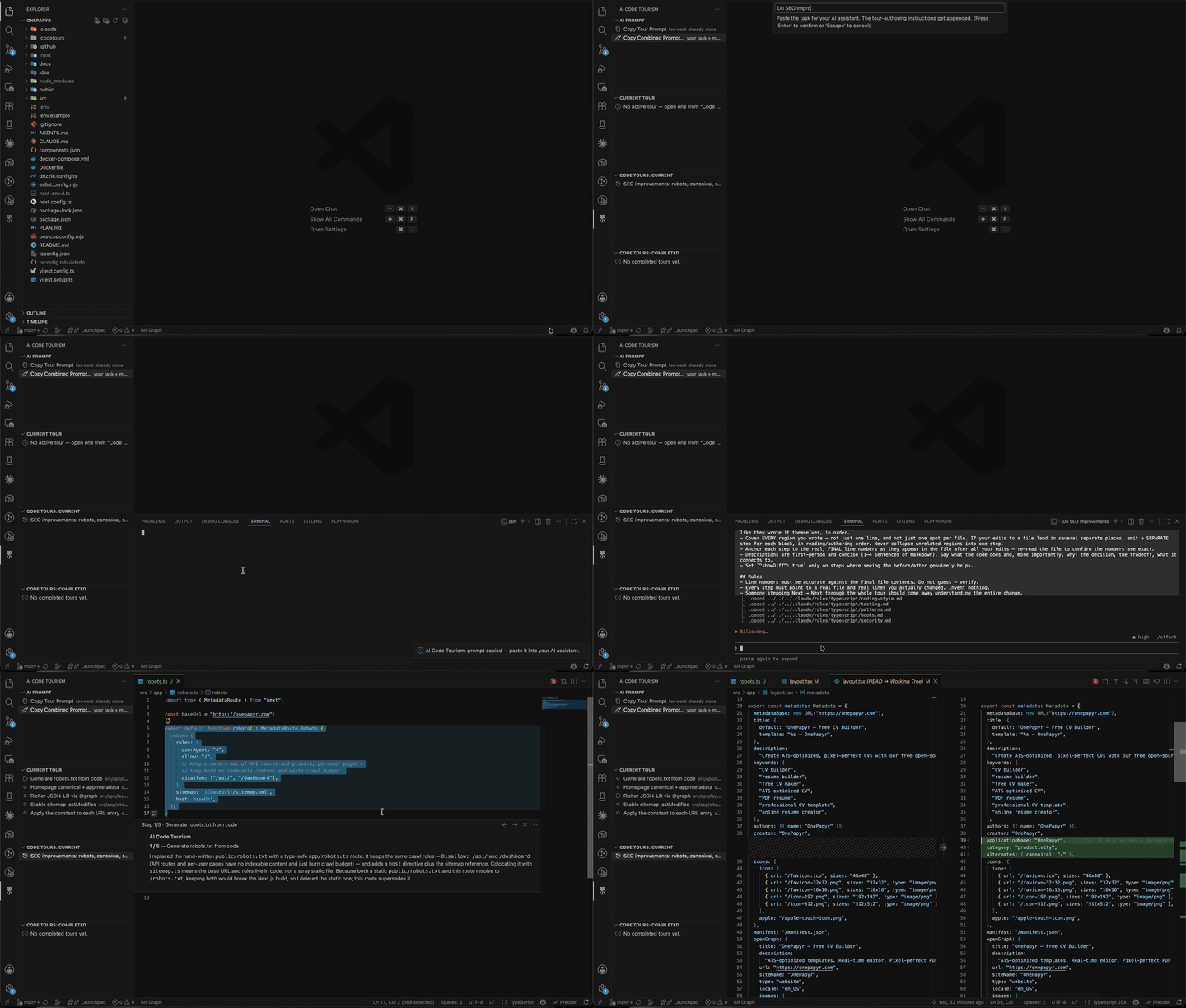
When an AI coding assistant (Claude Code, Codex, Copilot, …) rewrites part of your repo, you're left with a wall of diff to accept or reject. AI Code Walkthrough turns that change into a walkthrough you actually read — the extension opens each touched file, jumps to the exact lines, and floats a short explanation right there, in the order the work was done. You step Next → Next through the real code and come away understanding it, instead of rubber-stamping a diff.
There is no API key, no model, and no network call. The explanations come from the assistant that made the change — it writes a small walkthrough file into your repo, and this extension plays it.
▶️ Watch the full-quality video
Quick start
- Open the AI Code Walkthrough view in the Activity Bar.
- In the AI Prompt panel, click Copy Combined Prompt…, type the task you want done, and paste the result into Claude Code / Codex. (Or click Copy Walkthrough Prompt to have the assistant document work it already did, or Copy Feature Walkthrough Prompt… to have it explain how an existing feature works.)
- The assistant does the work and writes a walkthrough into
.aicodewalkthrough/current/.
- The walkthrough appears in Walkthroughs: Current — click it and the guided walkthrough begins.
No configuration, no sign-in. It works on a brand-new project with an empty .aicodewalkthrough folder.
Features
- 📋 One-click AI prompts. The AI Prompt panel copies a ready-made instruction that tells your assistant to author a walkthrough of its own changes — every edited region, in the order it built them. Always available, even before any walkthrough exists.
- 🧭 Feature walkthroughs for existing code. Copy Feature Walkthrough Prompt… asks which feature you want explained, then instructs the assistant to trace it read-only through the codebase — from the entry point where it's triggered, through every significant call and side effect, in execution order — and author a walkthrough of the whole flow. Perfect for onboarding onto code nobody remembers writing.
- 🚶 Step-by-step, in the real code. Each step opens the file, reveals the lines, and anchors a markdown explanation right at the anchor (VS Code's native Comments API). Prev / Next / End buttons live on the floating box — no webview, no separate report.
- 🧭 Read it in build order. Steps follow the sequence the change was actually made — first this, then that — so it lands like you wrote it yourself.
- 🔍 Optional per-step diff. Any step can open the native before/after diff against your base ref, so you see exactly what changed.
- 📁 Walkthroughs are just files. They live under
.aicodewalkthrough/ in your repo — committable, reviewable, and shareable with your team. The folder a walkthrough sits in (current/ vs completed/) is its state.
- 🔒 Fully local. No LLM call, no API key, nothing leaves your machine.
How it works
Your AI assistant  ──writes──▶  .aicodewalkthrough/current/001-*.walkthrough.json
                                        │
                                        ▼  (sidebar auto-refreshes)
        You click the walkthrough  ──▶  guided walkthrough in the editor
                                        │
                                   finish ▼  (after confirmation)
                                .aicodewalkthrough/completed/001-*.walkthrough.json
- The assistant makes changes, then writes a walkthrough file into
.aicodewalkthrough/current/.
- It shows up automatically in the Walkthroughs: Current sidebar list (a file watcher repaints on write).
- You click it: for each step the extension opens the file, jumps to the changed lines, and floats the explanation with Prev / Next.
- When you reach the end, confirm to move the walkthrough to
.aicodewalkthrough/completed/.
Everything lives in the AI Code Walkthrough container in the Activity Bar:
| View |
What it shows |
| AI Prompt |
Copy Walkthrough Prompt, Copy Combined Prompt…, and Copy Feature Walkthrough Prompt… actions. |
| Current Walkthrough |
The steps of the active walkthrough — click a step to jump to it. |
| Walkthroughs: Current |
Walkthroughs under .aicodewalkthrough/current waiting to be walked. |
| Walkthroughs: Completed |
Walkthroughs you've finished and moved to .aicodewalkthrough/completed. |
Authoring a walkthrough
A walkthrough is a single JSON file in .aicodewalkthrough/current/, named NNN-short-title.walkthrough.json
(e.g. 001-add-auth.walkthrough.json). Each step anchors to a file and line range with a markdown
explanation. Required per step: file, description, and line (or startLine).
{
  "title": "Add JWT auth middleware",
  "baseRef": "HEAD",
  "steps": [
    {
      "file": "src/auth/jwt.ts",
      "line": 12,
      "title": "JWT verify",
      "description": "Checks the token signature against the secret.\n\n**Why:** protect the `/api` routes.",
      "showDiff": false
    },
    {
      "file": "src/routes/api.ts",
      "startLine": 5,
      "endLine": 7,
      "title": "Wire the middleware",
      "description": "Applies `verify()` before every `/api` handler."
    }
  ]
}
| Field |
Notes |
file |
Repo-relative path to the file the step anchors to. Required. |
line or startLine/endLine |
1-based line (or range) to reveal and anchor to. Required. |
description |
Markdown shown in the floating comment. Required. |
title |
Short step heading. Defaults to Step N. |
showDiff |
Open the native before/after diff for this step. Defaults to false. |
baseRef |
Git ref the diffs compare against. Defaults to HEAD. |
The sidebar refreshes automatically the moment the file is written — you rarely author these by
hand, because the AI Prompt buttons hand your assistant a prompt that produces exactly this
format.
Commands
| Command |
ID |
What it does |
| Copy Walkthrough Prompt |
aiCodeWalkthrough.copyWalkthroughPrompt |
Copy a prompt that has your AI assistant write a walkthrough of the work it just did. |
| Copy Combined Prompt (task + walkthrough) |
aiCodeWalkthrough.copyCombinedPrompt |
Ask for your task, then copy your task plus the walkthrough-authoring instructions. |
| Copy Feature Walkthrough Prompt (explain an existing feature) |
aiCodeWalkthrough.copyFeaturePrompt |
Ask which existing feature to explain, then copy a read-only prompt that traces its whole flow — entry point onward, in execution order — into a walkthrough. |
| Refresh Walkthroughs |
aiCodeWalkthrough.refreshWalkthroughs |
Re-scan .aicodewalkthrough and repaint the sidebar lists. |
| Next Step |
aiCodeWalkthrough.walkthrough.next |
Advance the active walkthrough. |
| Previous Step |
aiCodeWalkthrough.walkthrough.prev |
Go back a step. |
| End Walkthrough |
aiCodeWalkthrough.walkthrough.end |
Stop the walkthrough and remove the floating explanation. |
Prev / Next / End also appear as buttons in the title bar of the floating explanation, so you can
drive the whole walkthrough from there. Walkthroughs are started by clicking them in the sidebar — there
is no "generate" command; walkthroughs come from files your assistant writes.
Requirements
- VS Code
^1.90.0.
- A folder open as your workspace. A Git repository is recommended so the optional per-step
Show Diff can render before/after against your base ref.
Privacy & network
Nothing leaves your machine. The extension only reads and writes files under .aicodewalkthrough/ and
renders them locally. There is no LLM call and no API key — the explanations are authored by the
assistant that made the change, not by a model this extension talks to.
Building from source
npm install
npm run compile      # typecheck + esbuild bundle → out/dist
npm test             # unit suite with coverage
npm run test:all     # + @vscode/test-cli integration run in a real host
npm run package      # produce a .vsix
See docs/TESTING.md for the full test/coverage layout.
License
MIT

