
Port Authority
Something is already listening on port 3000.
Port Authority tells you what it is, where it was started from,
and lets you stop it safely.


Why I wrote it
EADDRINUSE is not a hard problem. It is an annoying one. You know how it goes: the server fails to start, you switch to a terminal, run lsof -i :3000, squint at a PID, and try to remember whether that was yesterday's dev server or something Docker started. Thirty seconds each time, several times a week.
There are already a dozen extensions that kill a port. They all solve the last five seconds of that problem. The part that actually costs time is the middle bit, working out whose process it is and whether you can safely stop it, and none of them help with that.
So this one is built around identification. Killing the process is the easy part and comes last.
What it does
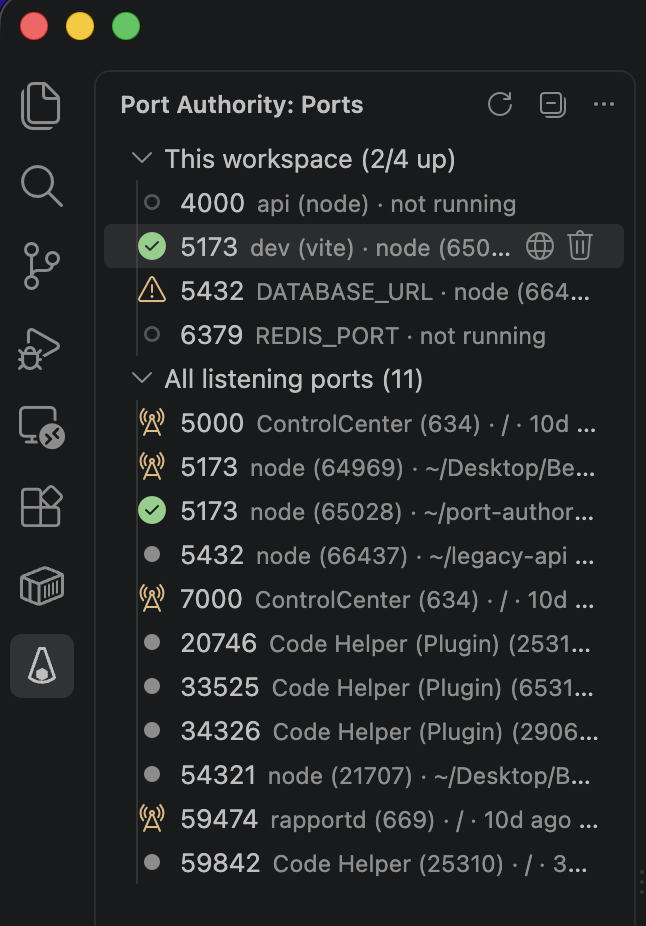
It knows which ports your project expects
Port Authority reads the scripts in your package.json and your local .env files, and works out which ports this workspace is supposed to be using. Those get their own section at the top of the view:
This workspace (2/4 up)
  ○ 4000  api (node)      not running
  ● 5173  dev (vite)      node (65028) · ~/shop-web · this workspace
  ⚠ 5432  DATABASE_URL    node (66437) · ~/legacy-api · FOREIGN
  ○ 6379  REDIS_PORT      not running
That third row is the interesting one. Port 5432 is up, but it belongs to a different project you left running last week. Without that distinction, "the port is in use" and "the port is in use by the right thing" look identical.
Every expectation is traceable. Hover a row and it will tell you it came from scripts.dev in apps/web/package.json, not just that it exists.
The rules for reading those files are narrow on purpose. -p counts as a port flag for next, vite, serve and about thirty other dev servers, and not for mkdir -p 1234. A DATABASE_URL pointing at localhost counts, one pointing at your production host does not. .env.example and .env.production are skipped entirely. I would rather miss a port than invent one, because a workspace section full of things that will never be running is worse than no workspace section.
It knows which container is behind a port
Every port Docker publishes is held by the same daemon process, so a plain port list shows
several rows of com.docker.backend sharing one pid. Port Authority asks the local daemon
which container publishes each port and shows that instead:
⚠ 6379 redis-queue shop/cache · redis:7-alpine · up 2 days · FOREIGN
Ownership works the same way it does for a process, when Compose recorded where the
project lives. Compose writes a project.working_dir label, and a container whose project
directory sits inside one of your open folders is yours; one from another project is not.
A container started with plain docker run, or by tooling that labels only the project
name, carries no directory and stays unknown rather than being guessed at.
Stopping one of these is a different operation from terminating a process, and it is
treated as one. The row offers Stop Container, which asks the daemon to stop it and
tells you it can be started again. Terminating the process is refused outright, because
that process is the daemon and it holds every other container's ports too.
The daemon is found the way the CLI finds it: DOCKER_HOST first, then your active
docker context, then the usual socket locations for Docker Desktop, rootless Docker,
Colima, OrbStack, Rancher Desktop and Podman's compatible API. Each candidate has to
answer a real request before it is used, because a socket file left behind by a stopped
daemon looks identical to a live one.
Only a local socket or named pipe is used. A remote DOCKER_HOST is refused rather than
followed: the extension makes no network requests, and a remote daemon's containers do not
hold this machine's ports anyway.
If Docker is running but its socket is somewhere this list does not cover, the panel says
so rather than quietly showing you the daemon process.
It comes to you when a port conflict happens
When EADDRINUSE shows up in a terminal or in the debug console, you get a notification that already knows the answer:
Port 3000 is held by node (PID 91204), started 6h ago, in ~/old-project.
[Terminate…] [Show Details] [Ignore This Port]
A match in terminal text is only a hint, so the notification is only raised after a real scan confirms that a process is genuinely holding that port. Grepping your logs for EADDRINUSE will not produce a popup.
The patterns cover Node, Go, nginx, Kestrel, Puma, Docker, Vite and Spring Boot. Messages that name no port, like Django's "That port is already in use", are ignored, because there is nothing useful to offer without one.
Stopping a process is treated as dangerous
It is a one way operation, so:
The target is re-identified immediately before every signal. Not once at the start. A confirmation dialog can sit on screen for an hour, and the PID that was your dev server when it opened can belong to something else entirely by the time you answer. Identity here means PID and start time, so a recycled PID reads as a different process and the whole thing stops.
Some processes are refused outright and no setting changes that: VS Code itself and its parent processes, PID 1, the Windows system PIDs, and the per platform list of OS critical processes. Shared infrastructure like dockerd or postgres, processes owned by another user, and processes whose name could not be read all require a second confirmation.
SIGTERM first, always. Force killing is a separate decision you make afterwards, and the dialog spells out what you lose by skipping the process's shutdown handlers.
"Port released" only appears after a rescan confirms nothing is listening. A process exiting does not always free the port, and I would rather say nothing than say something untrue.
Everything gets written to the Port Authority output channel, through a filter that strips credentials out of connection strings and token arguments.
Installing
From the Marketplace, or:
code --install-extension mkbaser.port-authority
Settings
Every feature can be switched off on its own.
| Setting |
Default |
|
portAuthority.autoRefresh.enabled |
true |
Periodic rescans, only while the view is open or the status bar item is on, and only while the window has focus |
portAuthority.autoRefresh.intervalSeconds |
10 |
How often, while the view is visible. The status bar alone never polls faster than every 30 seconds |
portAuthority.showAllInterfaces |
false |
Also list ports bound to a specific LAN address |
portAuthority.portRange |
[1, 65535] |
Restrict the listing to a range |
portAuthority.ignorePorts |
[] |
Ports that are never listed and never notified about |
portAuthority.statusBar.enabled |
true |
The 2/4 summary of expected ports |
portAuthority.workspaceExpectations.enabled |
true |
Read package.json and .env to infer expected ports |
portAuthority.workspaceExpectations.additionalPorts |
[] |
Extra ports, e.g. [{ "port": 9229, "label": "debugger" }] |
portAuthority.docker.enabled |
true |
Ask the local Docker daemon which container publishes each port |
portAuthority.docker.timeoutMs |
3000 |
Timeout for one request to the daemon |
portAuthority.eaddrinuse.enabled |
true |
Watch terminal output for port conflicts |
portAuthority.eaddrinuse.watchDebugConsole |
true |
Watch debug session output too |
portAuthority.eaddrinuse.cooldownSeconds |
60 |
Minimum gap before the same port notifies again |
portAuthority.terminate.confirmation |
"always" |
"unexpectedOnly" skips the dialog only for a normal risk process on a port this workspace expects and provably owns |
portAuthority.terminate.gracePeriodMs |
3000 |
How long to wait for a graceful exit before offering to force |
portAuthority.protectedProcessNames |
[] |
Names this extension must never terminate |
portAuthority.scan.timeoutMs |
5000 |
Timeout for one scan |
In a multi root workspace the safest value wins: if any folder asks for confirmation it becomes mandatory, the longest grace period applies, and protected names are combined.
How ports are read
| Platform |
Method |
| macOS |
lsof for the sockets, ps and lsof -d cwd for the details |
| Linux |
/proc/net/tcp and /proc/*/fd, falling back to ss -ltnp |
| Windows |
Get-NetTCPConnection and Win32_Process through powershell.exe |
Linux uses /proc first rather than ss because minimal devcontainer images often ship neither ss nor lsof, and reading /proc spawns no child process at all.
Over Remote SSH, in WSL or in a devcontainer, the extension runs where your workspace is and shows that machine's ports, which is where your dev server actually listens. It does not run in the browser, since there is no process table there.
Privacy
No telemetry. No network requests. The only outbound action anywhere in the extension is Open in Browser, and you have to click it.
.env files are read to find port numbers, and only .env, .env.local and similar local variants, never .env.production or .env.example. Their values never leave the inference code. Everything written to the log passes through a redaction filter that strips credentials out of connection strings, --token= style arguments and Bearer headers.
In Restricted Mode no workspace file is read at all, and a port conflict notification offers no terminate button, because the terminal output driving it comes from a repository you have not trusted yet.
What it does not do yet
- Nothing is probed over HTTP, so port 3000 is not labelled "Next.js dev server".
- Without elevation, macOS and Linux hide the details of processes you do not own. The port is still listed, with a row explaining why the owner is blank.
- Windows does not expose another process's working directory cheaply, so ownership there falls back to matching the workspace path inside the command line. That is shown as indirect evidence and is never enough to skip a confirmation.
- UDP is not listed. Every
EADDRINUSE worth chasing is TCP.
Development
npm install
npm run check      # lint, typecheck, unit tests
npm run watch      # then F5 to launch an Extension Development Host
npm test           # unit and integration tests
npm run package    # builds port-authority.vsix
src/core is plain TypeScript with no vscode import: the parsers, the port inference rules, the ownership logic and the kill guard all live there and are tested directly. src/node does the two side effects, running a command and reading the file system. src/vscode is the adapter. A lint rule keeps the boundary honest.
If you want to work on it, see CONTRIBUTING.md.
License
MIT © Mustafa Kürşad Başer

