Mermaid Lint for VS Code
Live Mermaid diagram validation, right in the editor.
Invalid diagrams get red squiggles as you type — in Markdown fenced
```mermaid blocks and in standalone .mmd files.
Powered by @mermaid-lint/core,
the same engine behind the mermaid-lint CLI, so the editor matches CI.

Install
- VS Code — Marketplace listing,
or search Mermaid Lint in the Extensions panel.
- Cursor / VSCodium / Windsurf / Gitpod (Open VSX) — Open VSX listing,
or search Mermaid Lint in the extensions panel.
- CLI —
code --install-extension mermaid-lint.mermaid-lint-vscode
Screenshots
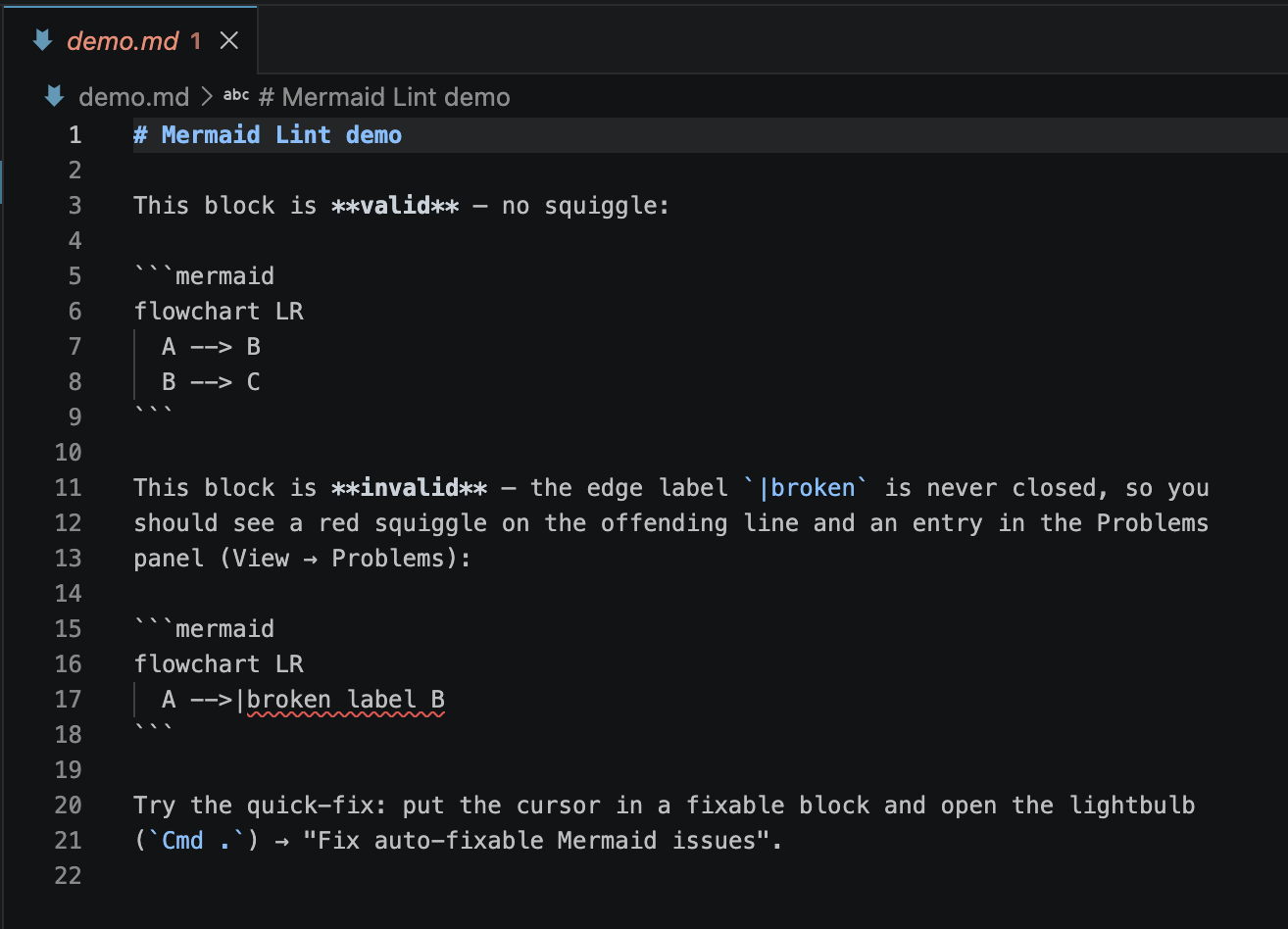
Invalid block in a Markdown file — red squiggle + Problems-panel entry:
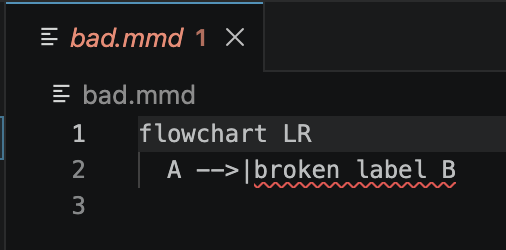
Standalone .mmd file (coverage the markdownlint rule can't provide):
Features
- Inline diagnostics on invalid Mermaid in
.md / .markdown fenced blocks
and in .mmd files — hover for the error message.
- Problems panel entries that jump to the offending line.
- Debounced on-type validation — see errors as you edit, not just on save.
- Quick-fix code actions — apply mermaid-lint's mechanical autocorrections
(
--fix) without leaving the editor.
- Config-aware — respects your project's mermaid-lint config file
(
.mermaidlintrc, mermaid-lint.config.js, the mermaidLint key in
package.json, …). strict, semantic, per-rule rules, and fences
settings all carry over from the CLI.
Settings
| Setting |
Default |
Description |
mermaidLint.enable |
true |
Enable/disable validation. |
mermaidLint.delay |
300 |
Debounce delay (ms) before validating after a change. |
Whether semantic warnings are reported (semantic), whether they are treated as
errors (strict), per-rule severity (rules, including off-by-default rules you
enable), and recognized fence markers (fences) are all read from your project's
mermaid-lint config file rather than a VS Code setting, so behavior matches
mermaid-lint on the command line.
Commands
- Mermaid Lint: Re-lint open documents (
mermaidLint.lintAllOpen)
Running from source
This extension lives in the mermaid-lint
monorepo. Build it once:
pnpm install
pnpm -r build
Try it in VS Code (F5): open the repo at its root in VS Code and press F5
(Run and Debug → "Run mermaid-lint-vscode (Extension Host)"). A second window
opens with the extension loaded and the demo/ folder — open demo.md
or bad.mmd to see live squiggles, hover messages, Problems-panel entries, and
the Cmd . quick-fix. See demo/README.md for a walkthrough.
Try it from a terminal (no launch config needed):
code --extensionDevelopmentPath="$PWD/packages/vscode" --disable-extensions \
  "$PWD/packages/vscode/demo"
Testing
pnpm test                                    # unit tests (pure logic, via root vitest)
pnpm --filter mermaid-lint-vscode test:e2e   # real VS Code host (@vscode/test-electron)
The e2e suite launches a real VS Code, loads the built extension, and asserts
diagnostics on the fixtures. It downloads a VS Code build into .vscode-test/
(gitignored). On Linux/CI it must run under a virtual display (xvfb-run); CI
does this in the e2e job. See AGENTS.md for build/architecture
invariants before changing the core integration.
Status
Published to the VS Code Marketplace
and Open VSX
under the install id mermaid-lint.mermaid-lint-vscode.
Packaging & publishing
See PUBLISHING.md for the full release runbook.
The .vsix is assembled by scripts/package-vsix.sh,
which stages a clean directory and installs @mermaid-lint/core from npm so
vsce can package a flat node_modules tree.
Relationship to @mermaid-lint/markdownlint
If you already use the markdownlint
VS Code extension, @mermaid-lint/markdownlint
gives you Mermaid squiggles in .md files through that toolchain. This dedicated
extension additionally covers .mmd files and offers quick-fixes, and needs no
markdownlint configuration.

