Miranda PreludeMiranda language support: syntax highlighting, autocompletion, and standard Prelude documentation. Installation Launch VS Code Quick Open ( Ctrl+P), paste the following command, and press enter.Copied to clipboard |

Miranda PreludeVS Code extension that improves the experience of writing Miranda code, with a focus on the standard Prelude (the language's built-in library). InstallInstall from the VS Code Marketplace Or search Miranda Prelude in the Extensions view for bilingual Prelude hover docs, highlighting, and autocompletion. FeaturesSyntax highlighting
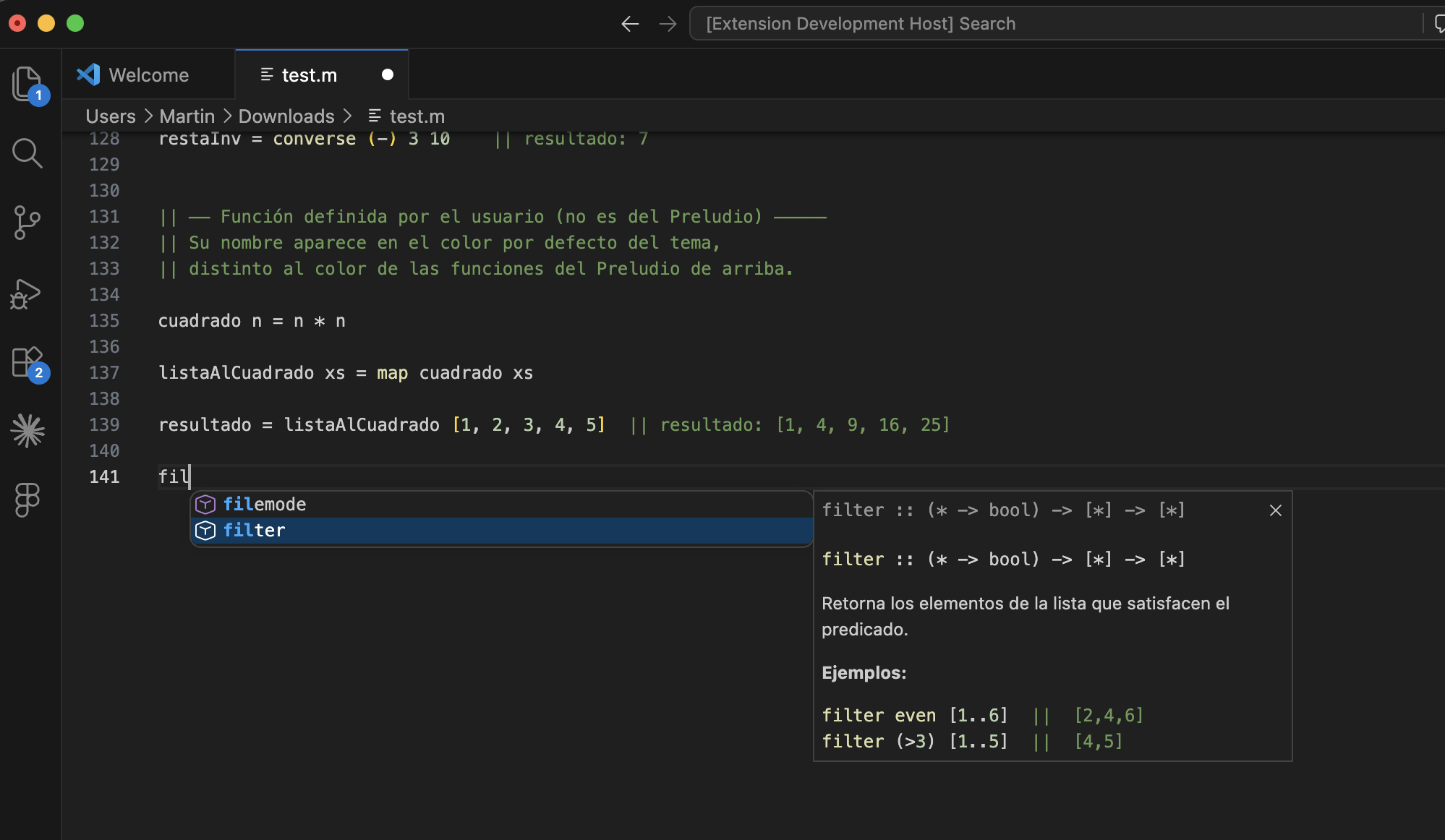
AutocompletionWhen you start typing a Prelude function name, IntelliSense suggests matches with their type signature. Selecting a suggestion shows full documentation with a description and examples.
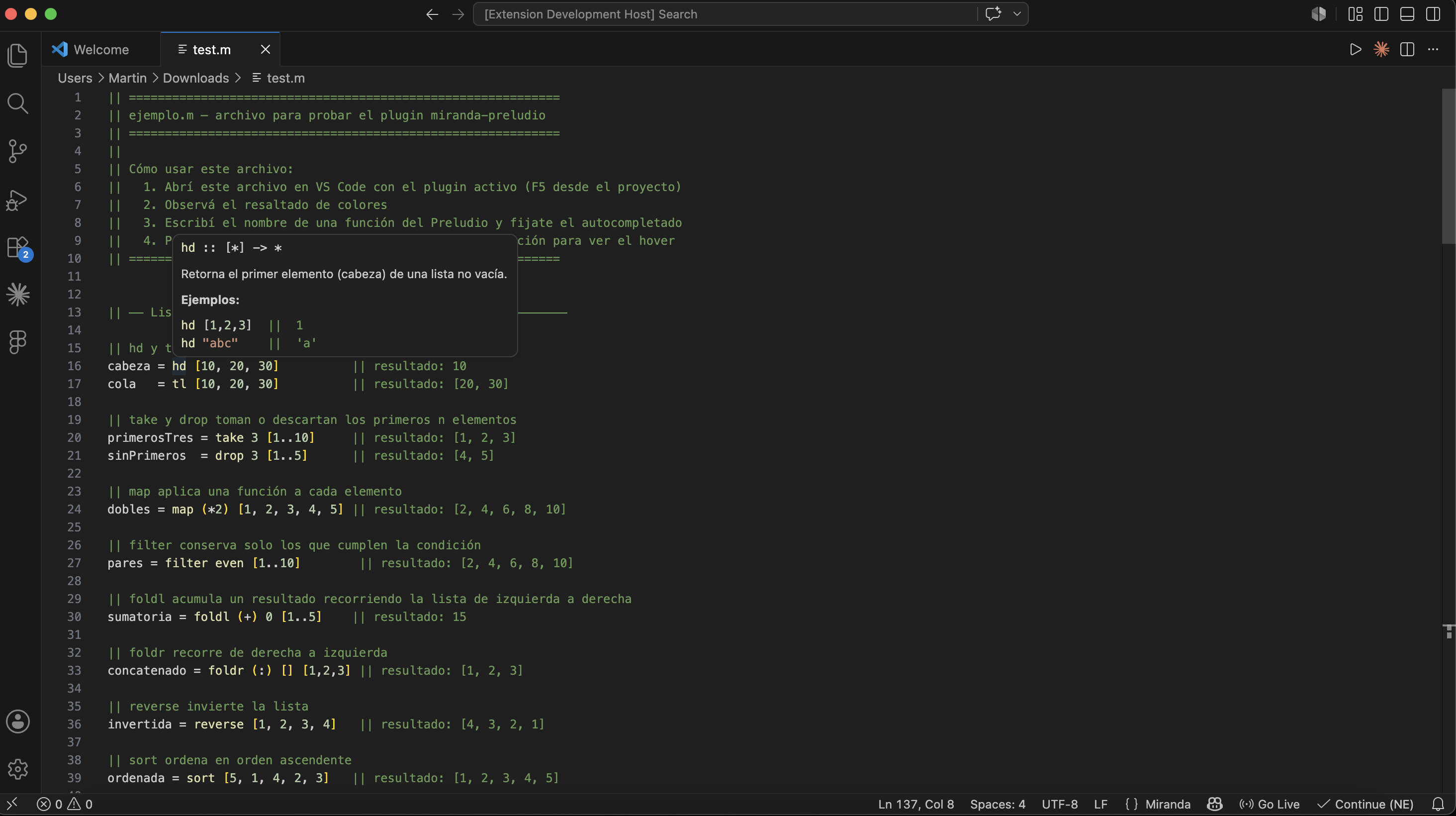
Hover documentationHovering over a Prelude function shows a tooltip with:
Documentation language follows the VS Code UI language (English by default). You can override it with the Covered functionsThe extension documents more than 95 standard Miranda Prelude functions, organized into these categories:
UsageThe extension activates automatically when you open any
Example files
Requirements
Release notes1.0.1Hover improvements: category label (lists, arithmetic, etc.) at the top of tooltips, and no false-positive hovers inside comments or strings. 0.0.3README wording: removed references to other Miranda extensions. 0.0.2Fix Marketplace README image and example file links after making the repository public. 0.0.1Initial release. Includes syntax highlighting, autocompletion, and bilingual hover documentation (English and Spanish) for all standard Miranda Prelude functions. Miranda PreludeExtensión de VS Code que mejora la experiencia al escribir código en Miranda, enfocándose en las funciones del Preludio estándar (la librería incorporada del lenguaje). InstalaciónInstalá desde el VS Code Marketplace O buscá Miranda Prelude en la vista de Extensiones para documentación bilingüe del Preludio, resaltado y autocompletado. FuncionalidadesResaltado de sintaxisLos archivos
AutocompletadoAl empezar a escribir el nombre de cualquier función del Preludio, IntelliSense sugiere las coincidencias con su firma de tipo. Al seleccionar una sugerencia, se despliega la documentación completa con descripción y ejemplos.
Hover con documentaciónAl posicionar el cursor sobre una función del Preludio aparece un tooltip con:
El idioma de la documentación sigue el idioma de la interfaz de VS Code (inglés por defecto). Podés cambiarlo con el setting Funciones cubiertasLa extensión incluye documentación para más de 95 funciones del Preludio estándar de Miranda, organizadas en las siguientes categorías:
UsoLa extensión se activa automáticamente al abrir cualquier archivo con extensión
Archivos de ejemplo
Requisitos
Notas de versión1.0.1Mejoras en hover: etiqueta de categoría (listas, aritmética, etc.) arriba del tooltip, y sin falsos positivos en comentarios o strings. 0.0.3Redacción del README: se quitaron referencias a otras extensiones Miranda. 0.0.2Corrección de links de imágenes y archivos de ejemplo en el README del Marketplace tras hacer público el repositorio. 0.0.1Versión inicial. Incluye resaltado de sintaxis, autocompletado y documentación bilingüe en hover (inglés y español) para todas las funciones del Preludio estándar de Miranda. |