Atalaya


An audit-friendly SQLite viewer for VSCode. One runtime dependency, no native code, no telemetry.
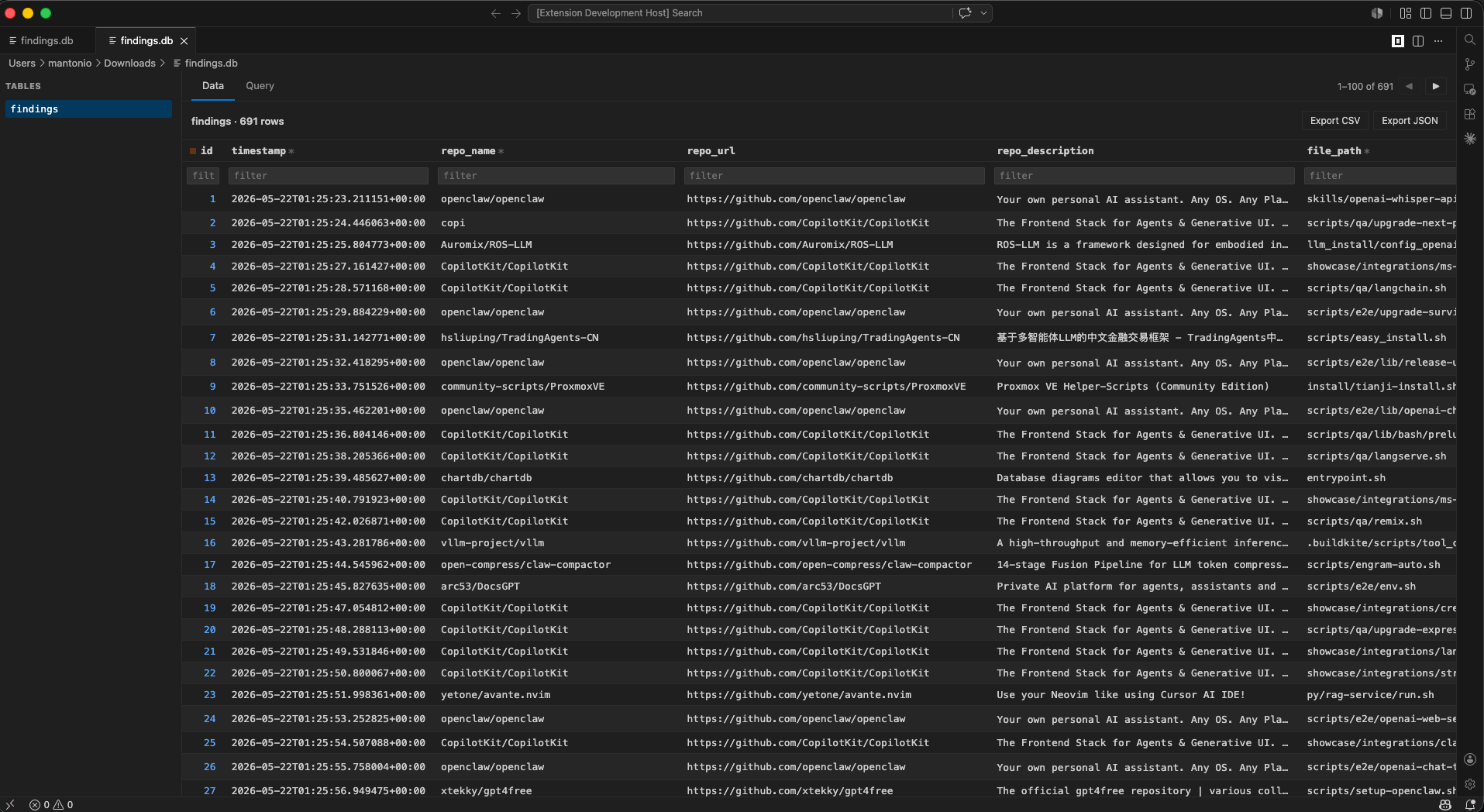
Open .db, .sqlite, .sqlite3 files like any other file in your editor. Browse tables, write SQL, edit rows in place, export to CSV / JSON. That's it.
Atalaya — a watchtower with a clear view over the territory below.
Why this exists
Most VSCode SQLite extensions bundle dozens of npm dependencies, native modules, or both. That's a real supply-chain surface for something that just needs to read a file. Atalaya ships with one runtime dependency — sql.js, the official SQLite compiled to WebAssembly — and zero native code. Auditing the source is straightforward.
Features
- Open
.db, .sqlite, .sqlite3 files as a custom editor
- Sidebar lists tables; click any to browse rows with pagination
- Type-aware coloring in the Data tab — INT/REAL right-aligned with tabular numerals, dates in green, BLOB italic; PK and NOT NULL markers in the header
- Sort by clicking column headers (▲ / ▼); the active column is highlighted across the whole column
- Filter any column with
LIKE '%text%' from a filter row beneath the headers; active filters stand out
- Double-click any data cell to edit in place
- Mutating statements (SQL or inline edits) mark the document as modified; explicit
Cmd+S writes to disk
- Native undo / redo for executed queries and inline edits
- Export tables or query results to CSV / JSON (BLOBs as base64)
- Read-only fallback for views, tables without primary key, and BLOB columns
- Webview locked down with strict CSP and per-load nonce — no remote resources
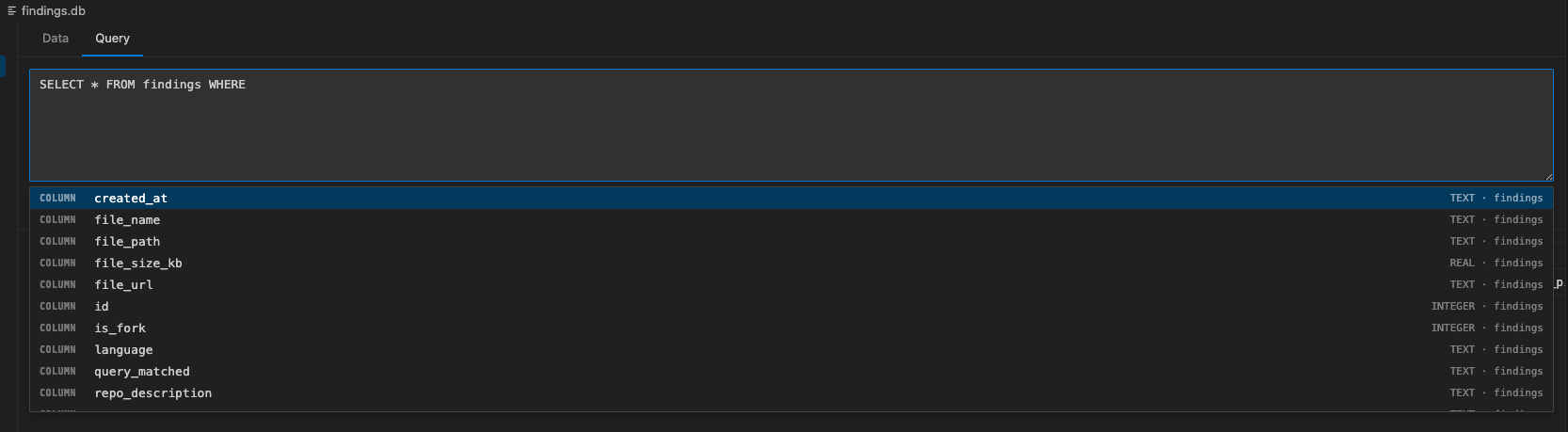
SQL Editor with autocomplete
Write arbitrary SQL with table and column suggestions. After FROM / JOIN / INTO / UPDATE you get tables; after SELECT / WHERE / AND / ON / , / ( and friends you get columns scoped to the tables already referenced in the query. Ctrl/Cmd+Enter runs.
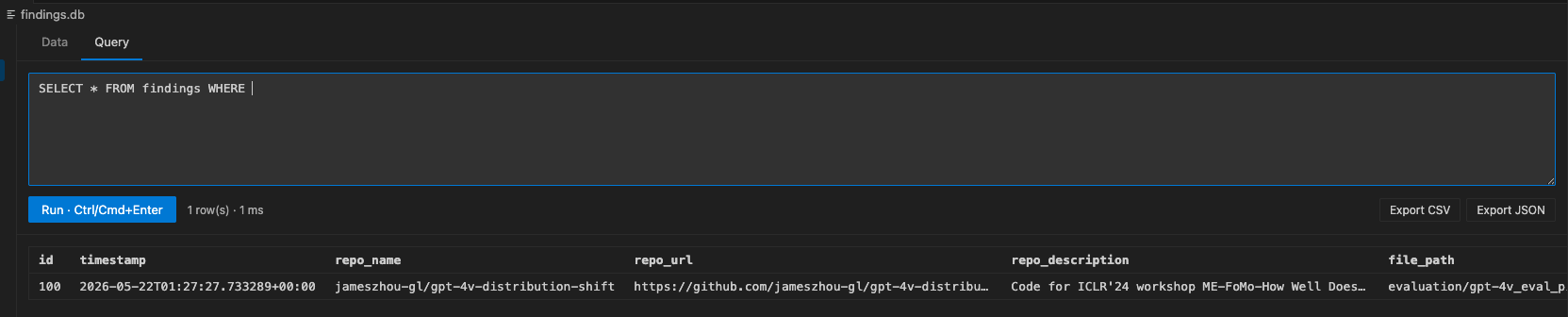
Query results
Multiple result sets are rendered separately. Mutations (INSERT / UPDATE / DELETE / DDL) mark the document as modified and trigger the undo stack — no surprise writes to disk until you Cmd+S.
Installation
From the Marketplace
Search for Atalaya in the VSCode Extensions view, or install via the command line:
code --install-extension Marioloez.atalaya
From a .vsix file
Download a release from the Releases page and install:
code --install-extension atalaya-<version>.vsix
Usage
- Open any
.db, .sqlite, or .sqlite3 file in VSCode.
- The Atalaya editor opens automatically.
- Click a table on the left to browse rows.
- Switch to the Query tab to run arbitrary SQL.
- Double-click any cell in the Data tab to edit it.
Enter saves, Esc cancels.
- Use the Export CSV / JSON buttons to dump the current table or query result.
Cmd+S writes pending changes back to the file. Close without saving to discard.
Security posture
The claim is about what ships in the .vsix, not about the development install footprint.
- One runtime dependency in the
.vsix: sql.js (WASM build of official SQLite)
- No native modules in the
.vsix: no node-gyp, no platform-specific compilation
- Strict CSP in the webview:
default-src 'none', per-load crypto.randomBytes nonce, form-action 'none', base-uri 'none'
- All SQL identifiers (table / column names) are allowlist-validated against
sqlite_master / PRAGMA table_info before they reach a query
- All SQL values go through prepared statements with bound parameters
- No network calls, no telemetry, no remote resource loading — verified via static analysis of both the extension code and the bundled
sql.js
- MIT licensed, open source — audit every line
The devDependencies install tree (@vscode/vsce, TypeScript, etc.) does pull in some native modules at build time (notably keytar via vsce). None of that reaches the .vsix. If you intend to audit from a clean clone, run npm ci --ignore-scripts to neutralize any postinstall hooks.
Known limitations
- Undo history holds full snapshots of the database in memory; for very large databases (>100 MB) consider saving and reopening to free memory after many edits
- Filter only supports
LIKE '%value%' (contains). For range or equality operators use the SQL editor
- Tables without a primary key or
rowid cannot be inline-edited; use the SQL editor
- Autocomplete is regex-based, not a full SQL parser; column suggestions don't resolve table aliases (
SELECT u.| where u is users u)
Development
git clone https://github.com/Marioloez/atalaya.git
cd atalaya
npm install
npm run compile
# Open the folder in VSCode and press F5 to launch an Extension Development Host
Roadmap
- Schema viewer (columns, types, indexes, foreign keys)
- Add / delete rows from the Data tab
- Undo history memory cap for large databases
License
MIT

